
“Enabled / Needs reboot” means ESXi has saved a passthrough change, but the PCI device is not yet active for passthrough. The required restart is a full ESXi host reboot, not a restart of the guest VM. If the status remains after a host reboot, check the exact PCI device, firmware settings, Intel VMD, and server-slot compatibility before repeating the reboot.
What “Enabled / Needs Reboot” means
In the ESXi PCI Devices view, an orange icon or “Enabled / Needs reboot” status indicates a pending host configuration change. Broadcom explains that the device cannot be used until the host restarts. Juniper’s vMX guide likewise instructs administrators to restart the host after enabling and saving SR-IOV; after restart, the state should appear as Active when the configuration is effective.
The status alone does not confirm that passthrough is working. It records the requested configuration, not proof that ESXi has successfully activated the device for a VM.
Confirm the device and its current state
- In the ESXi Host Client or vSphere Client, open the host’s Configure or Manage area, then go to Hardware > PCI Devices. Labels can vary by client and ESXi release.
- Show all PCI devices if the view is filtered, then identify the intended device by its description and record its PCI address. Broadcom recommends exposing all devices and filtering by description when locating a device.
- Record the device’s passthrough and SR-IOV states. Make sure you are diagnosing the intended PCI function rather than another function on the same adapter or controller.
Keep the PCI address and device description available for the CLI checks below. A similar name is not enough to safely change PCI passthrough configuration.
#1 Best Overall

- Equipped with original Intel 82576 controller chip which supports Intelligent Offloads and make the servers more stable. Compare to Intel E1G42ET.
- Compatible with Windows Server 2003/ 2008/ 2012, Windows7/8/10/Visa/XP, Linux, VMware ESX. (Does not support VMware ESXi 7.0 or above.)
- Dual copper RJ45 ports let you connect to Category-5 and up to 100m for meeting the demands of data center environments. PCI Express* 2.0. 2.5 GT/s X1 Lane.
- You also can download it from Intel website. With profile bracket and additional low profile bracket that makes it easy to install the card in a small form factor/low profile computer case/server.NOT support hot swaping.
- What You Get: 10Gtek 82576-2T-X1 1.25GbE PCI-E X1 Network Card (compare to Intel E1G42ET) x1, Low-profile Bracket x1. Backed by 10Gtek 30 Days Free-returned, 3 Year Free Warranty and Lifetime Technology Support.
Apply the change with a full ESXi host reboot
Save the setting and perform a full reboot of the ESXi host. A VM reboot, guest operating-system restart, or powering a VM off and on does not activate a host-level PCI passthrough change. Place the host in maintenance mode if your workload and operating procedures require it, and plan for the host outage.
After the host returns, revisit Configure/Manage > Hardware > PCI Devices and check the same PCI address. If the change took effect, the pending reboot indication should clear and the device should be shown as active for the configured feature. If the status persists, treat that as a diagnostic result rather than simply rebooting repeatedly.
Rank #2

- Supports IEEE 802.1Qav Audio-Video Bridging (AVB) for customers that require tightly controlled media stream synchronization, buffering, and reservation.
- Supports IEEE 1588/802.1AS for precision timestamping of packets. IEEE 1588 provides a mechanism for clock synchronization requirements of measurement and control systems.
- Lightning Protection Design:This network card is designed with lightning protection to protect your computer from damage during lightning storms
- OS Supports:Windows 8.1/10/11,Windows Server 2012/2012 R2/2016/2019/2022 ,Linux*:RHEL9.1 & 8.7, RHEL8.x (8.5 and previous), SLES15 SP4, SLES15 SP3 and previous ,SLES12 SP5 ,SLES12 SP4 and Previous ,Ubuntu 22.04 LTS, Ubuntu 20.04 LTS ,Debian 11 13 / 12.3 12.2 and Previous
- 180 day worry-free warranty and friendly customer service. If you have any questions, we will help you solve the problem when you need it, and if it can’t be solved, we will provide a refund and no return is required.
Check firmware prerequisites and Intel VMD
Verify VT-d/IOMMU and SR-IOV
In the server’s BIOS/UEFI, verify that Intel VT-d (the platform’s IOMMU support) and SR-IOV are enabled when required by the device and platform. Broadcom specifically notes that BIOS SR-IOV must be enabled for the applicable passthrough case. Firmware menu names and requirements differ between server models, so use the server and adapter documentation for the relevant settings.
Check whether Intel VMD is hiding the device
Intel VMD can sit between ESXi and PCI devices and prevent expected devices from appearing normally. If the target device is absent from the PCI list or does not match the expected topology, check whether VMD is enabled and managing that device. Do not disable VMD automatically: it may be part of the server’s storage design, and changing it can affect storage visibility or boot behavior. Confirm the consequences for the particular server before changing it.
PC Slower Than It Used to Be?
A free scan shows the junk files, broken settings and background clutter dragging Windows down - then fixes them in one click.Free scan · Windows 10 & 11Crashes, No Sound, or Screen Glitches?
Random freezes, missing sound and display glitches usually trace back to one bad driver. Find and replace yours safely.Free scan · under a minuteRank #3

- Ethernet Controller: 1Gb Network Card equipped with original Intel I350-AM2 Controller, which supports Quality-of-Service (QoS) technology to streamline your online experience and ensure stability. Compare to Intel I350-T2 NIC.
- Dual RJ45 PCI-E NIC: 1Gb Dual RJ45 Ports support 100/1000Mbps, support Cat5e or above Cable, up to 100 meters, , simplifying the transition to 1 Gb; PCIe v2.1 (5 G T/s) X4 Lane, compatible with PCIE X4, X8, X16 Slot. Support 1 Gbps/ 100 Mbps data rates
- Widely Compatible OS: Windows 7/8/10/11, Windows Server 2008/2012/2016/2019, Centos/RHEL 6/7/8, Ubuntu 16/18/19/20, Debian 9/10/11,FreeBSD 10/11/12, Vmware Esxi 5/6, SLSE 11/12. (Not support Mac OS and Bypass Mode)
- Easy to install: 1G NIC is packed with Both Full-height Bracket and Low Profile Bracket that support on Standard and Slim computer/server. Download operating systems driver from intel website or scan the QR code on the network card immediately.
- Friendly Customer Service: Provides 24/7 Customer Service, 30 Days Free-returned, 3 Year Free Warranty and Lifetime Technology Support.
Check ESXi device state from the command line
Use the ESXi Shell or SSH access permitted by your environment to list passthrough devices and correlate the result with the PCI address and device shown by lspci:
esxcli hardware pci pcipassthru list
Broadcom documents clearing passthrough on a selected device with this command format:
Rank #4
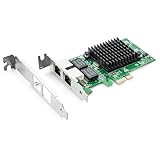
- Ethernet Controller: 1Gb Network Card equipped with original Intel 82576 Controller, which supports Quality-of-Service (QoS) technology to streamline your online experience and ensure stability; Compare to Intel E1G42ET, 1 Pack
- Dual RJ45 Ports: Gigabit RJ45 Support 10/100/1000Mbps data rates and Cat5e Cable, up to 100 meters, simplifying the transition to 1 Gb; PCI Express 2.0 (2.5 GT/s), X1 Lane, compatible with PCIE X1, X4, X8, X16 Slot. Support 1 Gbps/ 100 Mbps data rates
- Widely Compatible OS: Windows 7/8/10/11, Windows Server 2008/2012/2016/2019, Centos/RHEL 6/7/8, Ubuntu 16/18/19/20, Debian 9/10/11,FreeBSD 10/11/12, Vmware Esxi 5/6, SLSE 11/12. (Not support Vmware Esxi 7.0, Mac OS and Bypass Mode)
- Easy to Install: Network Card is packed with both Low Profile Bracket and Full-height Bracket that support on Standard and Slim computer/server; Download operating systems driver from intel website or scan the QR code on the network card
- Friendly Service: Provides 24/7 Customer Service, 30 Days Free-returned, 3 Years Free Warranty and Lifetime Technology Support
esxcli hardware pci pcipassthru set -d <PCI_Device_ID> -a -e=0
Replace <PCI_Device_ID> with the exact ID for the target device from the host’s PCI listing. Do not run the change against an unrelated device. Where appropriate, rescan, sync the configuration, and reboot:
vim-cmd hostsvc/firmware/sync_config
The CLI can help expose or clear stale passthrough state that is not obvious in the UI; it does not resolve missing firmware prerequisites or unsupported hardware topology.
What’s actually slowing this PC down?
Pick the symptom - the matching free tool is one click away.
Best Value

- Compatible with Windows Server 2003/ 2008/ 2012, Windows7/8/10*/Visa, Linux, ESX/ESXi*. Storage over Ethernet: iSCSI, FCoE, NFS. (Only by setting up Win10 driver correctly the NIC can work on Win11! See the main picture for more detail of installation.)
- Equipped with high quality original Intel 82599ES controller which supports I/O virtualization and make the servers more stable.
- Supports 10G, not support 1G/2.5G/5G; Dual SFP+ ports let you connect to 10 Gigabit SFP+ module/DAC/AOC for meeting the demands of data center environments. PCI-E X8 Lane is suitable for both PCI-E X8 and PCI-E X16 slots.
- With profile bracket and additional low profile bracket that makes it easy to install the card in a small form factor/low profile computer case/server.NOT support hot swaping.
- What You Get: 10GbE PCI-E X8 Card X520-10G-2S x1, Low-profile Bracket x1, 30 Days Free-returned, 3 Year Warranty and Lifetime Technology Support. PS: Due to the particularity in QNAP/Synology, for QNAP/Synology users, pls contact us before purchase.
Clear stale passthrough state carefully
- Identify the exact PCI device ID and confirm that disabling passthrough will not remove a host storage or network device your ESXi host needs.
- Disable passthrough for that device using the documented
esxclicommand format, then synchronize configuration where appropriate and reboot the ESXi host. - After reboot, verify that the device has returned to its expected native-driver or storage-adapter role.
- Only after confirming that state, re-enable passthrough for the intended device in the PCI Devices view and reboot the host again to apply it.
This sequence changes ESXi’s configuration for the selected PCI ID. It is not a substitute for correcting BIOS/UEFI settings, VMD ownership, or a compatibility problem.
If it still says “Needs Reboot” after the host reboot
A VMware community report describes an Intel I350 SR-IOV configuration that retained the status after repeated reboots. That example shows why repeating the same reboot is not a reliable fix: the cause can be platform or device support rather than a missed restart.
Check compatibility for the complete configuration—not just the adapter model—including the server, riser, PCIe slot, adapter firmware, and ESXi release/build. Review the relevant vendor and VMware/Broadcom compatibility guidance. Without the server model, ESXi build, PCI address, BIOS revision, slot/riser layout, and relevant logs, a single model-specific cause cannot be determined.
Quick Recap
| What you find | Where to focus next |
|---|---|
| The target PCI device is missing or cannot be matched | Confirm the PCI address and device listing; investigate VMD and the server’s slot/riser topology. |
| Firmware SR-IOV or VT-d/IOMMU is disabled | Check the server and device documentation, enable the required setting, then reboot the host. |
| The device remains pending and the CLI shows stale passthrough state | Verify the PCI ID and host dependencies before clearing passthrough for that device and rebooting. |
| The device remains pending after state and firmware checks | Verify the full server, slot, adapter firmware, and ESXi compatibility path rather than repeating reboots. |
Product prices and availability are accurate as of the date/time indicated and are subject to change. Any price and availability information displayed on Amazon at the time of purchase will apply.

