
You can build an AI avatar app by integrating a photo-to-avatar service rather than creating a 3D generation system yourself. The first decision is what “avatar” means in your product: a static 2D portrait, a customizable 3D character, or a conversational digital human that speaks and animates. The documented paths here cover photo-to-3D generation and embedding an existing 3D creator; a speaking character requires additional speech, animation, and conversational components.
Choose the kind of avatar experience you are building
Define the output before choosing a vendor or writing the upload flow. The input, processing pipeline, rendering requirements, and user experience differ substantially across these product types.


- Static 2D portrait: generates or edits an image. The documented 3D integrations below are not a complete guide to building this product.
- Customizable 3D identity: turns a photo into a model, or lets a user build an identity in an editor. This is the path most directly supported by the available vendor documentation.
- Conversational digital human: adds speech, animation, and a conversational system to a character. Do not assume those capabilities are included in a photo-to-3D API or creator.
Write down the required result: head or full body, realistic or stylized appearance, whether users can customize it, and whether the model needs a rig, animation support, or exportable files. Then verify that the specific vendor pipeline and plan support those requirements.
Choose an integration approach
The main architectural choice is whether your backend calls an avatar-generation API or your app embeds a ready-made creator. These approaches differ in how much of the experience you control and how processing and image data flow through your system.
#1 Best Overall

- DUAL-LENS SMART AI CAMERA: Take stunning photos and videos with the front and rear cameras, powered by AI features. This AI digital camera supports auto focus, beauty mode, portrait effects, dynamic stickers, and customizable filters, making it suitable for selfies, vlogging, and creative photography. Even first-time users can instantly become creative masters
- AI LEARNING COMPANION: Take a photo and meet 12 interesting AI companions. Children can discover a hidden world of wonders through the kids camera's photo recognition feature. For example: Point at a pinecone and Encyclopedia Doctor explains forest secrets, Capture a butterfly and Storyteller tells magical stories. 12 unique cartoon characters spark children's curiosity and enhance their learning interest. (Wi-Fi required)
- AI INTERACTIVE DIALOGUE & CREATIVITY: The point and shoot digital camera allows kids to engage in Q&A interactions with AI characters, which can improve their thinking skills and make exploration fun and engaging. At the same time, this vlogging camera has other features, including background replacement, portrait effects, hairstyle effects, artistic photos, or converting doodles into digital art. These interesting creative features enrich children's experiences and give them a happy childhood
- EASY TO USE & WI-FI TRANSFER: This digital camera for kids features a 3.6-inch IPS touchscreen and intuitive menus, making it easy for children to use. With the Al Cam Transfer app (Android/iOS), you can transfer photos/videos to your phone in seconds, allowing you to share every piece of your child's work anytime, anywhere
- COMPACT CAMERA & THOUGHTFUL GIFT: This AI smart camera is compact and portable, fitting easily into a pocket. The camera for photography has 8GB of built-in memory plus a 32GB card, meeting the needs of high-capacity photography. And the 2000mAh battery supports long-term use, ensuring you never miss a moment. This compact camera is a thoughtful gift for children, teens and students
| Approach | What you build | Documented example and considerations |
|---|---|---|
| Headless generation API | Your app owns image selection, progress UI, customization flow, preview, saving, export, and deletion. Your trusted backend coordinates requests to the vendor. | Avatar SDK REST documentation describes OAuth authentication, photo submission, asynchronous tasks, and model retrieval. The Avatar SDK Avatar API page describes GLB/glTF and FBX outputs and cloud or on-premise deployment; it says cloud API access is available on the Enterprise plan. Confirm current product scope, access, pricing, and terms with the vendor. |
| Embedded creator | Your app embeds an editor and connects its lifecycle to your product, typically through documented iframe messaging or an SDK. | MetaPerson Creator describes an embeddable editor and SDKs for Unity, Unreal, iOS, and Android. Its JavaScript API documentation covers generation and export events. The docs describe a Unity WebGL desktop implementation and a React.js/three.js mobile implementation, and warn that features can differ by platform. |
Compare the options against user-experience control, target platforms, photo-data flow, output formats and rig needs, expected latency and operating cost, support, licensing, and account and deletion requirements. Vendor performance statements are not independent benchmarks; validate the specific pipeline on your target devices.
Build the photo-to-avatar flow around asynchronous jobs
For the documented Avatar SDK REST path, avatar generation does not finish as part of a single blocking request. The API documentation describes OAuth 2.0 credentials and an access token, multipart form-data POST requests, photo input, and a task-based generation flow. Build your app to retain and track the task identifier rather than keeping the user waiting on one request.
- Collect the source image. Explain the upload and processing before the user selects or submits a photo. The API accepts a source photo; the documentation does not establish that a dedicated camera or other physical device is required.
- Submit the job from your backend. Keep vendor credentials on a trusted server. Send the photo and required parameters using the vendor’s current API instructions, then persist the returned task identifier against the relevant app account or session.
- Show job progress. Poll the task status according to the current API guidance and present useful progress states. The documentation describes states including uploading, queued, computing, and completed. Do not treat an incomplete avatar URL as a finished model URL: the docs say it is not accessible until processing is complete.
- Handle delays and failures. Provide a non-blocking progress screen, retry or restart paths, and clear recovery instructions for an unsuitable image, failed task, or timeout. Avoid making the interface depend on an unverified fixed generation time.
- Retrieve and validate the finished asset. Once the task is complete, retrieve or export the model and test it in the actual renderer and device class your product uses.
- Support deletion. Give users a way to remove the photo and generated asset from your app, and align your own deletion behavior with the vendor’s retention and deletion terms.
Before committing to a pipeline, check its current status and supported platform, formats, topology, and animation behavior. The Avatar SDK documentation marks some older pipelines deprecated and says the metaperson_2.0 REST API requires an Enterprise subscription. Access and pipeline status can change, so verify them with the vendor before launch.
Connect an embedded creator safely
An embedded editor can reduce the amount of avatar-editing UI your team must implement, but it still needs a deliberate integration and security boundary. MetaPerson’s JavaScript API documents generation from a JPEG or PNG image encoded as base64 and an export event that returns a model link.
Do these 3 things before closing this tab:
1Repair Windows errors before they cause bigger problems2Scan for outdated or missing drivers - takes under a minute3Clear out junk files and repair common Windows errors- Follow the vendor’s current iframe and JavaScript API instructions for initialization, messages, and events.
- When handling
postMessage, validate the sender origin and expected message shape. Do not copy a permissive example pattern into production without applying strict origin checks. - Use the documented access-token approach where appropriate instead of placing a client ID and secret in browser code. Never ship a client secret in a web or mobile app bundle; follow current vendor guidance for token issuance and server-side credentials.
- Test the exact feature set on each target platform. The vendor documents different desktop and mobile implementations and warns that capabilities can differ.
- Check the exported model link and asset format in your own renderer, and decide how your app will associate, store, expire, or delete the resulting asset.
Plan privacy before photo upload
A portrait is personal information. Decide what leaves the user’s device, which vendor processes it, what your app and the vendor retain, how long data is kept, and whether images or derived data are used to improve models. Apple’s Generative AI design guidance says to weigh privacy alongside capability and performance; for server-based processing, it advises minimizing shared information, telling users what may be sent and stored off-device, and obtaining permission before using personal information. It also recommends explaining how information is used and stored, including whether it is used for training or improvement.
- Show a concise notice before photo selection or upload, and distinguish local processing from cloud processing.
- Name the third-party processing role and explain the data flow in plain language.
- Collect only the image and metadata needed for the feature; avoid retaining source files longer than necessary.
- Provide deletion and opt-out controls where appropriate, and review vendor terms for retention, security, and deletion.
- Give minors and sensitive use cases additional product and legal review. Apple’s guidance is design guidance, not a complete legal assessment for every jurisdiction.
Validate output, access, and cost before launch
Confirm that the generated file works in the actual downstream workflow, not just that an API returns a model. The Avatar SDK product page lists GLB/glTF and FBX and names Unity, Unreal, Blender, three.js, and Babylon.js as compatible destinations; that list is not a guarantee that every pipeline configuration supports every format or feature.
Rank #4
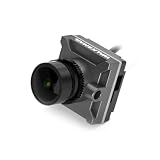
- dummyThe Walksnail Avatar HD Nano Camera is a nano-sized digital camera that works with the Walksnail Avatar and Fat Shark HD Dominator systems. This HD Camera has 1080P resolution, 170° FOV, an aluminum shell, and a 0.001Lux Starlight Sensor.Note: (Insert any product notes here in Red BOLD Italic. Example: "First Shipment expected January 2022" or "Electronics are Not Included".)VIDEO: (Insert Video Title here in Bold)FeaturesLower latency than the competitor at an average of 22msBuilt-in 8Gb I
The same product page advertises a full-body generation time of about 40 seconds and an outfit change of about a second, plus triangle-count, texture-size, and zipped-GLB-size figures. These are vendor-published statements, not independent measurements or guarantees for your traffic, settings, or devices. Treat them as planning inputs to verify—not service-level expectations—and test latency and asset performance with your intended configuration.
Before production, confirm licensing and commercial rights, subscription access, quotas, data-processing terms, support, and current pipeline availability directly with the vendor. Also establish whether your product can tolerate vendor outages or queue delays and what users will see when generation is unavailable.
Quick Recap
Product prices and availability are accurate as of the date/time indicated and are subject to change. Any price and availability information displayed on Amazon at the time of purchase will apply.

