
What’s actually slowing this PC down?
Pick the symptom - the matching free tool is one click away.
To read or write data with an Arduino SD card module, connect the card’s SPI signals to the board’s compatible SPI interface, set the sketch’s chip-select pin to match the wiring, then initialize the SD library and open a file. Write or read the file through the library and close it when finished. The exact pins and electrical requirements depend on the Arduino board and module, so confirm both before wiring.
What you need and how the connection works
You can use a standalone SPI microSD module, a board with an integrated card holder, or a compatible shield. The Arduino MKR Zero has an integrated microSD holder and documents a dedicated SPI1 interface; the MKR SD Proto Shield provides a microSD holder and prototyping area for MKR-family boards. These examples are not universal fits for every Arduino. Check that your chosen storage hardware is compatible with your board.
For a standalone module, identify its signal labels and the corresponding SPI pins on your board. The usual SPI roles are:
- MOSI (sometimes labeled CMD on an SD connector): data sent from the Arduino to the card.
- MISO (sometimes labeled DAT0): data returned from the card to the Arduino.
- SCK (sometimes labeled CLK): the clock for SPI transfers.
- CS or SS: chip select, which identifies the card interface.
Connect each signal according to the board and module documentation, and configure the sketch for the chip-select pin you actually use. Do not rely on one pin map for every Arduino: the MKR Zero documentation, for example, refers to SPI1 and its examples call out setting chipSelect to match the board. Electrical requirements also vary. An Arduino connector schematic dated May 6, 2024, shows a 3.3 V SD supply for that design; this does not establish the voltage rating of every module. Check the module’s requirements and the board’s supported levels before applying power.
Free tools Windows power users keep installed
One-click scans. No signup required.
#1 Best Overall
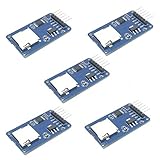
- Compatible with Arduino UNO, R3, MEGA 2560 Due: The HiLetgo 5pcs Micro SD TF Card Adapter Reader Module works with these Arduino boards for easy data transfer.
- 6-pin SPI interface: The module features a 6-pin SPI interface for connecting to micro SD cards and reading data.
- Chip level conversion: The module converts chip level data into a standard format for easy access and analysis.
- Lightweight and compact: Weighing just 0.11 pounds, the module is lightweight and compact for easy handling.
Initialize the card and choose a file operation
The Arduino SD library supports file creation, reading and writing, and directory navigation for a card connected through SPI. Arduino’s documented examples include Datalogger, DumpFile, Files, listfiles, NonBlockingWrite, and ReadWrite. Use the example closest to your task and adapt its board-specific chip-select setting.
- Include the libraries. Start with the SD library and include SPI as appropriate for the target board and example.
- Set the chip-select pin. Define the pin that is wired to the module’s CS/SS input. Confirm whether the board or integrated storage interface uses a different arrangement.
- Initialize the card. Call the SD library’s initialization routine with the selected chip-select setting. If initialization fails, report the failure over Serial and check the wiring, card seating, and pin configuration before continuing.
- Open a file. Use the library’s file-opening pattern to create or access the file needed for the task. Check that opening succeeded before attempting to read or write.
- Write or read content. For logging, write the values or text your project needs. To retrieve stored data, read from the opened file and send it to Serial or handle it in the sketch.
- Close the file. Close it when the operation is complete so the library can finish handling the file.
Exact method signatures and behavior can depend on the installed library version and board. Use the example bundled with your Arduino environment or the current documentation for your target rather than assuming a sketch written for another board will work unchanged.
Rank #2

- Micro SD Card Module: The module includes 74HC125 and AMS1117 chips, enabling voltage level conversion between 3.3V and 5V systems, ensuring stable communication between the Micro SD card and host devices with different voltage levels.
- Interface level: 3.3V or 5V
- Supported Interface: SPI
- Supported Card Type: Micro SD Card (TF Card)
- Socket: Pop-up
Check the result and troubleshoot failures
Serial output is useful for reporting whether card initialization and file opening succeeded, and for displaying data read from a file. If the card is not detected or a file operation fails, check these items in order:
- Make sure the microSD card is fully seated in the holder or module.
- Compare the module’s pin labels with the board’s documented SPI pins; confirm MOSI, MISO, SCK, power, and ground are routed as required.
- Verify that the sketch’s chip-select setting matches the wire and the board’s storage interface.
- Confirm that the module’s voltage requirements suit the board. Do not infer a module’s rating from a schematic for a different design.
- Check card format and capacity against documentation for the particular board, module, and library. Compatibility is not established universally across Arduino hardware.
When diagnosing a setup, record the board, module, SD library version, and card used. That makes it easier to distinguish wiring or configuration problems from media compatibility issues.
Do these 3 things before closing this tab:
1Scan for outdated or missing drivers - takes under a minute2Clear out junk files and repair common Windows errors3Fix the driver behind crashes, sound loss and screen glitchesRank #3

- Micro SD Card Adapter Mini Board: Connects to various sensors and periodically stores collected data on an SD card
- Input Voltage: 3.3V
- Supported Interface: SPI
- Supported Card Type: Micro SD Card (TF Card)
- Socket: Pop-up
Choose the right SD hardware for your Arduino
| Option | Connection and compatibility | Useful when |
|---|---|---|
| Standalone SPI microSD module | Connect its SPI and power signals to the board’s documented interface; set chip select to match. Check the module’s voltage requirements and pin labels. | You need a loose module and your board’s SPI wiring and electrical requirements match it. |
| Integrated card holder | The board documentation specifies the holder and interface. The MKR Zero includes an integrated microSD holder and documents SPI1. | You are using a board with built-in storage hardware and want to avoid a separate module. |
| Compatible shield | Fit depends on the board family. Arduino describes the MKR SD Proto Shield as a microSD holder shield for MKR-family boards, with prototyping area. | You use a compatible MKR-family board and want card storage alongside space for prototyping. |
Whichever option you choose, verify board compatibility, SPI routing, chip-select configuration, and electrical requirements before connecting the card.
Quick Recap
Best Value

- ✹✹The module (Micro SD Card Adapter) is a Micro SD card reader module, through the file system and the SPI interface driver, SCM system to complete the file to read and write MicroSD card. for Arduino users can directly use the for Arduino IDE comes with an SD Card to complete the library card initialization and read-write.
- ✹✹The module built-in level regulator circuit, level conversion circuit board that can interface level is 5V or 3.3V.
- ✹✹Voltage: 4.5V~5.5V DC; Communication Interface: Standard SPI; Interface Voltage Level: 3.3V or 5V;
- ✹✹Applicable card type: Micro SD Card, Micro SDHC Card.
- ✹✹Micro SD card to signal the direction of converts 3.3V, Micro SD card interface to control the direction of the MISO signal is also converted to 3.3V, general AVR microcontroller systems can read the signal.;
Rank #4
![Adafruit MicroSD Card Breakout Board+ [ADA254]](https://m.media-amazon.com/images/I/419rDaz-C7L._SL160_.jpg)
- Activity LED lights up when the SD card is being read or written
- Push-push socket with card slightly over the edge of the PCB so its easy to insert and remove
- Works great with Arduino, with tons of example code and wiring diagrams
- Skill Level: Component or Part
Official documentation
- Arduino MKR Zero SD library examples and capabilities
- Arduino MKR SD Proto Shield
- Arduino MKR Zero
- Arduino Documentation learning index
Product prices and availability are accurate as of the date/time indicated and are subject to change. Any price and availability information displayed on Amazon at the time of purchase will apply.

