
Do these 3 things before closing this tab:
1Repair Windows errors before they cause bigger problems2Fix the driver behind crashes, sound loss and screen glitches3Clear out junk files and repair common Windows errorsPeaZip 11.0.0, released April 6, 2026, focuses on making large archives quicker to browse. The project reports up to 94% less table-of-contents pre-parsing time for archives with more than 100,000 items, but actual speed depends on archive size, format, and how its contents are ordered. PeaZip 11.0 is not the latest version: the official changelog listed 11.3.0 as current by September 30, 2026.
How much faster is PeaZip 11.0?
The largest reported gains are in preparing an archive’s table of contents and drawing its folder tree. The PeaZip project says pre-parsing improved by up to 87% when an archive’s table of contents is not ordered by name, and by up to 94% for very large archives containing more than 100,000 items. Treeview rendering improved by 30%. These are project-reported maximums, not a guarantee that every archive will open by the same percentage faster. PeaZip 11.0 changelog
In the project’s benchmark, PeaZip 11.0.0 opened a 25,000-item 7Z archive with entries grouped by extension in 0.8 seconds on its reference WIN64 machine. The same test recorded 1.5 seconds for PeaZip 10.9.0 and 3.5 seconds for 10.4.0. A separate 25,000-item ZIP archive sorted by name took 0.6 seconds. Those figures are useful examples, but they are not an independent lab test or a direct comparison of identical ZIP and 7Z workloads: archive format and table-of-contents order affect results. PeaZip benchmark results
What changed in PeaZip 11.0?
Archive browsing and navigation
PeaZip redesigned its browser optimization levels to cover more use cases and make speed more consistent across archive types. It also adjusted archive-folder content calculation to align more closely with the selected optimization level. Alongside the faster treeview rendering, these changes target the work involved in displaying and navigating an archive, rather than promising a particular extraction-speed increase.
What’s actually slowing this PC down?
Pick the symptom - the matching free tool is one click away.
#1 Best Overall
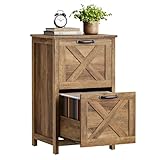
- 【Modern Farmhouse Styling】 Boasting distinctive X‑shaped barn‑door accents and crisp clean lines, this filing cabinet delivers timeless modern‑farmhouse charm to elevate your home office, bedroom or study space.
- 【Compact Footprint for Flexible Placement】 Measuring 15.7"D × 17.7"W × 29.5"H, it tucks neatly next to desks and works well within tight spots. Premium smooth drawer slides enable quiet, gliding opening and closing with minimal effort.
- 【Generous 2‑Drawer File Storage】 Two roomy drawers keep your documents well‑organized. Equipped with adjustable hanging rails to hold both A4 and letter‑size folders, each drawer can store approximately 90‑130 files.
- 【Durable Sturdy Build for Daily Use】 Engineered with a robust stable frame, the whole unit supports up to 110 lb. Each drawer bears a maximum weight of 33 lb. Its solid top surface doubles as a reliable printer stand for your daily workspace needs.
- 【Hassle‑Free Straightforward Assembly】Clearly‑marked hardware and illustrated step‑by‑step instructions simplify the whole setup process. Quickly assemble the unit and get your home office or study neatly organized in no time.
Bookmarks and internal drag and drop were improved. Items can now be dragged to tabs and the breadcrumb bar, providing additional ways to move through archive locations.
Other additions and updates
- Improvements to zoom and fractional scaling.
- Alternative icon-rendering styles.
- Batch archive testing functions.
- Password-entropy rating.
- Updated archive backends: 7z/p7zip 26.00 and Pea 1.30.
The 11.0 announcement also listed support for opening 242 file extensions as archives. PeaZip’s broader feature set includes creating, browsing, extracting, converting, encrypting, hashing, and managing archive formats, as well as saving tasks as command-line scripts. PeaZip 11.0 release announcement
Rank #2

- 【Sturdy Material】Firstsky Lateral File Cabinets are made of thick cold-rolled steel, not only dustproof and waterproof, but also more durable compared to wood products.Lockable drawers with 2 keys to keep your belongings secure.
- 【Silent Slides With Safety Lock Design】The slides of Firstsky Office File Cabinets will be hold still automatically when it is fully extension or fully closed which can prevent from sliding casually.And it is virtually silent when you use the drawer. The sturdy material gives it a longer life span.
- 【Large Capacity】This vertical file cabinet for home office has large storage space, fully retractable ball bearing drawer slide rails for easy access to all folders, file drawers with adjustable hanging rods can hang A4 size, letter size or legal size hanging folders to make your files well organized.
- 【Perfect Storage Solution】The contemporary design makes it a perfect match for your home office environment. Ample storage space and adjustable hanging bar allow for a variety of storage needs.
- 【Easy to Assemble】Firstsky locking cabinet comes with instructions and we have an assembly video for you. So it will be very easy to assemble.If you have any problems during assembly or use, we will help you within 24 hours.
How does it compare with 7-Zip and other archive tools?
In its own large-archive tests, the PeaZip project concluded that 7-Zip was fastest overall. It reported PeaZip as comparable to or faster than WinRAR and GNOME Archive Manager out of the box, and said Fast mode could bring PeaZip close to 7-Zip’s speed. These are the project’s benchmark conclusions; results can vary with archive structure, item count, operating system, widgetset, and settings. PeaZip benchmark results
For a meaningful comparison, use the same archive and machine, and account for whether PeaZip is running with its default optimization or Fast mode. A single opening-time figure does not establish which application will feel fastest for every format or workload.
Quick wins for a faster PC:
Clear out junk files and repair common Windows errorsFree Scan →Fix the driver behind crashes, sound loss and screen glitchesFind Drivers →Repair Windows errors before they cause bigger problemsFix Now →Rank #3

- 【Adjustable Design】: This hanging file frame features an adjustable length of 16-25 inches.Suitable for drawers/cabinets of varying depths. It's an excellent choice for office and home workspaces.
- 【Say Goodbye to Clutter】Our file cabinet rails measure 12.5x(16-25)x9.5 inches, accommodate standard letter-size hanging folders to help you create a clean desk and spacious workspace.
- 【Easy Assembly】: The installation process is straightforward and easy to follow, so even if it's your first time using it, you can complete it independently with ease!
- 【Sturdy and Durable】: The hanging file rack is constructed from thickened metal material, ensuring exceptional stability even when fully loaded with A4 folders.Save time rummaging through piles of documents and boost efficiency.
- 【Versatile Applications】: This hanging file organizer is suitable for various settings including homes, schools, and offices.Saves space and keeps items organized, making it an ideal choice for everyday use.
Does PeaZip 11 work on Windows, Linux, and macOS?
PeaZip is an LGPLv3 open-source archive manager for Windows, Linux, macOS, and BSD, according to the project. The specific packages and interface details can differ by operating system. PeaZip 11.0.0 itself was released in April 2026; check the official changelog and download listings for the current version and the package available for your system.
Where should you download PeaZip safely?
Use the project’s official GitHub or SourceForge repositories, linked from its download page. The project publishes SHA256 hashes for packages and warns against unofficial download sources and installers whose hashes do not match. If you verify a download, compare its computed SHA256 value with the hash published for that exact package. Official PeaZip download page
Quick Recap
Product prices and availability are accurate as of the date/time indicated and are subject to change. Any price and availability information displayed on Amazon at the time of purchase will apply.

