
Free tools Windows power users keep installed
One-click scans. No signup required.
iTechGuides is reader-supported. When you buy through links on our site, we may earn an affiliate commission. As an Amazon Associate I earn from qualifying purchases. Learn more
An Eye-Fi card was a camera memory card with built-in wireless LAN. After setup, a compatible camera could send photos from the card to a configured destination over Wi-Fi. It is now legacy technology: Eye-Fi’s 2016 end-of-life notice covered X2 and earlier products and warned that key services would shut down, so a surviving card should not be assumed to work with a current camera, phone, computer, or operating system.
What was an Eye-Fi card?
An Eye-Fi card combined removable camera storage with wireless LAN transfer. Instead of removing the card to copy pictures, a user could configure the card and camera to send recorded images to a computer or another supported destination over a wireless network. Sony’s 2014 DSC-H400 guide, for example, describes configuring access-point or transfer-direction settings before taking pictures, then uploading recorded images over wireless LAN. That documentation applies to the DSC-H400, not every camera with an SD-card slot: Sony DSC-H400 Eye-Fi help guide.
Eye-Fi’s Pro X2 guide describes an older setup using Eye-Fi Center software on Windows or Mac and an Eye-Fi account. It also documents Direct Mode, in which the card created a Wi-Fi network for supported mobile devices. These are historical setup instructions, not confirmation that the software, account services, or mobile apps remain operational: Eye-Fi Pro X2 Wireless Memory Card User Guide.
How did photo transfer work?
The exact workflow depended on the camera, card generation, settings, destination, and available network. Typically, the card and camera had to be configured first; the camera then recorded images to the card, and wireless transfer began according to that model’s behavior and settings. The card was not simply a universal wireless feature that any camera could use.
#1 Best Overall
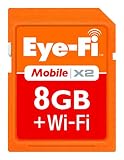
- Instant uploads while on-the-go with Direct Mode
- Automatically backup and organize photos and videos from your camera to smartphone, tablet, computer.
- Never miss a shot again using Endless Memory Mode as space is automatically freed once your photos and videos are safely uploaded
- 8GB memory combined with Class 6 read and write speeds for faster performance
- Quick and easy set-up
Transfer triggers varied by camera
CASIO documents a model-dependent example: communication may begin after a photo is taken, or when the camera is powered on if images remain untransferred. Its FAQ also says transfer does not occur while the camera is recording a movie or storing data. That describes the applicable CASIO camera workflows, not a rule for every Eye-Fi-compatible camera: CASIO Eye-Fi FAQ.
Camera-specific limitations mattered
Sony’s DSC-H400 guide says uploading disables that camera’s Power Save feature, wireless reception can be interrupted, and the camera does not support Endless Memory Mode on some Eye-Fi cards. These are model-specific cautions rather than universal properties of all Eye-Fi cards: Sony DSC-H400 Eye-Fi help guide.
Rank #2

- 4GB Memory to store up to 2000 photos or 90min or video
- Upload JPEG photos & videos fast through your home Wi-Fi network thanks to built in 802.11n speed
- Get email, Facebook, or Twitter alerts when your photos are uploading online
- Photos and videos can automatically land in date-based folders of your choice on your computer or even directly into iPhoto for Macs
- Requirements:An internet browser, specifically Internet Explorer 7 (Windows only), Firefox 2 and 3 (Windows and OS X) and Safari 3 (OS X 10.4 - 10.6)
Why did Eye-Fi support end?
In a notice dated June 30, 2016, Eye-Fi began the final end-of-life stage for X2 and earlier-generation products and told customers to cease use by September 16, 2016, when key supporting services would shut down. The affected items included pre-X2 cards, named X2 variants such as 8GB and 16GB Pro X2 cards, Eye-Fi Center for Windows and Mac, the iOS and Android apps, and the Eye-Fi Center web app. SanDisk’s support page also records the 2016 end-of-support announcement and deadline: Eye-Fi end-of-life notice; SanDisk Eye-Fi SD Card End of Support.
Eye-Fi’s notice said users would no longer be able to create an Eye-Fi Center account or log in after the deadline; installed software would not function when account access failed. The notice said Direct Mode might not be directly affected, but Eye-Fi would no longer update the apps for operating-system changes, support would end, and continued Direct Mode operation was not guaranteed. The same notice said Mobi, Mobi Pro, and Eyefi Cloud were unaffected by that particular 2016 announcement; that dated statement does not establish their present availability.
Rank #3
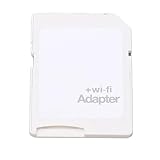
- SUPPORT WIFI SETTINGS: WiFi SD adapter supports WiFi, SD settings, WiFi password, AP mode, IP, channel, number or user, SSID.
Will an old Eye-Fi card work today?
There is no basis to treat a used Eye-Fi card as a dependable plug-and-play transfer solution. The 2016 shutdown affected important services and software, while historical documentation cannot establish present-day behavior with current cameras, phones, computers, or operating systems. A particular card might retain some local or Direct Mode behavior, but that is uncertain and unsupported; no current reliability or compatibility testing is established here.
- Identify the exact card model and generation. Determine whether it is pre-X2, X2, Mobi, or Mobi Pro; Eye-Fi’s 2016 notice treated product groups differently.
- Check the exact camera manual. Look for Eye-Fi support, required menu settings, transfer behavior, and restrictions for that camera model. An SD-card slot alone does not establish compatibility.
- Do not rely on old services or apps. The shutdown notice says Eye-Fi Center account access stopped for X2 and earlier customers after the 2016 deadline; Direct Mode continuation was not guaranteed.
- Use a regular card reader for ordinary copying if needed. A reader can provide a conventional way to access files on a removable card, but it does not restore Eye-Fi wireless services.
Compatibility and safe use
Compatibility was specific to both camera and card. Sony’s guide documents an Eye-Fi option for the DSC-H400; it does not certify every SD-slot camera. Canon’s service notice concerns X2 cards and a narrowly defined group of EOS cameras associated with main-board replacements during specified historical timeframes. It is a limited repair advisory, not a general warning about all Canon cameras or SD cards: Canon Eye-Fi and SD-card removal service notice.
Rank #4

- Support Settings: Customize, Settings, Passwords, And Modes Easily
- Material: Constructed From Material, The Adapter Is And Lasting For Extended Use. Wi-Fi Card
- Applicable Devices: Cont Up To 3 Devices At The Time, Port For, For Devices
- Simple: Insert Your Sdhc Or Card Into The Adapter, You Access Photos And Videos Sent Wirelessly From The Camera To Your Smartphone Or Tablet Via For Sharing
- Applicable Devices: To Card Cont Up To 3 Devices At The Time, Port For, For Ioevices
Sony describes Eye-Fi cards as using wireless LAN, advises against inserting one where wireless LAN is prohibited (giving an airplane as an example), and notes regional restrictions and an Eye-Fi-off setting for the DSC-H400. Follow local rules and the manual for the camera in use rather than assuming a blanket rule applies everywhere: Sony DSC-H400 Eye-Fi help guide.
Quick Recap
Best Value
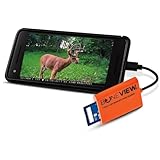
- NEW EDITION FOR ALL LATEST TYPE-C ANDROID PHONES - Designed specifically for hunters to instantly view, save, share and delete your trail camera pictures and videos with your smartphone or tablet
- READS ALL TRAIL CAMERA SD AND MICRO-SD MEMORY CARDS from all major trail cameras on the market
- INSTANTLY PLUG AND PLAY - No Extra Apps Required and Still Able to Quickly Swipe Through and Save Thousands of Photos or Play Most Video Files with Super Fast Transfer Speeds
- USE ANYWHERE IN THE WOODS - No Internet, Wi-Fi or Cell Service Required Ever, No Batteries Either
- BUY WITH CONFIDENCE - Bone View will always stand behind their products and make sure they work well for you no matter what
Product prices and availability are accurate as of the date/time indicated and are subject to change. Any price and availability information displayed on Amazon at the time of purchase will apply.

