
You can convert YouTube to MP3 when you own the video or have permission to download and extract its audio, but YouTube Premium does not export ordinary MP3 files. Public visibility is not permission to copy someone else’s content. Use an authorized download route, verify the license, and convert the resulting local file.
The conversion itself is simple; the important distinction is whether the source may lawfully be downloaded and whether the permission covers audio extraction. The sections below separate official YouTube options, authorized local conversion, licensing checks, technical troubleshooting, and safe storage.
Key takeaways
- YouTube Studio lets a signed-in creator download the creator’s own upload as an MP4, generally at 720p or 360p depending on the video; the MP4 must be converted locally if an MP3 is needed.
- YouTube Premium supports offline playback inside YouTube, but Premium downloads are not ordinary MP3 files that can be exported to a music library.
- A Creative Commons label does not automatically clear every right; the exact license, attribution requirement, commercial-use permission, and embedded content must be checked.
- For U.S. readers, the U.S. Copyright Office says unauthorized downloading can infringe copyright, while fair use is fact-specific and does not create a blanket personal-use exemption.
- Tools such as yt-dlp and FFmpeg can handle authorized downloads and local conversion, but technical capability is not permission to copy a YouTube video.
What can you officially download from YouTube?
The official download route depends on whether you own the upload, have a license, or only want offline playback. YouTube’s Terms of Service restrict accessing, reproducing, downloading, distributing, transmitting, broadcasting, displaying, selling, licensing, altering, or modifying service content unless YouTube specifically permits the activity, the user has prior written permission from YouTube and applicable rights holders, or applicable law permits it.
| Situation | Official or authorized route | Does it produce a transferable MP3? | What must be verified? |
|---|---|---|---|
| Your own YouTube upload | Download the MP4 from YouTube Studio or retrieve uploads through Google Takeout. | No. Convert the local MP4 separately. | You own or have cleared the music, voices, recordings, visuals, and other embedded material. |
| YouTube Premium offline playback | Download inside the official YouTube app or a supported browser. | No. The download remains in YouTube’s controlled playback environment. | Membership, device and browser eligibility, periodic reconnection, and continued video availability. |
| Creative Commons video | Use a download route authorized by the creator, platform, or license, then convert locally if permitted. | Possibly, if the license permits downloading and audio extraction. | The exact Creative Commons terms, attribution, adaptation, commercial-use rules, and third-party material. |
| Public-domain or permission-based material | Use the authorized source or obtain written permission, then convert the local file. | Possibly, subject to the permission or applicable law. | The specific work, sound recording, performance, jurisdiction, and intended use. |
| Purchased YouTube movies or television episodes | Use supported official offline viewing where available. | Not automatically. A purchase does not create a general MP3-export right. | The purchase license and applicable law. |
| Someone else’s ordinary public video | No general creator-download permission exists merely because the video is viewable. | Do not assume that a converter website or command makes copying authorized. | Permission, a suitable license, an applicable legal exception, or another valid authorization. |
What is the safest way to convert your own YouTube upload to MP3?
The safest workflow is to download your own upload from YouTube Studio, preserve the original MP4, confirm that every audio element is cleared, and convert the local file with a reputable media tool. YouTube explains that its creator-download function applies to videos uploaded by the signed-in creator, not other users’ videos, and that the downloaded file is MP4 rather than MP3. See YouTube’s instructions for downloading videos you uploaded.
Outdated Drivers Are Slowing You Down
One free scan finds every outdated or missing driver and matches the right update for your exact hardware.Free scan · exact hardware matchWindows Errors? Fix Them Before They Spread
Repair common Windows errors and clear accumulated junk for a smoother, more stable PC - no reinstall needed.Free scan · no reinstall#1 Best Overall
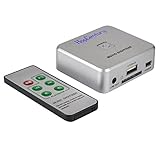
- Powerful Audio Capture Recorder: Capture all audio signals and save it as MP3 files in a USB flash drive, computer is NOT required. Support most audio and multimedia devices which has a 3.5mm or RCA audio output port, such as cellphones, cassette players, DVD, game consoles, TV boxes, phonograph and other equipments. Playback function is easy for you to check the MP3 files in the USB flash drive, just need a earphone! Designed to convert your old analog music to MP3, not a professional DJ device
- Record Audio: You could press the RECORD button to star and stop recording at any time you like, it is a flexible way for you in most situations. At the same time, you could connect a earphone to the LINE OUT port to listen the music you are recording. The recorded file is the popular and standard MP3 file, 128Kbps 44.1KHz Dual-Mono, it is very easy to edit or share to your friends
- Support SD Card & USB Flash Drive: You could plug a SD card or a USB flash drive on the music capture recorder to save the recorded files, usually the recorded file is about 50Mb for 60 minutes. It is IMPORTANT to format it before use to avoid errors. Support 32GB Max. with FAT32 file format, NTFS is not supported. Please do NOT insert a SD card and a USB flash drive at the same time
- Remote Controlled: It is very convenient to access all functions of the audio capture device with the attached remote control, Start / Stop recording, Play / Pause music, Previous, Next , Turn up / down Volume
- What You Get: 1 x Music digitizer recorder, 1 x USB power cable, 1 x 3.5mm audio cable, 1 x Remote control, 1 x User manual, 30-day money back & 1-year warranty guarantee, and 7 days a week friendly customer service
- Sign in to the owning channel. Open YouTube Studio, go to Content, and use the video’s menu to choose the download option. YouTube’s labels and interface can change, so use the current help page if the menu has moved.
- Save the original MP4. Keep the untouched download as your source file. Google Takeout is another option when the goal is to retrieve all uploaded videos rather than one video at a time.
- Check the rights. Confirm that the soundtrack, spoken performance, composition, visuals, samples, and any third-party clips are owned, licensed, public domain, or otherwise cleared for the intended use.
- Convert the local MP4. Import the MP4 into a trusted local media converter and choose MP3 as the output format. The conversion step is separate from YouTube’s download step.
- Preserve records. Keep the original MP4, written permissions, license files, attribution text, and any required metadata alongside the MP3.
How do you convert an authorized MP4 to MP3 locally?
A local converter extracts the audio stream from an MP4 and encodes that audio as an MP3 without contacting YouTube. A graphical media converter is the simplest option: open the MP4, select an audio-only export, choose MP3, select a suitable quality setting, and save the result to a new file.
Users comfortable with command-line tools can use FFmpeg for a local file they own or are authorized to convert:
ffmpeg -i 'owned-upload.mp4' -vn -c:a libmp3lame -q:a 2 'owned-upload.mp3'The command removes the video stream with -vn and creates an MP3 with the LAME encoder. The command does not download from YouTube; the input file must already be an authorized local copy. If a graphical converter is easier to maintain, use that instead.
Can yt-dlp convert an authorized YouTube URL to MP3?
yt-dlp can retrieve media from supported sites and pass the audio through post-processing, but yt-dlp’s technical capability does not grant permission to download a video. Use a third-party downloader only for a URL that you own or are explicitly authorized to download.
What’s actually slowing this PC down?
Pick the symptom - the matching free tool is one click away.
For an authorized URL, a typical current-style command is:
Rank #2

- 【4800 Hours of Audio Storage】Equipped with a 64GB memory, this digital voice recorder provides up to 4800 hours of high-quality audio (at 192Kbps). It’s the perfect tool for recording lectures, meetings, or storing your favorite music—an all-in-one solution for students, professionals, and travelers.
- 【OTG Direct Transfer】Easily connect the recorder device to your smartphone with an OTG adapter for quick file management. Compatible with Android as well as Windows XP/7/8/10, you can rename, share, or delete recordings on the spot—no computer setup required. Perfect for busy professionals, students, and journalists who need fast, hassle-free access to their audio files anytime, anywhere.
- 【AI Noise Cancellation】Powered by AI noise reduction and an upgraded DSP 4.0 chip, this audio recorder intelligently filters background noise for crisp, clear sound. Its advanced processing delivers professional-grade audio quality, making it perfect for lectures, meetings, interviews, or any recording scenario.
- 【Portable & Lightweight Design】Weighing just 1 ounce, this compact audio recorder easily clips to your keys, bag, or lanyard. Its slim profile is ideal for daily use in classrooms, meetings, or travel - a practical gift for students and professionals alike.s recording on just a 1.5-hour full charge, with each session supporting uninterrupted 2-hour audio files (auto-saved before switching to the next file). Never lose important recordings—when the battery runs low, the device automatically saves all files securely before powering off.
- 【One-Touch Recording】This audio recorder makes recording super easy—just hit the button and you’re rolling. No confusing setup, no wasted time. Perfect for students in class, professionals in meetings, or anyone who wants to grab clear audio fast and hassle-free
yt-dlp --extract-audio --audio-format mp3 --audio-quality 192K 'AUTHORIZED_URL'Use the project’s current yt-dlp documentation rather than assuming that an old command or installation method still works. The documentation identifies FFmpeg and ffprobe as important dependencies for merging and post-processing, and it also identifies a JavaScript runtime together with yt-dlp-ejs as relevant to full YouTube support. Dependencies and site support can change.
The command is not a workaround for YouTube’s rules. Do not use it to extract commercial music, films, podcasts, or other protected material merely because the material is publicly viewable. Do not describe yt-dlp or FFmpeg as endorsed by YouTube; their documentation establishes software functionality, not platform approval.
Why should you avoid random YouTube-to-MP3 websites?
Random converter websites are risky because the visible download button may lead to a misleading advertisement, unwanted software, tracking, or a malicious file rather than the promised audio. Browser extensions and bundled installers from unclear sources create similar risks.
Recommended Free Tools
- Do not enter a Google or YouTube password into a converter site.
- Do not install an extension merely because a website says it is required for conversion.
- Do not open unexpected executable files downloaded alongside an MP3.
- Use security software and scan downloads when a file or installer is not clearly trustworthy.
- Prefer a local converter after obtaining the file through an authorized route.
A website’s promise of “unlimited free MP3 downloads” does not change YouTube’s terms, the copyright status of the source, or the security risk of the website. This article does not endorse a specific converter site because safety, ownership, advertising behavior, and terms can change quickly.
How do Creative Commons, public-domain, and permission-based downloads differ?
Creative Commons, public-domain, and permission-based material can be converted when the specific rights allow the download, extraction, and intended use. The label or description alone is not enough.
Rank #3

- 【PCM Recording and Automatic Noise Reduction】:This digital voice recorder is equipped with advanced dual noise reduction microphones and supports 1536 kbps PCM HD audio recording, ensuring crystal-clear sound capture in any environment. Recorder device with automatic noise reduction and voice-activated recording, the recorder only picks up the sound when there’s speech, reducing background noise,Excellent sound quality can meet the needs of students, journalists, music lovers and more people
- 【136GB Memory and Long Battery Life】Voice Recorder with Playback with 8GB built-in storage and includes a complimentary 128GB TF card, this digital voice recorder can hold up to 9775 hours of recordings in MP3 format or WAV format;Recorder for lectures with a built-in 1100mAh rechargeable lithium battery, this voice recorder can continuously record for up to 68 hours on a single charge, making it perfect for back-to-back meetings, interviews, or extended classroom sessions
- 【One Click Record and Save】: Our voice recorder supports one click recording and saving functions. Even when the product is in a powered-off state, simply push up the side recording button to immediately enter recording mode, and push down the recording button to save the recording. This allows for capturing as much information as possible.Easily transfer your recordings to your computer using the USB-C connection, allowing for fast and secure file management
- 【Easy-to-Use】This portable voice recorder is designed with a simple, user-friendly interface featuring a large, easy-to-read LCD screen. The voice-activated recording (VOR) feature makes hands-free operation a breeze. With one-touch recording, users can start or stop recording instantly, even during busy moments. A-B repeat function and password protection ensure that important segments are easily accessible and secure
- 【Portable and Durable Design】Designed with portability in mind, this lightweight screen recorder fits comfortably in your pocket or bag, weighing only 97 grams. Its sleek and durable metal casing ensures longevity and protection from everyday wear and tear. Whether you’re traveling, in the office, or attending a lecture, this compact recorder is always ready to capture clear, high-quality audio
| Rights status | Questions to answer before conversion | Typical obligations |
|---|---|---|
| Creative Commons | Which license applies? Does it permit downloading, adaptation, commercial use, and redistribution? | Attribution may be required; some licenses restrict commercial use or require adaptations to use the same license. |
| Public domain | Is the specific composition, recording, performance, and video public domain in the relevant country? | Public-domain status may differ by jurisdiction, and a new recording can have rights even when an older composition does not. |
| Written permission | Does the permission expressly cover downloading, audio extraction, conversion, storage, and the planned distribution or commercial use? | Follow the permission’s limits, credit requirements, expiration, audience restrictions, and format restrictions. |
| Licensed creator asset | Does the license cover the particular file and the planned use rather than merely allowing viewing on YouTube? | Retain the license and comply with attribution, platform, modification, and redistribution conditions. |
YouTube explains its copyright and Creative Commons options, but the creator’s selected license does not necessarily clear every component inside a video. A video can contain separate rights in the composition, sound recording, voice performance, visuals, samples, and embedded third-party clips.
Is converting a YouTube video for personal use automatically legal?
No. Personal use alone is not a blanket authorization to download or convert copyrighted YouTube content. For U.S. readers, the U.S. Copyright Office’s fair-use guidance explains that unauthorized downloading can implicate the copyright owner’s exclusive rights and that fair use depends on the facts of each situation.
Quick wins for a faster PC:
Fix the driver behind crashes, sound loss and screen glitchesFind Drivers →Repair Windows errors before they cause bigger problemsFix Now →Fair use does not provide a fixed safe percentage for music, and the fact that a copy stays private does not automatically resolve the analysis. Relevant circumstances can include the purpose and character of the use, the nature of the work, the amount used, and the effect on the market. This is general information, not legal advice; laws and exceptions differ by country, and local legal review may be necessary for a disputed use.
YouTube’s terms and copyright law are separate questions. A use might require permission under the platform’s terms even when a reader believes a copyright exception could apply, and a platform feature that permits offline viewing does not necessarily authorize creation of a separate MP3.
How should you choose MP3 quality settings?
Choose the MP3 quality setting according to the source quality and the intended listening use; increasing the setting cannot restore audio detail that was absent from the original file. Conversion from an already compressed source can introduce another generation of lossy encoding.
Rank #4

- Clear PCM Recording: Adopts upgraded noise cancelling microphone with professional recording chip. Capture 1536Kbps premium quality sound. Voice recorder with playback function, which is well designed for the users to easily access. Customer Service includes real life phone call from a specialist to give instructions on this high-quality recording device. We ensure your satisfaction on this product.
- 128GB Digital Recorder, Computers Compatible: stores 9296hours of recording, or 40,000songs, up to 54 hours of continuous recording with full battery. Recording can be pre-set into mp3 128kbps,192kbps, or wav 1536kbps format. A wonderful voice recording device for lectures, meetings, and conversations.
- Voice Activated Recorder: This recorder device can set voice decibels at 6 different levels. Regardless the level of the volume, with correct voice decibel level, this recorder will catch talking voice only, reduce blank and whispering snippet.
- Powerful Feature: Multi-usage as a voice recorder, an USB flash drive, and a Mp3 Player. Newly developed 4-folder storage(A/B/C/D) for file management make your recording and other files more organized. Many other helpful features like password protection, A-B repeat, auto record, bookmark, ideal recorder for lectures, meetings, speeches, and interviews.
- Fast File Download: V618 can easily transfer files onto computers. A rechargeable voice recorder that can be quickly recharged, suit for students, teachers, seniors, businesspeople, writers, and bloggers
- Speech and lectures: Prioritize clear voice reproduction and a manageable file size.
- Music: Use a higher-quality setting when preserving listening quality matters, while recognizing that MP3 remains a lossy format.
- Archival work: Keep the original MP4 or another lossless source when available. Treat the MP3 as a convenience copy, not the master.
- Compatibility: Use a conventional MP3 filename and retain useful title, artist, album, and attribution information when the converter supports metadata.
Do not convert the same file repeatedly between MP3 and other lossy formats. Keep one authorized source and create the MP3 from that source whenever a new copy is needed.
Where should you store authorized MP3 files?
Store the MP3 in a normal music folder and keep a backup of both the MP3 and the rights records. An optional USB flash drive for music files can provide portable storage for authorized audio and a second copy; SanDisk’s USB flash-drive documentation describes these devices as portable file storage.
A USB flash drive is not required for conversion, does not download from YouTube, and does not bypass YouTube restrictions. Before moving files to a car stereo, speaker, phone, or other player, check that device’s supported file formats, USB filesystem requirements, and maximum storage limits. Playback hardware is an optional downstream convenience, not part of the authorization or conversion process.
What should you do when conversion fails?
| Symptom | Likely cause | Practical response |
|---|---|---|
| The local converter cannot open the file. | The download is incomplete, damaged, or not actually an MP4. | Keep the original download, verify that it plays normally, and obtain a fresh authorized copy rather than repeatedly converting a damaged file. |
| yt-dlp reports that FFmpeg or ffprobe is missing. | The required post-processing dependencies are not installed or are not available in the system path. | Install the dependencies from trusted sources and follow the current yt-dlp documentation, or use a reputable graphical converter. |
| yt-dlp reports a missing JavaScript runtime or yt-dlp-ejs. | Current YouTube support may require additional components described in the project documentation. | Check the current yt-dlp requirements and installation guidance instead of downloading an unverified bundled installer. |
| The MP3 sounds worse than the video. | The source may already be compressed, or the selected encoding setting may be too aggressive. | Return to the original authorized file, choose a more suitable setting, and remember that conversion cannot recreate missing detail. |
| The MP3 has no title, artist, or attribution information. | Metadata was not copied during conversion. | Add accurate metadata with a local tag editor and preserve any required creator attribution or license notice. |
| The downloaded video is no longer available. | YouTube can remove offline downloads when a video is no longer available, and an authorized source may have changed. | Use a separately authorized source or contact the rights holder; do not replace the missing source with an unauthorized copy. |
Which method should you choose?
Choose YouTube Studio for your own upload, Premium for official offline playback without an MP3 export, and a local converter only after you have an authorized file or URL. The decision is about rights first and software second.
- You own the upload: Download the MP4 in YouTube Studio, preserve it, and convert locally.
- You only need to listen offline: Use YouTube Premium or YouTube Music Premium where available, accepting that the download stays inside YouTube’s ecosystem.
- The creator grants a suitable license: Read the exact terms, download through an authorized route, convert locally, and retain attribution.
- The work is claimed to be public domain: Verify the status of the particular recording and jurisdiction before copying or distributing it.
- You want a commercial song from an ordinary public video: Do not assume that personal use, a converter site, or a command-line tool makes the MP3 lawful. Use a licensed source instead.
Official help pages, browser support, Premium availability, and third-party tool dependencies can change. Recheck the relevant YouTube help page and software documentation before publishing or relying on detailed interface instructions.
Free tools Windows power users keep installed
One-click scans. No signup required.
Best Value

- 【Simple Operation】- switch on your voice recorder, one button for recording. press the "REC", start the recording, press "STOP", end the recording, press “PLAY”, listen what you just recorded, and then Press A-B, select your important section to repeat. Easy to playback with inner powerful speaker, support external sound speaker playback, let you enjoy superior recording quality.
- 【Clear Voice Record】- high quality recording with noise redution, you will get super clear recorded voice, the sensitive microphone help you to catch speaker's words in an interview, lectures, meetings.
- 【Voice Activated Recording】- automatic voice reduction function, it starts recording when sound is detected or turn to standby state, saving recording time and reduce power consumption.
- 【 Player Function】- this voice recorder can be used as an music player, you could enjoy the music after your tired study, meeting and so on. Also can function as a detachable data storage device.you can take along your favorite pictures and documents whenever you go.Simply cut-and-paste or drag-and -drop files to or from it via USB connection, the player will appear as a removeable drive in Windows.
- 【High quality and long time】 uses DSP noise reduction technology to filter out environmental noise, has high-quality recording, 【1536kbps】to restore the real scene. It can continuously record for more than 30 hours and play for 7 hours.
Frequently Asked Questions
Does YouTube Premium let you download MP3 files?
No. YouTube Premium provides offline playback inside supported YouTube apps and browsers, but YouTube does not provide a general MP3 export for those downloads.
Can I convert someone else’s public YouTube video to MP3?
No. A video being publicly viewable does not by itself grant permission to download or convert it. You need ownership, a suitable license, written permission, or an applicable legal authorization.
Does Creative Commons mean a YouTube video is automatically free to convert?
No. A Creative Commons label is not blanket permission for every use. Check the exact license for downloading, audio extraction, adaptation, commercial use, redistribution, and attribution, and inspect third-party material in the video.
Does converting a YouTube video to MP3 improve audio quality?
No. MP3 conversion cannot restore audio detail that was absent from the source, and converting an already compressed source can create another lossy encoding generation. Keep the original authorized file as the master copy.
The Bottom Line
Bottom line: Convert YouTube to MP3 only when you own the content or have permission to download and extract its audio. YouTube Premium offers controlled offline playback rather than ordinary MP3 export, while YouTube Studio plus a trusted local converter is the clearest workflow for an authorized personal upload.
Quick Recap
Product prices and availability are accurate as of the date/time indicated and are subject to change. Any price and availability information displayed on Amazon at the time of purchase will apply.

