
Do these 3 things before closing this tab:
1Repair Windows errors before they cause bigger problems2Fix the driver behind crashes, sound loss and screen glitches3Clear out junk files and repair common Windows errorsAssetTiger is the best value for most businesses tracking ordinary physical assets such as tools, electronics, furniture, and equipment. Reftab is a better choice for IT teams that need reservations, software-license management, and automation; Snipe-IT is the strongest open-source option; Fleetio fits vehicles and maintenance; and Samsara or Tenna is the right category when you need live location rather than a record of the last scan.
There is no single best asset-tracking platform. A QR-code inventory system records custody and location when someone scans an item. It does not continuously locate that item. Live location requires compatible GPS, Bluetooth, telematics, or cellular hardware, normally with a connectivity charge.
Quick recommendations
- Best overall for ordinary physical assets: AssetTiger
- Best for visual inventory and simple tool tracking: Sortly
- Best open-source IT asset manager: Snipe-IT
- Best for IT teams and equipment lending: Reftab
- Best for vehicles and maintained equipment: Fleetio
- Best for maintenance-heavy operations: UpKeep
- Best for live GPS and Bluetooth asset monitoring: Samsara
- Best for construction fleets and heavy equipment: Tenna
The recommendations below are based on the type of tracking, pricing model, maintenance capability, offline operation, and operational complexity each product supports. Prices are the current figures supplied for this comparison and can change; promotional, annual, hardware, and connectivity charges require particular attention.
Best asset tracking software compared
| Software | Best for | Current pricing | Core capabilities | Main limitation |
|---|---|---|---|---|
| AssetTiger | General-purpose asset registers | 30-day trial for up to 250 assets; paid plans from $20/month for up to 500 assets | QR and barcode scanning, check-in/check-out, maintenance, depreciation, contracts, warranties, reports, mobile apps, and REST API | No permanent free plan; inventory quantities are billed separately from individually tracked assets |
| Reftab | Small IT teams and lending programs | Free for up to 50 assets; Starter from $31.25/month annually for 250 assets; Pro $62.50/month; Business $125/month | Assignments, reservations, labels, loan limits, software licenses, maintenance, depreciation, audit logs, integrations, and mobile apps | Software discovery adds $0.75/month per tracked user when billed annually |
| Sortly | Simple visual inventory | Free for 100 unique items and one user; paid tiers currently displayed from $24/month annually or $49/month monthly | Photos, folders, custom fields, barcode and QR scanning, offline mobile access, alerts, job tracking, reports, purchase orders, and integrations | Unique catalog records and user limits matter as the inventory grows; annual introductory pricing renews at the standard rate |
| Snipe-IT | Open-source IT asset management | Free to self-host; hosted plans currently start at $39.99/month or $399.99/year | Hardware and software records, assignments, check-in/check-out, labels, audits, API access, and unlimited users/assets subject to capacity | Self-hosting requires infrastructure, security, backups, upgrades, and administration |
| Fleetio | Vehicles and maintained equipment | Essential $4 per vehicle/month annually or $5 monthly; Professional $7 annually; Premium $10 annually | Vehicle records, inspections, service programs, fuel, maintenance, reminders, reports, telematics integrations, and mobile workflows | Not a GPS tracker by itself; the Tools add-on requires Fleetio Core |
| UpKeep | Maintenance-heavy operations | Essential $24/user/month; Premium $55/user/month; higher tiers require a quote | Work orders, preventive maintenance, asset records, parts inventory, mobile workflows, and maintenance automation | Important capabilities such as offline mode, deeper analytics, lifecycle tracking, and signature capture are listed under Professional |
| Samsara | Live tracking of vehicles and equipment | Quote-based; Asset Gateway listed at $249 MSRP, with software and connectivity quoted separately | GPS for powered assets, Bluetooth tags for smaller assets, network-assisted location, utilization reports, and theft alerts | Hardware and connectivity are required; Bluetooth tags are not independent cellular GPS |
| Tenna | Construction fleets and heavy equipment | Custom pricing based on asset count, hardware, and data | GPS and telematics, geofences, utilization, theft prevention, maintenance, job-site assignment, scheduling, and job costing | Specialized construction platform rather than a general office-asset database |
1. AssetTiger: best overall value for ordinary physical assets
AssetTiger is the strongest general-purpose choice when the central problem is knowing what an organization owns, who has it, where it should be, and when it needs attention. It combines asset records with barcode and QR scanning, check-in/check-out, maintenance schedules, depreciation, contracts, warranties, reporting, mobile apps, and a REST API.
#1 Best Overall

- FIND YOUR ITEMS ON FIND MY — AirTag (2nd generation) helps you keep track of what matters. Attach one to an item you want to keep track of using the Find My app.*
- EXPANDED PRECISION FINDING ON IPHONE AND APPLE WATCH — Get step-by-step directions to your lost item on iPhone and, now, Apple Watch.*
- ENHANCED SPEAKER — With a 50% louder speaker and a new, distinctive chime, it’s easier than ever to hear and find AirTag.*
- PING FROM FAR AND WIDE — Upgraded Ultra Wideband and Bluetooth chips allow you to find your items from even farther away than ever before.*
- SHARE ITEM LOCATION — Share AirTag location access temporarily and securely with trusted contacts, third parties, or over 50 airline partners if you lose something important.
Its pricing is especially attractive for organizations with many employees but a relatively modest number of tracked assets. Paid plans include unlimited users, which can make AssetTiger a good fit for schools, nonprofits, contractors, distributed teams, and businesses that need employees to check equipment in and out without buying a license for every employee.
The current pricing model needs careful interpretation. AssetTiger offers a 30-day trial for up to 250 assets, but that is not a permanent free production plan. Paid plans start at $20 per month for up to 500 assets. Inventory quantities are billed separately from individually tracked assets, so buyers should distinguish between, for example, 100 individually assigned laptops and a bulk quantity of disposable supplies.
Choose AssetTiger if: you need a low-cost asset register, custody history, maintenance reminders, depreciation, and scanning without live GPS.
Look elsewhere if: you need continuous location, advanced maintenance work orders, construction telematics, or a highly specialized IT software-discovery workflow.
What’s actually slowing this PC down?
Pick the symptom - the matching free tool is one click away.
2. Sortly: easiest visual inventory and tool tracking
Sortly is designed for users who want to identify equipment quickly from a phone. Its photo-based records, folders, custom fields, barcode and QR scanning, alerts, job-based tracking, reports, purchase orders, integrations, and offline mobile access make it approachable for teams that may not want a formal IT asset-management or CMMS implementation.
The visual approach is useful for tools, stockrooms, event equipment, samples, supplies, and field kits. A photo can reduce ambiguity when several items have similar names or model numbers, while folders can represent locations, jobs, vehicles, or departments.
Sortly’s free plan currently allows 100 unique items and one user. The important term is unique items: quantities of an item do not count as separate catalog records in the same way individually cataloged items do. The displayed Advanced price is currently $49 per month monthly or $24 per month when billed annually; Ultra is displayed at $149 monthly or $74 annually, and Premium at $299 monthly or $149 annually. Paid plans include a 14-day trial.
Annual prices shown on the pricing page include an introductory discount for the first year and renew at the standard rate afterward. Buyers should therefore compare the renewal price, not just the initial monthly equivalent.
Choose Sortly if: ease of use, photos, mobile access, and quick deployment matter more than deep IT controls or complex maintenance workflows.
Look elsewhere if: you need large-scale software-license management, detailed IT audit controls, continuous GPS, or pricing that scales cleanly for a very large catalog.
3. Snipe-IT: best open-source option for IT departments
Snipe-IT is the clearest choice for organizations that want a capable IT asset-management application without a software license fee and have the skills to operate it. It tracks hardware and software assets, assignments, check-in/check-out history, labels, audits, and API data. Its pricing model supports unlimited users and assets, subject to the capacity and configuration of the hosting environment.
The application is free and self-hostable. Hosted Snipe-IT plans currently start at $39.99 per month or $399.99 per year, with higher hosted tiers displayed at $99.99 per month and $249.99 per month. Hosted plans include operational services such as automatic upgrades, maintenance, and backups that a self-hosted installation must provide itself.
Recommended Free Tools
Self-hosting is therefore not operationally free. The organization must supply a server or hosting environment and handle TLS certificates, backups, monitoring, upgrades, security hardening, database administration, and recovery testing. Those responsibilities may be worthwhile for a technical organization that wants control over its data, but they should be included in the total cost of ownership.
Rank #2

- Easy Find & Family Sharing with Apple Find My: Quickly pair the FineTrack tag with your iPhone or iPad in just one tap. Using the pre-installed Find My app, add the Air Tracker tag to the Items tab to instantly locate and track your keys, wallet, and other valuables. With iOS 17 or later, you can also share your tracker’s location with family members, so everyone can help keep items safe. (Note: Compatible with iOS devices only, not for Android.)
- Smart Tracking Made Easy: Whether Bluetooth Air Tracker Tag is nearby or far away, locate it easily with the Find My app. When within Bluetooth range, play a sound to quickly find the item tracker tag; when out of range, the Apple Find My network uses its vast ecosystem of Apple devices to provide the item finder’s latest location. Enjoy global tracking with Apple’s Find My network without any subscription fees.
- Lost Item Alerts & Lost Mode: When your Air Tracker Tag moves out of range, the Apple Find My app sends an instant lost alert with the last known location. If your item is confirmed lost, you can activate Lost Mode and leave your contact information so nearby Apple devices can remotely access it and help locate your tracker, making recovery quick and easy.
- 2-Year Battery Life & Child-Safe Certified: The UGREEN 4-pack Bluetooth tracker tags feature a replaceable battery that lasts up to 2 years, outperforming standard 1-year trackers. You can check the tracker’s battery anytime in the app and replace it when needed, keeping your valuables always protected. Item finder tags are also UL4200A certified, preventing children from accidentally swallowing the battery.
- Your Privacy, Fully Protected: Certified by Apple MFi, this Bluetooth Air Tracker Tag uses end-to-end encryption to keep your location data private and secure. All communications are anonymous and encrypted, and no location data is stored on the device. Even if your item is lost, your information remains protected and cannot be accessed without your permission — not by Apple, the manufacturer, or any third party.
Snipe-IT is primarily an ITAM system. It is not a live GPS platform, and it is not a full CMMS for technician dispatch, parts consumption, downtime analysis, and condition monitoring.
Choose Snipe-IT if: you have IT or DevOps capacity, want open-source control, and need hardware assignment and audit history for a potentially large user and asset base.
Look elsewhere if: you need a managed turnkey service, maintenance-first workflows, vehicle telematics, or an app designed primarily for nontechnical inventory users.
PC Slower Than It Used to Be?
A free scan shows the junk files, broken settings and background clutter dragging Windows down - then fixes them in one click.Free scan · Windows 10 & 11Crashes, No Sound, or Screen Glitches?
Random freezes, missing sound and display glitches usually trace back to one bad driver. Find and replace yours safely.Free scan · under a minute4. Reftab: best for IT teams, lending libraries, and equipment reservations
Reftab goes beyond a basic inventory list with workflows for hardware assignment, reservations, equipment lending, loan limits, software-license tracking, maintenance, depreciation, audit logs, custom fields, mobile apps, and integrations. It is a strong fit for schools, businesses, studios, libraries, and IT departments that regularly lend equipment or need to know who has a device and when it is due back.
Reftab’s free plan supports up to 50 assets. Starter begins at $31.25 per month billed annually for 250 assets; Pro is $62.50 per month, and Business is $125 per month. Paid hardware plans include unlimited platform users, but software-management features create an important extra cost: tracked users are charged separately at $0.75 per month per tracked user when billed annually.
That distinction matters for organizations comparing Reftab with per-seat ITAM products. Count both physical assets and people whose software installations or licenses must be tracked. Archived assets that cannot be checked out do not count toward the active asset quota, which can help organizations retain historical records without paying for them as active inventory.
Choose Reftab if: reservations, lending, check-in/check-out, software licenses, identity or device-management integrations, and audit controls are central requirements.
Free tools Windows power users keep installed
One-click scans. No signup required.
Look elsewhere if: you only need a very simple photo inventory, need live location, or want to avoid a separate tracked-user charge for software management.
5. Fleetio: best for vehicles and maintained equipment
Fleetio is the better category of product when asset tracking means vehicles, trailers, machines, inspections, service schedules, fuel, and total cost of ownership. It provides vehicle inventory, service programs, maintenance records, reminders, inspections, reports, mobile workflows, and telematics integrations.
Fleetio’s displayed vehicle pricing is $4 per vehicle per month billed annually or $5 monthly for Essential. Professional is shown at $7 per vehicle per month annually, and Premium at $10 annually. The displayed example assumes a five-asset fleet, so a buyer should verify the quote for the actual fleet size and plan.
Fleetio can also manage smaller equipment through its Tools add-on. Tools pricing starts at an average of $0.50 per piece per month, with volume pricing varying by tier. However, Tools is not sold as a standalone asset-tracking product: Fleetio Core is required.
Fleetio is not a live GPS tracker by itself. Location data comes through compatible telematics integrations or hardware. If the requirement is continuous location, geofencing, or theft recovery, confirm the specific integration, hardware, update interval, cellular coverage, installation, and ongoing data charges before purchasing.
Choose Fleetio if: maintenance, inspections, fuel, service history, and vehicle operating costs are more important than general office-asset checkout.
Rank #3

- 🔐🔐【2026 NEW UPGRADED ITEM FINDER】Item Finder sets a new standard for Bluetooth trackers with its sleek design, robust features, and seamless integration with the ecosystem. Whether you’re keeping track of your keys, wallet, or any other valuable item, this smart tag offers peace of mind and convenience in one compact package.
- 🔐🔐【LIGHTWEIGHT AND EASY TO CARRY】The design of the Tracker Tag is both stylish and functional, with a sleek, compact form factor that easily attaches to keychains, bags, or any other item you want to keep track of. Tracker Tag Exquisite and compact design, easily attached to keychains, occupying no space and not affecting daily use. Tracker Tag operates for up to a year on a standard CR2032 battery (included), and replacing the battery is a breeze.
- 🔐🔐【EASY TO USE】One of the standout features of the Item Finder is its impressive range and reliability. Key Finders Using Bluetooth Low Energy technology, it allows you to track your belongings with precision, even in crowded or indoor environments. The accompanying Findmy app provides real-time location updates, making it easy to pinpoint the exact whereabouts of your items with just a few taps on your smartphone.
- 🔐🔐【ADVANCED TECHNOLOGY】It’s pretty easy to link up with your iPhone with the “Find My” app(compatible with iOS ONLY). Our smart Key Finders uses the latest Bluetooth tracking technology to easily bind your keys and track their location at any time. With just a gentle tap on the mobile app, no matter where the keys are hidden in the house or accidentally forgotten in the office, they can be quickly located, making searching simple and efficient.
- 🔐🔐【DON'T WORRY ABOUT LOSING ITEM】Each package includes key rings in addition to the tracker tag for keys. When the key leaves the preset safe range, the phone immediately sounds an alarm to remind you to retrieve it in a timely manner, effectively preventing the key from being lost and safeguarding your life. Our Bluetooth item finder leverages the vast Find My network, ensuring privacy while tracking your Wallet Finder.
Look elsewhere if: you need a general IT asset register, a standalone tool tracker, or live location without adding telematics.
6. UpKeep: best for maintenance-heavy operations
UpKeep is a computerized maintenance management system, or CMMS, with asset tracking. Its core workflows include work orders, preventive maintenance, asset records, parts and inventory management, mobile access, and maintenance automation. It fits plants, facilities teams, field service organizations, and operations departments where the important question is not only where an asset is, but whether it is working and what maintenance it requires.
Quick wins for a faster PC:
Clear out junk files and repair common Windows errorsFree Scan →Scan for outdated or missing drivers - takes under a minuteDriver Scan →Repair Windows errors before they cause bigger problemsFix Now →Essential is currently listed at $24 per user per month, and Premium at $55 per user per month. Professional and Enterprise require a quote. The pricing tiers are not simply different versions of the same asset register: UpKeep lists mobile offline mode, deeper analytics, asset lifecycle tracking, and signature capture under Professional.
That tier separation is significant for technicians working in basements, plants, remote sites, or areas with unreliable connectivity. A mobile app does not automatically mean every workflow works offline. Test the exact process—opening a work order, scanning an asset, adding parts, capturing a signature, and synchronizing later—on the devices and sites where employees will use it.
Choose UpKeep if: preventive maintenance, work orders, technician workflows, parts, inspections, and downtime are the center of the project.
Look elsewhere if: you need inexpensive custody tracking, vehicle-focused fleet management, or live GPS location.
7. Samsara: best for live GPS and Bluetooth asset monitoring
Samsara is the appropriate choice when the core requirement is where an asset is now, rather than who last scanned it. Its asset-monitoring system combines GPS hardware for powered assets with Bluetooth tags for smaller or unpowered assets. The platform supports near-real-time location through the Samsara Network, utilization reporting, and theft or loss alerts.
Samsara is quote-based. Its asset-monitoring materials list an Asset Gateway at a $249 MSRP, but the complete software and connectivity price requires a quote. A serious comparison should request the total cost for hardware, software, cellular service, installation, batteries or charging, replacement devices, contract term, and the expected update interval.
Bluetooth tags should not be treated as independent cellular GPS trackers. Their visibility depends on the Samsara Network and nearby compatible gateways or network coverage. They may be suitable for proximity and network-assisted location of smaller assets, while remote equipment that must report its own position may require GPS-capable hardware.
Choose Samsara if: live or near-real-time location, utilization, theft alerts, and a combination of powered and unpowered assets justify a hardware-based deployment.
Look elsewhere if: you only need barcode-based custody records or cannot support device, connectivity, and subscription costs.
8. Tenna: best for construction fleets and heavy equipment
Tenna is specialized for construction rather than general office inventory. It combines construction-focused GPS and telematics with geofences, utilization tracking, theft prevention, maintenance, job-site assignment, resource scheduling, and equipment job costing.
Pricing is custom and depends on asset count, hardware, and data. Implementation costs may include tracker installation, verification, training locations, implementation duration, and selected features. A quote should identify each of those components rather than presenting only a software subscription.
Rank #4
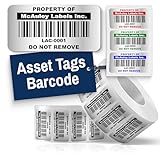
- Instantly Improve Asset Tracking: Take control of inventory management with durable and customizable asset tags that resist water, scratches, and fading. Whether labeling tools, IT equipment, or machinery, your barcode labels ensure seamless tracking and security
- Multiple Variations & Sizes for Your Needs: Choose from Metalized Silver, Heavy-Duty 3M Adhesive, or Semi-Gloss White Polyester asset tags. Available in standard 2x1” and 1.5x0.75” sizes, with custom color and sizing options to fit your inventory tracking requirements
- Precision Printing & High-Contrast Visibility: Your barcode labels and serial number stickers feature sharp, high-contrast printing, making them easy to scan in any lighting condition. Perfect for fast inventory management, security tracking, and equipment identification
- Strong Adhesion for Reliable Labeling: Featuring industrial-strength adhesive, your permanent labels bond securely to metal, plastic, and textured surfaces. Whether for laptops, servers, or machinery, they stay put with no peeling or fading
- Built to Last, Unlike the Rest: McAuley asset tags are built to last - unlike flimsy stickers that fade, smudge, or peel. With high-contrast, easy-to-scan barcodes, they ensure precise asset tracking and long-term durability in any environment
Tenna is a stronger fit than a general asset database when equipment moves between job sites and the business needs utilization, scheduling, job costing, and theft prevention. It is likely excessive for laptops, furniture, hand tools that are checked out at a storeroom, or other assets that do not require telematics.
The Tool Desk
Outbyte Driver Updater FREEScan for outdated or missing drivers - takes under a minuteDriver Scan →Outbyte PC Repair FREEClear out junk files and repair common Windows errorsFree Scan →Choose Tenna if: construction equipment, job-site movement, utilization, geofencing, and equipment cost allocation are the primary concerns.
Look elsewhere if: you need a general-purpose office asset register or a simple low-cost barcode system.
Understand what kind of tracking you actually need
The word tracking describes several different technologies. Choosing software before defining the tracking method is the fastest way to buy the wrong product.
QR codes and barcodes: transaction-based tracking
A QR or barcode label identifies an asset when a person scans it. The system can then record a check-out, check-in, inspection, assignment, transfer, or location update. This is inexpensive and practical for laptops, tools, furniture, cameras, laboratory equipment, and loaner devices.
Free tools Windows power users keep installed
One-click scans. No signup required.
It does not provide continuous location. If a worker scans a drill into a job-site inventory in the morning and moves it elsewhere without scanning, the software still shows the last recorded location. Barcode systems provide a last-known transaction, not a live position.
Bluetooth or BLE: proximity and network-assisted location
Bluetooth tags can help locate smaller or unpowered assets when nearby gateways, compatible devices, or a vendor network detect them. They generally consume less power than cellular GPS tags, but coverage and accuracy depend on the surrounding infrastructure. Ask whether the system reports an exact position, a nearby gateway, or only the last network detection.
Cellular GPS: live or near-real-time remote location
GPS trackers determine position and transmit it over a cellular connection. They require compatible hardware, power or battery management, and a connectivity subscription. Update frequency, indoor performance, regional cellular coverage, installation, and battery life all affect the real result.
OEM telematics: machine and vehicle data
Vehicle and heavy-equipment telematics can provide location alongside engine hours, utilization, faults, fuel, and other machine data. This is useful for fleets and construction operations, but compatibility varies by vehicle, equipment model, gateway, and integration.
What’s actually slowing this PC down?
Pick the symptom - the matching free tool is one click away.
How to choose the right platform
1. Define the operational question
- What do we own? Choose an asset register such as AssetTiger, Sortly, Snipe-IT, or Reftab.
- Who has it? Prioritize check-in/check-out, assignments, approvals, and audit history.
- Can someone reserve or borrow it? Reftab is particularly suited to reservations and lending.
- When does it need service? Consider AssetTiger, Fleetio, or UpKeep depending on maintenance depth.
- Where is it right now? Look at Samsara, Tenna, or a Fleetio telematics integration.
- How much does it cost to operate? Fleetio and UpKeep are better positioned for service, fuel, parts, labor, and total-cost records.
2. Match the pricing unit to your organization
Pricing can change the ranking completely:
- Per asset: AssetTiger and Reftab can be predictable for many users with a stable asset count.
- Per catalog record or unique item: Sortly’s limits are based on unique items, not simply every physical quantity.
- Per user: UpKeep’s core pricing is user-based, which can become significant when many technicians need accounts.
- Per vehicle: Fleetio’s main plans are structured around vehicle counts.
- Quote plus hardware and data: Samsara and Tenna require a complete commercial quote, not just a software-price comparison.
Ask vendors to price the real deployment: active assets, archived assets, users by role, software-discovery users, locations, API usage, mobile devices, hardware, installation, cellular connectivity, batteries, onboarding, support, and renewal pricing.
3. Separate an asset register from a CMMS
A basic asset system may store a service date and send a reminder. That does not make it a full maintenance-management platform. If the project requires technician work orders, preventive-maintenance schedules, inspections, labor, parts, downtime, condition monitoring, or maintenance approvals, evaluate UpKeep or Fleetio rather than assuming a general inventory product will cover those workflows.
4. Test offline operation instead of trusting the word mobile
Offline support matters in warehouses, construction sites, plants, basements, and remote locations. Ask the vendor whether users can create or update records, scan labels, attach photos, complete inspections, and synchronize conflicts without a connection. Sortly lists offline mobile access among its plan features. UpKeep lists mobile offline mode under Professional, so it is important to verify the required tier.
5. Test the real migration data
Before signing, import a representative copy of the existing spreadsheet. Include duplicate asset tags, blank serial numbers, custom fields, different date formats, archived assets, existing barcode values, attachments, ownership history, check-out history, and maintenance records. A successful CSV import proves only that rows can be loaded; it does not prove that historical transactions, photos, documents, or relationships will migrate.
Best Value
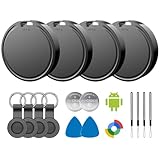
- 📱 Global Cloud Positioning – Works with both Google's Find Hub (Android)
- 📢 Loud Alert Sound – Built-in speaker with up to 85dB for quick locating
- 🔋 Far Superior Battery Life – Up to 2 years battery life on Android
- 💧 IP65 Waterproof – It provides protection against rainwaterand splashes
- 👮 Data Encryption – With the help of Google's technology, all location information is encrypted
6. Confirm governance and data controls
Unlimited users do not mean unlimited or uncontrolled access. Review role-based permissions, approval workflows, audit logs, API limits, export options, retention, authentication integrations, and account deactivation. For example, hosted Snipe-IT plans list API-call limits, while Reftab’s feature availability varies by tier even when platform users are unlimited.
Recommended decision paths
Choose a barcode or QR system when:
- Assets usually remain at known locations.
- People can scan during handoffs, audits, check-outs, and returns.
- The main goal is accountability and a reliable asset register.
- Hardware and recurring connectivity costs are undesirable.
Start with AssetTiger for value, Sortly for visual simplicity, Snipe-IT for self-hosted IT control, or Reftab for lending and IT automation.
Choose maintenance software when:
- Preventive maintenance and recurring inspections drive the project.
- Technicians need work orders and mobile workflows.
- Parts, labor, downtime, and service history must be connected to assets.
Choose UpKeep for maintenance-first operations or Fleetio for vehicles and fleet equipment.
Choose GPS or telematics when:
- Assets move without reliable human scanning.
- The business needs current location, geofences, utilization, or theft alerts.
- The value of recovery and operational visibility justifies hardware and data charges.
Choose Samsara for mixed powered and unpowered assets across a broad operation, or Tenna for construction equipment and job-site workflows. A fleet using Fleetio may instead add a compatible telematics integration.
Recommended Free Tools
Implementation checklist
- Inventory the inventory: list asset types, quantities, serial numbers, current locations, owners, conditions, purchase dates, warranties, and maintenance requirements.
- Set an asset identity standard: define a unique tag format and decide whether serial numbers, internal IDs, or both are required.
- Separate individually tracked assets from quantities: laptops and vehicles usually need individual records; consumables may be better represented as quantities.
- Define lifecycle states: examples include ordered, received, available, assigned, checked out, under repair, lost, retired, and disposed.
- Choose the label and scan workflow: test labels on metal, outdoor equipment, curved surfaces, cases, and items exposed to abrasion.
- Set permissions: employees may need to scan and request items without being allowed to delete records or alter depreciation.
- Run a pilot: include at least one office, one field or warehouse location, one offline scenario, and one return or repair workflow.
- Audit after launch: compare the software register with a physical count and investigate missing, duplicate, unassigned, and incorrectly located assets.
Common claims that are wrong or incomplete
Asset tracking software gives real-time location
Usually false. Barcode and QR systems update location when someone scans or changes a record. Live location requires Bluetooth, GPS, telematics, or another location technology, along with appropriate hardware and often a connectivity plan.
AssetTiger is free
That description is outdated or incomplete under the current model. AssetTiger currently offers a 30-day trial for up to 250 assets; active organizations need a paid plan after the trial. See the AssetTiger FAQ and pricing page.
Snipe-IT is free including hosting
Snipe-IT’s application is free and self-hostable, but hosting and operations are not automatically free. Server infrastructure, TLS, backups, monitoring, upgrades, security, and support remain the customer’s responsibility unless the organization uses hosted Snipe-IT.
Fleetio Tools is a standalone asset tracker
It is not. Fleetio states that the Tools add-on requires Fleetio Core and cannot be purchased standalone. Include the Core subscription when calculating the price.
The advertised GPS subscription is the total cost
Usually not. GPS deployments may include trackers, gateways, installation, cellular data, batteries, replacement hardware, support, and contract commitments. Samsara and Tenna require a quote for the complete asset-tracking deployment rather than publishing a complete self-serve software price on the cited pages.
Unlimited users mean unlimited access
Not necessarily. A plan can include unlimited platform users while still imposing asset limits, role restrictions, API limits, or feature differences. Confirm what each user role can do and how the system handles former employees, contractors, and external borrowers.
Frequently Asked Questions
What is the best asset tracking software for a small business?
For a small business tracking tools, electronics, furniture, or equipment, AssetTiger is the best value starting point because paid plans include unlimited users and begin at $20 per month for up to 500 assets. Sortly is easier when photo-based, visual inventory is the priority, while Reftab is better if employees regularly reserve or borrow equipment.
What is the best free asset tracking software?
Snipe-IT is the strongest free option when an organization can self-host and maintain a web application. Its software is free, but hosting, backups, security, upgrades, and administration still cost time or money. AssetTiger’s current free offer is a 30-day trial, not a permanent free plan. Sortly has a free plan for 100 unique items and one user, and Reftab has a free plan for up to 50 assets.
Can asset tracking software show an item’s live location?
Only if the deployment includes suitable location hardware and connectivity. QR and barcode systems show the last recorded scan or transaction. Bluetooth tags provide network-assisted or proximity-based visibility, while cellular GPS and telematics hardware can provide live or near-real-time location subject to coverage, battery, update interval, and subscription constraints.
What is the difference between asset tracking and inventory management?
Asset tracking normally follows individually identifiable, durable items through assignment, custody, location, maintenance, and lifecycle events. Inventory management often focuses on quantities of stock that are consumed or replenished. Some products support both, but pricing and workflows may treat individually tracked assets and bulk quantities differently.
The Bottom Line
For most ordinary physical assets, start with AssetTiger. Pick Sortly when visual simplicity matters most, Reftab when IT lending and automation matter, or Snipe-IT when your team wants open-source ITAM and can operate it. Use Fleetio or UpKeep when maintenance is the center of the workflow. If you need to know where a vehicle or machine is without waiting for a scan, skip barcode-only tools and evaluate Samsara, Tenna, or a Fleetio telematics integration with the full hardware and connectivity cost included.
Quick Recap
Product prices and availability are accurate as of the date/time indicated and are subject to change. Any price and availability information displayed on Amazon at the time of purchase will apply.

