
Windows Errors? Fix Them Before They Spread
Repair common Windows errors and clear accumulated junk for a smoother, more stable PC - no reinstall needed.Free scan · no reinstallCrashes, No Sound, or Screen Glitches?
Random freezes, missing sound and display glitches usually trace back to one bad driver. Find and replace yours safely.Free scan · under a minuteiTechGuides is reader-supported. When you buy through links on our site, we may earn an affiliate commission. As an Amazon Associate I earn from qualifying purchases. Learn more
If Microsoft Word is asking for a product key, you cannot legitimately unlock the permanently licensed Windows or Mac desktop app without a license. A free Microsoft account does not activate an unlicensed copy of Word.
You may still be able to use Word legally without entering a key: sign in to an account that already owns the license, use Word for the web, use an eligible school or work account, claim a qualifying trial or preinstalled entitlement, or edit documents with the mobile app on a supported device.
Can you activate the desktop version of Word without a product key?
Yes, but only when the license is already associated with an account or device. Microsoft 365 and many newer Office purchases activate through a Microsoft account rather than requiring you to type the key every time.
What’s actually slowing this PC down?
Pick the symptom - the matching free tool is one click away.
There is no legitimate method that turns an unlicensed desktop installation of Word into a permanently activated copy for free. KMS commands, activator scripts, cracked installers, and “free key” websites do not provide a valid license. They can also install malware, alter Windows security settings, or cause Word to stop working later.
#1 Best Overall

- Designed for Your Windows and Apple Devices | Install premium Office apps on your Windows laptop, desktop, MacBook or iMac. Works seamlessly across your devices for home, school, or personal productivity.
- Includes Word, Excel, PowerPoint & Outlook | Get premium versions of the essential Office apps that help you work, study, create, and stay organized.
- 1 TB Secure Cloud Storage | Store and access your documents, photos, and files from your Windows, Mac or mobile devices.
- Premium Tools Across Your Devices | Your subscription lets you work across all of your Windows, Mac, iPhone, iPad, and Android devices with apps that sync instantly through the cloud.
- Easy Digital Download with Microsoft Account | Product delivered electronically for quick setup. Sign in with your Microsoft account, redeem your code, and download your apps instantly to your Windows, Mac, iPhone, iPad, and Android devices.
Use Word for the web for free
Microsoft provides a browser-based version of Word at no charge. This is the simplest option if you only need to create, edit, and share ordinary documents.
- Go to Microsoft365.com.
- Select Sign in.
- Sign in with a Microsoft account, or choose the option to create one.
- Open the app launcher in the upper-left corner.
- Select Word, then choose Blank document or open a file from OneDrive.
A free account includes the web version of Word and 5 GB of OneDrive storage. It does not activate Word installed from Microsoft 365 or Office on Windows or macOS.
What the free web version cannot do
- It runs in a browser rather than as the fully featured desktop application.
- Some advanced layout, mail merge, macro, add-in, and publishing features are unavailable or limited.
- Normal use requires an internet connection.
- Signing in at Microsoft365.com does not change an “Unlicensed Product” message in desktop Word.
Sign in if you already own Word
If Word was previously purchased, supplied by an employer or school, or included with a Microsoft 365 subscription, you may not need the original product key. The license is usually linked to the account used during redemption or setup.
Do these 3 things before closing this tab:
1Scan for outdated or missing drivers - takes under a minute2Repair Windows errors before they cause bigger problems3Fix the driver behind crashes, sound loss and screen glitches- Open Word.
- Open a document, or select Blank document.
- Go to File > Account on Windows. On Mac, use the account or activation controls in Word’s menu and sign-in screen.
- Select Sign In.
- Use the Microsoft account or work/school account that owns the license.
On the File > Account page, check the product information and the email address shown next to Belongs to. If the wrong account is displayed, sign out and sign in with the account used to buy or receive Word.
For a redeemed product key, go to your Microsoft account’s Services & subscriptions page. If Word is listed there, install it from that page instead of trying to redeem the key again.
Rank #2

- The most portable Surface touchscreen 2-in-1. Perfect for your everyday tasks, homework, and play.
- Go-anywhere tablet with laptop productivity for the whole family. Starting at just 1.2 pounds,(4) with high-res 10.5” 220ppi touchscreen, adjustable Kickstand, Surface Pen, and Type Cover.
- All-day battery life. Get up to 11 hours (1) of on-the-go power, plus Fast Charging to take you from low to full when you do need to plug in.
- The new, more intuitive Windows. Work, play, and create in the way most natural to you with Windows 11.
- Plug in the accessories you use today with included USB-C port, headphone jack, Bluetooth 5.0, and MicroSDXC Card Reader.
Check whether your school provides Word
Eligible students and educators can obtain Microsoft 365 Education through a school account. The free A1 education plan generally includes web versions of Word, Excel, PowerPoint, Outlook, and OneNote.
- Open Microsoft’s Office 365 Education page.
- Choose the student or educator sign-up option.
- Enter your school email address.
- Complete Microsoft’s eligibility verification.
- Sign in with the resulting work or school account and open Word.
A1 access does not automatically include the installable desktop version of Word. Desktop applications depend on the plan assigned by the institution, such as an eligible A3 or A5 plan. If your school account only opens Word in a browser, that is normal for the entitlement you have.
Activate Word that came with a new computer
Some new Windows computers include a digital Office entitlement, a limited trial, or a one-year Microsoft 365 offer. A printed key may not be supplied.
- Open Word from the Start menu.
- When you see Sign in to set up Office or Let’s get started, sign in with a Microsoft account.
- Follow the setup prompts.
- Accept the included entitlement or trial if one is offered.
A digital entitlement can be associated with your account automatically. However, a preinstalled trial is not a permanent free license. When the trial ends, Word requires a qualifying subscription or purchase and may enter reduced-functionality mode.
Use the Word mobile app without a key
The Word app supports basic document creation and editing for many users on smaller iOS and Android devices. Microsoft’s current general threshold for free core editing is a screen size of 10.1 inches or smaller, although some plans support devices up to 10.9 inches. An iPad Pro requires a qualifying Microsoft 365 subscription for creating and editing Word files.
Rank #3
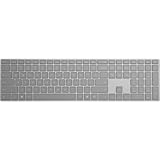
- Bluetooth 4.0
- AES over Bluetooth LE SSP of Passkey
- Soft Finish
- Wireless Range: - 50 Feet (In Open Air) - 23 Feet (In Office Environment)
- Includes 2 AAA Alkaline Batteries
- Install Microsoft Word from the Apple App Store or Google Play.
- Open the app and sign in, or continue with the available free option.
- Open an existing document or create a blank document.
Microsoft has been moving document editing from the Microsoft 365 Copilot mobile app into the separate Word, Excel, PowerPoint, and OneDrive apps. If Copilot redirects a file, install or open the dedicated Word app.
Fix “Unlicensed Product” in Word
An “Unlicensed Product” warning usually means Word cannot find or verify an active license. It is not evidence that Word needs a random key from the internet.
| Likely cause | What to check |
|---|---|
| Wrong account | Go to File > Account and sign in with the account that owns the subscription or purchase. |
| Expired subscription | Check Services & subscriptions in your Microsoft account. |
| School or work license | Use the organization account, not a personal Microsoft account. |
| Multiple Office installations | Remove unused or conflicting Office versions, then restart Word. |
| Too many activated computers | Deactivate an old installation from the Microsoft account or organization portal. Deactivation does not uninstall Office from that computer. |
| Long period offline | Reconnect to the internet and sign in. Microsoft 365 desktop apps need periodic license verification and can enter reduced-functionality mode after an extended offline period. |
On Windows 10 or later, Microsoft’s supported automated route is the activation troubleshooter in the Get Help app:
- Open Microsoft’s Microsoft 365 troubleshooters page.
- Select Start under the activation troubleshooter.
- Select Open if Windows asks to launch Get Help.
- Follow the prompts on the same PC where Word is installed.
What common activation claims really mean
“Office.com/setup activates Word for free”
No. The setup page redeems a new, unused product key. It does not create a free desktop license.
“This product key has already been used”
The key was probably redeemed previously. Sign in to the Microsoft account used during redemption and open Services & subscriptions to install Word from there.
Recommended Free Tools
Rank #4
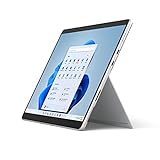
- The power of a laptop with the flexibility of a tablet, and every angle in between, with 13 inch touchscreen, iconic built-in Kickstand, and detachable Keyboard.
- Windows 11 brings your closer to what you love. Family, friends, obsessions, music, creations — Windows 11 is the one place for it all. With a fresh new feel and tools that make it easier to be efficient, it has what you need for whatever’s next.
- The first Surface Pro built on the Intel Evo platform. Do it all with the Intel Evo platform — performance, graphics, and battery life in a thin and light PC.
- The best pen experience on Pro with rechargeable Surface Slim Pen 2 and Surface Pro 8, for the natural feeling of pen on paper,(4) securely stored in Surface Pro Signature Keyboard.
- Type in comfort. Sleek and compact, Surface Signature Keyboard performs like a traditional laptop keyboard complete with a full function row and backlit keys.
“This product key is not valid”
Microsoft may have blocked the key because it was counterfeit, stolen, fraudulently obtained, or improperly resold. Ask the seller for a refund rather than running an activation utility.
“The products we found in your account can’t be used to activate…”
The installed edition may not match the license. For example, the computer may contain a preinstalled trial while your account owns a different Office product. Install the edition listed in the licensed account, or use the account that matches the installed product.
Free alternatives if Word’s desktop features are essential
If you need an installable word processor without a Microsoft license, consider LibreOffice Writer or another reputable office suite. These applications are not versions of Microsoft Word, but they can open and save many DOCX files. Check important documents after conversion because complex layouts, tracked changes, fonts, and macros may not transfer perfectly.
Independent reader supportYour contribution helps us test, update, and keep practical guides available for everyone.FAQ
Can I activate Microsoft Word permanently without a product key?
Not without a valid license. You can activate Word by signing in to the Microsoft account, work account, school account, or device entitlement that already owns a license, but a free account alone does not permanently activate the desktop app.
Quick wins for a faster PC:
Clear out junk files and repair common Windows errorsFree Scan →Fix the driver behind crashes, sound loss and screen glitchesFind Drivers →Is Microsoft Word online really free?
Yes. Word for the web is free with a Microsoft account and includes basic document creation and editing. It runs in a browser and does not activate the Word desktop application.
Best Value

- The power of a laptop with the flexibility of a tablet, and every angle in between, with 13” touchscreen, iconic built-in Kickstand, and detachable Keyboard.
- Windows 11 brings your closer to what you love. Family, friends, obsessions, music, creations — Windows 11 is the one place for it all. With a fresh new feel and tools that make it easier to be efficient, it has what you need for whatever’s next.
- The first Surface Pro built on the Intel Evo platform. Do it all with the Intel Evo platform — performance, graphics, and battery life in a thin and light PC.
- The best pen experience on Pro with rechargeable Surface Slim Pen 2 and Surface Pro 8, for the natural feeling of pen on paper,(4) securely stored in Surface Pro Signature Keyboard.
- Type in comfort. Sleek and compact, Surface Signature Keyboard performs like a traditional laptop keyboard complete with a full function row and backlit keys.
Can my school give me Microsoft Word for free?
Possibly. Eligible schools can provide Microsoft 365 Education. The free A1 plan generally provides web apps; desktop Word is available only when the institution assigns a plan that includes desktop applications.
Why does Word say “Unlicensed Product” after I sign in?
Common reasons include using the wrong account, an expired subscription, conflicting Office installations, an organization license assigned to another account, an activation limit, or an extended period without online license verification.
Are KMS commands and Office activators safe or legal?
They are not legitimate consumer activation methods. KMS is intended for organizational volume licensing, while unauthorized activators can violate licensing terms and expose the computer to malware.
Free tools Windows power users keep installed
One-click scans. No signup required.
The Bottom Line
Bottom line: You cannot legitimately activate the Windows or Mac desktop version of Microsoft Word for free without an associated license. First try File > Account > Sign In with the account that owns Word. If you have no license, use Word for the web, check an eligible school or work account, claim a qualifying device trial, or use the mobile app on a supported small-screen device.
Quick Recap
Product prices and availability are accurate as of the date/time indicated and are subject to change. Any price and availability information displayed on Amazon at the time of purchase will apply.

