
Microsoft Edge can open selected legacy websites with the Internet Explorer 11 engine instead of its normal Chromium engine. This feature, called Internet Explorer mode (IE mode), is intended for older business applications and intranet sites that depend on technologies such as ActiveX or old Internet Explorer document modes.
IE mode is available only on Windows. Internet Explorer 11 desktop support ended on June 15, 2022, but Microsoft continues IE mode in Edge for sites that cannot yet be modernized. Microsoft Support
Older instructions to choose Settings and more (…) > Reload in Internet Explorer mode are not current for every installation. The command disappeared from consumer installations beginning with Edge 141, and Edge 142 removed the consumer IE-mode toolbar button. On a personal Windows PC, add the website to Edge’s Internet Explorer mode pages list instead. Microsoft Edge blog
What IE mode does in Edge
Normal Edge tabs use the Chromium browser engine. A tab running in IE mode uses Internet Explorer 11’s Trident/MSHTML engine inside Edge; it does not reopen the old standalone Internet Explorer application. Only websites you configure use IE mode. Other sites continue to use the standard Edge engine. Microsoft Learn
#1 Best Overall

- [Package Contents] Includes four adapters (4.3*1.8 cm / 1.7*0.7 inch). These adapters are compatible with most PS/2 interface mice and keyboards. Only mice or keyboards with built-in chip converters will work; please check compatibility before purchasing.
- [USB to PS/2 Adapter] This USB to PS/2 adapter allows you to easily connect a USB mouse or keyboard to a computer with limited USB ports. Note that the resulting USB port can only be used to connect a mouse and keyboard; other USB devices cannot be connected.
- [Driver-Free Installation] This adapter features a plug-and-play design, requiring no software drivers. Simply plug your mouse or keyboard into a PS/2 port to use your device without any additional setup, ensuring a hassle-free and convenient experience.
- [Instructions] The PS/2 to USB adapter is not hot-swappable, so be sure to turn off your computer before connecting the adapter. After connecting, please restart your computer. If the middle mouse button becomes unresponsive, simply restart your computer for optimal performance.
- [Wide Application] This adapter is ideal for computers with insufficient USB ports or malfunctioning USB devices. By converting a USB port to a PS/2 connection, you can ensure stable use of your mouse or keyboard without taking up valuable USB ports, thereby enhancing the functionality of your device.
Use IE mode on a personal Windows PC
1. Allow sites to be reloaded in IE mode
- Open Microsoft Edge and enter edge://settings/defaultBrowser in the address bar.
- Under Internet Explorer compatibility, set Allow sites to be reloaded in Internet Explorer mode to Allow.
- Restart Edge when prompted, or close and reopen the browser.
2. Add the legacy website
- On the same Settings > Default browser page, find Internet Explorer mode pages.
- Select Add, enter the URL the application requires, and select Add again.
- Open or reload the site. The IE logo to the left of the address bar indicates that the tab is using the Internet Explorer engine.
Adding the site to this list is the current consumer workflow. If the old reload command is missing from the three-dot menu on Edge 141 or later, that is expected.
Use IE mode on a company-managed computer
Organizations normally control IE mode with Microsoft Edge policies and an Enterprise Mode Site List, which specifies sites that should open in IE mode and, when needed, their legacy document modes. The Group Policy path is Computer Configuration > Administrative Templates > Microsoft Edge.
Configure Internet Explorer integration
An administrator sets Configure Internet Explorer integration to Internet Explorer mode. The policy is InternetExplorerIntegrationLevel.
| Policy value | Meaning |
|---|---|
| None = 0 | IE integration is disabled. |
| IEMode = 1 | Use IE mode when a site is configured for it. |
| NeedIE = 2 | Use Internet Explorer integration as required by the policy configuration. |
The registry value is HKLM\SOFTWARE\Policies\Microsoft\Edge\InternetExplorerIntegrationLevel, a REG_DWORD. The IE-mode value is 0x00000001. Changing the policy requires an Edge restart. Microsoft Learn
Deploy the Enterprise Mode Site List
The site-list policy is InternetExplorerIntegrationSiteList. In Group Policy, find Administrative Templates > Microsoft Edge > Configure the Enterprise Mode Site List and set it to the URL of the organization’s XML site list. The registry value is HKLM\SOFTWARE\Policies\Microsoft\Edge\InternetExplorerIntegrationSiteList, a REG_SZ containing the site-list URL. The policy is mandatory and requires a browser restart. Microsoft Learn
After policies apply, users navigate to the configured site and Edge opens it automatically in IE mode. On a correctly configured managed device, users may also see Settings and more (…) > Reload in Internet Explorer mode. An administrator can enable manual reloads for unlisted sites with InternetExplorerIntegrationReloadInIEModeAllowed.
Rank #2

- 【USB to Dual PS/2 Adapter】 Convert a single USB port into two PS/2 ports. This adapter allows connection of one PS/2 keyboard and one PS/2 mouse to a computer that only has USB ports.
- 【Connect Keyboard and Mouse】 Designed with two PS/2 female ports (purple for keyboard and green for mouse), allowing connection of legacy PS/2 input devices to modern computers with USB ports.
- 【Broad OS Compatibility】 Works with most operating systems including Windows, Linux, and other systems that support standard USB keyboard and mouse devices.
- 【Ideal for Legacy Peripherals】 A practical solution for using older PS/2 keyboards and mice with PCs or laptops that lack PS/2 ports. Suitable for home, office, and legacy hardware setups.
- 【Passive Adapter – Compatibility Notice】 This is a passive adapter and requires devices that support both USB and PS/2 protocols (dual-mode devices). It will not convert PS/2-only devices to USB.
When manual reload is permitted, users can right-click a tab and select Reload tab in Internet Explorer mode, or right-click a link and select Open link in new Internet Explorer mode tab. A locally added site normally remains on the local IE-mode list for 30 days. Administrators can set InternetExplorerIntegrationLocalSiteListExpirationDays to a value from 0 to 90 days. The local list does not currently sync between devices. Microsoft Learn
How to use Compatibility View in Edge
Compatibility View is not a separate browser or a way to launch the old Internet Explorer application. In Edge, it is a compatibility setting applied while the page is running in IE mode.
PC Slower Than It Used to Be?
A free scan shows the junk files, broken settings and background clutter dragging Windows down - then fixes them in one click.Free scan · Windows 10 & 11Outdated Drivers Are Slowing You Down
One free scan finds every outdated or missing driver and matches the right update for your exact hardware.Free scan · exact hardware match- Open the site in IE mode.
- Select the IE logo to the left of the address bar.
- In the information flyout, select Open the page in Compatibility view.
- Allow the page to refresh.
This adds the site to Internet Explorer’s Compatibility View settings list and refreshes it using the corresponding legacy behavior. The option appears from the IE-mode indicator, not the standard Chromium page menu.
Compatibility View and Enterprise Mode site lists
For Enterprise Mode Site Lists, Microsoft maps old Compatibility View conditions—including local Compatibility View settings, the Compatibility View list, and intranet Compatibility View settings—to IE7 Enterprise behavior. Do not select IE7 Enterprise automatically. Start with the least restrictive mode that works:
- Default preserves the site’s own document-mode directives, including X-UA-Compatible where applicable.
- IE8 Enterprise is for applications that need that older behavior.
- IE7 Enterprise is for applications that specifically depend on Compatibility View-style behavior.
If an application loads in IE mode but displays incorrectly, its document mode may be the problem. Microsoft Learn
Leave IE mode
To return from IE mode, select Leave on the IE-mode information banner, select the IE-mode indicator and choose the option to leave, use Settings and more (…) > Exit Internet Explorer mode if available, or close the IE-mode tab and open a new Edge tab.
Quick wins for a faster PC:
Fix the driver behind crashes, sound loss and screen glitchesFind Drivers →Repair Windows errors before they cause bigger problemsFix Now →Edge generally keeps in-page navigation in IE mode. Links, scripts, forms, and some server-side redirects can remain in the IE engine. Navigation started from the address bar, Back button, or a favorite normally returns to standard Edge mode. Microsoft Learn
Rank #3

- PS/2-to-USB ADAPTER: Adapter for those who like to continue using their PS/2 devices. Connect mouse and keyboard to your computer by using only one USB port
- SUITABLE FOR PS/2 DEVICES: Two PS2 female ports, purple for keyboard and green for mouse, and one USB male port.
- BUILT-IN USB-IC: You can use PERIPRO-401 to connect your keyboard and mouse with PS2 interface to USB 2. 0 port at PC or laptop. It also supports PS/2 Port of KVM Switch.
- UNIVERSAL PURPOSES: Fits with industrial and professional needs
- PACKAGE INCLUDES: Perixx PERIPRO-401 adapter, manual; 12-month limited
Manage an Enterprise Mode Site List
When an administrator enables EnterpriseModeSiteListManagerAllowed, the built-in manager is available at edge://compat/SiteListManager. It uses the version 2 schema and supports version 2 files with .xml, .emie, or .txt extensions. Microsoft Learn
- Open edge://compat/SiteListManager.
- Select Add a site.
- Enter the domain or URL in the URL box.
- Select the required setting in Open in.
- Save or export the list.
- Deploy the resulting file at the URL configured by InternetExplorerIntegrationSiteList.
Common IE-mode problems
“Reload in Internet Explorer mode” is missing
On a personal computer running Edge 141 or later, this is usually expected. Enable IE-mode reloading at edge://settings/defaultBrowser, then add the site under Internet Explorer mode pages. On a managed computer, the command may be hidden, disabled, or controlled by the administrator through InternetExplorerIntegrationReloadInIEModeAllowed.
The application fails even though the IE logo is visible
Check the document mode and the application’s X-UA-Compatible requirements. In an Enterprise Mode Site List, try Default first, then use IE8 Enterprise or IE7 Enterprise only when testing shows the application needs it.
Free tools Windows power users keep installed
One-click scans. No signup required.
Edge asks for an administrator-level reinstall
The message “To open this page in Internet Explorer mode, reinstall Microsoft Edge with administrator privileges” can result from a per-user Edge installation, a canceled elevation prompt, a user-level Canary installation, disabled Internet Explorer 11 Windows features, or missing Windows updates.
Check the installation path at edge://version. A path beginning with C:\Program Files indicates a system-level installation; one beginning with C:\Users indicates a per-user installation. Microsoft’s documented installer command is installer.exe –system-level. Installation changes may require administrator assistance. Microsoft Learn
“Try restarting Microsoft Edge” appears
This indicates an unexpected IE-mode error. Close every Edge window, reopen the browser, and try the site again. If the problem remains, check the site-list and IE integration policies.
Rank #4
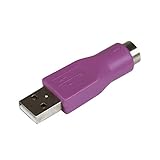
- Connect a supported PS/2 keyboard to the USB port on your computer
- Note: This product is designed as a replacement adapter for keyboards that originally shipped with a PS/2-USB converter
- Guaranteed reliability with lifetime support; RoHS compliant
- PS2 to USB Adapter / PS2 Keyboard to USB Adapter / Keyboard PS2 to USB
Remote debugging prevents IE mode
If Edge reports that remote debugging must be turned off, an active debugging session is interfering with IE mode. Continuing may cause Edge to render the page with its modern engine instead.
The Tool Desk
Outbyte Driver Updater FREEScan for outdated or missing drivers - takes under a minuteDriver Scan →Outbyte PC Repair FREERepair Windows errors before they cause bigger problemsFix Now →“Could not retrieve EMIE site list” appears
Edge could not download the Enterprise Mode Site List. One known cause is third-party cookies being blocked when the site-list endpoint uses HTTP authentication. An administrator may need to allow cookies for the site-list domain with the CookiesAllowedForURLs policy.
The site reports that the connection is not secure
Legacy sites using TLS 1.0 or TLS 1.1 can fail because those protocols are disabled by default in modern Edge. IE mode does not make obsolete security settings acceptable.
File links do not open
Edge blocks navigation from HTTP or HTTPS pages to file:// URLs. Pages loaded from the Intranet Zone in IE mode may navigate directly to file URLs. For intranet file shares, an administrator can investigate the IntranetFileLinksEnabled policy.
Attachments disappear when the browser switches modes
Edge can transfer some form data when navigation changes between Edge mode and IE mode, but file attachments are not transferred. Administrators can control the data types transferred with InternetExplorerIntegrationComplexNavDataTypes.
Recommended Free Tools
IE-mode sessions share cookies unexpectedly
IE-mode sessions can share state by default. Use separate Edge profiles, or configure the Enterprise Mode Site List entry with no-merge, for example: <site url=”contoso.com”> <open-in merge-type=”no-merge”>IE11</open-in> </site>.
Best Value

- PS/2 to USB ADAPTER: Premium computers accessories - PS2 to USB adapter - compatible for PS2 Keyboard/ PS2 Mouse/ Windows/ Mac/ Linux/ Bar Code Scanner
- CABLES INTERCONNECTS FUNCTIONAL: USB to ps2 adapter with two PS2 female ports, PS2 mouse and keyboard through USB port on any computer
- USAGE: PS2 adapter to usb is compliant with the Standard Specification of USB 1.0 and 1.1. Purple port for keyboard and green one for mouse
- CONVENIENCE: PS/2 to USB converter converts two PS/2 devices (Keyboard and Mouse) to the USB Interface
- COMPATIBILITY: PS2 USB adapter keyboard converts the PC PS/2 port of KVM switch to USB port (PC or SUN platforms
no-merge is supported from Edge 93 onward. It isolates that IE-mode session from other IE-mode sessions, but cookies are not shared between the isolated IE-mode session and normal Edge mode. Microsoft Learn
Independent reader supportYour contribution helps us test, update, and keep practical guides available for everyone.IE-mode diagnostics and developer tools
For configuration and policy information, open edge://compat/iediagnostic. This page can show registry checks, IE-mode configuration, API information, command-line switches, applied Group Policies, and diagnostic messages. It can also export diagnostic data to XML.
- Press Windows key + R.
- Enter %systemroot%\system32\f12\IEChooser.exe.
- Select the IE-mode tab in IEChooser.
FAQ
Is Internet Explorer mode still available in Microsoft Edge?
Yes. IE mode remains available on Windows, particularly for legacy business applications. Consumer Edge installations use the Internet Explorer mode pages list, while organizations commonly use policies and an Enterprise Mode Site List.
Why can’t I find Reload in Internet Explorer mode?
Edge 141 removed the command from consumer installations, and Edge 142 removed the consumer IE-mode toolbar button. Go to edge://settings/defaultBrowser, allow IE-mode reloading, and add the website under Internet Explorer mode pages. On a managed device, an administrator may control manual reloads.
Does IE mode work on macOS, Android, or iPhone?
No. Microsoft supports IE mode on Windows, not Edge for macOS, Android, or iOS. Microsoft Learn
Is Compatibility View the same as Internet Explorer mode?
No. The page must first be running in IE mode. Compatibility View is then a legacy rendering setting available from the IE logo indicator. In an Enterprise Mode Site List, Microsoft maps old Compatibility View behavior to IE7 Enterprise mode.
How long does a locally added IE-mode site remain enabled?
The local entry normally expires after 30 days. An administrator can change the expiration to a value from 0 through 90 days with InternetExplorerIntegrationLocalSiteListExpirationDays. Microsoft Learn
What’s actually slowing this PC down?
Pick the symptom - the matching free tool is one click away.
Can I install the old Internet Explorer application instead?
Internet Explorer 11 desktop support ended on June 15, 2022. IE mode in Edge is Microsoft’s supported way to run compatible legacy sites on Windows. Microsoft Support
The Bottom Line
On a personal Windows computer, open edge://settings/defaultBrowser, allow sites to be reloaded in IE mode, and add the legacy URL to Internet Explorer mode pages. On a company-managed device, IE mode is normally controlled by the InternetExplorerIntegrationLevel policy and an Enterprise Mode Site List. If the site opens but behaves incorrectly, investigate its document mode or Compatibility View requirement rather than assuming IE mode itself is failing.
Quick Recap
Product prices and availability are accurate as of the date/time indicated and are subject to change. Any price and availability information displayed on Amazon at the time of purchase will apply.

