
Windows 11 Home cannot open Microsoft’s full Local Users and Groups console. If Local Users and Groups is missing from Computer Management > System Tools, nothing is broken: the lusrmgr.msc snap-in is not included with the Home edition.
You can still create local accounts, remove them, change group membership, and inspect users. Use Settings > Accounts > Other users for the supported graphical controls, or use net user, net localgroup, netplwiz, and PowerShell for more control.
Why Local Users and Groups is missing
Microsoft includes the Local Users and Groups MMC snap-in in Windows 11 Pro, Enterprise, and Education. On those editions, you can open it by pressing Windows + R, entering:
lusrmgr.mscThe equivalent Computer Management route is:
Computer Management > System Tools > Local Users and GroupsWindows 11 Home does not contain this snap-in. Running lusrmgr.msc on Home will not install or unlock it, and reinstalling Computer Management will not make the missing node appear. A downloaded program named lusrmgr.exe is also not Microsoft’s built-in MMC snap-in; treat third-party replacements as separate software.
Quick wins for a faster PC:
Clear out junk files and repair common Windows errorsFree Scan →Fix the driver behind crashes, sound loss and screen glitchesFind Drivers →#1 Best Overall

- For use with silicone, butyl or foam tapes, and other materials that stay flexible over time.
- Built-in hand guard protects knuckles and serves as a guide.
- Simply slip the blade into the glazing pocket, and cut along the glass panel.
- The blade can be sharpened when dull and can be easily replaced.
- Blade Lays Flat on the Glass and Slides Into the Glazing Pocket
To check the edition installed on the PC, open Settings > System > About and look under Windows specifications. If it says Home, use one of the methods below.
Method 1: Manage accounts in Settings
For routine account creation and removal, Windows 11 Home provides the supported Settings interface.
- Open Settings.
- Select Accounts.
- Open Other users.
- Use Add account to create another user, or select an existing account to reveal its available options.
Windows may first ask whether the new user should sign in with a Microsoft account. To create a local account instead, choose the option indicating that you do not have the person’s sign-in information, then choose the option to add a user without a Microsoft account. The exact wording can change between Windows updates.
The Settings page is currently called Other users. Older instructions often call it Family & other users; that is an outdated label for current Windows 11 installations.
What’s actually slowing this PC down?
Pick the symptom - the matching free tool is one click away.
Rank #2

- Car Window Breaker Tool–76951 kit works for cars/RVs/trucks! Handles window jobs, upholstery, glass or stereo repairs. Saves time with no mismatched tools.
- Clip Removal Tool – Stops plastic clip breakage when taking apart door panels! Gentle removal, no damage. Universal for most vehicles, great for upholstery/electrical jobs.
- Door Panel Removal Tool – Protects car interior! Safely pries door panels, no scratches on paint/upholstery. Perfect for DIYers or pros doing paint/body work.
- Herramienta para abrir puerta de carro – Ideal for auto/RV/truck repairs! Removes panels/clips, aids upholstery/window jobs. Durable material for long-term use.
- If you have any questions about this product, please contact us, including pre-sale and after-sales questions, and we will reply to your message as soon as possible.
Method 2: Use the classic User Accounts dialog
The netplwiz utility provides a compact graphical alternative:
- Press Windows + R.
- Type
netplwiz. - Press Enter or select OK.
- Select a local account and choose Properties.
The Properties dialog can include a Group Membership tab. Depending on the account and configuration, it lets you select Standard user, Administrator, or Other.
netplwiz is not a complete replacement for lusrmgr.msc. It does not provide the snap-in’s separate tree-based Users and Groups views, but it is useful when you want to inspect an account or change its basic group category without using commands.
Method 3: Manage users and groups from Command Prompt
Open Command Prompt with administrator rights before changing accounts or group membership. Search for Command Prompt in Start, right-click it, and select Run as administrator.
Rank #3

- Ideal for upholstery, glass, stereo, electrical and paint/body jobs
- Durable metal construction for a long service life
- Universal fit for a broad range of applications
- Easy to use
- Ensure fit - to make sure this part fits your exact vehicle, input your make, model and trim level into the garage tool
List local users
net userShow one user’s details
net user <username>For example:
net user AliceCreate a local user
net user <username> <password> /addQuote a password if it contains spaces or special characters:
net user <username> "<password>" /addTyping a password directly into a command can expose it in command history or to someone viewing the command. For interactive password entry, create the account without supplying the password:
net user <username> * /addWindows then prompts for the password without displaying it.
Delete a local user
net user <username> /deleteDeleting an account can remove access to that account’s profile and data. Back up any files in its profile before using this command.
Recommended Free Tools
Rank #4
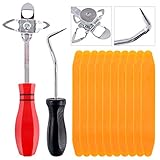
- 【One Convenient Tool Set】The great tool contains 3 kinds of essential tools, allowing you replace or install the window seals, gasket become easier. 1 piece cotter pin puller, 1 piece windshield installing Tool, 10 piece windshield stick setting tool, totally 12 piece. The perfect tool, saving your installation time.
- 【 Offset Windshield Installing Tool】Multifunctional design for various sizes,you could turn the screw too switch the size. Easy to operate: Step 1: adjust the suitable size you need, insert the head of the tool into the windshield lock strip Step 2: put the molding through the hole of tool. Step 3:Flattening tools and push it forward. Please press the insert to prevent displacement while pushing the tool.
- 【Windshield Stick Setting Tool】Made of ABS plastic , non-corrosive and non-conducting, durable and reusable,ergonomic design. Suitable for installing the rear window seals or gaskets without marring or otherwise damaging the rubber parts. Pretty great for detailing places, you also could use them to caulk or clean armor guard off windows.
- 【Cotter Pin Puller】Made of Stainless Steel, with a sharp and bent probe hook tip,the concave-convex handle, comfort to grip. Great windshield installation tool for removing O-rings, installing the windshield trim and pulling seals, rubber, windshield gaskets, glass and strips.
- 【Reliable After-sale Service:】We offer you reliable after-sales service. If you have any questions about our products or any problems with your packages, please feel free to contact us. We will reply you within 12 hours and we will try our best to solve the problems until you are satisfied.
List local groups
net localgroupDisplay members of a group
net localgroup <groupname>For the built-in administrators group on an English installation:
net localgroup AdministratorsAdd a user to a group
net localgroup <groupname> <username> /addExample:
net localgroup Administrators Alice /addRemove a user from a group
net localgroup <groupname> <username> /deleteGroup names are localized. On a non-English installation, first run net localgroup and use the exact group name shown there instead of assuming the group is called Administrators.
Method 4: Use PowerShell
Windows includes the Microsoft.PowerShell.LocalAccounts module for local account administration. Open Windows PowerShell or a compatible elevated terminal with Run as administrator.
Useful commands include:
Get-LocalUser
New-LocalUser
Remove-LocalUser
Get-LocalGroup
Add-LocalGroupMember
Remove-LocalGroupMember
For example, list users and groups with:
Get-LocalUser
Get-LocalGroup
To add an existing user to a group, use:
Add-LocalGroupMember -Group "Administrators" -Member "Alice"Use the group name returned by Get-LocalGroup if Windows is using a localized name. PowerShell is particularly useful for scripts and repeatable administration, while Settings is less error-prone for occasional account changes.
Do these 3 things before closing this tab:
1Clear out junk files and repair common Windows errors2Scan for outdated or missing drivers - takes under a minute3Repair Windows errors before they cause bigger problemsBest Value

- ❤!!Please NOTE❤ this is USB to RJ45 CONSOLE CABLE ,Not ETHERNET !!!It is 8p8c!! Look carefully of the Pin is match with your device. Before ordering , please confirm it is you need. After receiving ,please read user manual /instruction at first . Customer service always online.
- OIKWAN Console Cable is to help those who have a PC or laptop want to use a USB connection console port directly with their Cisco modem, router, firewall, switch or other Serial based Cisco device.
- Chip: FTDI232RL+ZT213LEEA. RJ45 cable to USB adopts UK original imported FTDI company FT232RL chip, which is currently the best serial chip with compatibility and stability.
- Cisco console port connect to the RJ45 port, USB port insert to your laptop. Plug and Play, no more need RS232 Female and male adapters. Very convenient!
- USB to RJ45 work with For Windows, Linux, Mac-book, etc. Microsoft (HCL) Certified to be compatible with Windows, no CD needed because the drivers are part of the OS distribution.
Common errors
| Problem | Cause and fix |
|---|---|
Local Users and Groups is absent from Computer Management |
This is expected on Windows 11 Home. Use Settings, netplwiz, Command Prompt, or PowerShell. |
lusrmgr.msc says the snap-in cannot be used with this edition |
The PC is running an edition without the Microsoft snap-in, normally Home. The command cannot enable it. |
System error 5 has occurred. Access is denied. |
Open the terminal with Run as administrator and make sure the signed-in account has administrative rights. |
| A Microsoft-account email address does not work as the username | Local commands use Windows’ local security-account name, which may differ from the Microsoft account’s email address. Run net user to see the names available to local account commands. |
Which method should you use?
| Task | Best option |
|---|---|
| Add or remove a normal user | Settings > Accounts > Other users |
| Open a simple graphical account list | netplwiz |
| List users or change one account quickly | net user |
| Inspect or change group membership | net localgroup or PowerShell |
| Repeat account administration in scripts | PowerShell LocalAccounts cmdlets |
Windows 11 Home can therefore manage local users and groups; it simply does not provide Microsoft’s full Local Users and Groups MMC interface. Upgrading to Pro is the route to that specific snap-in, but it is unnecessary if the available Settings, command-line, and PowerShell tools meet your needs.
FAQ
Can I open Local Users and Groups on Windows 11 Home?
No. Microsoft’s lusrmgr.msc snap-in is not included with Windows 11 Home. Its absence from Computer Management is an edition limitation, not an installation problem.
What is the replacement for Local Users and Groups in Windows 11 Home?
Use Settings > Accounts > Other users for basic account management, netplwiz for a graphical User Accounts dialog, or net user, net localgroup, and PowerShell for detailed administration.
Does running lusrmgr.msc install the missing feature?
No. On Home, the required Microsoft snap-in is not present, so entering lusrmgr.msc cannot unlock it.
How do I add a user to the administrators group on Windows 11 Home?
Open an elevated Command Prompt and run net localgroup Administrators <username> /add. On a non-English installation, replace Administrators with the localized group name returned by net localgroup.
Why does Windows show “Access is denied” when I run a command?
Account and group changes generally require elevation. Start Command Prompt, PowerShell, or Windows Terminal with Run as administrator, and use an account that has administrative rights.
The Bottom Line
Bottom line: Windows 11 Home does not include lusrmgr.msc, so you cannot restore the full Local Users and Groups console without using an edition that supports it. For the same underlying account tasks, use Settings > Accounts > Other users, netplwiz, net user, net localgroup, or PowerShell.
Quick Recap
Product prices and availability are accurate as of the date/time indicated and are subject to change. Any price and availability information displayed on Amazon at the time of purchase will apply.

