
The Tool Desk
Outbyte PC Repair FREEClear out junk files and repair common Windows errorsFree Scan →Outbyte Driver Updater FREEFix the driver behind crashes, sound loss and screen glitchesFind Drivers →“My Computer” is now called “This PC” in Windows 11. The fastest way to open it is to press the Windows logo key + E, then select This PC in File Explorer’s left navigation pane. This PC shows your computer’s drives and connected devices.
Open “My Computer” (This PC) from File Explorer
Use these steps to browse your drives and connected devices:
- Open File Explorer by pressing the Windows logo key + E, selecting its taskbar icon, or opening it from the Start menu.
- Select This PC in the left navigation pane.
This PC displays your computer’s drives and connected devices. Microsoft’s File Explorer guide describes this location as This PC.
Use Windows Search to find This PC
- Select Search on the taskbar.
- Type This PC.
- Select the matching This PC result if it appears.
If Search does not show a direct This PC result, open File Explorer and select This PC in the navigation pane. Microsoft’s Windows Search guide also explains how to find files and apps.
Quick wins for a faster PC:
Repair Windows errors before they cause bigger problemsFix Now →Scan for outdated or missing drivers - takes under a minuteDriver Scan →Clear out junk files and repair common Windows errorsFree Scan →#1 Best Overall

- A comfortable, ambidextrous shape feels good in either hand, so you feel more comfortable as you work-even at the end of the day
- With 800 dpi sensitivity, you'll get precise cursor control so you can edit documents and navigate the Web more efficiently
- Side-to-side scrolling plus zoom lets you instantly zoom in or out and scroll horizontally and vertically; perfect for working with spreadsheets and presentations.
- Zero setup with flexible connectivity means you just plug it into your USB or PS/2 port-it works right out of the box
- This mouse is built by Logitech-the mouse experts; it comes with the quality and design we've built into more than a billion mice, more than any other manufacturer
What happened to the old “My Computer” name?
My Computer is a legacy name. Windows 11 calls the File Explorer location This PC. This is a name change, not a missing feature: This PC still provides access to your computer’s drives and connected devices.
If This PC is missing from File Explorer
Restore the navigation pane
If File Explorer’s left side is not visible, turn the navigation pane back on:
- Open File Explorer.
- Select View on the command bar.
- Select Show.
- Select Navigation pane.
- Select This PC in the restored pane.
These are the current Windows 11 command-bar steps. Older instructions that say View tab > Options describe the former ribbon layout, not the current path.
Make File Explorer open to This PC every time
File Explorer opens to Home by default. In Windows 11, version 22H2, Microsoft renamed the former Quick access landing page to File Explorer Home. To change the startup location:
Recommended Free Tools
- Open File Explorer.
- Select See more (…) on the command bar.
- Select Options.
- On the General tab, find Open File Explorer to.
- Choose This PC.
- Select Apply, then OK.
New File Explorer windows should now open directly to This PC instead of Home. Microsoft documents the current Options path.
Rank #2
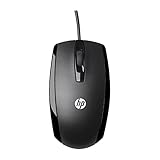
- COMFORTABLE CONTOURED SHAPE - Right-hand, left-hand and ambidextrous computer users will find comfort in using this HP wired mouse, formed with an elongated arch and contoured shape
- PLUG AND PLAY - No need to download apps or instructions; simply plug the USB cable in to your laptop or computer and start clicking and navigating right away
- CLICKABLE BUTTONS - Right click, left click, and use the scroll wheel for an additional clickable button
- SMOOTH ON SURFACES - The HP X500 glides over your table thanks to optical tracking
- WORKS WITH YOUR SYSTEM - This HP computer accessory works for any Windows (Windows XP and newer) or Mac (Mac OS X and newer) desktop, all-in-one computer, or notebook
Put a This PC icon on the desktop
The This PC icon can be hidden even when File Explorer is working normally. Add it through Windows 11’s desktop icon settings:
- Open Settings.
- Go to Personalization > Themes.
- Select Desktop icon settings.
- Check This PC.
- Select OK.
You can also right-click an empty part of the desktop, select Personalize, open Themes, then select Desktop icon settings under related settings. Select This PC, then Apply and OK if those buttons are displayed. See Microsoft’s desktop icon instructions.
If all desktop icons have disappeared
Windows can hide every desktop icon with one setting:
Do these 3 things before closing this tab:
1Clear out junk files and repair common Windows errors2Fix the driver behind crashes, sound loss and screen glitches3Repair Windows errors before they cause bigger problems- Right-click an empty area of the desktop.
- Select View.
- Make sure Show desktop icons is checked.
This setting shows or hides all desktop icons, including This PC. If only This PC is missing, also enable it under Settings > Personalization > Themes > Desktop icon settings.
Why Documents and Downloads may not appear under This PC
In Windows 11, version 22H2 and later, Desktop, Documents, Downloads, Pictures, Music, and Videos are pinned by default in Home and the navigation pane rather than listed under This PC. This PC is focused on drives and network locations; those folders have not been deleted.
Rank #3

- Slim and Comfortable Design: The Lenovo 100 Wired USB Mouse boasts a slim grip full-size mouse with an ambidextrous design, ensuring a comfortable fit in your hand, whether you're left or right-handed.
- Built to Last: Rest assured about durability with the Lenovo 100 Wired USB Mouse. It's engineered for a 3 million clicks button life, delivering long-lasting performance that stands the test of time.
- Reliable Wired Connection: Enjoy an easy and reliable connection to your PC via a 1.7-meter USB-A cable. No need to worry about signal drop-offs or battery replacements; this mouse is always ready for action.
- Precision and Smooth Movement: The Lenovo 100 Wired USB Mouse offers precise movement with its 1000 DPI resolution and red optical sensor. Glide smoothly from window to window, ensuring accurate and efficient navigation.
- Plug-and-Play Convenience: This hassle-free mouse is designed for productivity. It features a straightforward plug-and-play connection to PCs with a USB-A cable, making it a practical choice for users seeking a reliable and efficient pointing device.
To restore a known folder to the pinned-folder area:
- Open File Explorer and select Home.
- Select the Up arrow beside the address bar.
- Right-click the folder you want to restore.
- Select Pin to Quick access.
The command remains labeled Pin to Quick access, even though the landing page is called Home. Microsoft’s File Explorer guide describes this layout and command.
What to do if the This PC desktop icon opens the wrong Desktop folder
OneDrive can redirect or back up the Desktop folder. As a result, the desktop you see may correspond to a OneDrive Desktop folder rather than the local folder under your Windows user profile.
To check which folder you are viewing:
- Open File Explorer and find the relevant Desktop folder.
- Right-click it and select Properties.
- Open the Location tab.
- Review the folder path.
If the Location tab is missing, you may have opened the wrong Desktop folder—for example, the local folder instead of the OneDrive or work/school-account folder. Check the other Desktop location in File Explorer and inspect its properties. Microsoft’s desktop-icon guidance covers this case.
If File Explorer will not open
If pressing the Windows logo key + E does nothing and File Explorer will not start from Start, first check Windows for updates:
Rank #4

- Computer mouse for easily navigating a computer interface; click, scroll, and more
- USB-A wired connection; if existing device only supports USB-C, an additional adapter will be required
- High-definition (1000 dpi) optical tracking ensures responsive cursor control for precise tracking and easy text selection
- 3 buttons offer effortless fingertip control
- Plug-and-go ready for instant use
- Open Start > Settings.
- Select Windows Update.
- Select Check for updates.
- Install available updates and restart the computer.
If File Explorer still will not start after updating and restarting, Windows recovery options may be necessary. Microsoft lists resetting the PC as a later recovery option; back up important files before using it. See Microsoft’s File Explorer troubleshooting guide.
Quick reference
| Goal | Windows 11 path |
|---|---|
| Open My Computer | Windows logo key + E > This PC |
| Show the missing left pane | File Explorer > View > Show > Navigation pane |
| Open File Explorer to This PC | See more (…) > Options > Open File Explorer to > This PC > Apply |
| Show This PC on the desktop | Settings > Personalization > Themes > Desktop icon settings > This PC |
| Show all desktop icons | Right-click desktop > View > Show desktop icons |
Windows 11 editions
These paths apply to Windows 11 generally. Microsoft does not give a separate This PC location or desktop-icon procedure for Home, Pro, Enterprise, or Education editions.
Independent reader supportYour contribution helps us test, update, and keep practical guides available for everyone.FAQ
Is My Computer still available in Windows 11?
The feature is still available, but its current name is This PC. Open File Explorer with the Windows logo key + E and select This PC.
How do I put This PC on my Windows 11 desktop?
Go to Settings > Personalization > Themes > Desktop icon settings, check This PC, and select OK.
Why does File Explorer open to Home instead of This PC?
Windows 11 opens to File Explorer Home by default. To change it, open File Explorer, select See more (…) > Options, set Open File Explorer to This PC, and select Apply.
Free tools Windows power users keep installed
One-click scans. No signup required.
Best Value

- Compact Mouse: With a comfortable and contoured shape, this Logitech ambidextrous wireless mouse feels great in either right or left hand and is far superior to a touchpad
- Durable and Reliable: This USB wireless mouse features a line-by-line scroll wheel, up to 1 year of battery life (2) thanks to a smart sleep mode function, and comes with the included AA battery
- Universal Compatibility: Your Logitech mouse works with your Windows PC, Mac, or laptop, so no matter what type of computer you own today or buy tomorrow your mouse will be compatible
- Plug and Play Simplicity: Just plug in the tiny nano USB receiver and start working in seconds with a strong, reliable connection to your wireless computer mouse up to 33 feet / 10 m (5)
- Better than touchpad: Get more done by adding M185 to your laptop; according to a recent study, laptop users who chose this mouse over a touchpad were 50% more productive (3) and worked 30% faster (4)
Why are Documents and Downloads not under This PC?
In Windows 11, version 22H2 and later, the standard folders are pinned in Home and the navigation pane by default. This PC mainly shows drives and network locations.
Is Quick access still the Windows 11 home screen?
No. In Windows 11, version 22H2, Microsoft renamed the former Quick access landing page to File Explorer Home. Quick access remains the name used for the pinned-folder feature and the Pin to Quick access command.
What should I do if This PC is not visible in File Explorer?
Turn on the navigation pane with File Explorer > View > Show > Navigation pane. Then select This PC from the left side.
The Bottom Line
Windows 11’s replacement for “My Computer” is This PC. Press the Windows logo key + E and select it from File Explorer, or add a desktop icon through Settings > Personalization > Themes > Desktop icon settings. If you prefer the traditional view, set File Explorer to open directly to This PC from See more (…) > Options.
PC Slower Than It Used to Be?
A free scan shows the junk files, broken settings and background clutter dragging Windows down - then fixes them in one click.Free scan · Windows 10 & 11Outdated Drivers Are Slowing You Down
One free scan finds every outdated or missing driver and matches the right update for your exact hardware.Free scan · exact hardware matchQuick Recap
Product prices and availability are accurate as of the date/time indicated and are subject to change. Any price and availability information displayed on Amazon at the time of purchase will apply.

