
Free tools Windows power users keep installed
One-click scans. No signup required.
“SXM2 over PCIe” usually means an SXM2 GPU module mounted on a third-party carrier that connects to a PCIe host. It does not mean SXM2 is a standard PCIe card, and the phrase alone does not establish that a particular module, adapter, motherboard, power supply, cooling setup, or firmware will work together.
What “SXM2 over PCIe” means
SXM2 is a GPU module form factor used in accelerator platforms; PCIe is a host expansion interface. NVIDIA’s V100 comparison treats the Tesla V100 SXM2 and Tesla V100 PCIe as distinct configurations: the SXM2 system uses NVLink, while the PCIe model uses PCI Express Gen 3. In other words, an SXM2 module needs an intermediary carrier arrangement to connect to a PCIe host; it does not become a standard PCIe add-in card on its own. NVIDIA’s V100 architecture material describes the differences for those V100 configurations.
NVIDIA’s technical blog explains the motivation for NVLink: “Our vision for NVLink was to create an interconnect for GPUs that would offer much higher bandwidth than PCI Express Gen 3 (PCIe), and be compatible with the GPU ISA to support shared memory multiprocessing workloads.” NVIDIA Inside Pascal
Why an adapter does not guarantee compatibility
A carrier board may provide a physical and electrical bridge, but that does not mean it recreates the platform designed for an SXM2 module. Compatibility depends on the exact GPU and carrier, as well as the host system, firmware, power delivery, cooling, and any required interconnect topology. Community discussions describe SXM2 carrier or adapter boards, but they are anecdotal and do not establish an official compatibility list or guarantee. Community discussion of SXM2 over PCIe
The Tool Desk
Outbyte PC Repair FREEClear out junk files and repair common Windows errorsFree Scan →Outbyte Driver Updater FREEFix the driver behind crashes, sound loss and screen glitchesFind Drivers →#1 Best Overall

- NVIDIA Volta GV100 Architecture — 4,608 CUDA Cores, 640 1st-Gen Tensor Cores delivering 14 TFLOPS FP32 and 112 TFLOPS deep learning performance for AI training, inference, HPC, and scientific computing workloads
- 32GB HBM2 ECC Memory — 900 GB/s Bandwidth — High-bandwidth memory on a 4096-bit bus with ECC error correction provides the memory capacity and throughput required for the largest AI models, simulations, and datasets
- PCIe 3.0 x16 Interface — 250W TDP — Standard PCIe Gen3 connectivity with passive cooling designed for enterprise rack server deployment in HPE ProLiant, Dell PowerEdge, and Supermicro platforms with adequate chassis airflow
- NVLink — Scale to 96GB Unified Memory — Connect two V100 GPUs via NVLink at 300 GB/s bi-directional bandwidth to scale GPU memory from 32GB to 96GB for larger AI training and HPC workloads
- Multi-Precision Computing — Supports FP64 (7 TFLOPS), FP32 (14 TFLOPS), FP16 (112 TFLOPS) and INT8 precision modes for flexible deployment across training, inference, and scientific simulation workloads
Before buying or assembling anything, find documentation that names the exact GPU revision and carrier, and confirms host, firmware, power, and thermal requirements. If those details are absent, treat compatibility as unverified rather than assuming that a board advertised as “SXM2 to PCIe” will work with your module.
What the V100 comparison does—and does not—show
NVIDIA’s 2019 GTC presentation gives a useful historical example of how two versions of one GPU generation can differ. The figures below apply to the Tesla V100 configurations in that presentation, not to all SXM or PCIe GPUs. NVIDIA’s V100 presentation
Rank #2
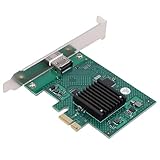
- HIGH COMPATIBILITY: The graphics card supports multiple displays and panels with a maximum resolution of 1920x1440, making it compatible with a wide range of systems for diverse applications.
- QUICK ROTATION: With the ability to quickly rotate screen images at 90°, 180°, and 270°, this graphics card enhances versatility in display orientation for improved user experience and flexibility.
- POWERFUL 2D GRAPHICS ACCELERATION: Equipped with a robust 2D graphics accelerator, the card supports various graphic processing functions, ensuring efficient performance for demanding applications.
- VERSATILE APPLICATION: This accelerator card supports video display layers, making it ideal for a variety of applications, including industrial computers, POS systems, ensuring reliable performance across different fields.
- WIDE OPERATING TEMPERATURE RANGE: Designed for reliable operation in harsh environments, the card functions effectively within a wide temperature range of -40°C to +85°C, ensuring durability and stability in challenging conditions.
| Measure | Tesla V100 PCIe | Tesla V100 SXM2 |
|---|---|---|
| GPU interconnect listed | PCI Express Gen 3 | NVLink |
| Interconnect bandwidth reported in NVIDIA’s 2019 presentation | 32 GB/s | 300 GB/s |
| Maximum power reported in NVIDIA’s 2019 presentation | 250 W | 300 W |
| Memory bandwidth reported in NVIDIA’s 2019 presentation | 900 GB/sec | 900 GB/sec |
The presentation also reports selected historical workload results, including 1–5% speedups for certain single-GPU training jobs and a 15% result for one recommendation workload. It says the benchmark result was not verified by MLPerf. These are results for the presentation’s tested configurations and workloads, not a general promise that SXM2, NVLink, or an adapter will be faster for your application.
Software support depends on the feature
Do not treat a statement about one software feature as a blanket verdict on PCIe. NVIDIA’s vGPU documentation says PCIe is not supported for the particular documented NVLink peer-to-peer CUDA transfer feature. That limitation is specific to the feature described; it does not establish that every PCIe peer-to-peer use case is unsupported. Check the documentation for the precise GPU, driver, software release, and capability you need. NVIDIA vGPU User Guide
Rank #3

- High-Performance ML Accelerator: Integrates Edge TPU, delivering 4 TOPS (int8) peak performance for machine learning inference tasks.
- Strong Compatibility: Supports M.2 A+E key interface for easy integration into existing systems.
- Low Power Design: Provides 2 TOPS per watt, ideal for embedded and energy-efficient applications.
- Wide OS Support: Compatible with Linux (Debian 10/Ubuntu 16.04+) and Windows 10 (64-bit).
- Industrial-Grade Reliability: Operating temperature range of -20°C to +85°C, suitable for harsh environments.
How to evaluate a proposed setup
Compare the proposed SXM2 assembly with a supported system using the same workload. Verify each item in the platform documentation before making a purchase or committing to deployment:
- GPU identity: exact model, generation, and module revision.
- Form factor and host interface: whether the carrier supports that module and how it connects to the host.
- GPU interconnect: which GPU-to-GPU link is present and supported; do not assume a carrier reproduces the original NVLink topology.
- Platform support: named server or motherboard, firmware requirements, and any required system configuration.
- Power and cooling: documented delivery and thermal requirements for the exact module and carrier.
- Software: support for the required driver, CUDA or vGPU feature, and software release.
- Workload performance: results for your model, workload, and configuration rather than an unrelated headline benchmark.
For a more predictable deployment, start with NVIDIA’s validated platform documentation and select a system qualified for the exact GPU and software release you intend to use. NVIDIA validated systems
Quick Recap
Product prices and availability are accurate as of the date/time indicated and are subject to change. Any price and availability information displayed on Amazon at the time of purchase will apply.

