
The Tool Desk
Outbyte Driver Updater FREEFix the driver behind crashes, sound loss and screen glitchesFind Drivers →Outbyte PC Repair FREEClear out junk files and repair common Windows errorsFree Scan →IEEE 802.11ac is the 2013 Wi-Fi amendment for Very High Throughput (VHT) operation below 6 GHz. It does not cover 2.4 GHz operation. Its headline throughput targets describe performance at a specific point in the wireless protocol—not the internet speed a household should expect. To check whether equipment is compatible, compare the access point and client separately, then verify each model’s band, channel-width support, and certified capabilities.
What does IEEE 802.11ac VHT mean?
IEEE 802.11ac-2013 is Amendment 4 to the IEEE 802.11 wireless LAN standard family. Its title is “Enhancements for Very High Throughput for Operation in Bands below 6 GHz.” VHT means Very High Throughput: the amendment was intended to increase wireless local-area-network throughput and support applications such as distributing multiple multimedia or data streams. IEEE’s amendment description states that purpose in terms of improving WLAN user experience and enabling new market segments.
The amendment is still useful terminology for the VHT feature set, but it is not the current standalone edition of the whole Wi-Fi standard. IEEE lists IEEE 802.11-2024 as the active WLAN MAC/PHY standard revision and says amendments 1 through 7, published from 2021 through 2024, have been incorporated. In other words, 802.11ac is a 2013 amendment within a standard family that has since been revised.
What do 802.11ac’s throughput figures actually measure?
IEEE’s 802.11ac amendment description sets minimum targets of 1 Gbit/s maximum multi-station throughput and 500 Mbit/s maximum single-link throughput, measured at the MAC data service access point. IEEE’s amendment record describes the same targets. These are standard-level MAC throughput targets, not guaranteed rates for a particular router or client.
Quick wins for a faster PC:
Fix the driver behind crashes, sound loss and screen glitchesFind Drivers →Repair Windows errors before they cause bigger problemsFix Now →#1 Best Overall

- 𝐋𝐨𝐧𝐠 𝐑𝐚𝐧𝐠𝐞 𝐀𝐝𝐚𝐩𝐭𝐞𝐫 – This compact USB Wi-Fi adapter provides long-range and lag-free connections wherever you are. Upgrade your PCs or laptops to 802.11ac standards which are three times faster than wireless N speeds.
- 𝐒𝐦𝐨𝐨𝐭𝐡 𝐋𝐚𝐠 𝐅𝐫𝐞𝐞 𝐂𝐨𝐧𝐧𝐞𝐜𝐭𝐢𝐨𝐧𝐬 – Get Wi-Fi speeds up to 200 Mbps on the 2.4 GHz band and up to 433 Mbps on the 5 GHz band for upgraded web surfing, gaming, and streaming. Performance varies by conditions, distance to devices, and obstacles such as walls.
- 𝐃𝐮𝐚𝐥-𝐛𝐚𝐧𝐝 𝟐.𝟒 𝐆𝐇𝐳 𝐚𝐧𝐝 𝟓 𝐆𝐇𝐳 𝐁𝐚𝐧𝐝𝐬 – Dual-bands provide flexible connectivity, giving your devices access to the latest routers for faster speeds and extended range. Wireless Security - WEP, WPA/WPA2, WPA-PSK/WPA2-PSK
- 𝟓𝐝𝐁𝐢 𝐇𝐢𝐠𝐡 𝐆𝐚𝐢𝐧 𝐀𝐧𝐭𝐞𝐧𝐧𝐚 – The high gain antenna of the Archer T2U Plus greatly enhances the reception and transmission of WiFi signal strengths.
- 𝐀𝐝𝐣𝐮𝐬𝐭𝐚𝐛𝐥𝐞, 𝐌𝐮𝐥𝐭𝐢-𝐃𝐢𝐫𝐞𝐜𝐭𝐢𝐨𝐧𝐚𝐥 𝐀𝐧𝐭𝐞𝐧𝐧𝐚: Rotate the multi-directional antenna to face your router to improve your experience and performance
The measurement boundary matters: these figures are not application-level transfer speeds or internet-plan speeds. A real result depends on the equipment and the conditions of the wireless link, among other factors. The figures should not be used to predict a particular network’s performance or to claim that every 802.11ac product reaches them.
Which bands and legacy devices are involved?
802.11ac’s defined scope is operation below 6 GHz, excluding 2.4 GHz. The amendment calls for backward compatibility and coexistence with legacy IEEE 802.11 devices in the 5 GHz band. That is a compatibility design goal for the band; it does not mean an older device gains every 802.11ac capability, or that every newer feature is present in every product.
Rank #2
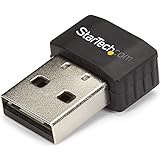
- SECURE WIRELESS CONNECTIVITY: The wireless USB WiFi adapter provides a reliable dual-band wireless network connectivity to your laptop, tablet or desktop
- UPGRADE YOUR WI-FI SUPPORT: The dual-band Wi-Fi dongle supports maximum data rates of up to 433 Mbps on the 5GHz band, plus up to 150Mbps on the 2.4GHz band
- COMPACT DESIGN: The USB Nano wireless adapter features a compact factor form for minimal obstruction, ideal for when youre on the go
- INDUSTRY COMPLIANT: For maximum performance, the UBS Wi-Fi connector is IEEE 802.11a/b/g/n/ac compliant and supports WEP, WPA, WPA2 wireless security
- VERSITILE USE: Supporting USB 2.0, the external adapter adds Wi-Fi networking to your desktop computer without the need for an internal expansion
How to check whether hardware is compatible
An 802.11ac wireless network depends on both an access point—often a router—and a client device, such as a laptop’s built-in Wi-Fi or a USB adapter. Check the two ends of the connection rather than treating a router’s label as proof that every client will support the same capabilities.
- Identify each device’s role. Confirm whether the product is an access point/router or a client adapter, and verify the mode supported by the device that will connect to it.
- Check the supported band. Look for 5 GHz support for an 802.11ac connection; 2.4 GHz support alone does not establish 802.11ac compatibility.
- Compare channel widths. Check the exact model’s documentation or certification for its supported widths. Do not assume 160 MHz support from an 802.11ac label.
- Review model-specific capabilities. Use the product’s own certification record and capability sheet. Optional features and supported configurations can differ between products.
- Set performance expectations separately. Treat IEEE’s MAC-layer targets as standard specifications, not as expected application throughput or internet speed.
Why the product’s certification record matters
A Wi-Fi Alliance record for one certified access point shows 20, 40, 80, and 160 MHz channel widths in 5 GHz and carries the “Wi-Fi CERTIFIED ac” label. That is useful evidence of what is certified for that specific product, not evidence that all 802.11ac access points or clients support 160 MHz. The Wi-Fi Alliance product finder can be used to inspect product-level records.
Rank #3

- Fast 1300Mbps USB WiFi Adapter - Nineplus wifi adapter provides long-range and stable wifi connections,Upgrade your desktop or laptop wifi Technology with our AC1300Mbps usb wireless Adapter. Whether your desktop pc's wifi usb is malfunctioning or you’re looking to upgrade to faster dual-band 5GHz and 2.4GHz speeds, this pc wifi adapter is the ideal choice. It’s a budget-friendly way to extend your device’s life and experience the benefits of modern WiFi technology
- Dual-band 5.8GHz and 2.4GHz Bands - 5.8Ghz wifi Connection speed up to 867Mbps,2.4GHz 400Mbps,With these upgraded speeds, web surfing, gaming, and streaming online meeting is much more enjoyable without buffering or interruptions,Experience the High Wi-Fi speed of our AC1300Mbps wifi dongle delivers faster internet speeds and stronger, more reliable signal penetration over long distances. It's a high-speed dual-band wifi usb adapter for pc and easy for the modern user.
- Two 5dBi High Gain Wifi Antenna – The high gain antenna of the desktop wifi adapter greatly enhances the reception and transmission of WiFi signal strengths.Equipped with dual high-gain pc wifi antenna, our wifi dongle for desktop pc ensures accurate capture of WiFi signals, providing a stable and strong connection even at greater distances, ideal for overcoming poor signal issues in bedrooms. This computer wifi adapter, wifi card, and usb wifi antenna extend your coverage.
- Super Speed USB 3.0 - wifi adapter for desktop pc Connect speeds Up to 10x faster than USB 2.0 USB, Super USB3.0 delivers faster data transfer, a more reliable network connection, and improved compatibility for wifi adapter for pc. It fully supports the high-speed demands of AC1300 wireless adapter, ensuring peak performance. Plus, it's backward compatible with standard USB 2.0 ports for added flexibility.usb wifi adapter for desktop pc 3.0
- Compatibility Systems: This Wi-Fi usb adapter is compatible with Windows11/10/8.1/8/7/XP,not supports Mac OS or Chromebook or Linux. Most Windows 11/10 systems will automatically detect and install the drivers. If the system does not detect the driver, you will need to download it from our website. For Windows 7, you will need to manually install the driver for this wifi card.or you go to the website online-setup support,we do online-setup for you.
“Wi-Fi CERTIFIED ac” is the certification wording shown in that record. “Wi-Fi 5” is commonly used as a consumer-facing name for 802.11ac, but the certification example does not establish a universal capability profile for every device using that name. Compare the actual model’s supported features instead of relying on a generation label alone.
Independent reader supportYour contribution helps us test, update, and keep practical guides available for everyone.Choosing an 802.11ac router or adapter
If you are buying equipment for an existing network or building one, choose by connection role and model specifications rather than by the standard’s maximum figures. An 802.11ac Wi-Fi router or access point provides the network side; a 5 GHz Wi-Fi adapter can provide a compatible client connection when a computer lacks one. This is a category-level fit, not a recommendation of any particular model.
Quick Recap
Best Value
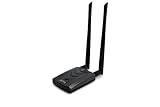
- Wireless Standards IEEE 802.11ac/a/b/g/n
- Wireless Frequency: 2.4 GHz / 5 GHz; Wireless Data Rate: 2.4 GHz-up to 300 Mbps, 5 GHz-up to 867 Mbps.
- Interface: USB-C (includes cable); Antenna Type: 2 x Dual-Band High-gain detachable antenna.
- Wireless Security: WEP, WPA, WPA2, WPA3 WPA/PSK, WPA2-PSK
- Operating System: Windows Vista 32/64bit; Windows 7 32/64bit; Windows 8/8.1 32/64bit; Windows10 32/64bit; Linux kernel 4.19 or later.
Rank #4

- Compatible System -- Compatible with Windows ( 11/10/ 7/ 8/ 8.1/ XP); Mac OS X (10.6~10.15.3); (Before using, please download the latest driver from our EDUP website site: szedup.com/ac1689/ )
- Lightning Fast speed -- Upgrades your Wi-Fi Card to 1300Mbps Wi-Fi speeds. Offering 867Mbps over 5GHz or 400Mbps over 2.4GHz for online gaming and HD video streaming with lag free experience
- USB 3.0 & MU-MIMO -- USB 3.0 wifi adapter can transfer data up to 5Gbps, which is backward compatible with USB 2.0 & 1.1; Multi-user MIMO ensures more devices process data simultaneously, no more delay in sequence
- Stable Performance -- With advanced RTL8812BU chipset amd built-in Antenna for range extended Wi-Fi connection and superior stability on your Desktop, Laptop, wireless adapter offers up to 1300Mbps Wi-Fi speeds in the signal strength, average upload and reading speed.
- Wi-Fi Hot Spot & Warranty Service : You can create a Hot spot with the Soft AP Function for more wifi devices;Lifetime manufacturer replacement warranty and 45 days no questions asked return policy
- For a router or access point, check its 5 GHz support and listed channel widths.
- For a client adapter, confirm that it supports the required 5 GHz mode and can connect to the access point’s available configuration.
- For either device, check certification and the capability sheet for the exact model number.
Product prices and availability are accurate as of the date/time indicated and are subject to change. Any price and availability information displayed on Amazon at the time of purchase will apply.

