
If you own a D-Link DIR-818L, DIR-818LW, DIR-850L, or DIR-860L, replace it as soon as possible. D-Link lists all four as end-of-life/end-of-service and recommends retiring them in favor of supported networking equipment that receives security updates. This warning applies to these named legacy models—not every D-Link router—and it does not mean your individual router has been compromised.
Which D-Link routers should be retired?
D-Link’s March 24, 2026 advisory identifies these four models across all hardware revisions:
| Router model | D-Link end-of-service/end-of-life date | Named in D-Link’s summary of the FBI campaign-model list? |
|---|---|---|
| DIR-818L | May 1, 2017 | No |
| DIR-818LW | May 1, 2017 | Yes |
| DIR-850L | March 1, 2020 | Yes |
| DIR-860L | May 1, 2018 | Yes |
D-Link says the FBI’s March 12, 2026 FLASH identified the DIR-818LW, DIR-850L, and DIR-860L among the “top 20 most represented device models” observed in the AVrecon/SocksEscort campaign. That is a position in a list, not a count of affected D-Link routers, and it does not establish that any particular router in a home has been infected. D-Link lists the DIR-818L as end-of-life/end-of-service in the same advisory, but does not name it among those three FBI-listed models. Read D-Link’s March 2026 advisory.
Why does end of life matter?
D-Link says end-of-life/end-of-service products no longer receive ongoing firmware development and support. That means owners should not assume that a new security fix will be developed for these models. The concern is heightened by D-Link’s report that AVrecon was used to compromise routers and IoT devices, preserve remote access, and monetize compromised devices as residential proxies through SocksEscort.
#1 Best Overall
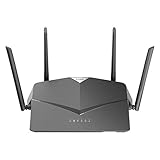
- AC2600 WiFi Speeds - Watch your favorite movies in 4K, game online, and video chat with friends. The DIR-2640 has plenty of bandwidth along with fast AC2600 dual band Wi-Fi, MU-MIMO and Smart Connect for a smooth, buffer-free online experience.
- More Processing Power - A powerful dual-core processor sits at the heart of your router, accelerating every thread and application with strong performance throughout your network.
- Set Boundaries with Enhanced Parental Controls - Create a profile for each person, then associate devices with each profile to control when and how they access the network. You can even use a profile to control internet access for shared devices, like game consoles and smart TVs.
- More Processing Power - A powerful dual-core processor sits at the heart of your router, accelerating every thread and application with strong performance throughout your network.
- Reliable Gigabit Wired Performance - Connect four devices to enjoy a strong and reliable wired connection with minimal latency - perfect for connecting Android boxes, smart TVs and game consoles.
The issue is not limited to these four models: a separate D-Link notice identifies the DIR-600, DIR-605, and DIR-605L as end-of-life/end-of-service. Those are additional specific legacy families, not evidence that every D-Link router is affected. See D-Link’s DIR-600-series announcement.
How to check your D-Link router’s model and hardware revision
- Read the product label. Look for the model name and hardware revision, often shown as “H/W Ver.” or a similar label.
- Check the router’s web interface. Sign in to the device and look for its model and hardware information in the status or device-information area. The exact menu names can vary by model.
- Compare both details with D-Link’s advisory and support information. Model and hardware revision matter when checking device support or firmware; do not assume a file for a different revision applies to yours.
What to do if you own one of these routers
1. Plan to replace it
D-Link’s recommendation is to retire the listed models and replace them with a currently supported networking product that receives security updates. When choosing a replacement, confirm that it works with your internet service and plan, provides adequate coverage for your home, and has an active security-update policy.
Rank #2

- DUAL-BAND WIFI 6 ROUTER: Wi-Fi 6(802.11ax) technology achieves faster speeds, greater capacity and reduced network congestion compared to the previous gen. All WiFi routers require a separate modem. Dual-Band WiFi routers do not support the 6 GHz band.
- AX1800: Enjoy smoother and more stable streaming, gaming, downloading with 1.8 Gbps total bandwidth (up to 1200 Mbps on 5 GHz and up to 574 Mbps on 2.4 GHz). Performance varies by conditions, distance to devices, and obstacles such as walls.
- CONNECT MORE DEVICES: Wi-Fi 6 technology communicates more data to more devices simultaneously using revolutionary OFDMA technology
- EXTENSIVE COVERAGE: Achieve the strong, reliable WiFi coverage with Archer AX1800 as it focuses signal strength to your devices far away using Beamforming technology, 4 high-gain antennas and an advanced front-end module (FEM) chipset
- OUR CYBERSECURITY COMMITMENT: TP-Link is a signatory of the U.S. Cybersecurity and Infrastructure Security Agency’s (CISA) Secure-by-Design pledge. This device is designed, built, and maintained, with advanced security as a core requirement.
2. Reduce avoidable exposure while replacement is pending
D-Link recommends these interim steps. They may reduce exposure, but they do not establish that an unsupported router is safe or free of compromise:
- Install the latest firmware available for your exact hardware revision, if one is available. Because support has ended for the named products, do not assume a patch exists; verify it for your model and revision.
- Change the administrator password to a strong, unique password.
- Enable Wi-Fi encryption and use a strong, unique wireless password.
- Disable remote management unless it is strictly required.
- Watch for unusual network activity.
3. Treat suspected compromise as urgent
If you suspect the router has been compromised, D-Link advises considering immediate replacement. The advisory cautions that rebooting alone may not remove an infection: some infections may persist through modified firmware and disabled update functionality.
Rank #3
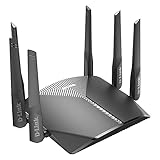
- AC3000 Tri-Band WiFi Speeds - The DIR-3040 packs powerful MU-MIMO Tri-Band and fast AC3000 WiFi speeds for buffer-free 4K video streaming and twitch-responsive gaming across multiple devices at the same time.
- Extreme Range with High Gain Antennas and AC Smartbeam - Seamlessly stream video, play games, surf the web, and even voice chat with friends. Four high-performance external antennas and AC SmartBeam technology deliver stronger Wi-Fi coverage to every device in your home.
- Supports the Latest in Wireless Encryption - Encrypts your data and wireless connections with the latest standard in the industry, which includes new protocols for authenticating communications and strengthening your wireless network security.
- Set Boundaries with Enhanced Parental Controls - Create a profile for each person, then associate devices with each profile to control when and how they access the network. You can even use a profile to control internet access for shared devices, like game consoles and smart TVs.
- More Processing Power - A powerful dual-core processor sits at the heart of your router, accelerating every thread and application with strong performance throughout your network.
Does this warning apply to every D-Link router?
No. The March 2026 warning names the DIR-818L, DIR-818LW, DIR-850L, and DIR-860L. It does not establish that all D-Link routers are vulnerable or compromised. Check your exact model and hardware revision against D-Link’s support and security notices, and use a router that still receives security updates.
Quick Recap
Best Value

- Dual band router upgrades to 1200 Mbps high speed internet (300mbps for 2.4GHz plus 900Mbps for 5GHz), reducing buffering and ideal for 4K stream
- Full Gigabit Ports - Gigabit Router with 4 Gigabit LAN ports, ideal for any internet plan and allow you to directly connect your wired devices
- Boosted Coverage - Four external antennas equipped with Beamforming technology extend and concentrate the Wi-Fi signals
- MU-MIMO technology - (5GHz band) allows high speeds for multiple devices simultaneously
- Access Point Mode - Supports AP Mode to transform your wired connection into wireless network, an ideal wireless router for home
Rank #4

- Next Generation Wireless Technology - Wireless AC750 for optimized performance and reliable coverage delivering smooth HD video streaming, fast file transfers and lag-free video chatting.
- Dual Band Performance - Up to 300Mbps (2.4GHz) + 433Mbps (5GHz) to deliver fast wireless speeds and less interference for maximum throughput
- Backward Compatibility - Compatible with a/b/g/n devices.
- Wired Connectivity - Four Fast Ethernet ports for fast device connectivity
- High-Performance Antennas: 3 high-performance antennas deliver maximum range around your home. Please refer the User Manual before use.
Product prices and availability are accurate as of the date/time indicated and are subject to change. Any price and availability information displayed on Amazon at the time of purchase will apply.

