
Not as a normal, supported installation. The Nokia E72 shipped with Symbian OS 9.3 and S60 3rd Edition Feature Pack 2, and there is no established, maintained Linux image or reproducible installation guide for the phone in the available documentation. Replacing Symbian would require device-specific boot support and hardware drivers—not just copying Linux files onto the handset.
What operating system does the Nokia E72 use?
Nokia’s service manual specifies Symbian OS 9.3 with S60 3rd Edition Feature Pack 2 (S60 3.2.3) as the E72’s platform. Nokia’s user manual also identifies software licensed from Symbian Software Ltd. The service documentation describes a QVGA display at 320 × 240 pixels, a 5-megapixel camera, and GSM/EDGE and WCDMA/HSDPA/HSUPA radio variants. Nokia E72 service manual Nokia E72 user manual
Is there a Linux, Maemo, or Android image for the E72?
A Linux Foundation discussion from August 2011 asked about installing mobile Linux distributions on Nokia phones, including the E72. Participants doubted that a distribution supported the E72 hardware; one suggested that Android or MeeGo images might exist, but the thread provides no working image, download, or installation steps. These are historical community comments, not evidence of a tested port. Linux Foundation discussion about Linux on Nokia smartphones
The available evidence does not establish that no private experiment has ever been attempted. It does not, however, document an authoritative current E72 Linux port, maintained project, or reproducible procedure. An Android or MeeGo mention in an old forum post should not be treated as proof that a compatible ROM is available.
#1 Best Overall
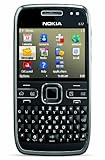
- What's in the Box: handset, Nokia Navigation Accessory Kit ( mobile holder, holder easy mount), rechargeable battery, charger, connectivity cable, headset, lanyard, pouch, printed documentation
- Up to 12.5 hours of GSM talk time (5.9 on 3G networks), up to 576 hours (24 days) of standby time
- Push e-mail and calendars via Microsoft Exchange and Lotus Notes Traveler; full QWERTY keyboard with Optical Navi key for more intuitive navigation
- Unlocked quad-band GSM cell phone compatible with 850/900/1800/1900 frequencies and US/International 3G compatibility via 850/1900/2100 UMTS/HSDPA plus GPRS/EDGE capabilities
- GPS with free Ovi Maps navigation plus Navigation Accessory Kit; 5-megapixel camera/camcorder; stereo Bluetooth; Wi-Fi networking (802.11b/g)
Why Maemo instructions do not work on the E72
Maemo firmware documentation names flashing procedures and images for the N900, N810, N800, and 770. Maemo’s historical overview describes the retail devices as Nokia Internet Tablets and the N900; it does not describe Maemo as software for arbitrary Nokia phones. An N900 image or flasher therefore is not an E72 installation method. Maemo firmware documentation Maemo historical overview
Why replacing Symbian with Linux is technically difficult
A Linux port needs a way to start the Linux kernel, plus support for the device’s hardware. Maemo’s technical overview explains that a bootloader loads the kernel during startup and that the kernel relies on hardware-specific device and bus drivers. Maemo technical overview
For the E72, a serious port would need a usable bootloader or chainloader, a kernel configured for the phone’s processor and memory map, and working support for components such as:
Rank #2

- Business optimized QWERTY Smartphone enhanced with touch
- Personal productivity on the go with email, chat and multiple calendars
- Be on top of your life with a wide range of applications
- Display and framebuffer, keyboard, and optical-navigation input
- Storage and USB
- Audio, camera, and power management
- Radio interfaces and modem integration
This is the engineering work a port would entail, not a claim that any of these components has already been made to work under Linux on the E72. The cited documentation does not provide E72-specific Linux drivers or a bootloader replacement.
Free tools Windows power users keep installed
One-click scans. No signup required.
Does flashing different E72 firmware install Linux?
No. Reflashing the phone with another Symbian package may change language, certificates, or bundled software, but it remains Symbian firmware. The available documentation does not provide an authoritative procedure for replacing the E72’s boot chain with Linux. Generic Nokia flashing tools and custom Symbian firmware should not be presented as Linux installers.
Independent reader supportYour contribution helps us test, update, and keep practical guides available for everyone.What can you do with an E72 instead?
Keep the phone running Symbian
If your aim is to keep an E72 usable, maintain it as a Symbian handset. A compatible BP-4L replacement battery is one practical hardware-maintenance option; it does not add Linux support. BP-4L battery information
Rank #3

- This unlocked cell phone is compatible with GSM carriers like AT&T and T-Mobile. Not all carrier features may be supported. It will not work with CDMA carriers like Verizon Wireless, Alltel and Sprint.
- Quad-band GSM cell phone compatible with 850/900/1800/1900 frequencies and International 3G compatibility via 2100 UMTS/HSDPA plus GPRS/EDGE capabilities
- Dual slide design; 8 GB of internal memory (not expandable); 5-megapixel/camcorder with Carl Zeiss Optics and DVD-quality video capture
- Wi-Fi networking (802.11b/g); A-GPS for navigation with Nokia Maps app; Bluetooth stereo music; integrated stereo speakers
- Up to 5 hours of GSM talk time (3.5 hours using 3G), up to 280 hours of standby time
Use it as a low-level development project
Only treat a Linux port as a reverse-engineering project if you can work on boot code, kernel configuration, and device drivers. The available evidence offers no turnkey image or installation path, so plan for substantial hardware-specific development rather than a routine firmware flash.
Choose another device for a Linux phone
If you want a usable Linux phone, select hardware with an existing mobile-Linux port and documented kernel and device support. Before choosing a device, check for an unlocked boot path, kernel support, working display, input, radio and power drivers, maintained images, and recovery tools. Also decide whether you need a daily-use phone, a Linux shell, or a device for experimentation: those goals require different levels of hardware support.
What’s actually slowing this PC down?
Pick the symptom - the matching free tool is one click away.
Quick Recap
Product prices and availability are accurate as of the date/time indicated and are subject to change. Any price and availability information displayed on Amazon at the time of purchase will apply.

