
Theme+ created a custom image for a Windows Phone 8.1 Start screen; it did not install that image for you. Save the generated image to Photos, then apply it through Settings > start+theme > choose photo. Transparent areas of compatible live tiles reveal the image, while tiles with opaque layouts may keep their solid color.
What Theme+ changed—and what it did not
Theme+ was a third-party Windows Phone app reported available in the Windows Phone Store in 2014. It generated images intended to serve as live-tile backgrounds, with geometric patterns and a preview of how the result would look on the Start screen. BetaNews reported that the app offered a 41-color palette and let users choose two shades, including the same shade twice. BetaNews, May 8, 2014
Generating the image and applying it were separate steps. The image was saved under Photos, and Windows Phone settings were used to select it. Theme+ therefore did not automatically change the Start screen after creating a design.
How to create and apply a Theme+ background
- Open Theme+ and choose the colors and geometric pattern for the image.
- Check the app’s preview to see the intended Start-screen effect.
- Save the generated image. It will be available under Photos.
- Open Settings and tap start+theme.
- Tap choose photo, then select the saved image from the Theme+ album.
This is a manual workflow: Theme+ makes the image, but Windows Phone’s choose photo setting applies it. The documented steps and save location were described by BetaNews.
Quick wins for a faster PC:
Fix the driver behind crashes, sound loss and screen glitchesFind Drivers →Clear out junk files and repair common Windows errorsFree Scan →#1 Best Overall

- Display: 4.5-inches
- Camera: 5-MP
- Processor Speed: 1.2 GHz
- OS: Windows Phone 8.1
Why the image may appear on some tiles but not others
Windows Phone 8.1 displayed a selected background image through transparent areas in compatible live tiles. Tiles with opaque layouts could continue to show a solid, preselected color instead. As a result, the same Theme+ image could be visible behind some tiles and absent from others; the image did not force every app tile to become transparent.
Windows Central’s April 14, 2014 review describes the background feature on a Nokia Lumia Icon. It notes that users could select an image from Microsoft’s built-in library or use a personal photo, and could keep an accent-color theme instead of choosing a photo background. Windows Central, April 14, 2014
Rank #2

- Touch screen
- Bluetooth Wireless
- 3.2 MP Camera
- 3g Internet with E-mail
- For use on Sprint network only in the USA. Clean ESN.
Theme+ versus choosing a regular photo
| What you want to do | Theme+ | Regular personal photo |
|---|---|---|
| Create a tile-oriented pattern | Generated geometric designs intended for the Start screen | Uses the photo as selected; no tile-pattern generator is described in the Windows Central review |
| Control colors and patterns | BetaNews reported 41 colors, two shade selections, and geometric patterns | Choose a personal photo; the review does not describe comparable color or pattern controls |
| Apply the background | Save the generated image, then select it in Settings | Select the photo through the Windows Phone background settings |
| Show the image behind tiles | Visible through transparent tile areas; opaque layouts may hide it | The same transparent-versus-opaque tile behavior applies |
The distinction is mainly how the image is made: Theme+ provides pattern and color choices, while a regular photo gives you an image you already have. Neither option changes the way individual tile layouts handle transparency.
Independent reader supportYour contribution helps us test, update, and keep practical guides available for everyone.Is Theme+ still available?
Theme+ was reported as a Windows Phone Store download in 2014, but its current availability is unverified. The historical reports also do not establish current availability of Windows Phone 8.1 devices. A Nokia Lumia Icon is one device associated with the feature in Windows Central’s 2014 review, not a claim about present-day stock.
Outdated Drivers Are Slowing You Down
One free scan finds every outdated or missing driver and matches the right update for your exact hardware.Free scan · exact hardware matchWindows Errors? Fix Them Before They Spread
Repair common Windows errors and clear accumulated junk for a smoother, more stable PC - no reinstall needed.Free scan · no reinstallQuick Recap
Best Value
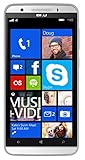
- Unlocked Dual SIM Windows 8.1 smartphone
- 8GB Internal memory 1GB RAM Micro SD up to 32GB
- Snapdragon 410, 1.2GHz Quad Core Processor
- 8MP Autofocus Main Camera and 2MP frontal Camera with LED flash
- 4G LTE,(700/1700/2600),4G HSPA+ (850/1700/1900/2100). GSM Quad band: US compatibility Nationwide on all GSM Networks including AT&T, T-Mobile, Cricket, MetroPCS, Straight Talk and others
Rank #4
- NOKIA LUMIA 640XL 5.7" WINDOWS SMARTPHONE FOR AT&T
Rank #3
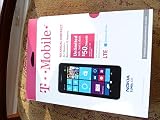
- An uncompromised Windows Phone 8.1 experience with fast quad core processor, bright colorful design with changeable shells and 4.5inch ClearBlack screen.
- Lightning-fast 4G LTE makes it quicker and easier to connect with the people and things you love online
- The same apps and experiences as high end Lumia's including free Global maps and navigation, free Nokia MixRadio streaming, and Nokia Camera
- Live Tiles for instant information from apps, one easy swipe to important notifications with Action Centre, Microsoft Office, OneDrive, and faster ways to connect with Word Flow and Whatsapp and Instagram
- A more personal and proactive assistant with Cortana
Product prices and availability are accurate as of the date/time indicated and are subject to change. Any price and availability information displayed on Amazon at the time of purchase will apply.

