
Recommended Free Tools
To check an RTX 5090’s temperature, open the NVIDIA App performance overlay or use GPU-Z or MSI Afterburner, then monitor the card while running the game or workload that causes concern. NVIDIA lists 90 °C as the maximum GPU temperature for its reference/Founders Edition design—not as a recommended gaming target. Add-in-card models can differ, so check the specification for your exact card.
How to check your RTX 5090 temperature while gaming
Measure during the workload that produces the concern: a reading at the desktop does not describe temperatures under a demanding game or other sustained load. Watch GPU temperature alongside GPU clock and fan behavior when your chosen utility exposes those readings. Treat the result as a snapshot of that workload and setup, not a universal score for every RTX 5090.
Use the NVIDIA App overlay
- Open NVIDIA App and enable its in-game performance overlay.
- Start the game or workload you want to check, then view GPU temperature and clock speeds in the overlay.
- Observe the readings while the workload is running, especially if performance drops or the fans change speed.
NVIDIA documents GPU temperature and clock speeds as overlay metrics: NVIDIA App support.
Use GPU-Z or MSI Afterburner
NVIDIA Support names GPU-Z as another monitoring option. MSI Afterburner can show GPU core temperature and other metrics, including GPU and memory frequency and voltage. To see data in a game, MSI says to run both Afterburner and RivaTuner Statistics Server in the background. Enable the monitoring metrics you want and configure the on-screen display in Afterburner’s settings. Download Afterburner from MSI or Guru3D, as MSI advises, rather than from an unknown installer site.
#1 Best Overall

- Part of the Core product series, these coolers combine the highest quality with exceptional performance
- The series continues to feature high-quality brass connectors that ensure optimal quality and safety
- The specially adapted aluminum backplate covers the entire backside of the copper cooler, ensuring a clear and uniform appearance
- Dimensions total (L x W x H): 260.25 x 160.90 x 34.32mm
MSI Afterburner also offers user-defined fan curves, but changing fan control is optional. First record how the card behaves at its stock settings; the cited MSI guide does not establish a recommended fan curve for all RTX 5090 cards.
What temperature is too hot for an RTX 5090?
NVIDIA specifies a maximum GPU temperature of 90 °C for the RTX 5090 Founders Edition/reference design. That is an upper specification, not an ideal gaming temperature or a promise that every add-in-card model uses the same limit. NVIDIA notes that add-in-card specifications can vary, so consult the card maker’s page or documentation for your exact model. The official sources cited here do not establish a universal RTX 5090 gaming-temperature target or hotspot threshold.
Rank #2
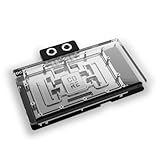
- Part of the Core product series, these coolers combine the highest quality with exceptional performance
- Designed for the Gigabyte Master/Gaming/Windforce graphics cards
- The series continues to feature high-quality brass connectors that ensure optimal quality and safety
- The specially adapted aluminum backplate covers the entire backside of the copper cooler, ensuring a clear and uniform appearance
- Dimensions (L x W x H): 237.50 x 157.07 x 34.20mm
NVIDIA’s general GPU overheating guidance, last updated September 29, 2021, says a GPU reaching its maximum temperature will have performance throttled in an attempt to bring the temperature below the maximum. If the temperature continues rising despite throttling, NVIDIA says the GPU will shut down the system to prevent damage. This guidance describes NVIDIA GPUs generally; pair it with the RTX 5090’s product specifications rather than treating it as a 5090-specific temperature table: NVIDIA overheating support.
How to troubleshoot high temperatures or throttling
- Recheck under the workload that triggers the problem. Use an overlay or monitoring utility to watch temperature and, where available, clock speed and fan behavior. This helps establish whether the concern occurs under load and whether performance changes alongside the temperature.
- Check for blocked GPU fans. Make sure nothing is obstructing the card’s fans. If they appear not to behave normally, consult the card maker’s documentation or support.
- Check the case’s airflow path. Confirm that intake air can reach the system and that warm air has a clear exhaust path. NVIDIA’s support advice for a GPU at its maximum includes improving system cooling, such as adding a system fan.
- Consider a case fan only if it addresses a real constraint. Check that the case has a compatible mounting position and that existing airflow is inadequate; consider airflow direction and noise as well as fit.
- Stop and seek support if the problem persists or worsens. If the temperature keeps rising, the computer shuts down, or the card behaves abnormally, stop the workload and contact the graphics-card maker or system builder. NVIDIA describes shutdown as protection when temperature continues rising despite throttling; this is a cautious troubleshooting step, not a quoted service procedure.
Do not treat GPU disassembly, thermal-paste replacement, or power-limit changes as routine fixes. The cited sources do not support those as standard steps for this symptom.
Rank #3

- Part of the Core product series, these coolers combine the highest quality with exceptional performance
- The series continues to feature high-quality brass connectors that ensure optimal quality and safety
- The specially adapted aluminum backplate covers the entire backside of the copper cooler, ensuring a clear and uniform appearance
- Dimensions total (L x W x H): 222.40 x 160.81 x 34.12mm
RTX 5090 power figures and what they mean
| Specification | NVIDIA figure | How to interpret it |
|---|---|---|
| Total graphics power | 575 W | NVIDIA’s published RTX 5090 reference/Founders Edition specification; add-in-card specifications can vary. |
| Required system power | 1000 W | NVIDIA bases this figure on a system with a Ryzen 9 9950X and says requirements may vary by system. It is not a universal PSU rule for every build. |
These are product power specifications, not temperature targets. Consider the rest of the system and your card maker’s requirements rather than using the 1000 W figure alone to diagnose a thermal problem. See NVIDIA’s RTX 5090 specifications.
Quick Recap
Best Value

- For MSI GeForce RTX 3070 LHR 8GB VENTUS 2X OC
- For MSI GeForce RTX 3070 8GB VENTUS 2X OC
- For MSI GeForce RTX 3060 Ti 8GB VENTUS 2X OC
- For MSI GeForce RTX 3060 12GB VENTUS 2X OC
- Model: PLD10010S12HH
Rank #4
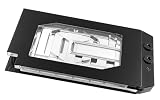
- Graphics card cooler for ASUS TUF GPUs *See compatibility note in description
- Material base plate: Electrolytic copper nickel-plated
- Connection terminal material: Acetal
- Compared to the PRO version, the ULTRA version has a larger cooling surface, which ensures better temperatures
- Dimensions: (LxWxH): 259.5 x 130 (incl. terminal) x 27.5mm (incl. backplate)
Product prices and availability are accurate as of the date/time indicated and are subject to change. Any price and availability information displayed on Amazon at the time of purchase will apply.

