
For higher frame rates on a Steam Machine, tune the game’s resolution and demanding graphics options to your display and the specific game, then use Steam’s Performance Monitor to check whether the GPU is limiting performance. There is no universal best preset: Steam says picture-quality choices depend on the machine’s settings, the display, and the game. An eGPU is a separate, advanced modification; available sources do not establish it as an officially supported or broadly compatible upgrade.
Why there is no single best Steam Machine graphics preset
Steam Machine runs SteamOS and uses a “discrete semi-custom AMD desktop class CPU and GPU,” according to Valve’s Steamworks documentation. That hardware description does not determine the right settings for every game: resolution, display, and each game’s workload all affect the result.
Steam Support puts it directly: “Steps to achieve your desired picture quality can vary a lot based on your Steam Machine settings, the display you’re using, and the individual game you’re playing.” Use that guidance from the Steam Machine – Feature & Troubleshooting guide as the reason to tune game by game, rather than relying on a machine-wide preset.
A repeatable way to get more FPS
- Record your starting point. Note the game’s resolution, quality preset, upscaler mode, frame-generation setting, and frame rate. Menu labels differ between games, so record the options as they appear in the title you are tuning.
- Check GPU load with Steam’s overlay. Enable the Steam In-Game Overlay Performance Monitor and use it to see whether the GPU is limiting frame rate. Steam also warns that performance may suffer if a game needs more video memory than is available. The Steam Support troubleshooting guide explains the monitor and related performance checks.
- Lower one demanding setting at a time. Compare the same scene or repeatable workload after each change. This makes it easier to see which option improves performance and whether the visual trade-off is acceptable. Avoid changing several options at once, or you will not know which adjustment mattered.
- Set resolution for your display and target. If performance is short of your target, test a lower in-game resolution or an available upscaler mode. Inspect the image as well as the frame rate; a higher number is not automatically a better result if the image becomes too soft or unstable.
- Check which upscaling options the game actually offers. Support varies between titles. A reviewer found inconsistent FSR availability across tested games, so do not assume the same upscaler or quality modes will appear in every game. See PC Gamer’s Steam Machine review for its title-specific observations.
- Evaluate frame generation separately. Record whether a displayed FPS figure includes generated frames. Frame generation can raise the reported output rate without changing the underlying base rendering rate by the same amount, and it may bring latency or image-quality compromises.
- Recheck after updates. Game, SteamOS, or hardware updates can change performance or available options. Steam’s guide covers separate locations for Steam Machine hardware updates and SteamOS software updates; use the current instructions there if you need to check for updates.
How to interpret FPS when upscaling or frame generation is enabled
A Cyberpunk 2077 result illustrates why a frame-rate number needs its settings attached. PC Gamer reported an average of 58–61 FPS at 4K with Medium settings, ray tracing off, FSR Performance, and 2x frame generation. The reviewer estimated the base frame rate at about 30 FPS and noted latency and image-quality issues. That is one review configuration, not a frame-rate promise for other games or Steam Machines.
Recommended Free Tools
#1 Best Overall

- Upgraded 6-in-1 Docking Station: Features HDMI 2.1 4K@120Hz output for ultra-smooth, crystal-clear visuals, plus 100W PD charging, 3 fast USB A 3.0 ports, and a ultra-fast Gigabit Ethernet connection. Now supports ROG Ally X and Legion Go S, giving you more ways to enjoy a seamless big-screen gaming experience. NOTE: Not for ROG XBOX Ally / XBOX Ally X.
- 4K@120Hz HDMI Output (Upgraded): Experience double the refresh rate compared to the previous 4K@60Hz version. Whether you’re battling online or watching cinematic cut-scenes, enjoy buttery-smooth gameplay and reduced screen tearing on external monitors.
- Full-Speed 100W Charging: Supports up to 100W PD charging, easily powering your handheld in Turbo Mode. Keeps your gaming sessions uninterrupted — no need to worry about battery drain even during marathon play. Note: The ROG Ally's 30W Turbo Mode is fully supported, but a 100W charger is recommended.
- Gigabit Ethernet: Enhance your gaming with gigabit Ethernet for seamless online play, rapid updates, and quick file transfers. Enjoy lightning-fast downloads and uploads, eliminating lag and latency for uninterrupted sessions.
- Expanded Device Compatibility: Now works with Steam Deck LCD/OLED, ROG Ally / Ally X, Legion Go / Go S, and MSI Claw — making it your all-in-one solution across multiple handhelds. NOTE: Not for ROG XBOX Ally / XBOX Ally X.
When comparing your own results, keep base rendering and generated output distinct. If you are deciding whether a setting helped, use the same scene and configuration and note whether frame generation is on; otherwise, two FPS figures may not represent the same kind of performance.
Does Steam Machine support an eGPU?
An eGPU has been reported on a modified Steam Machine, but that is not evidence of a supported or broadly compatible upgrade path. Tom’s Hardware described a Radeon RX 9070 XT connected with an M.2-to-OCuLink adapter and an external GPU dock; the report also says the system’s boot drive was moved to USB-C storage. See Tom’s Hardware’s report for the specific modification.
Rank #2

- 6-in-1 USB-C Hub: Connect, charge, and play without limits thanks to a 100W PD-IN port for fast charging, a 4K HDMI output, a 1Gbps Ethernet port, two USB-A ports at 5Gbps each, and one USB-C port at 5Gbps.
- See Every Detail: The 4K@60Hz HDMI port brings your games to life with stunning resolution and crystal-clear imagery.(Note: The USB-C data port does not support screen mirroring.)
- Ultra-Speed Ethernet: Dominate online play with lightning-fast 1,000 Mbps Ethernet, where every millisecond counts.
- Unlimited Connections: Maximize your gameplay with versatile USB ports, offering 5Gbps speed for mice, keyboards, game controllers, and more.
- What You Get: Anker USB-C Hub (6-in-1, For Handheld Game Console), 8.66-inch (220 mm) built-in USB C cable, welcome guide, 18-month warranty, and our friendly customer service.
The distinction matters: a report of one working modification does not establish that the same parts, firmware, drivers, or boot arrangement will work in another system. A ValveSoftware GitHub issue requesting eGPU support is a feature request, not compatibility confirmation. Valve’s Steam Machine OEM documentation advises ensuring Linux support and coordinating drivers for hardware; it does not provide a general Steam Machine eGPU recipe or verified adapter list.
For ordinary frame-rate tuning, start with in-game settings and Steam’s overlay rather than treating an eGPU mod as a routine upgrade. Anyone considering the reported hardware category—an M.2-to-OCuLink adapter and compatible external GPU dock—would need to verify hardware revision, firmware, driver, and boot configuration compatibility before buying. The available sources do not establish plug-and-play use or a predictable performance gain.
Quick Recap
Best Value

- 12-in-1 Full-Function Dock All Ports You Need: Features HDMI 2.0 (4K@60Hz), Gigabit Ethernet, 3 USB 3.0 (5Gbps), 3 USB 2.0, and Type-C PD 3.0 (100W charging + 40Gbps data). One dock handles video output, wired network, peripherals, and fast charging—keeps your desk clutter-free.
- Dual 5cm RGB Cooling Fans No More Thermal Throttling: Two 5cm fans (much larger than common 2cm) deliver higher airflow with lower noise, effectively preventing frame drops on Steam Deck / ROG Ally / Switch 2 due to overheating. Maintains peak performance and extends battery life. Rear on/off switch disables fans & RGB for winter energy saving.
- Wide Compatibility for Handhelds, Laptops & Tablets: Dedicated slot fits devices 27mm thick: Steam Deck (OLED/LCD), Switch 1/2, ROG Ally/Ally X, Legion Go (S/2), MSI Claw, etc. For laptops, iPads, Android devices, simply use the included Type-C cable (no slot needed). Switch video/charging work; USB data limited by Nintendo (same for all docks).
- Included Joystick Caps & Type-C Extender Protect Your Device: 4 silicone joystick caps improve grip, prevent dust and stick wear. Type-C extender acts as a sacrificial port, absorbing wear from repeated plug/unplug to save your console's original port from damage.
- Premium Aviation Aluminum Build Durable & Cool: Screwless seamless design, high-strength aluminum alloy (not plastic) for robust durability and passive heat dissipation. Open fan area ensures superior airflow, solving overheating issues common with sealed official docks.
Rank #4
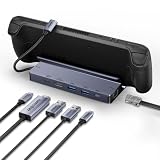
- ✅【8K HDMI Output & 5Gbps USB Expansion】Output stunning 8K@30Hz, 4K@144Hz, 2K@240Hz, or 1080P@480Hz to your display. Expand with 2× USB 3.0 and 1× USB-C data port (5Gbps each) for peripherals, external storage, and more.
- ✅【Lag-Free Gaming with Gigabit Ethernet & 100W PD Charging】Stay competitive with stable wired Gigabit Ethernet. The 100W PD 3.0 port keeps your Steam Deck fully charged even during marathon gaming sessions—no more battery anxiety.
- ✅【All-Aluminum Stand with Secure Docking】The sturdy all-in-one stand holds your Steam Deck at the optimal viewing angle. Silicone pads prevent slipping and scratching while keeping air vents fully unobstructed for maximum cooling.
- ✅【Plug and Play—Instant Desktop Setup】Designed exclusively for Steam Deck. No drivers, no setup hassle. Just plug in and transform your handheld into a full desktop gaming station with expanded display, network, peripherals, and charging.
- ✅【18-Month Warranty & Dedicated Support】Your purchase is backed by 18-month warranty. Our BENFEI customer service team is ready to assist you with prompt, friendly support.
Rank #3

- Ultimate 4K@120Hz Visual Fidelity: The steam deck dock helps experience incredibly smooth and immersive gaming or movie playback with HDMI 2.1 output, supporting up to 4K@120Hz, VRR, FreeSync, and G-Sync. Eliminates screen tearing and lag, providing a highly responsive and visually stunning experience on compatible displays.
- 100W PD Charging & Stable Power Management: This usb c dock power your host device (up to 85W) and the dock simultaneously with 100W PD 3.0 fast charging. Built-in comprehensive circuit protection (TVS, ESD, Over-Current) ensures safe and stable operation, protecting your valuable equipment from voltage spikes and surges.
- Extensive Connectivity for Gaming & Work: The steam deck docking station expands your setup with 2x USB-A 3.0, 1x USB-C 3.0 data port (all 5Gbps), and a Gigabit Ethernet port. Connect peripherals like storage, keyboards, and get a stable, high-speed wired internet connection for seamless online gaming and uninterrupted work.
- Broad Compatibility with Consoles & Systems: Designed for gaming handhelds like Steam Deck, ROG Ally, Rog Xbox Ally, Rog Xbox Ally X, Region Go, and also fully compatible with laptops, PCs, Macs, and phones. It's plug-and-play across Windows, macOS, Linux, and SteamOS, requiring no drivers for immediate use. Not compatible with Nintendo Switch 2.
- Compact Foldable Design with Robust Build: This usb c hub features a space-saving foldable stand made from aluminum alloy and PC+ABS, making it highly portable. The clever design provides a stable base for your handheld while keeping a minimal footprint on your desk, perfect for on-the-go gamers and professionals.
Product prices and availability are accurate as of the date/time indicated and are subject to change. Any price and availability information displayed on Amazon at the time of purchase will apply.
Independent reader supportYour contribution helps us test, update, and keep practical guides available for everyone.
