
Quick wins for a faster PC:
Repair Windows errors before they cause bigger problemsFix Now →Scan for outdated or missing drivers - takes under a minuteDriver Scan →If your PS5 controller moves your character or selection when you are not touching the stick, check whether the problem occurs in one game or across the PS5 interface and other games. A game-specific dead-zone setting may help when the issue is limited to that game; for a standard DualSense, Sony’s documented troubleshooting is to reset the controller, reconnect it by USB, update PS5 system software, and contact PlayStation Repairs if the issue persists. Sony documents stick sensitivity and dead-zone controls for the DualSense Edge, not a general calibration menu for the standard DualSense.
What PS5 stick drift is—and what a dead zone does
Stick drift is unwanted analog input while a controller’s stick is untouched. A dead zone is a setting that determines how much small stick input a game or supported controller profile ignores before registering movement. Adjusting a dead zone can change what you experience, but it does not prove that a worn or faulty stick sensor has been repaired.
First compare behavior in the game where you noticed it with another game and the PS5 interface. If movement occurs only in one game, look for that game’s controller, input, or dead-zone settings. This comparison is a useful diagnostic step, not a definitive hardware test published by Sony.
Reset a standard DualSense controller
Sony’s troubleshooting sequence for a standard DualSense starts with a hardware reset. The reset button is in a small hole on the controller’s back, beside the Sony logo. Follow Sony’s DualSense troubleshooting instructions:
#1 Best Overall

- Custom designed joysticks to perfectly fit for PS5, for PS4, for PS4 Slim, for PS4 Pro controller. Work exactly like the original thumbsticks
- Unique replacement to add much more personality to your controller. The replacement thumb sticks will make your controller distinct when playing with friends, no more boring standard color
- Made of premium PC & TPE plastic material, durable and practical. Ideal replacement for your broken or cracked controller thumbsticks
- A variety of colours thumbsticks are available, you can combine eXtremeRate replacement accessories to customize your controller
- Easy to install, requires internal fitting, the screwdriver tool included can help you easily open the shell and install the gaming parts. Get the installation video guide by searching "eXtremeRate Thumbsticks for PS5" or "EiWmjR87CS4" on YouTube
- Turn off the PS5.
- Disconnect the controller from the official USB cable.
- Use a pin or similar tool to press the reset button for at least five seconds.
- Reconnect the controller to the PS5 with the included official USB cable, then press the PS button.
The pin is simply a means of reaching the reset button; Sony does not require a specialty tool.
Update the PS5 and escalate persistent problems
If resetting does not resolve the unwanted input, Sony advises installing the latest available PS5 system software. If the stick still behaves incorrectly, use the controller troubleshooting page to select the analog-stick issue or go to PlayStation Repairs for the next step.
Rank #2

- Compatible with PS4/PS5 Controller: Perfect Fit for PS4/PS5/PS5 Edge Controllers. Replace your sticky, missing or damaged original joystick caps with NEWDERY joysticks grips caps.
- Easy to Install: Simply remove your worn-out or damaged original caps and snap these new grips into place and adjust for perfect alignment. Get back to gaming with better-than-stock feel in seconds.
- Laser-Textured for Superior Grip: Our PS4/PS5 thumb grips caps laser-etched texture provides enhanced feel that outlasts original PS4/PS5 general-Textured thumbsticks, preventing the loss of control from worn-down original grips.
- Premium TPU Material: Unlike others silicone caps, our PS4/PS5 joystick caps high-grade TPU resists sweat and wear, non-slip surface effectively enhances the feel.
- Protective & Long-Lasting: Complete protection, not only do these PS4/PS5 thumbstick grips caps improve handling, they also shield your controller's original sticks from damage. Never worry about lost or broken caps again.
The cited Sony guidance does not establish compressed air, contact cleaner, opening the controller, or a third-party calibration tool as a fix for drift. Avoid treating any of those as a guaranteed repair.
Does a PS5 controller have a calibration menu?
Standard DualSense
The standard DualSense support instructions reviewed by Sony document reset, system-software update, and repair escalation. They do not document a general user-facing calibration menu for correcting stick drift on this controller. A game’s own dead-zone setting may still be available, but it is a game-level adjustment rather than a documented DualSense hardware calibration.
Rank #3

- 【Compatible model】-- Replacement analog joystick compatible with PS5 Controller Only (NOT FIT for PS4 Xbox One Xbox One S/X Controller).
- 【What you get】Package include -- 6 x Joystick, 6 x 2K3 Ohm Potentiometer, 6 x Thumbstick Cap, 6 x Protective Ring, 2 x Thumbstick Grip, 27 x Screw, 1 x Metal Cross Screwdriver, 1 x Metal Tweezer, 1 x Metal Pry tool, 1 x Pry bar. (You also need a soldering tool which isn‘t included in the kit.)
- 【6 × 3D Analog Joystick】-- Ikpek joysticks replacement's model number is EL6 for PS5 Controller, and the Potentiometer is 2.3K ohm. Repair your worn-out, damaged, drift, blind spots, dead spots, can't center analog joystick . Quality Guarantee -- The joystick replacement was test before shipment. And it is made of high quality metal, ABS plastic material. Make it has longer working life and used more accurately.
- 【6 x 2K3 Ohm Potentiometer】Design for PS5 controller -- Solve Most Joystick Problem: Stick drift, stuttering, dead zones, creeping, blind spots, non centered.
- 【6 × Thumbstick Cap + 27 x Screw for PS5 Controller + 6 x Protective Ring】Thumbstick Caps -- Made of premium ABS material, enduring and practical. Ideal replacement for your broken or cracked controller thumbsticks. Screws -- Replacement of screws can better help you repair the controller. Protective Ring -- 0.1 Ultra-thin protective ring compatible with PS5, PS4, Switch, Xbox controller,it will protect controllers from wear and tear, avoid powder, extend the life of controller.
DualSense Edge
The DualSense Edge supports custom profiles with stick sensitivity and dead-zone settings. Sony explains these options in its DualSense Edge personalization guide. These settings change how input is handled; Sony does not describe increasing a dead zone as repairing the underlying stick hardware.
When to repair, replace, or adjust
- Adjust a game setting: The symptom appears in only one game, and that game provides a dead-zone or input setting.
- Reset and update: The controller is a standard DualSense and unwanted input occurs in multiple places; use Sony’s reset steps and install available PS5 system software.
- Seek service: The problem remains after Sony’s troubleshooting. Check PlayStation Repairs and your applicable regional warranty before paying for repair or replacement.
- Consider a module replacement: You own a DualSense Edge and its stick remains faulty. Sony provides a replaceable stick-module option for that model.
- Compare repair with replacement: For a standard DualSense, the official material cited here documents troubleshooting and service escalation, but not a user-replaceable stick module. Check service eligibility and cost against replacing the controller; no general price comparison is established here.
DualSense Edge stick-module replacement
Sony’s DualSense Edge support guidance and instruction manual describe separately sold replacement stick modules. The manual states that the left and right modules are interchangeable. This is an Edge-specific option; it does not establish compatibility with the standard DualSense.
Rank #4
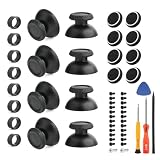
- Compatibility and Application: The thumbsticks replacement only compatible with PlayStation 5 PS5, please make sure your model is correct. To solve the problem of joystick does not slide smoothly,loss of anti-slip texture or the edges become sharp or jagged, ect. For PS5 thumbsticks replacement will help to restore the playing feeling.
- Quality Guarantee: The thumb Stick for PS5 was made by good ABS material and produce by accurate machine, can restore the quality and size with your original thumbsticks . All for PS5 thumbsticks have passed strictly QC double tested and 100% in good condition before shipment.
- Easy Installation: ①Wipe the top of the joystick with a clean damp cloth to remove dust, grease or sweat to ensure a more secure fit. ②Align the opening side of thumbstick for PS5 with the Joystick and gently press around to make it fit in completely. Then check whether it is firmly and avoid being skewed or loose. ③After installation, turning the Joystick gently to ensure that it does not rub against the controller housing.
- Good Protection: Comes with 4pcs thumb grips and 4pcs protective rings. The thumb grips for PS5 can Protect joystick,fit the original joystick tightly without fear of deviation.Avoid joystick damage and extend using time. The protective ring for PS5 are made by good silicone material to protect joystick ,and reduce wear and tear.
- Suggestion Tips: It also comes with set of professional tools and set screws of controller, helps to disassemble and replace the thumbsticks more convenient. If you do not have any installation experience, we suggest find the professional. If you need the installation guide for PS5 thumbsticks replacement or have problem, please leave a message.
When handling an Edge module, follow the manual’s precautions: discharge static by touching a grounded metal object, and avoid touching the connectors on the module or controller. If you are not comfortable handling the parts, use a repair service.
Independent reader supportYour contribution helps us test, update, and keep practical guides available for everyone.Check warranty terms for your region and controller
Warranty coverage depends on the product version and country. Sony Interactive Entertainment LLC’s CFI-ZCT2W manual states a one-year limited warranty for the original purchaser in the United States and Canada for defects in materials or workmanship, subject to proof of purchase and other terms. That specific term is not a worldwide warranty promise. Check the warranty documentation that applies to your controller and location before deciding whether to pay for service.
Do these 3 things before closing this tab:
1Repair Windows errors before they cause bigger problems2Fix the driver behind crashes, sound loss and screen glitches3Clear out junk files and repair common Windows errorsQuick Recap
Best Value

- Note: The analog joystick replacement work requires professional tool kit/repair devices(not included in our package) and good skills in desoldering and soldering. If you are not experienced with soldering, we recommend seeking professional assistance to ensure proper installation.After installation, use the Test Tool on our site to run stick calibration first before use. We also have an installation video on our listing for your reference.
- Upgraded Anti-Drift TMR Joystick Technology – Evolved from GuliKit's patented Hall Effect joystick, the more advanced TMR (Tunnel Magnetoresistance) thumb stick same works with contact-less magnetic field sensing mechanism to eliminate stick drift cause,while offers ultra-low power consumption, enhanced stability, drift-free long lasting durability, high-precision and silk-like smoothness.
- No Circuit Changes Required (Soldering Required) – Replace the original stick module with the enhanced TMR version to fix stick drift on DualSense / DualSense Edge controllers.
- Anti-Interference Structure –Unique structural design prevents interference from magnetic triggers on the joysticks.
- Premium Stick Caps – Includes 2 GuliKit KK Ring anti-friction stick knobs designed for enhanced gripping and comfort during extended play.
Product prices and availability are accurate as of the date/time indicated and are subject to change. Any price and availability information displayed on Amazon at the time of purchase will apply.

