
The Tool Desk
Outbyte Driver Updater FREEScan for outdated or missing drivers - takes under a minuteDriver Scan →Outbyte PC Repair FREERepair Windows errors before they cause bigger problemsFix Now →If your Galaxy Z Fold is losing charge faster than expected, start by checking which apps use the battery, then look at background activity, screen time, and signal conditions. A recently set-up phone may also use more power temporarily while apps and services are optimized. If the drain continues after these checks, battery wear or another fault may need attention.
1. Check whether the drain is temporary
On a new or recently set-up Galaxy, battery use may be higher during the first few days as apps and services are optimized. That is one possible explanation, not proof that persistent or unusually severe drain is normal. If the problem began later or does not settle, continue with the checks below.
2. Find out what is using the battery
Review battery usage before changing settings. Samsung’s US guidance gives this path: Settings > Battery > View details. Menu names and locations can differ by Galaxy Z Fold generation and software version.
Look for an app using an unexpectedly large share of power compared with how much you used it. Pay particular attention to an app installed or updated around the time the drain began. Battery-use details help identify where to investigate; they do not, by themselves, prove that an app or the phone has a fault.
What’s actually slowing this PC down?
Pick the symptom - the matching free tool is one click away.
#1 Best Overall

- This battery is compatible with Samsung Galaxy Z Fold 3 5G SM-F926U, please carefully check your phone model before purchase.
- When you replace your old battery, please carefully and gently disconnect your old battery's cable then connect your new battery to the mainboard. If you phone cannot be powered on with the new battery, you may need to install it again and be sure to check if the cable has been properly connected.
- If you have any questions or got any issues with our product, please feel free to contact us, we will reply to you within 24 hrs. We highly appreciate your kind patience.
- All the batteries have been tested before shipping out, No installation instruction.
- Need professional installation technology,We won't responsible for any damage due to improper operation.
3. Reduce background activity selectively
Samsung recommends managing infrequently used apps under Battery > Background usage limits, where available. You can place suitable apps in sleeping or deep sleeping lists. Deep sleeping apps do not run in the background and work only when opened manually.
That restriction can interfere with expected background behavior. Avoid deep-sleeping apps for which timely notifications or background activity matter to you, such as messaging, security, or navigation apps. Choose individual apps based on how you use them rather than applying the restriction to everything.
Samsung also recommends Device Care or optimization tools where available. Power saving mode can reduce consumption, but it may restrict background data and high-power features. Treat it as a tradeoff when you need more runtime, not as a change with no effect on how the phone works.
Rank #2
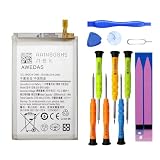
- 【Wide Compatibility】 Fully Compatible for Z Fold 2 5G SM-F916B SM-F916U SM-F916U1 SM-F916N SM-F9160 SM-F916W and more models.
- 【Product Specifications】This EB-BF916ABY replacement battery for Z Fold 2 5G has a capacity of 2155mAh, Li-ion Polymer material, 3.88V Voltage, Watt-hour: 8.37Wh
- 【About Our Battery】The latest advanced technology provides additional stable battery life and battery health. Our batteries are all new and the size is the same as your original battery. The high-quality designed battery case for z fold 2 5g, which provides strong protection to the battery and smart chip. Over temperature protection, over charging protection, over load protection, and short circuit protection were all provided by built-in A-class battery cells and ic chips.
- 【About Our Customer Service】 Your shopping experience is very important to us. If you have any questions or any quality-related issues, please contact us at any time. We settle all quality-related issues with a resolution within 24 hours.
- 【Tips】 A new z fold 2 battery will achieve its best performance after 2 or 3 complete cycles of charge and discharge. Please check the model number of your device to see if this battery is compatible with your device.
4. Check screen and network habits
Reduce avoidable screen-on time
Samsung recommends reducing unnecessary screen use and reviewing display settings such as screen timeout and Adaptive brightness. These are useful places to look if battery use seems to track long periods with the screen on.
Consider signal strength and 5G
A weak or unstable signal can increase power use. Samsung also notes that 5G may use more power and create more warmth in some network configurations, including where the phone maintains connections to multiple networks.
If your carrier and phone offer the option, compare battery behavior on LTE in a location where 5G coverage is weak. This is a diagnostic comparison, not a guaranteed fix: the result depends on the network, carrier, and device.
Rank #3

- 【Compatible Model】Only Compatible with Samsung Galaxy Z Fold 4 5G Sub Battery GH82-29451A battery, battery model number is EB-BF937ABY battery, please double check your cell phone model match before purchasing the battery.
- 【Durable and long-lasting】New 0-cycle battery cells with upgraded capacity, batteries are tested under strict quality control standards before leaving the factory, storing more power, bringing more standby time, prolonging battery life and reducing the number of recharges.
- 【Easy Installation】Complete repair kit is provided. Instruction/manual is not included, before removing, please read the battery replacement guide video on YouTube carefully. Please remember that the battery will only reach its best use after 3 to 5 full charge/discharge cycles.
- 【Multi-protection】Built-in upgraded smart IC chip technology prevents overcharging, overheating, short-circuiting, etc. to ensure safety.
- 【Friendly Customer Service】If you encounter any problems after installing the battery, please contact us at the first time. We will contact you within 24 hours. We will be happy to serve you. Thanks.
5. Consider battery wear and when to get help
Rechargeable batteries lose capacity over repeated charging and discharging; that capacity cannot be restored. If battery drain remains unusual after you check app use, background settings, display habits, and coverage, run phone diagnostics in Samsung Members if they are available on your device, or contact Samsung support or service.
There is no universal battery-percentage cutoff, screen-on-time threshold, Fold-specific replacement criterion, or repair price established for every Z Fold generation. The appropriate next step depends on the device and region. Persistent drain is a reason to seek a device-specific assessment, not by itself a diagnosis of battery failure.
Free tools Windows power users keep installed
One-click scans. No signup required.
Quick Recap
Product prices and availability are accurate as of the date/time indicated and are subject to change. Any price and availability information displayed on Amazon at the time of purchase will apply.

