
The Orico DockPro Thunderbolt 5 Storage Docking Station is most appealing if you need both a port-rich dock and fast local storage: it combines Thunderbolt 5 connectivity with an internal M.2 NVMe slot. If you only need an SSD enclosure, or only need a dock, its combined design may be more than you need. The reviewed unit requires you to supply the SSD.
What the Orico DockPro TB5 offers
ORICO’s DockPro Thunderbolt 5 Storage Docking Station (model ORICO-DockPro-T5) puts a Thunderbolt 5 hub and an M.2 NVMe drive slot in one aluminum-alloy enclosure. ORICO lists these connections and specifications:
| Feature | ORICO specification |
|---|---|
| Host connection | Thunderbolt 5 input; ORICO lists 80G/120G and PD 140W |
| Downstream Thunderbolt | Two Thunderbolt 5 ports |
| USB data ports | Three USB-A and one USB-C, each listed at 10Gbps |
| Card readers | SD and TF 4.0, with simultaneous reading listed |
| Video outputs | HDMI and DisplayPort |
| Other connections | 2.5GbE Ethernet and a 3.5mm headset jack |
| Internal storage | M.2 NVMe slot; up to 8TB supported capacity |
| Maximum power input | 180W (20V/9A) |
| Listed operating systems | Windows, macOS, and Linux |
| Dimensions | 166 × 85 × 23 mm |
These are manufacturer specifications, not a promise that every host, cable, display, or operating-system configuration will support every maximum simultaneously. ORICO lists single-display output up to 8K at 30Hz or dual-display output up to 4K at 60Hz; actual results depend on the connected computer and displays.
How the storage slot works—and what 120Gbps means
The M.2 slot is for an NVMe SSD, which you must buy separately. PCWorld’s review describes a PCIe 4.0 M.2 slot behind a magnetic bottom access plate; the SSD retaining screw was supplied in the box. ORICO lists supported capacity up to 8TB. Check the drive’s physical fit and capacity against the product documentation before buying one.
Do these 3 things before closing this tab:
1Repair Windows errors before they cause bigger problems2Fix the driver behind crashes, sound loss and screen glitches3Clear out junk files and repair common Windows errors#1 Best Overall

- Certified Thunderbolt 5 Dock: Built-with JHL9480 chip delivers standard 80Gbps and up to 120Gbps in boost mode (1RX‑3TX). This enormous bandwidth effortlessly handles 8K raw video streams, NVMe SSD, and daisy‑chained Thunderbolt peripherals, significantly accelerating data transfers and concurrent tasks. It is fully compatible with Thunderbolt 5 and Thunderbolt 4 laptops, ensuring stable, high‑speed expansion for demanding creative and professional environments
- Integrated M.2 NVMe SSD Slot: ORICO Thunderbolt 5 Docking Station with M.2 Enclosure supports up to 8TB SSD expansion (SSD not included), with real‑world read/write speeds reaching 6000MB/s. This built‑in storage solution eliminates messy external hard drive enclosures, keeping your workspace clean and organized. Ideal for video editors, photographers, and data analysts who need fast, on‑dock storage for large projects and archives
- Multi‑Monitor Independent Displays: Dual Thunderbolt 5 Downstream ports, plus HDMI and DP outputs, enable independent multi‑display setups. HDMI or DP alone supports 8K@30Hz; when used together, they deliver 4K@60Hz. The TB5 downstream ports can output 8K@120Hz (single) or 8K@60Hz (dual), providing crisp, high‑refresh visuals for design, trading, gaming, and multi‑window productivity
- 14 Ports Connectivity Covers All Your Peripherals: TB5 upstream of ORICO Thunderbolt 5 Dock with 140W PD host charging, two TB5 downstream (36W/15W device charging), 3x USB‑A 10Gbps, 2x USB‑C 10Gbps, SD/TF 4.0 dual simultaneous read, 2.5G Ethernet, HDMI, DP, 3.5mm combo audio, and the M.2 slot. One cable replaces multiple dongles, offering fast charging, gigabit networking, card reading, and display expansion for a clutter‑free desktop
- Triple‑tier Cooling System: ORICO Thunderbolt 5 Docking Station combines aluminum alloy chassis, intelligent turbo fan, and optimized airflow ducts. Under sustained high load, the fan automatically adjusts to dissipate heat efficiently, ensuring reliable operation even when all ports are fully occupied. Low noise and durable construction guarantee long‑term stability for intensive rendering, backup, and multi‑tasking sessions
Do not interpret the advertised 120Gbps as the dock’s storage-transfer speed. PCWorld explains that 120Gbps is a one-way bandwidth mode intended for video workloads. Storage uses bidirectional bandwidth up to 80Gbps. Those figures describe different kinds of traffic, not two interchangeable measures of SSD speed.
ORICO advertises measured read/write rates up to 6000MB/s. That is a manufacturer figure, not a guaranteed result for every SSD or computer. In PCWorld’s explanation, 80Gbps corresponds to roughly 6GB/s of sequential throughput in ideal terms; real results also depend on the drive, host, and workload.
Rank #2

- 14-in-1 Thunderbolt 5 Dock: Equipped with a Thunderbolt 5 upstream port, two Thunderbolt 5 downstream ports, two USB-C ports, three USB-A ports, SD and TF card readers, an AC input, a 2.5Gbps Ethernet port, an audio jack, and an HDMI 2.1 or DisplayPort 2.1 port. It also includes an advanced active cooling system for optimal performance even under full load, preventing overheating.
- The Speed You Need for Large Files: Transfer massive files quickly-move a 150GB file in just 25 seconds with the Thunderbolt 5 port.
- Dual Display Docking Station: Supports one HDMI or DisplayPort and two Thunderbolt 5 downstream video outputs. Delivers up to 8K@60Hz for a single display, or dual 8K@60Hz for Thunderbolt 5 Windows laptops.
- Fast Charge Multiple Devices: Power your devices efficiently with the powerful 140W max Thunderbolt 5 upstream port, supporting the PD 3.1 protocol for optimal charging. The front-facing dual USB-C ports share a total of 45W.
- What You Get: Anker Prime Docking Station (14-in-1, 8K, Thunderbolt 5), 3.3 ft Thunderbolt 5 cable, 6 ft AC power cable, 24-month warranty, safety sheet with QR code for user manual, and our friendly customer service.
What PCWorld’s performance test establishes
Jon L. Jacobi’s PCWorld review, published October 5, 2026, reports very fast storage performance with the reviewer’s selected drive and test system. The setup used Windows 11 22H2 on a Z790 motherboard with an Intel Core i5-12400, integrated graphics, and a Crucial T705 PCIe 5.0 SSD installed in the dock. The review places the dock near the top of its tested external-SSD comparisons and reports a 48GB transfer result.
Those results belong to that particular drive and test setup, not to every DockPro owner’s expected speed. Jacobi notes that SSD model and capacity, NAND configuration, caching, how full the drive is, and the host and test configuration can affect performance. The review says a PCIe 4.0 drive is sufficient to saturate the dock’s 80Gbps storage link; PCIe 5.0 is not necessary for that purpose.
Free tools Windows power users keep installed
One-click scans. No signup required.
Rank #3

- Professional assistant for business office - This 13-in-1 TB5 docking station is equipped with 1x Upstream Thunderbolt 5 Port (120Gb/s, 140W), 3x Downstream Thunderbolt 5 Ports (80Gb/s; PD15W;PD30W), PCIe Gen 4 x4 M.2 SSD slot(64Gbps), 1x 2.5G RJ45 Ethernet, 4x USB-A 3.2, 1x SD 4.0, 1x 3.5mm Audio/Mic, 1x Kensington slot. Its exceptional transfer efficiency and full function makes it a powerful tool for business office.
- Love letter for film and video creators – what if your computer's memory and read/write speeds are insufficient? It can directly store high-bitrate RAW footage within the docking station's SSD, achieving read/write speeds of up to 64Gbps. No external hard drive enclosure is needed, and real-time timeline previews are smooth and frame-free. Not enough screens? Single-screen 8K@144Hz, dual-screen 8K@60Hz, triple-screen 4K@144Hz – a multi-screen editing environment with no latency and no dropped frames. It also features a built-in SD 4.0 card reader for high-speed direct copying of camera and video footage to the internal SSD. Perhaps this is a love letter written for film and video creators.
- The ultimate solution for local high-speed caching - This thunderbolt 5 dock supports high-performance PCIe Gen 4 x4 M.2 SSD with a data transfer rate of up to 64Gbps, significantly improving read and write efficiency, especially when managing large datasets and high-performance applications. It is the ultimate solution for local high-speed caching of ultra-large RAW, PSD, and 3D engineering files, meeting the needs of photographers, graphic designers, and 3D designers.
- More possibilities – it's a docking station, and also a high-efficiency team. With just one device, you can achieve 4K/6K/8K real-time editing workstation, material import, batch archiving, multi-screen editing, multi-screen design and color grading, multi-screen office work; high-speed local caching of large RAW, PSD, and 3D projects; local multi-virtual machine and container development; code repository and large-scale project local storage; business office work; large-capacity data backup desktop, and more. It will assist you in unlocking more possibilities for your work.
- Pls Note - Your computer C port needs to support Thunderbolt 4/5. Triple external display requires a Windows 11 (or later) PC with a Thunderbolt 5 port. macOS systems just support dual external displays through this dock, please refer to the compatibility list(A+) for details. USB-C to HDMI/DP cables and the security lock are not included. NVMe SSD are not included,The SSD is only compatible with M KEY, 2280 size.
For video, PCWorld’s checks used one 4K display at 60Hz. That test does not establish how every multi-display resolution and refresh-rate combination will perform.
Port layout and everyday usability
PCWorld describes the rear as holding the power input, HDMI, DisplayPort, host Thunderbolt 5 connection, a downstream Thunderbolt 5 port, 2.5GbE Ethernet, and the headphone jack. The front has SD/TF slots, four 10Gbps USB ports, another downstream Thunderbolt 5 port, and the power button.
Rank #4

- 【Note before Buying】FusionDock Max 2 is not compatible with any Windows and Chrome laptop, and it is restricted to only one Mac and does not support switching between other Macs.
- 【Upgraded Silent Cooling】 Aerospace-grade thermal materials draw heat from critical components through the metal frame and spread it across the full-aluminum chassis, turning the enclosure into a large cooling surface for stable performance. 🔥No internal cooling fan means no fan noise. Surface warmth under load is expected as heat moves outward. In a 12-hour full-load test, the hottest outer-frame point reached just 49°C (120°F)—well below the applicable 60°C (140°F) UL touch-temperature limit, supporting safe, reliable long-term use.
- 【Triple Displays Up to 6K@60Hz】Only the Mac series with M1/M2/M3/M4/M5 Max chips supports Triple extended displays(Dual 6K@60Hz+Single 4K@60Hz). The Mac series with M4/M5 base chips or M1/M2/M3/M4/M5 Pro chips only supports dual 6K@60Hz displays. The Mac series with M1/M2/M3 base chips only supports a single 6K@60Hz extended display.
- 【120Gbps Data Transfer】Thanks to the 3*120Gbps Thunderbolt 5 ports, you can upstream and downstream any data in a flash. Equipped with 10*USB ports, which can support up to 10Gbps data transfer and allow you connect enough external equipment.
- 【Excellence in Every Aspect】The SD/TF 4.0 card slot can support up to 312Mb/s, and the RJ45 Gigabit Ethernet port can maintain a smooth and stable 2.5Gbps Ethernet connection.
The review identifies two practical drawbacks. First, the front USB ports are close together, so neighboring thumb drives can obstruct one another; cable-connected peripherals are less affected. Second, the dock does not power on automatically with the host: you need to press its power button.
Independent reader supportYour contribution helps us test, update, and keep practical guides available for everyone.Should you buy the Orico TB5 dock?
It makes sense if you need the dock and storage together
- You want a single device for Thunderbolt 5 port expansion and an internal NVMe SSD.
- You will use several of its listed connections, such as Ethernet, card readers, USB ports, or display outputs.
- You are comfortable supplying and installing a compatible M.2 NVMe drive.
Consider a different setup if you need only one function
- If your priority is storage alone, compare the cost and performance of a standalone SSD enclosure and drive.
- If your priority is port expansion, a dock without an M.2 slot may suit you better.
- If you frequently plug several thumb drives into the front at once, the closely spaced USB ports may be inconvenient.
- If you need a particular multi-display resolution or refresh rate, confirm compatibility for your computer, displays, and connection path rather than relying on the dock’s headline maximum.
PCWorld listed the dock at $329.99 when it reviewed the product in October 2026. That is review-time context, not a verified current price; compare the current dock price plus the SSD you will need. Jacobi’s conclusion was that it was “Though pricey for pure storage, if you need more ports along with your super-fast 80Gbps SSD, the TB5 is a short-lister.”
Quick Recap
Best Value
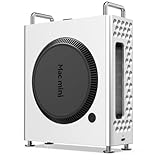
- Unleash 80Gbps Thunderbolt 5 Speed: Experience the next generation of connectivity with an 80Gbps Thunderbolt 5 USB-C port. Transfer massive files in seconds and enjoy ultra-responsive external storage for demanding workflows like video editing and large data backups.
- High-Capacity NVMe SSD Storage: Built-in 1TB NVMe SSD storage. Get ample space for your entire project library, media collections, and system backups while maintaining blazing-fast access to all your data.
- Universal Compatibility Across All Major Systems: Effortlessly connect and use with a wide range of operating systems including Windows, Mac OS, Linux, Android, and iPadOS. This plug-and-play enclosure works seamlessly with your computers, tablets, and phones.
- Sleek, Durable Aluminum Alloy Enclosure: Housed in a compact and sturdy aluminum alloy chassis combined with plastic, this dock offers superior heat dissipation for sustained high performance. Its sleek silver design (150x66x190mm) saves space while protecting your valuable SSD.
- Includes Premium Cable & Long-Term Warranty: Comes with a dedicated 0.15m Thunderbolt 5 cable for immediate setup. Invest with confidence, backed by a 3-year warranty for the SSD models (or 1-year for specific configurations), ensuring reliable performance and peace of mind.
Product prices and availability are accurate as of the date/time indicated and are subject to change. Any price and availability information displayed on Amazon at the time of purchase will apply.

