
Free tools Windows power users keep installed
One-click scans. No signup required.
iTechGuides is reader-supported. When you buy through links on our site, we may earn an affiliate commission. As an Amazon Associate I earn from qualifying purchases. Learn more
Android offers several ways to reduce ads, but no single setting blocks them all. Start with Private DNS for a broad, app-wide first layer; use a browser with content-blocking support for ads embedded in web pages; and consider a filtering app if you want browser and app traffic filtered together. Ads served from the same domain as the content may still appear.
Choose a method based on where the ads appear
Ad blocking works at different layers. DNS filtering can block connections to known ad-serving domains, while a browser content blocker can also filter page requests and hide page elements. A filtering app may cover browser and app traffic, but can use Android’s VPN slot. The table shows what each method is suited to; it does not rank effectiveness.

| Method | Where it can help | Filtering layer | Key trade-off |
|---|---|---|---|
| Private DNS | DNS requests from the phone, including requests made by apps | Domain-name requests | May not block ads served from the same domain as the content |
| Browser with content-blocking support | Web pages viewed in that browser | Page requests and, depending on the browser, page elements | Does not automatically filter other apps |
| Filtering app using a local VPN | Browser and app traffic handled by the app | App-level network filtering | May conflict with another VPN because Android allows only one active VPN at a time |
1. Set up Android Private DNS with a filtering provider
Private DNS is built into Android and can route DNS lookups through a provider that filters known ad domains. Google’s Android network settings guidance describes the setting; menu names and locations vary by Android version and device maker. AdGuard’s Android DNS instructions document a manual setup using a provider hostname with DNS-over-TLS.
- Open Settings, then go to Network & Internet or the equivalent network section on your phone.
- Tap Private DNS. If you do not see it, search Settings for “Private DNS”; the menu can differ by device.
- Select the option to enter a private DNS provider hostname. Use the current hostname and setup instructions published by the provider you choose.
- Save the setting, then check that websites and apps can connect normally.
Private DNS filters at the domain layer, not by inspecting and removing individual elements from a web page. It may reduce requests to ad domains across apps, but it cannot reliably remove an ad delivered from the same domain as the content.
#1 Best Overall

- ✨ Absolutely Safe: Features an internal physical data line cut design, permanently disconnecting the data pins in the USB interface, leaving only the power pathway, effectively eliminating the risk of data leakage.
- ⚡ Fast Charging Without Slowdown:The usb data blocker Adapter supports charging up to 100W and is compatible with multiple fast charging protocols. Charging speed is the same as the original charger, ensuring both safety and efficiency.
- 🔗 Wide Compatibility: Suitable for all devices that use various charging interfaces. Whether it’s iPhone, Android phones, iPad, tablets, Bluetooth headsets, or power banks, just plug and play.
- 👌 Compact and Portable: The lightest model weighs only 2.2g, as compact as a USB drive. Protects safe charging anytime, anywhere.
- 🎯 Plug and Play: No drivers, no apps, no complicated setup required. Simply insert into a public USB port and connect your charging cable to start safe charging.
If the phone loses connectivity
As a reversible first check, return to Private DNS and set it to Automatic or Off. If connectivity returns, recheck the hostname and the provider’s current status before trying again.
2. Use a browser with content-blocking support
For ads inside web pages, use a browser that supports content-blocking add-ons or has suitable filtering built in. This can address page-level content that a DNS filter cannot, and its effect is limited to browsing in that browser.
Chrome on Android does not support conventional browser extensions, according to the AdBlock Help Center’s mobile guidance. If extension-style filtering is important, check the browser maker’s current documentation to confirm that the browser supports the content blocker you want.
Quick wins for a faster PC:
Clear out junk files and repair common Windows errorsFree Scan →Fix the driver behind crashes, sound loss and screen glitchesFind Drivers →Repair Windows errors before they cause bigger problemsFix Now →3. Consider a system-wide filtering app
If ads also appear in apps, a filtering app may cover more than a browser-only blocker. AdGuard describes its Android app as filtering browser and app traffic through a local filtering engine, with a local VPN used for network filtering. See the vendor’s Android app documentation for its current setup and distribution instructions.
Rank #3
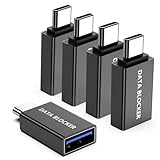
- ✨ Absolutely Safe: Features an internal physical data line cut design, permanently disconnecting the data pins in the USB interface, leaving only the power pathway, effectively eliminating the risk of data leakage.
- ⚡ Fast Charging Without Slowdown: usb-c to usb-a data blocker Adapter supports charging up to 100W and is compatible with multiple fast charging protocols. Charging speed is the same as the original charger, ensuring both safety and efficiency.
- 🔗 Wide Compatibility: Suitable for all devices that use various charging interfaces. Whether it’s iPhone, Android phones, iPad, tablets, Bluetooth headsets, or power banks, just plug and play.
- 👌 Compact and Portable: The usb-c male to usb-a female data blocker Adapter weighs only 3.95 grams, as compact as a USB drive. Protects safe charging anytime, anywhere.
- 🎯 Plug and Play: No drivers, no apps, no complicated setup required. Simply insert into a public USB port and connect your charging cable to start safe charging.
Check VPN compatibility before enabling this approach. Android does not allow two VPNs to run at once, so a filtering app that uses a local VPN may require you to turn off an existing VPN or use a compatible configuration. AdGuard also says its app is not published on Google Play and describes other distribution options; follow the vendor’s current instructions and consider the source before installing an app outside the Play Store.
4. Expect some ads to remain
A network-level filter may not be able to distinguish an ad from wanted content when both come from the same domain. The AdBlock Help Center notes this limitation for mobile VPN-based blocking and describes limited YouTube blocking in supported mobile contexts. That does not mean DNS filtering or a local filtering app will remove ads from YouTube’s Android app, every game, or every other service.
Rank #4

- Removes all ads in Qizzle free version
- optimized layouts for wide range of Android devices (phones and tablets)
- fun and instructive topics
- exclusive settings include next letter hint and capitalization
- online leaderboards
5. Check the service’s own ad controls
When one streaming service, game, or social app keeps showing ads, check that service’s settings and official information for any ad-free option. This is especially relevant when ads are delivered alongside the content in a way that network filters cannot separate. Availability and terms differ by service, so confirm them with the service itself.
Recommended Free Tools
Quick Recap
Best Value
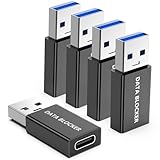
- ✨ Absolutely Safe: Features an internal physical data line cut design, permanently disconnecting the data pins in the USB interface, leaving only the power pathway, effectively eliminating the risk of data leakage.
- ⚡ Fast Charging Without Slowdown:The USB-A to usb-c data blocker Adapter supports charging up to 100W and is compatible with multiple fast charging protocols. Charging speed is the same as the original charger, ensuring both safety and efficiency.
- 🔗 Wide Compatibility: Suitable for all devices that use various charging interfaces. Whether it’s iPhone, Android phones, iPad, tablets, Bluetooth headsets, or power banks, just plug and play.
- 👌 Compact and Portable: The model weighs only 5.0 grams, as compact as a USB drive. Protects safe charging anytime, anywhere.
- 🎯 Plug and Play: No drivers, no apps, no complicated setup required. Simply insert into a public USB port and connect your charging cable to start safe charging.
Product prices and availability are accurate as of the date/time indicated and are subject to change. Any price and availability information displayed on Amazon at the time of purchase will apply.

