
Quick wins for a faster PC:
Clear out junk files and repair common Windows errorsFree Scan →Scan for outdated or missing drivers - takes under a minuteDriver Scan →Repair Windows errors before they cause bigger problemsFix Now →iTechGuides is reader-supported. When you buy through links on our site, we may earn an affiliate commission. As an Amazon Associate I earn from qualifying purchases. Learn more
There is no consumer iCloud Activation Lock tool that can be recommended as a reliable, permanent replacement for the owner’s Apple Account, Apple Support, or an organization administrator. Activation Lock is enforced through Apple’s activation servers. In the normal consumer case, the associated Apple Account credentials—or, where Apple supports it, the previously used device passcode—are required.
The 15 names and methods below are therefore a market survey, not a ranking of guaranteed unlockers. Some are vendor-claimed commercial utilities, some are narrow jailbreak or legacy workflows, one is a legitimate organization-management method, and several are high-risk claims. A secondhand iPhone or iPad that shows “iPhone Locked to Owner” should generally be returned rather than “fixed” with bypass software.
First, identify which lock you are dealing with
“iCloud lock” is a common but imprecise name for Activation Lock. It is different from several other Apple protections:
- Screen passcode: the code used to unlock the device. Reset utilities often advertise help with this, but removing a screen passcode does not necessarily remove Activation Lock.
- Apple Account password: the account credential associated with Find My and Activation Lock. Apple now uses “Apple Account” in place of “Apple ID,” although many tools and older articles still use Apple ID.
- Activation Lock: an ownership check performed by Apple’s activation servers when an iPhone or iPad is activated, erased, restored, or set up.
- Remote Management or MDM: an organization’s management enrollment. It may appear during setup and is controlled by an employer, school, or other organization—not by a general consumer unlock utility.
These protections can overlap. For example, a program may be able to reset a forgotten screen passcode while the device still asks for the previous owner’s Apple Account during setup.
#1 Best Overall
![2Pack Apple Original Cable [Apple MFi Certified] Lightning to USB Cable Compatible iPhone 13/12/11 Pro Max/XS MAX/XR/XS/X/8/7/Plus/6S iPad AirPods,iPod Touch (1M/3.3FT) Original Certified - White](https://m.media-amazon.com/images/I/316Eh2ikADL._SL160_.jpg)
- [Fast Charging & Sync] - iPhone Charger Cord Max 2.4 output current, high quality copper wire, improve charging and data transfer speed of iPhone charging cable. iPhone Lightning Cable ensures faster charging time and keeps your device safer.
- [Perfect comptibility] - iPhone lightning cables compatible with iPhone 14/14 Plus/14 Pro/14 Pro Max/iPhone 13/13 mini/13 Pro/13 Pro Max/12/12 mini/12 Pro/12 Pro Max/11/11 Pro/11 Pro Max/SE 2/XS/XS Max/XR/X/8Plus/8/7Plus/7/6s Plus/6s/6 Plus/6/5s/5c,iPad,AirPods
- [MFi Certified] - The lightning cable has an original lightning chip inside. Make sure it's compatible with your iPhone and charges your device safely. Enjoy fast data transfer, sync and charging.
- [Superior Durability] - iPhone lightning cable are made of top quality materials and coated with premium TPE. Passed 10,000 flex tests and won't get tangled for extra protection and durability.
- [What you get?] - 2x 3.3ft Mfi Certified iPhone Charging Cable. If you have any quality problems with our products, please feel free to contact us. We provide 24/7 customer support
How Activation Lock works
Activation Lock turns on automatically when Find My is enabled. When the device is activated or recovered, it contacts Apple to check its status. If the device remains linked to an Apple Account, Apple normally requires that account’s credentials before Find My can be disabled, the device can be erased for transfer, or setup can be completed. Apple explains the mechanism and the ownership requirements in its Activation Lock support documentation.
A factory reset does not change the ownership record stored by Apple. That is why a phone can look freshly erased and still stop at the Activation Lock screen. A third-party program that skips part of Setup Assistant is not necessarily changing Apple’s server-side record, and it may stop working after an erase or reset.
The legitimate ways to remove Activation Lock
1. Use the linked owner’s credentials
If you are the owner, enter the Apple Account credentials requested on the device. If you can access the device, the usual transfer sequence is to turn off Find My, sign out of the Apple Account, and then erase the device from Settings. Labels vary slightly by iOS or iPadOS version, but the relevant paths are generally:
Do these 3 things before closing this tab:
1Repair Windows errors before they cause bigger problems2Scan for outdated or missing drivers - takes under a minute3Clear out junk files and repair common Windows errors- Settings > [your name] > Find My > Find My iPhone/iPad, then turn off Find My when prompted.
- Settings > [your name] > Sign Out, if the device is being transferred.
- Settings > General > Transfer or Reset iPhone/iPad > Erase All Content and Settings.
Do not give those credentials to a website or technician who says they need to “unlock” the phone for you. Enter them only into Apple’s own interface when you are physically setting up or managing your device.
2. Use the previously used device passcode where Apple supports it
Apple’s security documentation lists the previously used device passcode as an unlock method for supported unsupervised iPhone, iPad, Apple Vision Pro, and Mac scenarios. This does not mean any passcode will work on every device or every version. If Setup Assistant offers the previous passcode as an option, it is an Apple-supported path; a third-party tool cannot create a valid passcode for a device it does not own.
3. Have the previous owner remove the device remotely
For a used device, the clean solution is for the seller to remove it from their Apple Account. The seller can use Apple’s Find My management tools to select the device, erase it if necessary, and remove it from the account. The buyer should then restart setup and verify that the device reaches the normal Hello screen without asking for the former owner’s account.
Rank #2

- 1080P HD Visuals: Experience your iPhone or iPad content on the big screen with this adapter that supports up to 1080P (HD) resolution, mirroring everything from photos and movies to presentations and games onto your HD-equipped TV, projector, or monitor with crystal-clear clarity
- Stable & Delay-Free Performance: Equipped with an MFi certified chip, this adapter ensures a stable and lag-free video output, allowing you to enjoy seamless streaming, gaming, and presentations without frustrating delays
- True Plug and Play Simplicity: This adapter offers effortless connectivity by simply plugging it in with no extra HD cable needed, featuring a 6.6ft length that provides convenient reach and durable construction for long-lasting performance with no settings adjustments required on your iPhone or iPad
- Universal iOS Compatibility: This cable adapter is widely compatible with a vast range of Apple devices, including iPhone 14/14 Plus/14 Pro/14 Pro Max/13/13 Pro/13 Pro Max/13 Mini/12/12 Pro/12 Pro Max/12 Mini/11/11 Pro/11 Pro Max, iPhone X/XR/XS/XS Max, iPhone 8/7/6 Plus, iPhone 5/5S/5C/SE, iPad, iPod, and other devices with a compatible interface, supporting all iOS versions for a seamless experience
- Extended Cable Length: The 6.6 feet cable length provides flexibility and convenience, allowing you to comfortably connect your device to your TV or projector from a distance without being restricted by short cables
Do this before paying whenever possible. If the seller is absent, refuses, or says a bypass program is required, treat that as a serious reason to cancel the transaction or request a refund.
4. Submit an Apple Activation Lock support request with proof of purchase
If you legitimately own the device but cannot regain access to the associated account, Apple provides an Apple Activation Lock support request route for cases with acceptable proof of purchase. Apple says the receipt should clearly identify the device and include information such as the purchase date, price, receipt or invoice number, reseller contact information, and, when normally listed, the serial number.
A marketplace message, an unverifiable screenshot, or a serial number by itself should not be assumed to meet Apple’s documentation requirements. Approval is Apple’s decision; no independent unlock website can guarantee that Apple will remove the lock.
5. Use an organization’s managed bypass code
Supervised devices owned by a business or school can be managed through Apple Business Manager, Apple School Manager, and mobile-device-management software. In an eligible deployment, the administrator may have an escrowed Activation Lock bypass code or may issue a server-side management command. Apple documents this organization workflow in its Activation Lock security guide.
This is not a retail bypass product. A private buyer cannot legitimately apply a company’s bypass code to an unrelated secondhand iPhone, and an organization should contact its own MDM administrator rather than a consumer unlock site.
PC Slower Than It Used to Be?
A free scan shows the junk files, broken settings and background clutter dragging Windows down - then fixes them in one click.Free scan · Windows 10 & 11Outdated Drivers Are Slowing You Down
One free scan finds every outdated or missing driver and matches the right update for your exact hardware.Free scan · exact hardware matchThe 15 names and methods compared
The first eight names below appear in a comparison article that reports vendor and publisher compatibility and pricing claims. That source does not establish a controlled, independent success rate, so the claims should not be read as guarantees. CheckM8’s own documentation also describes restrictions and distinguishes skipping an activation step from permanently disconnecting a device from its Apple Account.
Rank #3
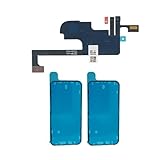
- RESTORE SCREEN-OFF DURING CALLS: Does your screen stay on when you hold the phone to your ear? A faulty proximity sensor is the cause. This sensor flex restores automatic screen-off functionality during calls, preventing accidental taps on your cheek and saving battery life.
- FACE ID COMPATIBLE: Unlike older models, the proximity sensor for this device is NOT encrypted with the Face ID module. Replacing this cable will NOT disable your Face ID, allowing you to retain secure facial recognition while restoring essential sensor.
- RESTORE INTERNAL PROTECTION: Every kit includes TWO high-quality screen adhesive seals (one for use, one for backup). Opening your device destroys the factory bond; our custom-cut gaskets help restore dust and water resistance, ensuring a professional, well-protected repair.
- PRECISION ENGINEERING: Features an integrated front microphone, a high-sensitivity Ambient Light Sensor (ALS), and reliable connectors for stable signal transmission. Designed for reliable proximity detection and front-facing audio capture. Also targets the sensor fault most commonly associated with Panic Log 0x200000 — the code frequently seen in 3-minute restart loop cases on this model. Perfect fit for A2649, A2881, A2882, A2883, and A2884.
- WHAT YOU LOSE — TRUE TONE & AUTO-BRIGHTNESS: While Face ID is fully retained, both True Tone and Auto-Brightness require original serialized sensor data. Replacing this part will permanently disable these two features — you will need to manually adjust screen brightness after repair. This is normal behavior for ALL third-party proximity sensor replacements. Professional installation is highly recommended.
| # | Tool or method | What the evidence supports | Practical verdict |
|---|---|---|---|
| 1 | CheckM8 Activation Lock Bypass | CheckM8 advertises paid and free workflows for selected iPhone, iPad, and Intel/T2 Mac scenarios. Its own material describes processor and model restrictions, some tethered solutions, and the possibility that a bypass is triggered again after a factory reset. It distinguishes bypassing an activation step from permanently disconnecting the Apple Account. | Limited vendor claim, not an Apple-approved permanent unlock. Compatibility and persistence must be verified for the exact device. |
| 2 | Tenorshare 4MeKey | A commercial consumer utility marketed for Activation Lock-related scenarios. Current compatibility and the advertised result depend on the exact hardware and software version; the available comparison is not independent testing. | Unverified commercial claim. Do not infer a universal or permanent removal. |
| 3 | iToolab UnlockGo | A paid utility with selected iOS and device-support claims reported by the comparison source. Apple’s server-side ownership record is not shown to be changed. | Limited and version-dependent. Verify the exact model and iOS or iPadOS version before considering it, and do not treat marketing compatibility as proof. |
| 4 | AnyUnlock | Advertised as a commercial lock-removal product. The available evidence reports vendor or publisher claims rather than a reproducible test across current devices. | Unverified commercial claim. It is not a substitute for the owner’s credentials or Apple’s support process. |
| 5 | TunesKit Activation Unlocker | Reported as a paid utility with support limited to particular iOS ranges in the comparison material. Apple hardware, iOS releases, and server behavior can change independently of the software. | Narrow, potentially stale compatibility. Do not assume that a version listed in an old article remains supported. |
| 6 | Wondershare Dr.Fone Screen Unlock | A broader commercial toolkit with functions related to screen unlocking, device reset, MDM, and Activation Lock. Those functions address different problems and should not be conflated. | Read the exact function carefully. A screen-passcode or reset feature is not evidence of permanent Activation Lock removal. |
| 7 | Foneazy Unlockit iCloud Remover | Described in the comparison source as a Mac-compatible workflow with claims for selected older iOS versions. | Limited vendor-claimed workflow. It should not be presented as a universal solution for current iPhones or iPads. |
| 8 | iMyFone iBypasser | Listed with selected device and iOS-version claims. The reviewed evidence does not provide independent, reproducible testing that would justify a success-rate claim. | Unverified and version-dependent. Avoid “high success rate” language unless supported by transparent testing. |
| 9 | Checkra1n-based legacy workflows | Jailbreak-adjacent methods that depend on particular hardware and software conditions. A jailbreak or Setup Assistant workaround is technically different from changing Apple’s account association. | Legacy and narrow. Not a current universal consumer unlock, and often unsuitable for an ordinary secondhand buyer. |
| 10 | Sliver | A legacy or jailbreak-adjacent name found in discussions of activation workarounds. No source reviewed here independently validates it as a current universal consumer solution. | Unverified. Treat claims of effortless permanent removal as a warning sign. |
| 11 | PurpleSliver | Another legacy or jailbreak-adjacent workflow. Its applicability depends on specific device conditions and is not equivalent to an Apple-authorized account removal. | Unverified and narrow. Do not rank it as a dependable alternative to Apple Support. |
| 12 | Palera1n and similar jailbreak workflows | Jailbreak-related approaches are tied to particular chip generations, models, and operating-system conditions. Even when a setup screen can be bypassed, that does not demonstrate permanent server-side removal. | Technical workaround category, not a general unlock. It may be tethered, temporary, or unusable after a reset. |
| 13 | DNS-based “activation bypass” methods | These generally attempt to redirect or interfere with part of the setup process. They do not normally remove the Activation Lock status from Apple’s servers and may provide only partial access. | Temporary or incomplete at best. A device that works only until the next reset is bypassed, not unlocked. |
| 14 | IMEI/FMI OFF and server-side unlock websites | These sites may promise a permanent result from an IMEI or serial number. Apple’s documentation describes enforcement through its activation servers and authorized account or organization credentials, not a public consumer IMEI-unlock channel. | Highest-risk category. Do not send payment, account credentials, identity documents, or remote access based on an IMEI-only promise. |
| 15 | Apple Business or MDM Activation Lock bypass codes | Unlike the other entries, this is a documented and legitimate category—but only for eligible organization-owned, supervised or organization-linked devices managed by the owning organization. | Legitimate only in the organization’s workflow. It is not a consumer tool for a privately purchased locked phone. |
Why “bypass” and “removal” must not be treated as the same result
A permanent removal means that the device is no longer associated with the previous Apple Account and can be erased, activated, updated, and transferred normally. A bypass may instead mean that one part of Setup Assistant was skipped under a narrow set of conditions.
Ask what happens in each of these tests before believing a provider’s claim:
- Can the device be erased and activated again without the previous owner?
- Does it remain usable after a factory reset?
- Does it support normal Apple Account sign-in, iCloud services, Find My, cellular activation, and software updates?
- Can it be transferred to another owner without repeating the workaround?
- Does the provider explain the exact model, processor, iOS or iPadOS version, and tethering requirements?
If the answer depends on keeping the device in a particular state, connecting it to a computer after every restart, or avoiding another reset, the result is a workaround—not ownership transfer.
The Tool Desk
Outbyte Driver Updater FREEFix the driver behind crashes, sound loss and screen glitchesFind Drivers →Outbyte PC Repair FREERepair Windows errors before they cause bigger problemsFix Now →How to avoid an Activation-Locked device when buying used
- Ask the seller to erase it in front of you. The device should reach the Hello screen without requesting the seller’s Apple Account.
- Begin setup far enough to test ownership status. Stop if you see “iPhone Locked to Owner” or a request for the previous owner’s account.
- Do not accept “you can remove it later.” The seller should remove the device from Find My before the sale is final.
- Keep the original invoice or receipt. This may be important if you later need Apple’s support process.
- Use payment and return protection. A seller who insists on cryptocurrency, gift cards, wire transfer, or an urgent off-platform payment removes important recovery options.
Apple specifically advises buyers not to accept a used iPhone or iPad that displays “iPhone Locked to Owner” or asks for the previous owner’s Apple Account. A marketplace’s “refurbished” label by itself is not proof that Activation Lock has been cleared; look for explicit account-removal checks and meaningful buyer protection.
Warning signs of a fake or dangerous unlock service
Apple advises users not to share passwords, verification codes, or other security information and recommends downloading software only from trusted sources. The FTC’s guidance on technical-support scams also warns about requests for remote access, payment, credentials, and malicious software. The following combination should end the conversation:
- A promise of a guaranteed permanent unlock from only an IMEI or serial number.
- A request for your Apple Account password, two-factor authentication code, recovery key, or trusted-device approval.
- A demand for gift cards, cryptocurrency, wire transfer, or an urgent payment.
- A request to install remote-access software so an unknown operator can control your Mac or PC.
- An unsigned utility, suspicious profile, or configuration file with no trustworthy provenance.
- A claim that Apple, the police, or a carrier requires you to pay immediately to “release” the phone.
- A refusal to explain whether the result survives erase, reset, reboot, or transfer to another owner.
For more background, see Apple’s security and privacy guidance and the FTC’s advice on how to spot and report tech-support scams.
Rank #4

- Preview your shots in real time while using your phone's superior rear camera.
- The 3.5-inch high-res touchscreen gives you total control of your phone with screen mirroring to frame your shots perfectly every time.
- Plug in and play, no charging required. Shoot in 4K with instant preview for a true "what you see is what you get" experience.
- (Light edition) Co-developed with beauty-tech experts AMIRO, it offers 3 colors and 5 brightness levels for a glowing complexion, even in low light.
- Premium cover that protects the screen from scratches during storage and also secures the cable when not in use.
What to do in common situations
You bought a locked phone from a private seller
Do not install a bypass tool first. Photograph the screen, contact the seller in writing, request account removal or a refund, and use the marketplace’s dispute process if necessary. If the seller cannot remove the device, the transaction did not deliver a usable, transferable iPhone or iPad.
You have a receipt but the original account is inaccessible
Collect the detailed proof-of-purchase information Apple requests and submit the Activation Lock support request. Avoid providers that claim to have a private route into Apple’s activation servers. They cannot legitimately replace Apple’s ownership review.
The device belongs to an employer or school
Contact the organization’s IT or MDM administrator. Do not erase or modify the device in an attempt to remove management. The organization may have an escrowed bypass code or a server-side command, but only its authorized administrator can use that workflow.
The device is lost or may be stolen
Do not try to defeat its protection. Use Find My, mark it as lost, contact the carrier or relevant authorities, and follow the owner’s recovery process. If you found the device, return it through an appropriate channel rather than seeking a bypass.
The lock is gone but the device has a physical fault
Physical repair is a separate issue from account ownership. After the lock has been legitimately resolved, a precision iPhone repair tool kit may be relevant for an experienced owner or repair technician working on a device they are authorized to repair. It cannot remove Activation Lock, change Apple’s server record, or make a questionable secondhand purchase legitimate.
What’s actually slowing this PC down?
Pick the symptom - the matching free tool is one click away.
A safer decision framework
| Your situation | Best next action | What not to do |
|---|---|---|
| You are the account owner | Use the Apple Account credentials or an Apple-supported previous-passcode option. | Pay a third party to enter or “recover” your credentials. |
| You are buying used | Have the seller remove Find My and verify setup before payment. | Buy a phone that says “Locked to Owner” because the price is attractive. |
| You have legitimate proof of purchase | Use Apple’s Activation Lock support request. | Assume an IMEI website can guarantee Apple’s decision. |
| The device is organization-owned | Ask the organization’s administrator to use its MDM controls or bypass code. | Use a consumer jailbreak or pay an outside “MDM removal” service. |
| The device is lost or stolen | Use Find My and report or return it. | Attempt to bypass the ownership protection. |
Bottom line on the “best” tool
The best solution is not number 1, number 2, or any other consumer bypass utility. It is the legitimate path that matches the device’s ownership:
- Owner: Apple Account credentials or an Apple-supported passcode option.
- Secondhand buyer: seller removal before purchase, or a return and refund.
- Documented owner without account access: Apple Support with acceptable proof of purchase.
- Business or school: the organization’s Apple and MDM administrator.
Most products marketed as iCloud Activation Lock removers either target narrow legacy conditions, provide a temporary or tethered setup workaround, or make claims that cannot be independently verified from the available evidence. Treat any promise of a universal, permanent unlock—especially one based only on an IMEI—as a risk signal rather than a recommendation.
Best Value
![Fotbor for iPhone 14 Pro Privacy Screen Protector, [2 Pack] Privacy Screen iPhone 14 Pro, Anti Spy Private Full Coverage, Shockproof Anti-Scratch 9H Tempered Glass, iPhone 14 Pro Accessories 6.1 Inchd](https://m.media-amazon.com/images/I/31BpNFw-RLL._SL160_.jpg)
- 【Excellent Privacy Protection】 Our Privacy Screen iPhone 14 Pro made of high quality materials, have better privacy performance. It can effectively safeguard your privacy from people near you who may be peeking. The best choice for buses, elevators, subways or other public places.
- 【Shatterproof and Scratch-Resistant】 iPhone 14 Pro screen protector privacy glass made of 9H super strong military explosion-proof glass, and the strengthened edge design ensure the corners of the screen are protected well, which not only shock-proof, also protecting your screen from scratches to high impact drops.
- 【Bubble-free & Anti-Fingerprint】The iPhone 14 Pro tempered glass screen protector will self-expel air bubble when automatically bonding with the screen. Coated with hydrophobic and oleophobic clear layers on the glass protector can against oil residue from fingerprints from long-term use.
- 【Sensitive Touch】- The 0.33 mm super-thin glass preserves touchscreen sensitivity allowing it to respond accurately to your touch. Support 3D Touch / Haptics Touch.
- 【Compatible Model and Lifetime Warranty】 Specially Designed for iPhone 14 Pro 6.1 Inch only. Included 2 Pack iPhone 14 Pro Privacy Screen Protector. We provides lifetime service for this screen protectors. If you have any problems, please feel free to contact us. we will provide you with satisfactory service within 24 hours.
Frequently Asked Questions
Can a factory reset remove iCloud Activation Lock?
No. Erasing the device removes local data, but Activation Lock remains associated with the Apple Account on Apple’s activation servers until the owner or an eligible organization removes it.
Is a DNS activation bypass a permanent unlock?
Generally no. DNS-based methods may interfere with part of setup, but they do not normally remove the server-side ownership record. A device that stops working after reset should be considered bypassed, not unlocked.
Can Apple remove Activation Lock without the previous owner’s password?
Apple may review an Activation Lock support request when the legitimate owner has acceptable proof of purchase. Apple’s receipt requirements include identifying information such as the device, purchase date, price, invoice or receipt number, reseller contact information, and, when normally listed, the serial number. Approval is not guaranteed.
What should I do if a seller says an Activation-Locked iPhone can be fixed with software?
Ask the seller to remove the device from Find My before payment. If they cannot or will not do so, request a refund or use the marketplace dispute process. Do not provide your Apple Account credentials or install remote-access software.
Are MDM Activation Lock bypass codes available to private buyers?
No. Apple’s documented bypass-code workflow is for eligible organization-owned, supervised or organization-linked devices and is controlled by the owning organization’s administrator.
The Bottom Line
Bottom line: Activation Lock is an Apple server-side ownership control, not an ordinary screen lock. The dependable options are the linked owner’s credentials, an Apple-supported passcode path where offered, seller removal, Apple Support with acceptable proof of purchase, or an organization’s authorized MDM workflow. The remaining tools in this comparison should be treated as narrow, temporary, unverified, or high-risk—not as guaranteed permanent unlockers.
Quick Recap
Product prices and availability are accurate as of the date/time indicated and are subject to change. Any price and availability information displayed on Amazon at the time of purchase will apply.

