
Free tools Windows power users keep installed
One-click scans. No signup required.
iTechGuides is reader-supported. When you buy through links on our site, we may earn an affiliate commission. As an Amazon Associate I earn from qualifying purchases. Learn more
It depends on which restore option you choose. On the PS3, Restore Default Settings resets system settings; Restore PS3 System deletes all data on the system hard disk and returns settings to their defaults. Back up what you want to keep before a full restore, but note that Sony says some data cannot be copied or backed up.
What the PS3 restore options do
Sony’s instructions distinguish two actions that sound similar but have very different consequences. The menu labels and paths below come from the CECH-2501B manual; they may differ by PS3 model, region, or system software, so check the wording on your console before confirming.
| Option | Effect | Menu path in the cited manual |
|---|---|---|
| Restore Default Settings | Returns current settings to their defaults. Sony does not describe this option as deleting all data on the hard disk. | Settings → System Settings → Restore Default Settings |
| Restore PS3 System | Deletes all data on the system hard disk and restores settings to their defaults. After the operation and restart, the initial setup screen appears. | Settings → System Settings → Restore PS3 System |
These effects are documented in Sony’s CECH-2501B PS3 manual. Choose Restore Default Settings if you only intend to reset settings; do not select Restore PS3 System for that purpose.
What’s actually slowing this PC down?
Pick the symptom - the matching free tool is one click away.
Back up the data you want to keep
Sony documents a Backup Utility at Settings → System Settings → Backup Utility, which backs up hard-disk data to a USB mass storage device. The manual also describes copying or moving selected supported files—such as game saves and video, music, or photo files—to USB storage.
#1 Best Overall

- Easily store and access 2TB to content on the go with the Seagate Portable Drive, a USB external hard drive
- Designed to work with Windows or Mac computers, this external hard drive makes backup a snap just drag and drop
- To get set up, connect the portable hard drive to a computer for automatic recognition no software required
- This USB drive provides plug and play simplicity with the included 18 inch USB 3.0 cable
- The available storage capacity may vary.
A backup is not a guarantee that every item can be preserved or restored. Sony warns that some data cannot be copied, moved, or backed up, and some copyright-protected content may not be included. For important data the utility cannot back up, Sony recommends selectively copying or moving it to USB storage before using the utility. Check that the files you care about are present and readable before starting the restore. See Sony’s Backup Utility instructions.
Quick Format or Full Format?
When you select Restore PS3 System, the formatting choice affects the operation’s duration and how suitable it is for sensitive data. Sony gives no completion-time estimate, so do not rely on a particular number of minutes or hours.
Rank #2
- Easily store and access 1TB to content on the go with the Seagate Portable Drive, a USB external hard drive.Specific uses: Personal
- Designed to work with Windows or Mac computers, this external hard drive makes backup a snap just drag and drop. Reformatting may be required for Mac
- To get set up, connect the portable hard drive to a computer for automatic recognition no software required
- This USB drive provides plug and play simplicity with the included 18 inch USB 3.0 cable
- The available storage capacity may vary.
| Choice | What Sony says | When it matters |
|---|---|---|
| Quick Format | Shortens the time required for restoration, but erased data might be recoverable in some cases with a special tool. | It is the quicker format, but Sony does not describe it as secure erasure. |
| Full Format | Sony recommends this when formatting a hard disk that contains important or sensitive data. | Use Sony’s recommendation when the console’s drive contains sensitive information, such as before passing on or disposing of the console. |
The format guidance is in Sony’s PS3 system restoration instructions.
Crashes, No Sound, or Screen Glitches?
Random freezes, missing sound and display glitches usually trace back to one bad driver. Find and replace yours safely.Free scan · under a minuteWindows Errors? Fix Them Before They Spread
Repair common Windows errors and clear accumulated junk for a smoother, more stable PC - no reinstall needed.Free scan · no reinstallWhat to know before starting
- Restoration cannot be undone. Sony says changes made by restoration cannot be undone and that data loss or corruption is the user’s responsibility.
- Do not turn off the console during the operation. Sony warns that canceling before it finishes may damage system software and require service or exchange. The power button and controller PS button are inactive during the operation.
- Protect data on both consoles before transferring. Sony’s Data Transfer Utility moves data from a source PS3 to a destination PS3, but deletes all data already stored on the destination. Back up anything wanted from that destination first. See Sony’s Data Transfer Utility instructions.
If system software needs to be reinstalled
Sony says that system software may need to be reinstalled in some cases, such as after initialization. Its current PS3 support instructions describe using a USB drive: format it as FAT32, create PS3/UPDATE folders, save the official update file as PS3UPDAT.PUP, connect the drive to the console, and follow the on-screen instructions. Because Sony’s software file and support directions can change, check the current PS3 system software page before beginning.
Quick Recap
Best Value

- 【Plug-and-Play Expandability】 With no software to install, just plug it in and the drive is ready to use in Windows(For Mac,first format the drive and select the ExFat format.
- 【Fast Data Transfers 】The external hard drives with the USB 3.0 cable to provide super fast transfer speed. The theoretical read speed is as high as 110MB/s-133MB/s, and the write speed is as high as 103MB/s.
- 【High capacity in a small enclosure 】The small, lightweight design offers up to 500GB capacity, offering ample space for storing large files, multimedia content, and backups with ease. Weighing only 0.35 Lbs, it's easy to carry "
- 【Wide Compatibility】Supports PS4 5/xbox one/Windows/Linux/Mac and other operating systems, ensuring seamless integration with game consoles,various laptops and desktops .
- Important Notes for PS/Xbox Gaming Devices: You can play last-gen games (PS4 / Xbox One) directly from an external hard drive. However, to play current-gen games (PS5 / Xbox Series X|S), you must copy them to the console's internal SSD first. The external drive is great for keeping your library on hand, but it can't run the new games.
Rank #4
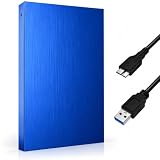
- FAST & RELIABLE USB 3.0 PERFORMANCE: Enjoy quick file transfers and smooth data access with USB 3.0 technology for backing up photos, videos, documents, and media libraries
- PORTABLE 2.5-INCH EXTERNAL HARD DRIVE: Slim, lightweight, and pocket-sized design makes it easy to carry anywhere for work, travel, gaming, or everyday storage needs
- WIDE COMPATIBILITY ACROSS DEVICES: Works seamlessly with laptops, desktops, PCs, gaming consoles, and more. Plug and play with no software installation required
- DURABLE & STYLISH DESIGN: Built with a sturdy Aluminium housing and a modern geometric finish for improved durability, heat resistance, and a premium look
- BUILT-IN LED INDICATOR FOR EASY MONITORING: LED activity light clearly shows power and data transfer status, so you always know when your drive is in use
Rank #3

- Ultra fast data transfers: the external hard drive works with USB 3.0 thickened copper cable to provide super fast transfer speeds. Theoretical read speed is as high as 110MB/s-133MB/s and write speed is as high as 103MB/s.
- Ultra-thin and quiet: the motherboard adopts a noise-free solution, giving you a quiet working environment. Lightweight and portable size designed to fit in your pocket for easy portability.
- Compatibility: compatible with PS4/xbox one/Windows/Linux/Mac/Android,Stable and fast downloading on game console no difference from fast transmission when using on PC.
- Plug and Play: no software to install, just plug it in and the drive is ready to use. The hard drive chip is wrapped with aluminum anti-interference layer to increase heat dissipation and protect data
- Package Contents: 1* portable hard drive, 1 *USB 3.0 cable, 1*USB to type C adapter,1 *user manual, shell packaging, three-year manufacturer's warranty and free technical support services
Product prices and availability are accurate as of the date/time indicated and are subject to change. Any price and availability information displayed on Amazon at the time of purchase will apply.

