
Recommended Free Tools
iTechGuides is reader-supported. When you buy through links on our site, we may earn an affiliate commission. As an Amazon Associate I earn from qualifying purchases. Learn more
Windows does not assign Quick removal or Better performance to a motherboard USB port. Those options are policies for an external storage device. If a drive’s Policies tab is missing, inspect that drive’s properties; if the port does not detect devices, troubleshoot the connection separately.
What Windows’ removal policy controls
Windows’ Quick removal and Better performance settings govern how the operating system handles writes to external storage, such as USB drives and Thunderbolt-enabled external drives. They are not settings for an individual motherboard port. Microsoft documents the two choices in its Windows default media removal policy.
- Quick removal: Windows avoids disk-write caching, so the storage device can be disconnected without using Safely Remove Hardware. Write performance may be lower.
- Better performance: Windows can cache writes. Use Safely Remove Hardware before disconnecting; removing the device before pending writes finish risks data loss.
Microsoft says Quick removal has been the default policy since Windows 10 version 1809. The policy is associated with the external device, and remains in effect if you disconnect it and reconnect it to the same computer port.
What’s actually slowing this PC down?
Pick the symptom - the matching free tool is one click away.
There is also a driver-level DEVICE_REMOVAL_POLICY property. It describes whether a device is generally not removed, removed orderly, or removed suddenly; it is distinct from the two external-storage choices shown in Windows.
#1 Best Overall

- Suitable for: external interfaces of desktop computers and DIY computers (such as USB , HDMI, VGA,RJ45,DP etc)
- Purpose: To prevent the external interface of the computer and the idle interface of the motherboard from oxidized beacause of moisture , and to prevent the interface from entering dust or foreign objects.
- Usage: according to the standard interface design and manufacture, and like HDMI/USB dust plugs are designed with small handle, easy to install and remove, easy to clean, can be recycled after cleaning and drying.
- Material:The dust plug set is made of silicon.: soft, environmentally friendly, high temperature resistant, and will not be deformed after long-term use.
- Safety warning:Please inform children to prevent suffocation caused by accidentally swallowing the silicone cap.
Where to find the setting for an external drive
Connect the drive first, then open the properties for the storage device—not the motherboard port. Microsoft documents this route in its guidance on changing the default removal policy for external storage media:
- In File Explorer, identify the external drive.
- Open Disk Management, right-click the drive label, and select Properties.
- Select the Policies tab to view the available removal policies.
If you do not see Policies, open the drive’s Hardware tab, select the removable drive in the disk-drive list, and open that device’s Properties. Windows versions may arrange these tabs differently.
Rank #2
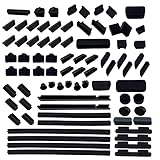
- DO NOT fit Macbook models. And before place the order, Do check these 25 types of port plugs can cover all the ports you need: USB 2.0/USB 3.0, RJ45, PS/2, Audio 3.5, RCA, TYPE C/USB C, USB Male, LPT, HDMI, DP, mini DP, SD Card Slot, VGA, COM, DVI, 1394-4, 13946-9, 1394-6, DDR, PCI, PCI-E, PCI X1, SATA, E-SATA, Extend USB/AUDIO
- These 80 pcs laptop and computer and motherboard port plugs are suitable for the ports of the most of general laptops, computers and motherboards, Like USB plug, HDMI plug, rj45 plug, mini DP plug, DDR plug, PCI plug and so on, they are commonly applied to protect the ports of the computers, the laptops and motherboard, but not for Apple computer and laptops
- These port anti-dust plugs are made of high quality silicone. They are durable and perfect for protecting laptop and computer and motherboard ports from dust, liquid and oxidation rust, keep the ports clean and durable
- 80 pcs anti-dust covers are included in the package. The numbers and the types of the plugs are listed below:
- 12x USB 2.0/USB 3.0 plug, 8x RJ45 plug, 6x Audio 3.5 plug, 6x HDMI plug, 6x DP plug, 4x TYPE-C/USB C plug, 2x USB Male plug, 1x LPT plug, 2x PS/2 plug, 2x RCA plug, 2x mini DP plug, 1x SD Card Slot plug, 1x VGA plug, 1x COM plug, 1x DVI plug, 1x 1394-4 p1x 1396-9 plug, 1x 1396-6 plug, 4x DDR plug, 2x PCI plug, 2x PCI-E plug, 4x PCI X1 plug, 6x SATA plug, 2x E-SATA plug, 2x Extend USB/AUDIO plug
If one USB port does not detect a device
A missing Policies tab does not show that a port has failed. First determine whether the problem is a missing setting for a drive or a port that does not recognize connected devices. For the second problem, check the physical connection and the device before drawing conclusions about the motherboard.
- Inspect the port and cable for visible damage, then test the device on a computer with a known-working USB port.
- If available, connect a known-good USB storage device to the suspect port. This helps distinguish a device problem from a port-specific problem.
- If detection still fails, check device and chipset drivers using guidance for your exact motherboard model. MSI’s motherboard USB port troubleshooting guidance recommends checking the port and cable, testing the device on another computer, and considering device software or chipset drivers.
- For Windows-side investigation, review the relevant USB controller and device entries in Device Manager. Microsoft explains how USB ports connect through host-controller hardware in its overview of USB host-side drivers.
The right diagnostic steps can depend on the motherboard model and Windows build. Without those details, a missing setting alone cannot establish the cause of a detection failure.
Rank #3
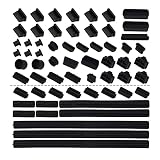
- Suitable for: External interfaces of desktop computers and DIY computers (such as USB moisture-proof, HDMI, VGA,RJ45 etc.), and idle interfaces on the motherboard (such as: RAM dust-proof, PCI-E, PCIX1, SATA, USB, HDMI, etc.)
- Purpose: To prevent the external interface of the computer and the idle interface of the motherboard from oxidized beacause of moisture , and to prevent the interface from entering dust or foreign objects.
- Usage: The computer dust cover kit is designed and manufactured according to the standard interface,can be easily installed and disassembled, easy to clean, can be reused after washing and drying.
- Material:The dust plug set is made of silicon.: soft, environmentally friendly, high temperature resistant, and will not be deformed after long-term use.
- Safety warning:Please inform children to prevent suffocation caused by accidentally swallowing the silicone cap.
Disconnecting a drive safely
If Better performance is enabled for the external storage device, use Safely Remove Hardware before unplugging it so cached writes can finish. With Quick removal, Windows avoids disk-write caching, which permits removal without that step, though performance may be lower.
Quick Recap
Best Value

- USB Port Cover Package: Total 45 pcs 6 Types 10x USB A female plugs, 5x USB A male plugs, 5x HDMI, 10x Headphone plugs, 10x USB Type C dust plug , 5x RJ45 ethernet port plugs.
- Effectively Protect the Port: The USB port caps can effectively protect the port of the device from dust, liquid intrusion, port rust, etc., resulting in poor internal connection and inability to use normally.
- Stable and Durable: The USB Dust Plug is made of soft silicone, which has good sealing performance and is not easy to fall off. Fits perfectly with your device port.
- Only protect, not destroy: The soft silicone material will not harm the inside of the device port, so you don't have to worry about it.
- Wide range of applications: Total 45 pcs 6 types are enough to be applied to many devices, such as your computer host, laptop, car USB ports, sockets, TVs, routers and so on to protect the ports that are not used frequently.
Rank #4

- Before place the order, Do check these 6 types of motherboard port plugs that can cover all the ports you need: DDR, PCI, PCI-E, PCI X1, SATA, Extend USB/AUDIO
- These 20 pcs motherboard port plugs are suitable for the ports of the most of general motherboards: DDR plug, PCI plug, PCI-E plug, PCI X1 plug, SATA plug, Extend USB/AUDIO plug, they are commonly applied to protect the ports of the motherboards
- These motherboard port anti-dust plugs are made of high quality silicone. They are durable and perfect for protecting motherboard ports from dust, liquid and oxidation rust, keep the ports of the motherboard clean and durable
- 20 pcs motherboard port anti-dust covers are included in the package. The numbers and the types of the plugs are listed below:
- 4x DDR plug, 2x PCI plug, 2x PCI-E plug, 4x PCI X1 plug, 6x SATA plug, 2x Extend USB/AUDIO plug
Product prices and availability are accurate as of the date/time indicated and are subject to change. Any price and availability information displayed on Amazon at the time of purchase will apply.

