
iTechGuides is reader-supported. When you buy through links on our site, we may earn an affiliate commission. As an Amazon Associate I earn from qualifying purchases. Learn more
If your Samsung fridge is beeping, first check that every door is fully closed and nothing is blocking it. Then look at the temperature display: a blinking temperature reading points to a high-temperature warning, while a displayed error code calls for model-specific troubleshooting. The beep alone does not identify the cause.
Why does my Samsung fridge keep beeping?
A door left open or unable to close is a common first thing to check. Samsung says most refrigerator models have a door alarm that sounds when a door is not shut. A temperature warning or an error indication can also involve beeping, so use the display and the refrigerator’s behavior—not the sound alone—to narrow down the cause. Samsung’s noise guidance distinguishes these signs.
How do I stop my Samsung refrigerator from beeping?
- Check that the sound is coming from the refrigerator. Samsung suggests unplugging the refrigerator to see whether the sound continues. Treat this only as a brief source check: do not leave the refrigerator unplugged, because that interrupts cooling. If the sound continues, it may be coming from another appliance or device.
- Close each door and check for obstructions. Open and firmly close the doors. Look for food containers, shelves, or drawers that prevent a door from seating properly. Confirm that the doors sit shut.
- Check the control panel and model manual. Some models provide a Door Alarm control. If your panel has one, consult the manual for your exact model to check whether the alarm is enabled and how to operate it. Do not assume that a button sequence from another refrigerator applies to yours.
- Read the display before resetting anything. A blinking temperature display and an error code point to different troubleshooting paths. Note or photograph any unfamiliar code so you can look it up or share it with support.
What does a blinking Samsung fridge temperature display mean?
Samsung says a blinking temperature display means the refrigerator temperature is too high. Its guidance identifies temperatures above 59°F as the condition associated with this warning. A door left open or a recent power outage may explain a temporary rise. Samsung’s temperature-display guidance says the display may take up to four hours to stop blinking as the temperature recovers, provided the refrigerator is working correctly.
PC Slower Than It Used to Be?
A free scan shows the junk files, broken settings and background clutter dragging Windows down - then fixes them in one click.Free scan · Windows 10 & 11Outdated Drivers Are Slowing You Down
One free scan finds every outdated or missing driver and matches the right update for your exact hardware.Free scan · exact hardware matchIf cooling seems abnormal, the warning does not clear, or food is not staying cold, do not treat the four-hour figure as a promise that the appliance is safe or functioning normally. Follow Samsung’s refrigerator cooling troubleshooting or contact Samsung Support.
#1 Best Overall

- COMPACT SIZE – Smaller than other AAA battery models. Fits modern or older fridges and freezers and stays discreet, keeping your appliance’s clean look.
- PROGRESSIVE ALERTS - Alert after 1 minute (lasting 2 seconds), a second alarm after 2 minutes (lasting 4 seconds) when the fridge door is still open or ajar.
- CONTINUOUS ALARM - Alert after 3 minutes (lasting 60 seconds) will help you close the fridge or freezer door in normal situations.
- LOUD SIREN – If the soft alerts are missed, Loud Mode triggers an additional 110 dB siren every 4 minutes (lasting 20 seconds). Activate using the SET button.
- FOUR MODES - Low (80dB), Medium (85dB), Normal (90dB with a beep every 10s), Loud (95dB, with a beep every 10s and a 110db Siren every 4 minutes).
How long should a door alarm take to sound?
The timing depends on the refrigerator. Samsung Gulf describes a Door Alarm control and an alarm after a door remains open for two minutes. A Samsung Dacor manual documents that behavior for the specific model family it covers, and says the alarm function is enabled at the factory on that unit. Those details are not universal: consult the manual for your refrigerator’s model and region. Samsung Gulf’s Door Alarm instructions and the Dacor refrigerator manual describe their respective controls.
What should I do if the display shows an error code?
An error code can point to a power event, communication issue, or another fault; the code matters more than the beep. Some codes, including 83E, 85E, 86E, and 88 88, may follow electrical interruptions or power anomalies. Look up the exact code in Samsung’s refrigerator error-code guide rather than guessing at a repair. If the code returns or you cannot identify it, photograph the display and contact Samsung Support.
Rank #2
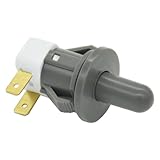
- Replaces Part Numbers: 2705488, AP5306252, PS4138763, EAP4138763. It can be used on most Samsung cecilware refrigerator door lights
- Why Need This: The ice maker will know the door is closed so it can dispense ice when the outside button is pressed, that's the switch which can reduce energy and save electricity
- Easy To Install: It only takes a few minutes to install, the important thing is you need to disconnect the power first, and find your switch's location, remove the cover with a screwdriver, then remove the old one and replace it with the new one, simple to use
- Worth Buying: Usually all samsung fridges use the same one so this is a great replacement part fits perfectly save your time and money
- Compatible model: RF263BEAESR/AA-03 RS25H5000SR/AA-00 RF28HDEDBSR/AA-04 RF23HCEDTSR/AA-01 RF26J7500SR/AA-02 etc. if you are not sure whether the model is suitable, please use the "Crtl+F" shortcut to search for the model you need, or contact us to help you check
When should I contact Samsung Support?
- The refrigerator is not cooling normally or the temperature warning persists.
- An error code returns after the relevant Samsung troubleshooting steps.
- The beeping continues after you have checked the doors, obstructions, and model-specific alarm control.
- You cannot identify the display indication or determine the next safe step from your model manual.
Alarm sounds, panel controls, error displays, and repair procedures vary by model and region. Use the refrigerator’s model number to find its manual and give that number and any recorded code to Samsung Support.
Quick Recap
Rank #4
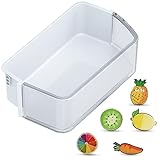
- ONLY for DA97-12650A Right Side Samsung Door Shelf! NOT for DA97-12657A Left Door Bin: Right side refrigerator replacement shelves ONLY for DA97-12650A, AP5620330, 2692337, PS4176653, DA63-07104A, DA63-06963A Samsung fridge door shelves. Notice: the replacement for Samsung french door refrigerator is NOT universal fridge door bin for Samsung, it ONLY for the part numbers we listed and ONLY fit for the upper slot on the right refrigerator-side door. It will Not fit for the bottom slots or the freezer-side door. Please check your part number, fridge models and slot location before purchase.
- How to Confirm Compatibility Before Purchasing: Step 1: Confirm Model Number: Find your fridge's model and serial number on the bottom left exterior or inside the top compartment. Ensure it matches the listed compatible models. Step 2: Correct Placement: Only for upper shelves of right side (Note: It will NOT fit the bottom slots or the freezer-side door). Step 3: Check Dimensions: Please refer to the detailed size in our 2nd image and measure the dimensions of the refrigerator bin in all directions (must include the side latches). Important Notice: Deviation of any side must be less than 1/8" or it will not fit! Double-check your measurements to ensure compatibility before purchasing.
- Fits These Models We Listed: Please Double-Check Compatibility! RF26HFPNBSR/AA, RF260BEAEBC/AA, RF260BEAESG/AA, RF260BEAESL/EM, RF260BEAESP/AA, RF260BEAESR/AA, RF260BEAEWW/AA; RF261BEAEBC/AA, RF261BEAESG/AA, RF261BEAESP/AA, RF261BEAESR/AA, RF261BEAEWW/AA, RF261BIAESR/AA; RF263BEAEBC/AA, RF263BEAEBC/CL, RF263BEAEBC/PE, RF263BEAESP/AA, RF263BEAESR/AA, RF263BEAEWW/AA, RF263TEAEBC/AA, RF263BEAESG/AA, RF263TEAESG/AA, RF263TEAESP/AA, RF263TEAESR/AA, RF263TEAEWW/AA. Notice: NOT for RF265/RF262 series.
- Come with 5 PCS Fridge Magnets: The bin for Samsung fridge shelf replacement with 5 PCS cute fridge magnets. The refrigerator magnets for Samsung rf260beaesr parts are print with varied exquisite fruit patterns, which can decorate your kitchen or office and makes your life more interesting.
- Premium Quality: DA97-12650A door shelf for Samsung refrigerator door bin is manufactured with premium materials, for durability, pollution-free, safe, hygienic and exact fit. Easy to install and clean, save your time and money.
Rank #3

- COMPACT SIZE – Smaller than other AAA battery models. Fits modern or older fridges and freezers and stays discreet, keeping your appliance’s clean look.
- PROGRESSIVE ALERTS - Alert after 1 minute (lasting 2 seconds), a second alarm after 2 minutes (lasting 4 seconds) when the fridge door is still open or ajar.
- CONTINUOUS ALARM - Alert after 3 minutes (lasting 60 seconds) will help you close the fridge or freezer door in normal situations.
- LOUD SIREN - Loud Mode includes an additional 110dB Siren every 4 minutes (lasting 20 seconds), activate using SET Button (4 beeps confirmation).
- FOUR MODES - Low (80dB), Medium (85dB), Normal (90dB with a beep every 10s), Loud (95dB, with a beep every 10s and a 110db Siren every 4 minutes).
Product prices and availability are accurate as of the date/time indicated and are subject to change. Any price and availability information displayed on Amazon at the time of purchase will apply.

