
Quick wins for a faster PC:
Clear out junk files and repair common Windows errorsFree Scan →Scan for outdated or missing drivers - takes under a minuteDriver Scan →Repair Windows errors before they cause bigger problemsFix Now →iTechGuides is reader-supported. When you buy through links on our site, we may earn an affiliate commission. As an Amazon Associate I earn from qualifying purchases. Learn more
A print that curls at the corners or comes loose usually has one of two problems: it never adhered well on the first layer, or it stuck at first and lifted later as the plastic cooled and shrank. Check when the failure begins before changing settings: first-layer failure calls for attention to the plate, leveling, and profile; later corner lift calls for managing shrinkage, drafts, and the part’s contact with the bed.
Why 3D prints warp or detach
As printed plastic cools, it contracts. If different parts of a model cool at different rates, stress can build until an edge or corner curls upward. Prusa notes that this is especially common with large objects and higher-temperature materials such as PC Blend, ASA, and ABS. Its goal is to minimize the thermal shock the part receives so it warps less (Prusa’s warping guide).
Poor first-layer adhesion is a related but distinct failure: the print may shift or detach because it did not bond adequately to the build plate at the start. UltiMaker’s S6 manual also identifies poor adhesion as a cause of warping, shifts, or complete detachment (UltiMaker S6 manual). Look at the print’s progress: an edge that lifts only after several layers points toward cooling and shrinkage, while a first layer that does not stay put calls for adhesion checks first.
Do these 3 things before closing this tab:
1Clear out junk files and repair common Windows errors2Scan for outdated or missing drivers - takes under a minute3Repair Windows errors before they cause bigger problemsFix the problem in a useful order
1. Start with the correct filament and printer profile
Use the recommended profile for your exact printer and filament before experimenting with temperatures. Material profiles account for differences in nozzle temperature, bed temperature, and cooling; there is no single bed-temperature setting that suits every filament, plate, and printer. If you use custom slicer settings, UltiMaker recommends checking them and trying a default Cura profile as a comparison (UltiMaker S6 manual).
#1 Best Overall

- WORKS ON MULTIPLE FILAMENTS: This versatile 3D printer glue is ideal for securing prints made with ABS, PLA, PETG, HIPS, and TPU filaments. This PLA glue's reliable bonding ensures your creations stay in place throughout all printing processes, making this adhesive glue an essential addition to your 3D printing supplies. Whether you are a professional or looking for gifts for 3D printer lovers, our adhesive glue guarantees smooth results across various filament types of all 3D printing projects. It is also compatible with TPU Flex filament.
- WORKS ON ALL SURFACES: Designed for flexibility, this 3D printer glue stick works seamlessly on different types of build surfaces like Flex Plate, Glass, PEI, Buildtak, Kapton, and more. The advanced formulation of this 3D printer adhesive glue ensures a secure grip on your 3D printer build plate for consistent and high-quality prints. Whether you are working with ABS glue or experimenting with different materials, this adhesive glue ensures reliable performance across every 3D printing surface.
- EASY TO USE: Applying this glue stick for 3D printing is effortless! Just shake, press, and apply to your active printing area. This 3D printer adhesive glue bonds seamlessly to the 3D printer build plate, reducing warping and delivering stable results. Compatible with various materials like PETG, it's the ultimate PETG glue for professional results. This 3D glue for 3D printing easily releases prints once cooled and cleans up with water, making our adhesive glue a staple for all 3D enthusiasts.
- LONG-LASTING ADHESIVE GLUE: Delivering over 100 prints, this 3D printer glue is built to last through multiple uses without reapplication. Perfect for all 3D printing materials, especially ABS, PLA, PETG, HIPS, and TPU filaments. It's the ultimate companion for hobbyists and professionals. This 3D adhesive glue provides ideal durability while remaining easy to apply. Whether using filament glue or other glue for 3D printing, it ensures strong bonds for consistent, high-quality prints every time. Magigoo MO2016 is also an essential addition to 3D printing accessories, supplies, and materials.
- ODOURLESS AND SAFE: This 3D printer adhesive glue is designed with your safety in mind. Completely odorless and non-flammable, this 3D printer glue is ideal for home, office, or educational settings, including workshops with kids. Whether you need a reliable adhesive glue for daily projects or a 3D printing adhesive for intricate designs, our adhesive glue delivers consistent results. Perfect for bonding ABS materials, this ABS plastic adhesive is a dependable choice for every printing hobbyist.
2. Clean and install the build plate as its maker specifies
Fingerprints, residue, or debris can interfere with adhesion. Clean the plate using the method approved for that specific surface, and make sure it is installed correctly. The directions are not interchangeable: Prusa recommends wiping its surface with IPA 90% or higher, while the UltiMaker S6 manual specifies IPA for flexible build plates and water for glass. Check your printer’s instructions rather than applying one cleaner to every plate (Prusa’s first-layer guide; UltiMaker S6 manual).
3. Check leveling and first-layer placement carefully
Confirm that both the plate and nozzle are clean before leveling. The nozzle needs to be positioned so the first layer adheres, but avoid compensating by pressing it excessively close to the plate. Prusa warns that too much Z squish can damage a steel sheet; PETG or PC can also bond too strongly to PEI when first-layer adjustment is excessive (Prusa’s first-layer guide).
Rank #2
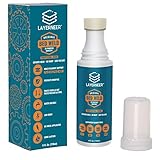
- THERMAL DYNAMIC COATING: Based on science, works like magic; Parts stick at hot and release when cooled; CHECK COMPATIBILITY IMAGE FOR YOUR SURFACE TYPE
- LONG LASTING: Print several times on a single coating; recharge with a wet sponge to get more prints out of a single application; Cost pennies per print
- LOW ODOR & WATER SOLUBLE: No harsh smells; No headaches; Easy to touch up or remove with water
- NO-MESS APPLICATOR: Built in foam tip makes applying the coating to your build plate surface simple and it won't accidentally spill
- WIDE FILAMENT COMPATIBILITY: Works with PLA, ABS, PETG, ASA, and CPE filaments for versatile 3D printing applications across multiple material types
If adhesion remains unreliable, Prusa’s guide suggests slowing the first three layers to about 75% and, for experimental materials, trying a 5–10°C heatbed increase. Treat those as contextual troubleshooting suggestions, not universal settings; return to the material and printer maker’s profile when deciding what is safe for your setup.
Recommended Free Tools
4. Add a brim to increase contact area
A brim adds printed material around the model’s base, giving it more area to grip the plate. It is particularly useful for a tall object with a small footprint or for several small parts. Prusa generally advises at least a 3 mm brim in its guide, but the effective width depends on the model and material (Prusa’s brim guide). Try this slicer adjustment before adding a surface product if the model’s footprint is the weak point.
Rank #3
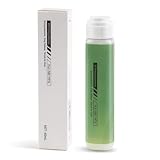
- 【Strong Adhesion】Liquid 3D printer glue is specially developed for 3D printing; it ensures consistent grip even during high-speed printing, prevents model lifting or warping, ensures a perfect first layer, and thereby increases printing success rates while reducing waste of filaments and time.
- 【Durable】The 3D Printer Glue provides strong bonding properties, requiring just a small amount per print. With 60ml, you can achieve lasting adhesion over many prints. For optimal results, it is recommended to reapply the glue before each printing session.
- 【Easy Print Release】Enjoy effortless removal of 3D prints after cooling, ensuring a hassle-free post-printing experience with 3D printer bed adhesive.
- 【Wide Compatibility】Ideal 3d printer bed adhesion solution for PLA, PETG, PET, ABS, ASA, and TPU. Adheres well to diverse 3D printing surfaces such as low-temperature, high-temperature, textured/smooth build plates, glass, PEI, PEO, PET, Buildtak, and aluminum plates,etc.
- 【Easy to Apply】Experience a mess-free process with Bamboo Lab 3D print glue. Simply press the applicator head to open the valve and spread evenly over the printing area. Its liquid form ensures a more uniform and quicker application compared to solid 3d printer glue stick for hot bed.
5. Manage drafts and cooling according to the material
ABS and ASA often benefit from a warmer, more stable environment; an enclosure may help when the printer and material support one. A draft shield can also help retain heat around a part. These are not universal fixes: Prusa cautions that PLA and PETG need cooling and may not be good candidates for enclosure printing (Prusa’s ABS guidance; Prusa’s ASA guidance).
Too much fan cooling can contribute to corner lift with a high-warping material or weaken bonding between layers. Too little cooling can also cause problems for materials that need it. Follow the material profile rather than simply turning the fan off or enclosing every printer.
Rank #4

- Quality Assurance: Produced by Creality, our 3D printer glue sticks guarantee reliability and consistent performance
- Eco-friendly Composition: Formulated from PVP material without the addition of formaldehyde, these 3D printer glue sticks prioritize safety and environmental sustainability, providing a safer and healthier printing environment
- Premium 3d Printer Adhesive: Engineered specifically to elevate the 3D printing process, they facilitate smooth application for thin coatings, ensuring precise prints with improved adhesion at high temperatures and easy demolding post-cooling
- Easy Maintenance: Designed for simple upkeep, they are water washable, enabling the printing glue easily cleaned without leaving any residue behind
- Wide Compatibility: With versatile adaptability, these 3D print glue sticks effectively adhere to various materials and printing bed surfaces, ensuring compatibility across diverse printing setups
6. Use adhesive only when the plate and filament allow it
If the plate maker recommends it, a thin glue-stick layer on a cold steel sheet can help adhesion and act as a separation layer that protects the sheet, according to Prusa (Prusa’s warping guide). Do not assume the same adhesive suits every surface or filament. In particular, excess first-layer squish can make PETG or PC adhere too strongly to PEI. Check both the build-plate and filament instructions before applying anything.
What’s actually slowing this PC down?
Pick the symptom - the matching free tool is one click away.
7. Adjust speed or model placement for stubborn lifting
For a material prone to warping, slower printing may give the part more time to settle and improve layer bonding. If a particular corner repeatedly lifts, orient the problem area toward the bed’s center where practical. Prusa also suggests adding a small sacrificial feature near a troublesome spot to help anchor it (Prusa’s warping guide).
Quick Recap
Best Value

- Quality Assurance: Produced by Creality, our 3D printer glue sticks guarantee reliability and consistent performance
- Eco-friendly Composition: Formulated from PVP material without the addition of formaldehyde, these 3D printer glue sticks prioritize safety and environmental sustainability, providing a safer and healthier printing environment
- Premium 3d Printer Adhesive: Engineered specifically to elevate the 3D printing process, they facilitate smooth application for thin coatings, ensuring precise prints with improved adhesion at high temperatures and easy demolding post-cooling
- Easy Maintenance: Designed for simple upkeep, they are water washable, enabling the printing glue easily cleaned without leaving any residue behind
- Wide Compatibility: With versatile adaptability, these 3D print glue sticks effectively adhere to various materials and printing bed surfaces, ensuring compatibility across diverse printing setups
Choose the next change by the failure
| What you see | What to check first |
|---|---|
| The first layer fails to stick or shifts immediately | Plate cleanliness and installation, leveling, first-layer placement, and the recommended printer-and-filament profile. |
| The print starts well, then a corner rises | Cooling and drafts, the material’s shrinkage behavior, the model’s footprint, and whether a brim or more stable ambient conditions are appropriate. |
| The model has a small base or several small parts | Try a brim to increase the first layer’s contact area. |
| The nozzle seems to press the first layer too hard | Recheck first-layer placement instead of increasing squish; excessive squish can damage a steel sheet or make some materials bond too strongly to PEI. |
| You are considering an enclosure or less fan cooling | Check whether the filament needs a warmer environment or instead requires cooling; ABS/ASA and PLA/PETG do not call for the same approach. |
Product prices and availability are accurate as of the date/time indicated and are subject to change. Any price and availability information displayed on Amazon at the time of purchase will apply.

