
PC Slower Than It Used to Be?
A free scan shows the junk files, broken settings and background clutter dragging Windows down - then fixes them in one click.Free scan · Windows 10 & 11Crashes, No Sound, or Screen Glitches?
Random freezes, missing sound and display glitches usually trace back to one bad driver. Find and replace yours safely.Free scan · under a minuteiTechGuides is reader-supported. When you buy through links on our site, we may earn an affiliate commission. As an Amazon Associate I earn from qualifying purchases. Learn more
A single USB-C cable can connect a compatible Mac to a display, a dock, and external drives, but no cable solves every desktop setup. Whether it works depends on three things: the Thunderbolt or USB-C port on your Mac, the protocols your monitor and peripherals use, and how much bandwidth and power each device needs. Apple’s two Pro cables cover different ground. The Thunderbolt 5 Pro Cable (1 m) has the highest listed ceilings. The Thunderbolt 4 Pro Cable (3 m) is the better fit for longer runs and for setups that do not need Thunderbolt 5 maximums.
Start with the port, not the cable’s shape
USB-C describes a connector. It does not tell you what data speed, video output, or power level a connection will reach. Two cables that look identical can behave very differently. Apple’s product listings separate several capabilities that share the same plug shape:
- Thunderbolt 5, with the highest data ceilings in Apple’s current lineup
- Thunderbolt 4, with lower ceilings than Thunderbolt 5 but still a full Thunderbolt connection
- USB 4, which can carry Thunderbolt-class data in some configurations, depending on the devices on each end
- USB 3, which covers many storage and accessory connections at lower speeds
- DisplayPort video output, which the display side must also support
- Power delivery, which describes how much power the cable can carry to a connected device
The practical rule is simple: the connection runs at the level of the weakest link. Your Mac port, the cable, and every device in the chain all set the ceiling.
Recommended Free Tools
Find the right port on your desktop Mac
Desktop Macs differ in which ports handle external displays, so check your model before buying anything. Apple Support’s model-specific guide, Identify the ports on your Mac, explains the Thunderbolt and USB-C roles for each model.
#1 Best Overall

- 【4K UHD Visual Feast】This USB-C to HDMI cable supports up to 4K@60Hz resolution and is backward compatible with 1440P@60Hz and 1080P@120Hz. It can seamlessly transmit at 3840x2160 resolution, providing crystal-clear images and smooth video, suitable for high-definition monitors, TVs, and projectors, meeting the needs of various devices and use cases. 📌𝐍𝐨𝐭𝐞: 𝐔𝐒𝐁-𝐂 𝐩𝐨𝐫𝐭 𝐦𝐮𝐬𝐭 𝐬𝐮𝐩𝐩𝐨𝐫𝐭 "𝐃𝐢𝐬𝐩𝐥𝐚𝐲𝐏𝐨𝐫𝐭 𝐀𝐥𝐭𝐞𝐫𝐧𝐚𝐭𝐞 𝐌𝐨𝐝𝐞". 𝐍𝐎𝐓 𝐬𝐮𝐩𝐩𝐨𝐫𝐭 𝐏𝐨𝐫𝐭𝐚𝐛𝐥𝐞 𝐌𝐨𝐧𝐢𝐭𝐨𝐫 𝐨𝐫 𝐔𝐥𝐭𝐫𝐚 𝐖𝐢𝐝𝐞 𝐌𝐨𝐧𝐢𝐭𝐨𝐫.
- 【Plug-and-Play Simplicity】This Thunderbolt 3 to HDMI connects from your Type-C phone, tablet, laptop, and desktop computer to larger displays like monitor, TV, and projector. Leave behind the worries of unstable WiFi and the hassle of drivers. HDCP compliance ensures smooth media streaming without limitations. 📌𝐍𝐨𝐭𝐞: 𝐨𝐧𝐞-𝐰𝐚𝐲 𝐜𝐨𝐫𝐝, 𝐞𝐱𝐜𝐥𝐮𝐬𝐢𝐯𝐞𝐥𝐲 𝐟𝐫𝐨𝐦 𝐔𝐒𝐁-𝐂 𝐡𝐨𝐬𝐭 𝐝𝐞𝐯𝐢𝐜𝐞𝐬 𝐭𝐨 𝐇𝐃𝐌𝐈 𝐝𝐢𝐬𝐩𝐥𝐚𝐲𝐬
- 【Sturdy and Lasting Design】Braided cable for enhanced durability and resistance to wear and tear. Reinforced connectors prevent loosening or breaking after repeated use. Premium aluminum or copper shielding provides better heat dissipation and prevents signal loss. The usbc to hdmi ensures synchronized video and audio with no lag or interruptions, perfect for gaming, movies, or presentations. *Note: Only supports Android phones with video output function. Not support iPhone Lightning. Does not support HDR.
- 【Improve Work Efficiency】 Mirror or Extend your desktop to boost productivity. Connect to a 4K LED monitor or UHD TV. This c to hdmi cable meets all the smooth, lag-free work, meetings, or multimedia needs. Multiple length options (e.g., 3.3FT, 6.6FT, 10FT) for different setups, from office desks to living rooms. 📌𝐍𝐨𝐭𝐞: 𝐓𝐡𝐞 𝐜𝐚𝐛𝐥𝐞 𝐝𝐨𝐞𝐬 𝐧𝐨𝐭 𝐡𝐚𝐯𝐞 𝐚 𝐩𝐨𝐰𝐞𝐫 𝐬𝐮𝐩𝐩𝐥𝐲, 𝐬𝐨 𝐢𝐭 𝐜𝐚𝐧 𝐧𝐨𝐭 𝐜𝐡𝐚𝐫𝐠𝐞 𝐲𝐨𝐮𝐫 𝐝𝐞𝐯𝐢𝐜𝐞.
- 【Universal Compatibility】The Thunderbolt 3/4/5 to HDMI cable works seamlessly with USB-C devices that support DisplayPort Alternate Mode (DP Alt Mode) for video output; Compatible with MacBook Neo, Pro 2016-2024, MacBook Air 2018-2024, iMac (2017 and later), iPad Pro (2021 and later), iPad Air (2021 and later), iPhone 16/ 15 Pro Max/ 15 Pro/ 15 Plus, Mac Studio, Mac Pro, Surface Book 2/3, Surface Laptop 3, Dell XPS 15/13, HP Chromebook x360, Samsung Galaxy S24/S23/S22/S21/S20/S10/S9/S8, Note 20/10/9/8, LG V40, Steam Deck, and more. 📌𝐍𝐨𝐭 𝐒𝐮𝐩𝐩𝐨𝐫𝐭 𝐃𝐨𝐜𝐤/ 𝐃𝐨𝐜𝐤𝐢𝐧𝐠/ 𝐇𝐮𝐛/ 𝐌𝐨𝐭𝐨𝐫𝐨𝐥𝐚 𝐒𝐞𝐫𝐢𝐞𝐬.
- Open the Apple menu and choose About This Mac to confirm your model and chip.
- Go to the Identify the ports on your Mac guide and find your model’s section.
- Look for the Thunderbolt symbol (a small lightning-bolt-style mark) beside each port. Note which ports are on the back and which are on the front.
- For an external display, use the port Apple names for that purpose. Front USB-C ports are not always designed for display output.
- Check your monitor’s input requirements, including whether it accepts Thunderbolt, DisplayPort over USB-C, or only HDMI.
Mac mini (2024 or later)
Apple Support says Mac mini models introduced in 2024 or later should use the rear ports marked with the Thunderbolt symbol for an external display. The front USB-C ports are intended for devices that use USB-C. A cable plugged into a front port may charge or connect a peripheral without giving you the display connection you expect.
Mac Studio
Mac Studio port capabilities depend on the model and chip configuration, so do not assume that two identical-looking ports behave the same way. On Apple’s current Mac Studio technical specifications page, the machine lists four rear Thunderbolt 5 USB-C ports, and the front port capabilities vary by chip configuration. Check that page for your exact configuration.
Rank #2

- Move Files Fast: Transfer music, movies, or entire seasons of TV shows in seconds at 40 Gbps.
- HD Display: Connect your laptop to an external monitor to mirror or extend your screen in up to 8K@60Hz or 4K@144Hz.
- Huge Range of Power: Supports a maximum 240W charge when paired up with a compatible charger. Charge virtually any USB-C device from phones and accessories to laptops.
- Built to Last: Proven in lab tests to withstand up to 5,000 bends.
- What You Get: Anker 515 USB-C to USB-C Cable (USB4, 3.3ft), welcome guide, our worry-free 18-month warranty, and friendly customer service.
The 2022 Mac Studio was different. It had four rear Thunderbolt 4 ports and two front USB-C ports. According to Apple’s March 2022 announcement, the front ports offered 10Gb/s USB 3 on the M1 Max model and 40Gb/s Thunderbolt 4 on the M1 Ultra model. Those figures apply to that generation only.
What’s actually slowing this PC down?
Pick the symptom - the matching free tool is one click away.
What a single cable can do, and what it cannot
Apple’s clearest one-cable example is Studio Display. Apple’s 2022 announcement says that a Thunderbolt port lets users connect Studio Display and any connected peripherals to their Mac with a single cable. The same announcement says that cable can supply 96W to a Mac notebook.
Rank #3
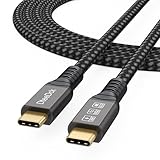
- Multifunctional 3.2 Cable: Our plug and play usb c 3.2 display cable support for 8K@60hz, 4K@144hz video output, 20Gbps fast data transmission and 100W high-speed power charging.
- 4K@144Hz Video Display: Supports 4K@144Hz, 2K@240Hz, 1080P@240Hz display. Compatible with portable, gaming, and graphic monitors. Requires DP Alt Mode on both devices.
- 20Gbps High Speed Data Transfer: USB 3.2 Gen 2 speeds up to 20Gbps. Backward compatible with USB 3.1, 3.0, and 2.0. 20Gbps requires USB 3.2 support on both ends.
- 100W Fast Charging: PD 3.0 up to 20V/5A (100W Max). Built-in chip for safe, rapid charging of USB-C devices.
- Reliable Service: DteeDck is committed to providing high-quality products, combining refinement and affordability. usb-c data cable support 2 years (24 months) coverage care
That 96W figure applies to charging a notebook. It does not mean the cable powers a desktop Mac. A Mac mini, Mac Studio, or iMac still needs its own power connection, and USB-C wattage describes what the cable can deliver to a connected device.
Independent reader supportYour contribution helps us test, update, and keep practical guides available for everyone.Thunderbolt 5 or Thunderbolt 4: which cable fits your setup
Apple sells both cables as Pro cables, but the listed specifications differ. The table below uses Apple’s current product listings as of October 2026. Where Apple does not state a value, the cell says so.
Rank #4

- 【Latest Version USB C 3.2 Gen 2 Cable】ZeroneTeck latest USB C for Thunderbolt cable: ①This 20Gbps USB C to USB C data cable is capable of meeting your ultra-fast data transfer needs. ②USB C to USB C monitor cable support 4K@60Hz Ultra HD video output ③In addition, this Type c to Type c cable also has a faster than normal 60W data cable with 100W ultra fast charging. Makes it easy for you to solve all your problems with just one cable.
- 【20Gbps USB C Data Cable】USBC to USBC data transfer cable provides explosive transfer speed up to 20Gbps, connect hard drives and SSDs, Also suitable for phone to laptop data transfer, transfer large files in seconds and save you more work time. Meanwhile, USBC to USBC 3.2 gen 2 20gbps data transfer cable backward compatible with USB 3.1, USB 3.0 and USB 2.0.(*Note: Maximum speeds are achieved when both upstream and downstream devices are Thunderbolt 3/4 interfaces.)
- 【4K@60Hz USB C Cable for Monitor & Plug and Play】Plug and play, no drivers or applications required to use this cable! USB C monitor cord to stream 4K@60Hz (3840*2160) content directly from your phones, tablets, laptops and desktop computers to large screens such as monitors, HDTVs and projectors. You will enjoy stunning Ultra HD video and colorful image quality. (Note: Please make sure your device has a USB-C port and supports DP Alt mode).
- 【5A/100W Fast Charging Cable】USB Type C fast charging cable with E-Marker IC chip, safely charges your devices with up to 100W power. It can fully charge a MacBook Pro 60%, an iPad Pro 75%, a iPhone 15 85%, and a Switch 95% in 35 minutes. Fully satisfies the charging power needs of professionals for MacBooks Pro, Android devices, Samsung and iPad Pro. Charge any USB-C device at maximum speed for timely use and no more waiting. *Note: Requires a C-port adapter of appropriate power.
- 【Dual Vehicle System】 Flawlessly supports CarPlay & Android Auto for seamless navigation/music streaming. 20Gbps ultra-speed — 40× faster than USB 2.0 CarPlay cables with enhanced signal stability.
| Feature | Thunderbolt 5 Pro Cable (1 m) | Thunderbolt 4 Pro Cable (3 m) |
|---|---|---|
| Length | 1 m | 3 m |
| Mac ports Apple says it supports | Macs with Thunderbolt 3, 4, or 5 ports | Macs with Thunderbolt 3 or 4 ports |
| Maximum data transfer (Apple listing) | Up to 120Gb/s | Up to 40Gb/s Thunderbolt/USB 4 |
| USB 4 data | Up to 80Gb/s | Up to 40Gb/s |
| USB 3 data | Not stated | Up to 10Gb/s |
| DisplayPort video output | DisplayPort 2.1 (UHBR20) | DisplayPort HBR3 |
| Power delivery (maximum) | Up to 240W | Up to 100W |
| Daisy-chaining | Up to six Thunderbolt devices | Not stated |
| Construction | Passive, per Apple | Not stated |
These are cable ceilings from Apple’s product listings, accessed in October 2026. They are not independent performance measurements, and Apple’s listings do not say what real-world speeds you will see with any particular Mac or monitor.
Thunderbolt 5 Pro Cable (1 m)
This cable makes sense when your Mac has Thunderbolt 5 ports and your devices use Thunderbolt 5 or Thunderbolt 4 at high bandwidth, such as a fast external storage array or a dock with multiple high-resolution displays. Apple says it works with Macs that have Thunderbolt 3, 4, or 5 ports, so it can also serve older machines. However, the cable does not raise the speed of a port or device that is slower. The 1 m length suits a desk-mounted setup with the Mac close by.
Best Value

- 【8K/5K/4K for USB C Monitors】 Silkland usb cdisplay cable right angle supports 8K@30Hz, 5K@60Hz and 4K@144Hz, 1080p@240Hz resolution video output from USB C laptops to USB C monitor,compatible for LG 4k, HP EliteDisplay, Dell USB-C Monitors U2520D, S2719DC, U2421HE, P2419HC, and HP E273d, E27d G4 and more.
- 【USB C 3.2 for USB C Laptops】 The usb c 3.2 gen 2 cable 90 degree fits virtually all USB-C/Thunderbolt 4/3 Laptops (Note: the port is fully inserted into the device), such as MacBook 2016/2017/2018, MacBook Air 2018/2019, MacBook Pro 13'' /15'' /16'', Dell XPS 15, Dell Alienware 17 and the Dell Precision 17, Aspire V15, S5-391-6419 Nitro / V17 Nitro, Predator 17, ROG G752VL / GX700VO / ZenBook Pro UX501VW, Clevo P870DM, ThinkPad P70, MSI GT80 , VAIO S11 and more. NOTE: The video function only works for devices with USB-C ports that support DP Alt Mode.
- 【Excellent for Portable Monitors】This usb c video cable angle works with most usb c portable monitors, support output 4K@60/30Hz and full HD 1080P. Compatible for KYY, MNN, ARZOPA, InnoView, ViewSonic, ZenScreen MB16AC or AOC i1601fwux and more brands. NOTE: The video function only works for devices with USB-C ports that support DP Alt Mode.
- 【USB C 3.2 20Gbps Data Transfer】 This usb c data cable elbow is USB 3.2 Gen 2 compliant and can quickly send or receive HD movies, audio and 4K video signals, backing up 10GB files in less than 10s. Support connecting USB C port hub, docking station, SSD and other USB C port devices, plug and play, rest assured and reliable. (Note: avoid excessive swaying that could cause transmission interruptions.)
- 【Flexible & Organized】This usb c monitor cable right angle solves the problem of cables being bent and ports being frayed, ensuring a longer service life and a more convenient use experience. Reduces port stress, easy to manage and prevents tangles and knots. Ideal for use in a variety of tight spaces, such as corner outlets or car charging. Enjoy a comfortable and tidy setup for both entertainment and office use. This 90 degree usb c data cable is durable and reliable for everyday use!
Thunderbolt 4 Pro Cable (3 m)
This cable is the sensible choice when the workflow does not need Thunderbolt 5’s ceilings. Its 3 m length covers a desk with the Mac on the floor or at a distance from the monitor. Its 40Gb/s maximum and 100W power delivery still handle a monitor, a dock, and most external drives. Apple’s listing says it is intended for Macs with Thunderbolt 3 or 4 ports, so confirm that your port matches before buying.
Quick Recap
A decision checklist before you buy
- Confirm the Mac port type from Apple’s port guide and the Thunderbolt symbol.
- Choose the display port that your monitor supports. Do not rely on the cable to add a video standard the monitor lacks.
- Add up the maximum data needs of your storage and dock, and compare them with the cable’s listed ceiling.
- If you need to charge a notebook through a dock or display, check the wattage the device requires against the cable’s listed maximum.
- Measure the distance from the Mac to the monitor and dock before choosing 1 m or 3 m.
- If you plan to daisy-chain devices, confirm the Thunderbolt chain limit on Apple’s listing for your cable.
Limits to keep in mind
- Maximums are not guarantees. A cable rated at 120Gb/s will not push a slower dock or drive beyond that device’s own limit.
- Desktop power is separate. The wattage a cable carries serves connected devices. Your Mac’s power cord still powers the computer.
- Model and generation matter. Port layouts changed between the 2022 Mac Studio and the current model. Use the specification page for your exact configuration rather than older announcements.
- Daisy-chaining has a limit. Apple lists up to six Thunderbolt devices for the Thunderbolt 5 Pro Cable. Long chains add latency and consume bandwidth, so put the most demanding device nearest the Mac.
Product prices and availability are accurate as of the date/time indicated and are subject to change. Any price and availability information displayed on Amazon at the time of purchase will apply.

