
Free tools Windows power users keep installed
One-click scans. No signup required.
iTechGuides is reader-supported. When you buy through links on our site, we may earn an affiliate commission. As an Amazon Associate I earn from qualifying purchases. Learn more
If your Galaxy S23 is draining quickly or getting hot after a One UI update, first check for another software update, then use the Battery screen to find apps consuming unusual power. Update or limit the apps responsible, reduce unnecessary background activity, and restart the phone. Warmth can also come from charging, heavy use, a weak signal, or hot surroundings; it does not by itself prove the update caused a fault.
Start with these checks
- Check for a follow-up update. Go to Settings > Software update and check for an available release. Samsung says later updates may include patches, fixes, and stability or performance improvements. Availability depends on your S23 model, carrier, and region. Samsung’s One UI 7 battery guidance recommends checking for subsequent updates.
- Find what is using the battery. Open Settings > Battery and review the battery graph and app-level usage. Look for an app whose consumption is unusually high for how much you used it. Update that app, then see whether usage changes. If one app remains the likely cause, test it on its own and consider limiting its activity or uninstalling it. Menu names can differ by software version and region. Samsung’s battery-use guidance explains how to check app consumption.
- Limit unnecessary background activity. Use Background usage limits for apps you rarely use, and try Power saving mode if needed. These settings can restrict background data, syncing, and notifications. Avoid putting essential messaging, health, security, or authentication apps into deep sleep unless you are willing to miss timely alerts or updates. Samsung describes these options in its battery-saving guidance.
- Restart and check for app conflicts. Restart after installing updates or if the problem began suddenly. If the drain continues, Samsung recommends using Safe Mode to help identify app-related problems. If the symptoms stop in Safe Mode, a recently installed app may be involved. A factory reset is a later option only after simpler steps fail; back up your data before resetting. See Samsung’s post-update troubleshooting steps.
Is battery drain after an update normal?
Battery use can temporarily increase during the first few days of initial setup while apps and services optimize. A weak or unstable mobile signal can also increase consumption. Neither explanation establishes that a particular One UI update caused your S23’s symptoms, and Samsung’s guidance does not promise that post-update drain will resolve within a fixed number of days.
Use the timing and pattern to narrow it down: note your exact software version, carrier and region, what the Battery graph shows, and whether the phone gets hot at idle, during demanding use, or while charging. Samsung’s One UI 7 guidance specifically advises checking background apps, settings, and location services when battery life drops after that update. It is troubleshooting advice, not confirmation of a general Galaxy S23 update defect.
Reduce heat during use
Charging, gaming, long video recording, streaming at maximum brightness, hotspot use, multitasking, weak signal, and hot surroundings can all contribute to warmth. Pause demanding tasks that are happening at the same time, lower screen brightness, move out of direct sun or a hot enclosed space, and switch off Wi-Fi, Bluetooth, or location services when you do not need them. These steps reduce possible sources of heat; they do not diagnose a software fault. Samsung’s overheating guidance and device heat advice cover common contributing conditions.
#1 Best Overall
![ITMBET [5000mAh] Galaxy S23 Battery, EB-BS912ABY Battery with Repair Kit](https://m.media-amazon.com/images/I/51kypRPvS7L._SL160_.jpg)
- ⚡ Premium Quality: Experience a new level of performance with our upgraded 5000mAh battery replacement. This high-quality 0-cycle battery will restore your phone’s battery life to like-new condition, ensuring you stay connected longer with up to 1000+ charge cycles.
- 🔋 Compatible Model: Specifically designed for the Samsung Galaxy S23 5G, this replacement battery is compatible with models SM-S911B, SM-S911U, SM-S911U1, and SM-S911N. [Note: Not compatible with any other Galaxy models.]
- 🛡️ Perfect Fit & Safe Performance: The EB-BS912ABY battery matches the original size, allowing for seamless integration within your phone’s motherboard frame. Constructed with premium Grade A+ battery cells and certified by CE, UL, and ROHS, this battery offers effective protection against overcharging, overheating, and over-discharging.
- ⚠️ Usage Instructions: For optimal performance, use your original charger and cable to recharge this replacement battery. To maximize efficiency, fully discharge the battery during the first three uses before charging it to 100%. Remember, the battery reaches its full potential through 3 to 5 complete charge and discharge cycles.
- ✅ Worry-Free Warranty: We stand by our product. If you encounter any issues, contact us via Amazon for a response within 24 hours. Backed by a 30-day money-back guarantee and lifetime technical support. Buy with confidence!
If the S23 gets hot while charging
- Unplug the phone, close running apps, and let it cool before charging again. Do not keep charging if the cable or port is damaged or contaminated.
- Inspect the cable and connector. Replace a damaged cable with a Samsung-approved accessory compatible with your S23; an accessory is not a remedy for software-related battery drain.
- For wireless charging, keep metal objects, magnets, and cards off the charging surface. Samsung’s charging guidance, heat advice, and charging safety information advise using suitable accessories and keeping foreign objects away.
Know when to stop using the phone and get help
The Galaxy S23 series manual gives a recommended operating temperature range of 0–35 °C (Samsung Electronics, 2024). Samsung describes protections that can limit performance, slow or interrupt charging, display a warning, or shut the device down if its temperature rises. Stop using the phone if it becomes severely hot or feels persistently hot; if it is charging, disconnect it and let it cool. The manual advises contacting a Samsung Service Centre or authorised service centre if overheating continues. Samsung’s European support site provides support options; routes and service availability vary by region.
You can also run Samsung Members > Support > Phone diagnostics and check the battery status. Diagnostics provide general information, not a repair or a definitive explanation for every drain problem. If overheating is severe or persists after the basic steps, or diagnostics or support point to a battery or hardware issue, contact Samsung support or an authorized service center rather than attempting a battery repair. See Samsung’s overheating and service guidance.
Quick Recap
Best Value
![[5800mAh] Galaxy S23 Ultra Battery,EB-BS918ABY Battery with Repair Kit](https://m.media-amazon.com/images/I/413u8eALCsL._SL160_.jpg)
- ⚡ Premium Quality: Experience a new level of performance with our upgraded 5800mAh 3.85V battery replacement. This high-quality battery will restore your phone’s battery life to like-new condition, ensuring you stay connected longer.
- 🔋 Compatible Model: Specifically designed for the Samsung Galaxy S23 Ultra, this replacement battery is compatible with models SM-S918B, SM-S918U, and SM-S918U1/DS. [Note: Not compatible with Samsung Galaxy S23, S23 Plus, or any other Galaxy models.]
- 🛡️ Perfect Fit & Safe Performance: The EB-BS918ABY battery matches the original size, allowing for seamless integration within your phone’s motherboard frame. Constructed with premium integrated battery cells and certified by CE, UL, and ROHS, this battery offers effective protection against overcharging, overheating, and over-discharging.
- ⚠️ Usage Instructions: For optimal performance, use your original charger and cable to recharge this replacement battery. To maximize efficiency, fully discharge the battery during the first three uses before charging it to 100%. Remember, the battery reaches its full potential through 3 to 5 complete charge and discharge cycles.
- ✅Worry-Free Warranty: We stand by our product. If you encounter any issues, contact us via Amazon for a response within 12 hours. Backed by a 30-day money-back guarantee and lifetime technical support. Buy with confidence!
Rank #4
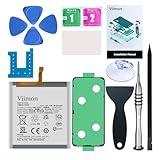
- 【Compatible Model】It is compatible with Samsung Galaxy S23 Only, Model: SM-S911. Not for S23+ Plus and S23 Ultra. Please double identify and check your phone model matches before purchasing the battery.
- 【Installation Manual and Repair Toolkit are included】The detailed Installation Manual is included and it makes the process easy and hassle-free. It comes with a full set professional toolkit also to help you take apart the phone and remove the old battery with no issue.
- 【0 Cycle and OEM Battery Cells】 OEM quality Galaxy S23 battery replacement perfect fit your phone. It is safer than so-called upgraded high-capacity batteries. No potential risks during use. Multiple protection features to prevent overcharging and prevent overheating. Built-in microchip to ensure safe battery charging and improve battery life. NOTE: Please fully charge and discharge your new battery 3 to 5 cycles to release all capacity of the new battery.
- 【Battery Adhesive and Back Glass Adhesive are included】 It is easier for you to install the battery and you can assemble the phone perfectly.
- 【Customer Service】24-hour response, 12-month warranty. We pay much attention to customers' shopping experience from VIIMON, please do not hesitate to let us know if you have any problems during the usage.
Rank #3

- [PLS CONFIRM DEVICE MODEL] --- The repair kit contains the instruction to guide you step by step installation, and we have professional engineers to answer all your questions about the repair process. Please verify your old battery part number and model before purchasing this replacement battery. Compatible with Samsung Galaxy S23 SM-S912, S912V, S912A, S912T, S912P, S912R4, S912U, S912U1, EB-BS912ABY. ★NOT FOR Samsung Galaxy S23+, S23 FE, S23 Ultra★
- [FOR BEST PERFORMANCE] --- Please use original charger and cable to charge this battery. Using up all the power of galaxy s912 battery replacement for the first three times before charging, and then take a full charge, thus the battery can be reached the optimum effect of using. Please remember that its full performance and longevity is only achieved after 3 to 5 complete charge and discharge cycles.
- [HIGH CAPACITY BATTERY] --- ASDAWN for galaxy s23 battery replacement is made of high quality Li-ion battery cell, the advanced technology makes this replacement battery capacity up to 3900mAh and provides you a high-speed and efficient charging. Up to 48 hours of long lasting time, bring your battery's life back to glory and save the money. Choose ASDAWN battery restore your phone to like new performance!
- [SAFETY TESTED BATTERY CELLS] --- Our battery uses Grade A rated battery cells ensure longer battery life (500 cycles) and high-speed, efficient charging. Every for s23 galaxy battery s912 is manufactured and tested under strict quality control standards. Build-in microchip to prevent over-charging, over-discharging, short-circuit and over-heating. Voltage protection and current protection for safer operation for both user and devices.
- [STRICT DUAL QUALITY CONTROL] --- We take care of all quality-related issues with a REPLACEMENT or REFUND. Our items are all produced in fully automated workshops, and the finished products are controlled and inspected by professional technical personnel to ensure that they are delivered to customers with superior performance and do not disappoint their trust in us. Only with excellent product quality can we go further!
Rank #2

- Designed exclusively for Galaxy S23 variants: SM-S911B, SM-S911B/DS, SM-S911U, SM-S911U1, SM-S911W, SM-S911E. Double-check your device's model (found under Settings > About Phone) to ensure perfect fitment.
- Advanced Battery Tech: features a premium 0-cycle Li-ion battery cell engineered for 850+ recharge cycles. Restore factory-level power efficiency and extend your phone's lifespan with minimal charge degradation.
- Repair Galaxy S23 Battery Complete DIY Toolkit: includes specialized tools (premium screwdrivers, pry tools, adhesives) tailored for safe disassembly. Streamline repairs without professional assistance.
- Beginner-Friendly Installation: follow our illustrated, step-by-step manual with magnified diagrams and safety tips. Achieve seamless battery replacement in under 30 minutes, even for first-time repairers.
- Hassle-free Support: rest assured with our ongoing technical assistance for product inquiries or usage guidance. Every purchase includes a robust 24-mon quality assurance program to safeguard your investment.
Product prices and availability are accurate as of the date/time indicated and are subject to change. Any price and availability information displayed on Amazon at the time of purchase will apply.
Recommended Free Tools

