
Do these 3 things before closing this tab:
1Fix the driver behind crashes, sound loss and screen glitches2Repair Windows errors before they cause bigger problems3Scan for outdated or missing drivers - takes under a minuteiTechGuides is reader-supported. When you buy through links on our site, we may earn an affiliate commission. As an Amazon Associate I earn from qualifying purchases. Learn more
If you notice the mistaken item before paying, stop and ask the attendant to remove or void that line. If you have already paid, keep your receipt and payment record, ask the store to correct the transaction, and contact your card issuer promptly if the retailer does not resolve it. The right formal dispute process depends on where you live and whether you used a credit or debit card.
If you have not paid yet
- Pause the checkout. Point out the item on the screen or receipt preview and ask the self-checkout attendant to remove or void the line.
- Check the new total. Make sure the unintended charge is gone before completing payment. If staff cannot correct it at the machine, ask them how to complete the purchase without paying for that item.
Checkout systems and store procedures vary; there is no single interface or attendant process that applies everywhere.
If you have already paid
Keep the transaction evidence
Save the itemized receipt and the card or bank transaction record. Write down the store location, date and approximate time, and the item description or code shown on the receipt. If a shelf label or barcode helps explain a mismatch, photograph it. Keep copies of messages and note whom you spoke with and when. The Federal Trade Commission (FTC) recommends keeping receipts and transaction documents; its guidance is general and does not make online-order rules apply to an in-store checkout error.
Ask the store to correct the charge
Go to the customer service desk or ask for a manager. Identify the specific line, say you did not buy that item, and give the amount charged. Ask the retailer to remove the charge and return that amount, preferably to the original payment method where available. Request a corrected receipt or written confirmation.
#1 Best Overall

- With Square Terminal, you can ring up sales, accept payments, and print receipts, all with one device. Use it at the counter or ring up customers anywhere in your store.
- Accept all major credit and debit cards and pay one low rate with no hidden fees and no long-term contracts.
- Process chip cards in just two seconds.
- Get your money as soon as the next business day.
- Use it cordlessly with the built-in battery, designed to last all day.
Be specific and keep a record of the conversation. The FTC’s business-problem guidance recommends contacting the seller and documenting discussions. As the FTC puts it, “Most businesses will work with you to resolve the problem and keep you as a customer.” That is a general observation, not a guarantee of a particular outcome.
If the store does not fix it
Send a written request
Write to the store manager or corporate customer service. Include the transaction date, location, unintended item and amount, a copy of the receipt, and the dates you already contacted the store. State the correction you want and keep a copy of your message and any reply. The FTC provides a sample letter for disputing card charges that describes an overcharge or an item not bought.
Rank #2

- No Hidden Fees or Forced Subscriptions: The SmartPOS 129 arrives ready to use, equipped with a comprehensive range of functionalities, ensuring no additional costs. For details on these capabilities, refer to the "SmartPOS Included Features" table below.
- Professional All-in-One POS System: The SmartPOS 129 comes with a 15" cashier touchscreen, a matching 15" customer-facing promo display, a cash drawer, a handheld scanner, and a thermal printer, ensuring a seamless checkout experience.
- Over 50 Card Processor Integrations: SmartPOS offers unparalleled flexibility, integrating with a vast array of card processors and forecourts, so you can select the best option for your business needs without extra hardware costs.
- Free Initial Setup Call: Benefit from personalized guidance with our specialists dedicated to ensuring your SmartPOS is up and running effortlessly, providing you with the tools and knowledge for a seamless start.
- Free Mobile App: Experience seamless integration with SmartPOS through the free Retail360 app. Easily scan products, update your price book, and make on-the-spot price adjustments — all from your mobile device, at no additional cost.
Contact your payment-card issuer promptly
If the charge remains, contact the issuer using the number on your card or statement and ask how to dispute it. Provide the receipt and other records, and follow the issuer’s instructions. Do not wait for a prolonged store process before checking the applicable deadline.
Free tools Windows power users keep installed
One-click scans. No signup required.
- Credit card: For a billing error covered by the Fair Credit Billing Act, the FTC says you generally must dispute it in writing within 60 days after the first statement showing the error was sent. The deadline and process concern covered credit-card billing errors; check the issuer’s instructions and the FTC’s credit-card dispute guidance.
- Debit card: Protections and procedures differ from credit-card rules. Contact your bank or debit-card issuer promptly and follow its dispute process rather than assuming the same 60-day rule applies.
When a consumer agency or scanner law may help
If the problem appears recurring or remains unresolved, you can look up your state consumer protection office through USAGov’s directory. A state or local weights-and-measures authority may also be relevant when the issue concerns a price that differs from the displayed price. These reporting channels depend on your location and the facts; they do not replace any card-dispute deadline.
Rank #3

- Runs on Android 13 with 3GB RAM and 32GB ROM storage to support compatible business applications. This handheld terminal provides responsive performance and reliable storage for sales, inventory, and transaction records, and includes a software development kit (SDK) to facilitate customized application integration.
- Features an integrated 58mm thermal receipt printer with print speeds up to 80mm/s. This built-in monochrome printer requires only 58mm thermal paper and no ink or toner, enabling mobile retailers, food trucks, and pop-up businesses to print on-the-spot receipts and transactions.
- Designed with a 5.5-inch touchscreen interface for quick navigation and inventory management. The terminal features an integrated camera that reads both 1D and 2D barcodes, streamlining mobile checkout, ticketing, and barcode-scanning processes.
- Offers dual-band Wi-Fi and 4G LTE mobile connectivity to ensure stable internet access on the go. Integrated Bluetooth and USB-C connectivity allow you to pair the device with external peripherals and accessories to support diverse business needs.
- Powered by a rechargeable 6000mAh lithium-polymer battery with USB-C charging for extended operating hours. Weighing 345 grams and measuring 9x3x1 inches, this compact, lightweight handheld device is built for portable operations and on-the-go business environments.
Scanner-price laws are local and may cover a different problem from an item you never bought. For example, Michigan’s Attorney General describes a state process for certain completed transactions where the charged price exceeds the displayed price. In Michigan, the consumer must have a receipt and notify the seller within 30 days; the guidance describes a refund of the difference and a possible additional payment of ten times the difference, with a $1 minimum and $5 maximum. This Michigan-specific remedy is not a nationwide bonus and may not apply when an unintended item was charged at its displayed price. See Michigan’s Scanner Law for its scope.
Quick Recap
Best Value
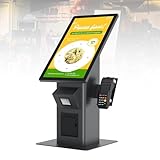
- 【HD Touch Display】21.5-inch touch screen kiosk with FHD resolution, 178° wide viewing angle, and 10-point multi-touch operation, delivering clear advertising displays and a smooth self-service ordering experience in restaurants and commercial spaces.
- 【Multiple Payment Methods】Supports payment processing via QR codes and barcode scanners, with professional POS payment terminal support. This enables fast self-ordering and reliable order placement while working smoothly with existing restaurant ordering systems and POS setups.
- 【Expandable Ports】Equipped with versatile ports to connect scanner modules, cameras, and thermal printers, supporting flexible peripheral expansion. This makes the desktop ordering kiosk highly suitable for restaurants, retail stores, and self-service businesses.
- 【Stable Connectivity】Ethernet connection ensures fast network access and stable cloud management, optimized for desktop installation in fast-food stores, retail environments, and business locations requiring continuous ordering terminal operation.
- 【Wide Applications】Durable steel structure designed for high-traffic commercial spaces, suitable for restaurants, retail businesses, hospitals, hotels, and self-service stores, improving customer flow through efficient self-ordering and digital signage interaction.
Rank #4
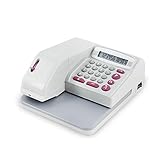
- SECURE EMBOSSED CHECK PRINTING - Produces tamper-resistant embossed print that helps prevent alterations while giving every check a clean, professional appearance. Ideal for offices, retailers, accountants, and financial environments.
- FAST & EASY TO USE - Large 12-digit LCD display allows quick amount entry with clear visibility. Simply enter the amount and print in seconds with consistent accuracy. Prints amounts only and does not print payee names.
- SUPPORTS 16 CURRENCY FORMATS - Designed for international flexibility with multiple currency modes including USD, EUR, GBP and others—great for businesses handling global transactions.
- READY TO USE COMPLETE SET - Includes black ink cartridge plus black ink ink bottle so your machine is ready for immediate operation and extended use with less downtime.
- COMPACT OFFICE DESIGN -- Space-saving desktop size fits neatly on counters, desks, and office workstations while providing dependable daily performance.
Which route should you use?
| Route | What it can do | What to keep in mind |
|---|---|---|
| Store customer service or manager | Can correct the store transaction and provide a corrected receipt or refund. | Ask promptly and keep a record; exact store procedures vary. |
| Card issuer | Can explain and process a dispute over a remaining card charge. | Start promptly; requirements differ for credit and debit cards. |
| Consumer protection or weights-and-measures office | Can receive a report about an unresolved or recurring issue, depending on the jurisdiction. | Local authority and available remedy depend on where the transaction occurred and what went wrong. |
Product prices and availability are accurate as of the date/time indicated and are subject to change. Any price and availability information displayed on Amazon at the time of purchase will apply.

