
iTechGuides is reader-supported. When you buy through links on our site, we may earn an affiliate commission. As an Amazon Associate I earn from qualifying purchases. Learn more
What to check before replacing Google apps with open-source alternatives: start by listing what you actually use, then test a representative export and import before moving everything. A copy of your Google data is not automatically a working replacement account, and a platform with broad features is not necessarily a match for every app or workflow.
This is a decision checklist, not a blanket case for leaving Google. The right outcome may be to move one workflow, several, or none. The aim is to find out whether a candidate handles your real tasks, preserves the data you rely on, works for the people you collaborate with, and has an operating model you can sustain.
1. Map the work each Google app does
Begin with an inventory, not a shortlist of alternatives. For each Google app, write down the recurring tasks it supports, the data involved, and the people who need to use that data. This exposes dependencies that an app-name-to-app-name comparison can miss. “I use it for email” or “we keep files there” is a useful starting point, but it is not yet a migration requirement: the details of how you use it determine what a replacement has to do.
Quick wins for a faster PC:
Scan for outdated or missing drivers - takes under a minuteDriver Scan →Repair Windows errors before they cause bigger problemsFix Now →Fix the driver behind crashes, sound loss and screen glitchesFind Drivers →Record the workflows and constraints
- Tasks: Note what you do routinely and any infrequent but essential edge cases. A workflow that happens only occasionally can still be a must-have if you depend on it when it does occur.
- Data: List file types, approximate storage needs, and important metadata such as labels, comments, or calendar details. Note which items are active and which are older records you may need to retrieve later.
- Sharing: Record who can view or edit items, how permissions are granted, and whether links are shared outside your household or organization. Include shared material as well as data that appears to belong to one account.
- Access: Check mobile use, offline requirements, supported browsers, and the devices collaborators use. Distinguish “nice to have on a phone” from a situation where a workflow must work away from a desktop.
- Connections: Identify integrations, automations, and other services that depend on the Google account or its data. A replacement can appear to work on its own while a connected workflow no longer does.
- Priority: Separate must-have functions from conveniences. Include the needs of family members, coworkers, or other collaborators who must open, edit, or share migrated material.
Turn the inventory into a short acceptance list: what must work, what data must arrive, who must be able to use it, and what limitations would be acceptable. That list helps you compare candidates consistently rather than being swayed by a long feature page or a familiar product name.
#1 Best Overall

- Value NAS with RAID for centralized storage and backup for all your devices. Check out the LS 700 for enhanced features, cloud capabilities, macOS 26, and up to 7x faster performance than the LS 200.
- Connect the LinkStation to your router and enjoy shared network storage for your devices. The NAS is compatible with Windows and macOS*, and Buffalo's US-based support is on-hand 24/7 for installation walkthroughs. *Only for macOS 15 (Sequoia) and earlier. For macOS 26, check out our LS 700 series.
- Subscription-Free Personal Cloud – Store, back up, and manage all your videos, music, and photos and access them anytime without paying any monthly fees.
- Storage Purpose-Built for Data Security – A NAS designed to keep your data safe, the LS200 features a closed system to reduce vulnerabilities from 3rd party apps and SSL encryption for secure file transfers.
- Back Up Multiple Computers & Devices – NAS Navigator management utility and PC backup software included. NAS Navigator 2 for macOS 15 and earlier. You can set up automated backups of data on your computers.
Use the inventory to define a small, representative workflow to test. Choose data and tasks that reflect the variety of your actual use, including an important edge case if one exists. No universal one-to-one feature match across Google’s apps and open-source alternatives is established here; treat every candidate as a hypothesis until it works with your real tasks and data.
2. Export a sample and inspect what you get
Google Takeout lets you select data from products including email, documents, calendars, and photos, and create an archive for your records or transfer. You can select products and, for some products, subsets of data. Creating or downloading the archive copies data; it does not delete the copy in your Google account. See Google’s instructions for downloading your data.
That distinction matters: an export is a way to obtain a copy, not a promise that another service can recreate the original account. Export details vary by product, and the destination decides what it can import and how it interprets the archive. Treat the archive as material to inspect and test, not as a completed migration.
Free tools Windows power users keep installed
One-click scans. No signup required.
Run a small trial before a full export
- Choose a sample. In Google Takeout, select only the products or representative subsets relevant to your inventory. The sample should be large enough to include the kinds of items and metadata that matter, but manageable enough to inspect.
- Request and download the archive. Inspect it on a desktop so you can see the included files, folders, and formats. Do not assume that a recognizable file name means the contents will import as expected.
- Test the intended destination. Import the sample into the service or setup you are considering. Import behavior depends on that service; a Takeout archive is not a ready-made replacement account.
- Verify the workflow, not just the file count. Check messages, dates, attachments, documents, photos, and calendar entries that are relevant to your use. Then try the actions you need to perform with the imported material.
- Check collaboration. Confirm whether the people who need access can view or edit the result in the way you expect. Do not assume that the original sharing setup will be reproduced simply because the data itself arrived.
- Keep the source available. Keep your Google account available during the trial. Do not delete or change access to the original data until you have verified the destination and decided what to do with any gaps.
Timing can affect completeness: Google warns that changes made after an export request may not appear in the archive created from that request. For a sample, note that the archive may represent the data as of a point before the export is ready. For a later full export, consider how you will account for activity that happens while the archive is being prepared. The evidence does not establish a universal method for reconciling those changes, so check the result rather than assuming it is current.
Pay particular attention to Gmail labels
Google stores Gmail labels in a special X-Gmail-Labels header in exported mail. Google notes that many mail clients do not recognize that header directly, so do not assume labels will appear as usable folders or labels after import. The header’s presence in an archive is not the same thing as an imported mail client presenting the labels in a usable way.
Make labels part of the sample test if you use them to organize or find mail. Look at the actual imported messages and see whether the labels you rely on are available in the destination. If not, decide whether that loss is acceptable, whether you need a different import path, or whether the candidate is unsuitable for that mail workflow. Do not generalize a successful test of one data type to other Google products: the export details vary by product.
Rank #2
- Value NAS with RAID for centralized storage and backup for all your devices. Check out the LS 700 for enhanced features, cloud capabilities, macOS 26, and up to 7x faster performance than the LS 200.
- Connect the LinkStation to your router and enjoy shared network storage for your devices. The NAS is compatible with Windows and macOS*, and Buffalo's US-based support is on-hand 24/7 for installation walkthroughs. *Only for macOS 15 (Sequoia) and earlier. For macOS 26, check out our LS 700 series.
- Subscription-Free Personal Cloud – Store, back up, and manage all your videos, music, and photos and access them anytime without paying any monthly fees.
- Storage Purpose-Built for Data Security – A NAS designed to keep your data safe, the LS200 features a closed system to reduce vulnerabilities from 3rd party apps and SSL encryption for secure file transfers.
- Back Up Multiple Computers & Devices – NAS Navigator management utility and PC backup software included. NAS Navigator 2 for macOS 15 and earlier. You can set up automated backups of data on your computers.
3. Check whether direct transfer is available—and who receives the data
Google also provides a separate option for third-party services to request a copy of selected data. Availability depends on your region, account eligibility, and support from the receiving service. The flow begins on the third party’s website or app, not as a universal export-to-anywhere function. Review Google’s third-party data transfer guidance and confirm your account qualifies before making this part of a migration plan.
Outdated Drivers Are Slowing You Down
One free scan finds every outdated or missing driver and matches the right update for your exact hardware.Free scan · exact hardware matchWindows Errors? Fix Them Before They Spread
Repair common Windows errors and clear accumulated junk for a smoother, more stable PC - no reinstall needed.Free scan · no reinstallThis is distinct from downloading an archive with Takeout. Do not build a plan around direct transfer until you have checked that your account and region are eligible and that the receiving service supports the feature. If it is unavailable, that does not mean your data cannot be exported by other means; it means this particular transfer route should not be treated as guaranteed.
When a recipient receives a copy, Google says that service becomes responsible for managing and protecting it. Before authorizing a transfer, review the recipient’s privacy policy and security disclosures, and grant access only to a service you trust. Consider who operates the destination and what terms govern the copy after it arrives. A transfer can reduce some manual steps, but it also gives the recipient access to the selected data; convenience does not remove the need to evaluate that relationship.
This portability flow copies data; it does not remove the original from Google. Passwords and other security-related account data may need a separate export, and a work or school account may be subject to administrator controls. Check whether the data you need is included in the specific transfer, and whether an administrator’s policies affect what you can export or authorize. Do not assume that moving selected information moves every piece of account data or changes the status of the original.
4. Compare capabilities across the whole workflow
Compare what you need to do, not merely whether a candidate has an app with a familiar name. Nextcloud is one example of an open-source, self-hosted collaboration platform. Its Hub groups Files, Talk, Groupware, and Office; Groupware includes calendar and contacts, while Office supports collaborative editing. Those capabilities may suit some file, calendar, contacts, and office workflows, but they do not prove equivalence to every Google feature, import format, mobile behavior, or integration. See Nextcloud Hub’s feature description.
Use the feature description to form test cases, not to skip testing. For instance, if your inventory includes files, calendars, contacts, and collaborative editing, a platform that groups those capabilities may be worth evaluating. You still need to verify that the specific files and data you have can be moved and used, that collaborators can participate, and that any required connections continue to work. A broad platform description does not establish that every individual workflow has a direct equivalent.
Rank #3

- Entry-level NAS Personal Storage:UGREEN NAS DH2300 is your first and best NAS made easy. It is designed for beginners who want a simple, private way to store videos, photos and personal files, which is intuitive for users moving from cloud storage or external drives and move away from scattered date across devices. This entry-level NAS 2-bay perfect for personal entertainment, photo storage, and easy data backup (doesn't support Docker or virtual machines).
- Set Your Devices Free, Expand Your Digital World: This unified storage hub supports massive capacity up to 64TB.*Storage drives not included. Stop Deleting, Start Storing. You can store 22 million 3MB images, or 2 million 30MB songs, or 43K 1.5GB movies or 67 million 1MB documents! UGREEN NAS is a better way to free up storage across all your devices such as phones, computers, tablets and also does automatic backups across devices regardless of the operating system—Window, iOS, Android or macOS.
- The Smarter Long-term Way to Store: Unlike cloud storage with recurring monthly fees, a UGREEN NAS enclosure requires only a one-time purchase for long-term use. For example, you only need to pay $459.98 for a NAS, while for cloud storage, you need to pay $719.88 per year, $2,159.64 for 3 years, $3,599.40 for 5 years. You will save $6,738.82 over 10 years with UGREEN NAS! *NAS cost based on DH2300 + 12TB HDD; cloud cost based on 12TB plan (e.g. $59.99/month).
- Blazing Speed, Minimal Power: Equipped with a high-performance processor, 1GbE port, and 4GB LPDDR4X RAM, this NAS handles multiple tasks with ease. File transfers reach up to 125MB/s—a 1GB file takes only 8 seconds. Don't let slow clouds hold you back; they often need over 100 seconds for the same task. The difference is clear.
- Let AI Better Organize Your Memories: UGREEN NAS uses AI to tag faces, locations, texts, and objects—so you can effortlessly find any photo by searching for who or what's in it in seconds. It also automatically finds and deletes similar or duplicate photo, backs up live photos and allows you to share them with your friends or family with just one tap. Everything stays effortlessly organized, powered by intelligent tagging and recognition.
Use the same checklist for every candidate
- Feature coverage: Can it handle required functions and edge cases, not just the obvious daily task? Compare against the acceptance list you made, and mark each requirement as tested, untested, or not supported rather than relying on a general impression.
- Data portability: Which formats, metadata, permissions, comments, and labels survive export and import? What does not? Check the destination itself, since an archive’s contents do not establish how a target service will interpret them.
- Compatibility: Can collaborators use it on their devices and browsers, with their file formats, mobile apps, and integrations? Confirm this with the people affected, especially if they depend on a device or connection you do not use yourself.
- Privacy and control: Where will data be stored, who operates the service, and which terms or disclosures govern it? Distinguish between a platform you operate and a service run by a provider.
- Security and recovery: How are accounts and access protected? Who applies updates, maintains backups, and tests restoration? Ask what happens if the service or a device is unavailable and how you would recover the data you depend on.
- Operations and cost: Account for hosting, storage, support, and administration time, as well as any paid services. Include the ongoing work required to keep a setup usable; do not compare a paid service’s price only with the apparent purchase price of a home machine.
These are evaluation questions, not claims that a particular candidate wins every category. The sources do not provide a full app-by-app feature-parity matrix, migration guarantee, or cost comparison for Google’s apps and open-source alternatives. Your own test is therefore central to the decision.
Compare total effort as well as features
For each candidate, write down what you would need to do before, during, and after a move. Beforehand, that may include learning the destination’s import process and checking that collaborators can use it. During the trial, it includes inspecting the data and testing permissions and important tasks. Afterwards, it includes operating the service, keeping the data protected, and having a recovery plan. This makes hidden work visible alongside the feature checklist.
Cost is part of that comparison, but the available evidence does not supply prices or a universal cost ranking. Build your own comparison using the expenses and time that actually apply: hosting or a provider, storage, support, and administration. A home setup may involve different direct expenses and responsibilities than a managed service; a provider may reduce direct server administration while adding a service relationship to assess. Include the time someone will spend handling updates, access, backups, and recovery, even if that time does not appear on an invoice.
The Tool Desk
Outbyte PC Repair FREERepair Windows errors before they cause bigger problemsFix Now →Outbyte Driver Updater FREEFix the driver behind crashes, sound loss and screen glitchesFind Drivers →Run the representative workflow with the people who will use it. A feature that works for one person may still fail the migration if collaborators cannot access or edit the resulting data as expected. Include people with different roles or devices where those differences matter to your inventory. Record failures and workarounds instead of treating a successful demonstration of one task as proof that the whole workflow is ready.
5. Decide who will operate the replacement
Self-hosting shifts responsibility as well as control. Nextcloud describes deployment through a provider or on a home machine. Decide who will manage infrastructure, updates, access control, availability, and backups before choosing either route. A home deployment requires someone to take ownership of those tasks; a provider may reduce direct server administration but adds an operator whose privacy terms, security practices, support, and continuity need review.
Make the operator explicit. “We will host it ourselves” is not a complete operating plan unless a person or team accepts the recurring work. Likewise, “we will use a provider” is not a complete privacy or reliability assessment unless you have checked what the provider says about its service, support, and continuity. The deployment options include a provider or a home machine, but no maintenance effort is quantified and no particular host is established as suitable.
Rank #4
- Value NAS with RAID for centralized storage and backup for all your devices. Check out the LS 700 for enhanced features, cloud capabilities, macOS 26, and up to 7x faster performance than the LS 200.
- Connect the LinkStation to your router and enjoy shared network storage for your devices. The NAS is compatible with Windows and macOS*, and Buffalo's US-based support is on-hand 24/7 for installation walkthroughs. *Only for macOS 15 (Sequoia) and earlier. For macOS 26, check out our LS 700 series.
- Subscription-Free Personal Cloud – Store, back up, and manage all your videos, music, and photos and access them anytime without paying any monthly fees.
- Storage Purpose-Built for Data Security – A NAS designed to keep your data safe, the LS200 features a closed system to reduce vulnerabilities from 3rd party apps and SSL encryption for secure file transfers.
- Back Up Multiple Computers & Devices – NAS Navigator management utility and PC backup software included. NAS Navigator 2 for macOS 15 and earlier. You can set up automated backups of data on your computers.
Make the operating decision explicit
- Choose a home machine only if someone can maintain it, control access, keep it updated, and make and test backups. Decide who owns each job, rather than assuming that setup is the end of the work.
- Consider a provider if you prefer not to operate the server directly, but assess the provider’s policies, security information, support, and continuity rather than assuming those are guaranteed. Review what you are comfortable entrusting to that operator.
- Plan availability. Consider whether people need the service at particular times and who will respond if it is unavailable. The deployment description alone does not establish service availability for any particular setup.
- Test recovery as part of the workflow: know where backups are kept and how you would restore the data you depend on. Having a backup plan on paper is not the same as knowing that you can restore the material you need.
- Include administration in the decision. If no one has time or responsibility for updates, access control, backups, and restore testing, account for that constraint before choosing a self-managed setup.
The deployment options alone do not establish how much maintenance a particular setup will require or whether a particular host is suitable. Base the choice on the operator, responsibilities, and recovery plan you can verify.
6. Move only after the trial passes
Use the test results to decide whether to migrate all, some, or none of your workflows. A partial move can be a reasonable outcome if only some of your needs pass the test; there is no requirement to replace every app at once. If important data, sharing behavior, or collaborator access does not survive the trial, resolve that gap before relying on the new setup.
Before a wider migration, review the acceptance list and confirm that each must-have item has been tested in the destination. Check the data types separately, because export details vary by product. Check the workflow with its actual collaborators. Review the provider or self-hosting plan, including who will maintain access, updates, backups, and recovery. If an item remains untested, treat it as an open risk rather than a confirmed success.
Keep the original Google data available until you have confirmed that the destination contains what you need and supports the work you planned to move. Remember that Takeout and third-party portability create copies rather than remove the originals. Keep both the data result and the operating arrangement in view: a successful import is only one part of a sustainable replacement.
Questions to settle before committing
At the end of the trial, you should be able to answer a few practical questions: Which exact workflows are moving? Which data or metadata did not carry over? Can every person who needs access use the destination? Who operates and secures the service? What are the ongoing hosting, storage, support, and administration costs? How will you make and test a restore? If any answer is unclear, keep the migration limited until you can verify it.
Recommended Free Tools
Frequently Asked Questions
Does downloading Google Takeout delete the data in my Google account?
No. Takeout creates an archive copy; downloading it does not delete the original data in your Google account.
Best Value
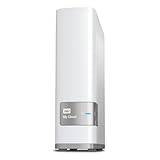
- Centralized, whole-home storage
- Mobile and remote web access, Backs up PC and Mac computers
- Photo and video backup for smartphones and tablets, Operating System - Windows/Mac
- Sync software to keep content up-to-date across all your computers and creates a common place for friends and family to share photos
- Compatible with Windows 10, Windows 8, Windows 7, Mac OS X El Capitan, Yosemite, Mavericks, or Mountain Lion operating systems and requires, DLNA/UPnP devices for streaming and a router with Internet connection
Will a Google Takeout archive automatically restore my account in an open-source alternative?
No. Takeout provides an export copy, not a ready-made replacement account. Export details vary by Google product, and importing the archive depends on the destination service, so test a representative sample first.
Will Gmail labels appear normally after I import exported mail?
Not necessarily. Gmail labels are stored in an X-Gmail-Labels header, and Google notes that many mail clients do not recognize that header directly. Check how the labels appear in the destination you plan to use.
Can I transfer my Google data directly to a third-party service?
Sometimes. Google’s third-party portability option depends on region, account eligibility, and whether the receiving service supports it. The transfer begins on that service’s site or app, so confirm eligibility and review the recipient before authorizing it.
What’s actually slowing this PC down?
Pick the symptom - the matching free tool is one click away.
Does a third-party transfer remove my data from Google?
No. The transfer copies selected data. Google says the receiving service becomes responsible for managing and protecting the copy it receives; review its privacy policy and security disclosures before granting access.
Is Nextcloud a complete replacement for every Google app?
The available feature description does not establish that. Nextcloud Hub groups Files, Talk, Groupware, and Office, including calendar and contacts features and collaborative editing. Whether it fits a particular Google workflow depends on your data, requirements, integrations, collaborators, and test results.
Is self-hosting always cheaper than using a provider?
The evidence does not establish a universal cost comparison. Compare the hosting or storage expense, any paid services and support, and the time needed for administration, updates, access control, backups, and recovery. A provider may reduce direct server administration but introduces an operator to assess.
The Bottom Line
Before replacing Google apps, inventory the workflows and people involved, test a representative Takeout export or eligible direct transfer, and verify the imported data and collaboration behavior. Then compare the whole workflow—including privacy, compatibility, cost, recovery, and who will operate the service. Move only the parts that pass those checks, and keep the original available until the replacement is verified.
Quick Recap
Product prices and availability are accurate as of the date/time indicated and are subject to change. Any price and availability information displayed on Amazon at the time of purchase will apply.

