
iTechGuides is reader-supported. When you buy through links on our site, we may earn an affiliate commission. As an Amazon Associate I earn from qualifying purchases. Learn more
F_AUDIO is the motherboard header for a computer case’s front-panel audio module. Connect the case’s front headphone and microphone jacks to this header, following the exact motherboard and case manuals. The label and pinout are not universal across boards or manufacturers.
What F_AUDIO connects
In the reviewed Gigabyte manuals, F_AUDIO is the front-panel audio header. It carries the signals from the case’s front headphone and microphone jacks to the motherboard, allowing those jacks to work with the system’s audio hardware.
Motherboard naming varies, so another manufacturer may use a different label. Even on Gigabyte boards, the physical location and signal assignments depend on the exact model and revision. Use the board-specific manual rather than treating “F_AUDIO” as a universal pinout.
Crashes, No Sound, or Screen Glitches?
Random freezes, missing sound and display glitches usually trace back to one bad driver. Find and replace yours safely.Free scan · under a minutePC Slower Than It Used to Be?
A free scan shows the junk files, broken settings and background clutter dragging Windows down - then fixes them in one click.Free scan · Windows 10 & 11How to connect the case audio cable
- Shut down and disconnect power. Turn off the PC, switch off the power supply, and unplug the AC cable before working inside the case.
- Locate the header in the motherboard diagram. Find the printed F_AUDIO label and the pin 1 or orientation marking in the manual for your exact board.
- Identify the case connector. Most recent cases provide one keyed HD Audio plug. Some modules expose separate wires, and some older cases include an AC’97 plug as well.
- Verify the assignments. Compare the case module’s wire labels with the motherboard manual. Do not rely on the connector’s shape alone.
- Align and seat the plug. Match the blocked or missing position and pin 1 marking. Never force a connector that does not align.
- Test after reassembly. Check both front headphone output and the front microphone input in the operating system’s audio settings.
Gigabyte warns in the B850M-D3HP manual: “Incorrect connection between the module connector and the motherboard header will make the device unable to work or even damage it.”
#1 Best Overall
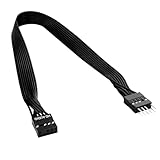
- 30cm Extended Design: Effectively solves the problem of insufficient length of ATX chassis front audio cables, enabling the normal use of front panel audio interfaces effortlessly. It meets the needs of back cable routing, keeping the internal wiring of the chassis neat and tidy.
- Standard Specification Configuration: Features an HD AUDIO 9PIN connector, compliant with the motherboard AC97 series front standard 2.54 pin audio interface specifications. It offers strong compatibility and ensures stable and reliable connections.
- High-Quality Tinned Copper Material: The 24AWG tinned copper wire provides excellent conductivity and oxidation resistance, reducing signal transmission loss and ensuring stable audio signal output.
- Male-to-Female Connection: The convenient male-to-female design allows for plug-and-play use without complex operations, easily extending the front audio cable. It eliminates the trouble of abandoning the use of front interfaces due to short cables.
- Enhanced User Experience: Not only solves the cable length issue but also makes the internal space of the chassis more organized through standardized wiring. Ideal for users pursuing a neat assembly effect, making computer use more convenient and comfortable.
Why the pinout must be checked for your model
A connector labeled F_AUDIO does not guarantee identical signal names or wiring. For example, the Gigabyte B850M-D3HP manual lists this ten-position assignment:
| Position | B850M-D3HP assignment |
|---|---|
| 1 | MIC L |
| 2 | GND |
| 3 | MIC R |
| 4 | NC |
| 5 | Head Phone R |
| 6 | MIC Detection |
| 7 | SENSE_SEND |
| 8 | No Pin |
| 9 | Head Phone L |
| 10 | Head Phone Detection |
This is a named-model example, not a universal standard. See the GIGABYTE B850M-D3HP User’s Manual for its diagram and warnings.
Rank #2

- 【Complete Cable Set】This motherboard extension wire set includes all essential front panel connectors: HDD LED with clear +/- polarity marking, Power LED with polarity indicators, Power SW switch cable, and Reset SW cable. The 24AWG tinned copper wiring ensures stable conductivity and reliable performance for your computer's front panel functions.
- 【Additional Extension】Package includes male to female header extension cables that extend your motherboard's header connection by 30cm. These internal cables feature flexible PVC sheathing and secure connections for front panel ports, expansion cards, and other internal devices.
- 【Premium Construction】Featuring 24AWG tinned copper cores with oxidation-resistant gold-plated contacts, these motherboard front panel extension cables deliver consistent signal transmission. The ultra-thin flat ribbon design reduces cable clutter inside your chassis while maintaining excellent conductivity and durability for long-term use.
- 【Universal Compatibility】The set includes two complete cable packages, making it ideal for dual-system builds, case modifications, or replacing damaged front panel wiring in various computer configurations.
- 【Installation Ready】Each connector is clearly labeled with polarity markings for HDD LED and Power LED connections. The flat ribbon design simplifies cable routing in compact cases, while the 30cm length provides ample reach for most computer chassis layouts, ensuring neat and organized internal cable management.
An older Gigabyte GA-B75M-D3P manual documents separate HD Audio and AC’97 assignments. Its HD Audio table uses signals including MIC2_L, GND, MIC2_R, -ACZ_DET, LINE2_R, GND, FAUDIO_JD, no pin, LINE2_L, and GND; the AC’97 table is different. This demonstrates why an older AC’97 lead cannot be assumed interchangeable with a current HD Audio header. Consult the GA-B75M-D3P manual for that board’s exact wiring.
HD Audio versus AC’97 plugs
When the case has an HD Audio plug
Use it when the motherboard manual specifies the corresponding HD Audio front-panel connection. The keyed plug normally has one blocked position to preserve orientation, but you still need to confirm pin 1 and the board’s documentation.
Rank #3

- 【Extend ATX Audio】9Pin HD Audio Male to Female Motherboard Audio Extension cable. Used to extend the motherboard ATX front audio cable.
- 【Optimise chassis wiring】9 Pin Male to Female HD Audio motherboard extension cable. Convenient motherboard audio interface back cable wiring, optimise the internal chassis wiring.
- 【Compatible with AC97 Chassis】9 Pin HD Audio motherboard audio extension cable.Enables the HD Audio front audio socket to be compatible with the AC97's front audio panel.
- 【9Pin Motherboard PCB Audio Cable】9 Pin HD Audio front audio extension cable.It is 9 Pin 2.54 mm pitch male to female motherboard audio extension cable.
- 【Braided Mesh Jacket】HD AUDIO chassis front panel audio connection cable. The outer jacket is made of PET braided mesh, which is more flexible and durable.
When the case has an AC’97 plug
Do not connect it by guesswork. Some older motherboards document both standards, while newer manuals may specify only HD Audio. If the case provides both plugs, compare the supported standard and assignments in both manuals and use only the one the motherboard supports.
When the case has individual wires
Match every labeled wire to the board’s documented assignment. If the labels do not correspond, stop and contact the case manufacturer; do not bridge pins or insert wires based on their apparent position.
Rank #4

- Computer motherboard front audio extension cable male-to-female connecting set of network cable, ATX front audio cable is not long enough, use this line to extend the back cable wiring more beautiful and beautiful generous
- Material: tinned copper
- Length: 30 cm/11.81 inches
- Wire Model: 24AWG
- Package content: 1 computer motherboard front audio extension cable male to female connection set of network cable
Common problems after connecting F_AUDIO
Front audio is not detected
- Recheck that the plug is on F_AUDIO, not a similarly shaped header.
- Confirm that the plug is fully seated and oriented to pin 1.
- Check the motherboard’s audio-driver utility and operating-system input/output selection.
- Verify that the case’s front module and cable are not damaged.
Headphones work but the microphone does not
The microphone contacts and detection lines are separate from the headphone channels. Recheck the case wire assignments and select the front microphone as the recording device in the operating system.
Recommended Free Tools
The connector does not fit
Do not force it and do not assume an AC’97 connector is a substitute for HD Audio. Re-read both manuals. If the case wiring and motherboard assignments differ, ask the chassis manufacturer for the correct cable or module.
Best Value
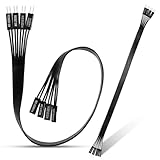
- 【Complete Cable Set】This motherboard extension wire set includes all essential front panel connectors: HDD LED with clear +/- polarity marking, Power LED with polarity indicators, Power SW switch cable, and Reset SW cable. The 24AWG tinned copper wiring ensures stable conductivity and reliable performance for your computer's front panel functions.
- 【Premium Construction】Featuring 24AWG tinned copper cores with oxidation-resistant gold-plated contacts, these motherboard front panel extension cables deliver consistent signal transmission. The ultra-thin flat ribbon design reduces cable clutter inside your chassis while maintaining excellent conductivity and durability for long-term use.
- 【Universal Compatibility】The set includes two complete cable packages, making it ideal for dual-system builds, case modifications, or replacing damaged front panel wiring in various computer configurations.
- 【Additional Extension】Package includes male to female header extension cables that extend your motherboard's header connection by 30cm. These internal cables feature flexible PVC sheathing and secure connections for front panel ports, expansion cards, and other internal devices.
- 【Installation Ready】Each connector is clearly labeled with polarity markings for HDD LED and Power LED connections. The flat ribbon design simplifies cable routing in compact cases, while the 30cm length provides ample reach for most computer chassis layouts, ensuring neat and organized internal cable management.
Where to find the correct information
Download the manual for the exact motherboard model and revision from its manufacturer. Search the board diagram for F_AUDIO, then follow the pin numbers, orientation mark, and supported front-panel standard shown there. The case manual or front-I/O specification should identify each wire and whether its module is HD Audio, AC’97, or a proprietary arrangement.
Replacement front-panel audio cables or modules can solve a damaged or missing lead, but compatibility is model-specific. Confirm the motherboard header, case connector, and pin assignments before buying any replacement.
The Bottom Line
F_AUDIO is the front-panel audio header on the Gigabyte boards covered here. Connect the case’s front-audio module only after matching its HD Audio/AC’97 wiring and orientation to the exact motherboard manual; never infer the pinout from the label alone.
Quick wins for a faster PC:
Scan for outdated or missing drivers - takes under a minuteDriver Scan →Repair Windows errors before they cause bigger problemsFix Now →Quick Recap
Product prices and availability are accurate as of the date/time indicated and are subject to change. Any price and availability information displayed on Amazon at the time of purchase will apply.

