
Free tools Windows power users keep installed
One-click scans. No signup required.
iTechGuides is reader-supported. When you buy through links on our site, we may earn an affiliate commission. As an Amazon Associate I earn from qualifying purchases. Learn more
Prioritize fast item capture, useful ownership evidence, secure backups and exports, and reminders to keep records current. For people preparing for a possible insurance claim, the app should make it easy to assemble descriptions, photos, receipts, appraisals, and model or serial numbers—but an inventory alone does not determine what a policy covers.
Make adding an item quick enough to do in the moment
The more effort it takes to record a purchase, the more likely users are to put it off. Make a basic entry possible in a few steps, then let people add detail when they have time.
Offer a fast, flexible capture flow
- Let users take or attach a photo, choose a room and category, and add a short description.
- Support barcode scanning when an item has a barcode, with manual entry for items that do not. Barcode capture, photos, grouping, and export are established features in the NAIC’s home-inventory app.
- Allow an optional voice note for details that are easier to say than type, such as where an item was bought or what makes it distinctive.
- For shelves, drawers, or collections, consider capturing several items in one session. Show the proposed entries for review so users can correct names, categories, or matches before saving. This is a product-design suggestion, not a capability verified in the NAIC app.
Keep the first entry lightweight. Ask for more information later rather than making every field mandatory at the point of capture.
Record the details that make an item identifiable
A photo and a name are a start, but a record becomes more useful when it helps distinguish the item and documents its value and ownership. The NAIC recommends recording a brief description, age, purchase price, estimated current value, and model or serial numbers. Its guidance also calls for keeping receipts or appraisal documents where available.
#1 Best Overall

- [Powerful Android 12] MUNBYN handheld scanner 082Pro is equipped with the Android 12 system and has obtained Google Mobile Services (GMS) certification, seamlessly running inventory scanning software such as InFlow, Zoho, Sortly, Odoo, Orcascan, and more. Android 12 features advanced privacy and security mechanisms to ensure the safety of data transmission and storage, providing a reliable solution for warehouse management.
- [Ultra-Fast & Spacious] Boasting 3GB of RAM and 32GB of ROM, the MUNBYN handheld barcode scanner 082Pro provides ample space for storing applications, data, and scanned information. Powered by the octa-core Qualcomm SDM450 CPU, this pda device ensures smooth and efficient operation, allowing you to handle multiple tasks simultaneously without lag.
- [High-Resolution Scanning] Featuring compatibility with the advanced HW HS7 scan engine, the MUNBYN handheld barcode scanner 082Pro offers high-resolution scanning capability for precise and quick barcode reading. It supports reading of 20mil Code-39 at a typical distance of 0.86 meters, even for damaged or poorly printed barcodes, enhancing overall efficiency in inventory tracking and management.
- [Dual SIM Slots & WiFi 5] The MUNBYN PDA scanner features dual SIM card slots, allowing for dual standby capability and enhanced connectivity options. Additionally, it supports WiFi 5, ensuring faster and more stable wireless connections. This Android PDA ensures a continuous network connection whether used in indoor warehouses or outdoor logistics environments.
- [IP67 Protection Standards] Designed with an IP67 protection standards, the MUNBYN barcode scanner with keypad offers robust protection and ensures 4.9-foot drop resistance. The IP67 protection standards provides superior water immersion resistance compared to IP65 PDAs. This inventory scanner can withstand temporary water immersion at depths ranging from 150mm to 1000mm (6 inches to 39 inches) for up to 30 minutes, making it ideal for use in harsh warehouse or outdoor environments.
Use practical item fields
- Identification: name, description, brand, model, and serial number.
- Place and organization: room, category, and, if useful, a more specific location such as a cabinet or storage box.
- Purchase and condition: purchase date or approximate age, purchase price, and condition.
- Value: estimated current value, with a date and a clear label that it is the user’s estimate.
- Supporting files: photos, receipts, invoices, warranties, and appraisals.
Make fields optional where users may not know the answer. A blank serial-number field is better than losing the record because someone cannot find the label.
Give valuable or unusual items more room
Offer an expanded detail view for items that need more documentation, such as jewelry, art, antiques, or specialized equipment. Let users attach multiple images and documents and record identifying details. If the app displays an estimated value, do not present it as a professional appraisal, a replacement-cost valuation, or a promise of insurance reimbursement.
Rank #2
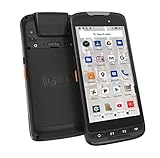
- Upgraded Hardware Configurations - Comparing with the discontinued Android 11 version, this 2026Q1 launched version maintains the appearance & structure, but upgraded CPU and enhanced memory. With a superior processor, the latest Android 15 OS & 4GB RAM +128GB ROM, this rugged handheld mobile computer brings faster system speed, optimized multi-task tool, upgraded data security, & stronger compatibility.
- Designed for Enterprise Mobility - With rugged, drop-tested construction & IP65 rated housing, this portable handheld data terminal can be used in a wide range of enterprise field works. Ideal for business, retail, distribution, commercial delivery, warehouse & logistics management, manufacturing, asset tracking, etc., tasked with delivering high work efficiency, reducing operational costs.
- Professional Barcode Scanner - With built-in Zebra SE4710 barcode scan engine, this Android barcode scanner can read any 1D & 2D QR barcodes in milliseconds, provides outstanding performance on damaged or poor-printed barcodes. With notable maximum motion tolerance of 6 m/s for reading moving barcodes, it boosts scanning speed and productivity. And the picklist feature allows user to easily select a single barcode to capture on a field of bar codes, ideal for intensive scan environment.
- Android-based Warehouse Management - With certified Google Mobile Service, you can easily utilize Android-based inventory applications or develop customized warehouse management system. It supports 3rd party software such as Zoho Inventory, Orca Scan etc. The pre-installed Scan Configuration App make things simple - you can set different scan mode (trigger on press or continuous scan etc.), barcode output formats, add prefix/ suffix / check digits etc. And you can simply utilize excel or web-based applications.
- Other Advantages - Except for barcode scanner, this android PDA also comes with NFC, camera etc. function. With a removable /replaceable 4000mAh Li-ion battery, it can work up to 10 hours. The 13MP camera allows you take clear pictures into your inventory or POS systems. In addition, it supports WiFi, Bluetooth and 4G LTE. You can access data center anytime, anywhere.
Make records usable after a loss or when a device is unavailable
An inventory saved only on a phone kept at home may be inaccessible when it is most needed. Provide a complete export and a reliable backup-and-restore path, and explain what each one contains.
Build exports people can actually use
- Include item descriptions, photos, dates, and attached documents where the export format supports them.
- Show when the export was generated and make it easy to create a fresh copy.
- Offer a paper-friendly version for people who want a printed record or need an offline copy.
- Explain whether an export includes original files, thumbnails, or links that require an account or internet access.
Let users keep a copy somewhere away from the home or device, and make selected exports shareable with a trusted person or an insurer. California’s Department of Insurance recommends keeping an inventory and supporting documents in a safe, accessible place; its examples include a fire-proof box, a safe-deposit box, or another safe location. The guidance does not establish that any particular product guarantees protection.
Rank #3

- Widely Compatible: Bluetooth Barcode Scanner for iPhone iPad Android Tablet PC, Support HID / SPP / BLE mode via bluetooth, Work with Windows XP/7/8/10, Mac OS, Windows Mobile, Android OS, iOS, Linux.
- Strong Recognition Ability: With the 2500 pixels high-resolution CCD sensor Engine, Rapidly decodes all 1D and stacked barcodes (including ISBN book), even worn, damaged or tightly spaced codes. Scan 1D codes directly from paper or screen, such as a computer monitor, smartphone, or tablet, or scan through glass surfaces, plastic shrink wrap, a CCD scanner is likely the best way to go.
- Automatic Scanning: NT-1228bc barcode scanner have three scanning modes: manual trigger mode, continuous scanning mode and auto-sensing scanning mode. In addition, there is a storage mode. Storage mode can be used when you are out of range of Bluetooth and wireless connectivity. Supports storage of up to 100,000 barcodes. Note: Before use, you need to scan the corresponding setting barcode on the manual.
- 2600mAh Battery Upgraded: Continuous scanning up to 200,000 times on a full charge. After a full charge the scanner can be used for one month at least, even in warehouses and at pos checkout counters where scanners are frequently used. In libraries and hospitals it can be used even longer.
- Programmable Configuration: Add custom prefixes/ suffixes, delete characters, Add keyboard keys/ combinations (terminator TAB, CR&LF, Home etc.), Enable or disable the barcode type as you want. Buzzer can be set to mute to allow for a quiet operation.(Note: It does not work with square POS / Divalto / DoorDash / Lightspeed POS system)
Protect privacy while enabling sharing
Sharing should be deliberate and limited to what the user selects. Provide controls for household members and collaborators, and let users revoke access where the sharing method permits it. Keep exact home-location information and especially sensitive item details private by default. Make clear whether a shared copy can be downloaded or forwarded.
Help users keep the inventory current
A home inventory loses value when it stops reflecting what someone owns. California’s Department of Insurance recommends updating an inventory at least once a year.
Rank #4

- Multi-function 2D barcode scanner: This inventory scanner is a 3-in-1 multi-function wireless barcode scanner, which integrates USB barcode scanner, collector, and inventory counter, which can realize the function of fixed asset management. 1D 2D barcode scanner is mainly used in warehouses, medical and cosmetic stores. , Supermarkets, banks, logistics, shops, etc.
- Fast decoding capability: This bar code scanner can read 1D barcodes and 2D codes in all directions. Identify 1D: Codabar, Code 11, Code93, MSI, Code 128, EAN,UPC,Code 39, UPC-A, ISBN, Industrial 25, Standard25, Matrix; Recognize 2D: QR, DataMatrix, PDF417, Aztec, Micro PDF417. Hand held barcode scanner can also read the QR code on the screen of other smart devices.
- Up to 150M long-distance transmission: The store inventory barcode scanner is connected to the computer through a 2.4G wireless USB receiver, supports WINDOWS XP/7/8/10 system, and is compatible with office software such as WORD/EXCEL/Text; the transmission distance of 2d barcode scanner can reach when there is no obstacle outdoors 150M, 50M in interference environment or indoor.
- Convenient operation: The shape of the barcode scanner wireless is composed of a HD color screen and 26 buttons, which is convenient to carry and can be put in pants or clothing pockets; at the same time, wireless 2d barcode scanner is equipped with a 2.4G wireless USB receiver, which is plug and play, and can be paired with the portable barcode scanner within 3 seconds Success; and the scanner supports three languages: Japanese, English, and Chinese.
- 1000MAH Large capacity battery :The barcode scanner for library has a built-in lithium polymer battery, which can be charged using a USB data cable. The capacity is 1000MAH. The scanner for barcodes can be fully charged in about two hours and can be used for 20-40 hours. Help you extend working hours and increase workload.
Make maintenance manageable
- Offer an annual review reminder that users can schedule or dismiss.
- Prompt users to add new purchases and archive items they no longer own.
- Record when each item was last reviewed, so stale entries are easy to spot.
- Make bulk edits and review by room or category possible, rather than requiring users to open every record individually.
Explain what an inventory can—and cannot—do for insurance
The NAIC says an accurate home inventory gives an insurance carrier information it needs to help settle claims. That makes an inventory a useful record to discuss with an insurer, but it does not establish whether a particular loss is covered or how much a policy will pay.
Recommended Free Tools
Coverage varies by policy. The NAIC advises consumers to check their own policy and notes that categories such as jewelry, antiques, and art may have limits. Consider a contextual reminder for users to ask their insurer or agent whether a valuable item needs additional documentation or different coverage. Keep that reminder educational; do not imply that an app’s estimated value determines coverage.
Best Value

- 【3-in-1 Multifunction Inventory Barcode Scanner】- The wireless barcode scanner is a multi-functional inventory scanner that integrates a inventory barcode reader, data collector, and inventory counter. You can create 180 storage libraries and store 400,000 data. Our inventory barcode scanners are mainly used in warehouses, medical, cosmetics stores, supermarkets, banks, logistics, libraries, shops, etc
- 【Super 1D & 2D Code Recognition Capability】- The barcode scanner can scan 1D and 2D codes, no matter whether the barcode is blurred, reflective, or broken, including the screen code, it can be quickly identified.Identify 1D: Codabar, Code 11, Code93, MSI, Code 128, EAN,UPC,Code 39, UPC-A, ISBN, Industrial 25, Standard25, Matrix; Recognize 2D: QR, DataMatrix, PDF417, Aztec, Micro PDF417. (Note: Not compatible with Square.)
- 【2.4G Wireless Long-distance Transmission】- Our wireless barcode scanner is connected to the computer through a 2.4G wireless USB receiver, supports WINDOWS XP/7/8/10 system, and is compatible with office software such as WORD/EXCEL/Text; the inventory barcode scanner transmits distance when there is no obstacle outdoors It can reach 150M/492 feet, and it can reach 50M/164 feet when there are obstacles or indoors
- 【2000mAh battery and 16M storage space】- The portable barcode scanner has a built-in lithium polymer battery, which can be charged with a USB data cable. The capacity is 2000 mAh. Our bar code scanners readers can be fully charged in about two hours and can be used for 60 hours. When you want to transmit 10,000 barcodes, you can use text upload to improve your work efficiency
- 【Plug and play for Easy Portability】- Insert the USB wireless receiver into the computer, turn on the inventory scanner and connect to the computer immediately, plug and play, no need to install drivers or software; support lightning scanning and upload of blurry or broken barcodes under strong and dim light , make scan more easier , Compatible with Windows 7, Vista, XP, Windows 2000, work with Word, Excel, etc. Data Tools: Please contact us to send, if you did't dowload the tool
Prioritize the roadmap by what makes records dependable
- Start with capture and organization: photos, descriptions, room and category labels, barcode scanning where available, and manual entry.
- Add evidence: purchase details, model and serial numbers, condition, receipts, and other supporting documents.
- Make records durable: backup, restore, complete export, and a paper-friendly option.
- Make sharing and privacy explicit: user-selected exports, controlled collaboration, and clear access settings.
- Close the maintenance loop: annual review reminders, last-reviewed dates, and easy updates when ownership changes.
These priorities focus on capture effort, the completeness of item evidence, resilience of stored records, privacy, and upkeep. They are product-design criteria, not a benchmark of existing apps.
Quick Recap
Product prices and availability are accurate as of the date/time indicated and are subject to change. Any price and availability information displayed on Amazon at the time of purchase will apply.

