
iTechGuides is reader-supported. When you buy through links on our site, we may earn an affiliate commission. As an Amazon Associate I earn from qualifying purchases. Learn more
A “virtual CAN” setup can mean anything from a software interface that exchanges CAN frames to a simulated ECU running inside a larger vehicle-network model. Those are different layers of simulation: Linux vcan and MathWorks virtual channels support application-level frame exchange, while Vector vVIRTUALtarget can run a virtual ECU in CANoe. Choose based on whether you need to test software logic, model ECU behavior, or validate a real bus.
What does virtual CAN mean?
Virtual CAN is an umbrella term, not one specific kind of simulator. A virtual interface gives software a way to send and receive CAN frames without a physical CAN controller. A virtual ECU goes further by executing an ECU software model as part of a network simulation. Neither should automatically be treated as a simulation of the electrical and protocol behavior of a physical bus.
That distinction determines what a test can establish: frame exchange can help check application behavior, but it does not by itself prove that a real network will arbitrate, acknowledge, or handle errors as expected.
Windows Errors? Fix Them Before They Spread
Repair common Windows errors and clear accumulated junk for a smoother, more stable PC - no reinstall needed.Free scan · no reinstallCrashes, No Sound, or Screen Glitches?
Random freezes, missing sound and display glitches usually trace back to one bad driver. Find and replace yours safely.Free scan · under a minuteHow the main virtual CAN models differ
| Model | What it represents | Suitable workflow | Important limit |
|---|---|---|---|
Linux SocketCAN vcan |
A virtual local CAN network interface | Application development and automated tests that exchange CAN frames without controller hardware | It is a virtual interface, not evidence of physical-bus validation. Linux kernel SocketCAN documentation, v6.12 |
| MathWorks Vehicle Network Toolbox virtual channels | Two application-level virtual CAN channels | MATLAB or Simulink prototyping and simulation; documented CAN and CAN FD support on Windows and Linux | No low-level arbitration, error frames, or acknowledgments. Protocol support differs by OS. MathWorks virtual CAN channels documentation |
| Vector vVIRTUALtarget integrated with CANoe | A virtual ECU connected to a network simulation | ECU software development, early integration, and testing with CANoe | Requires the appropriate CANoe target network and correct communication-controller channel mapping. Vector vVIRTUALtarget and DaVinci Configurator Classic CANoe vECU help |
CANdevStudio with vcan or a hardware backend |
A CAN simulation and traffic-inspection workflow | Software signal simulation and inspection, with optional physical-interface support | Backend and hardware compatibility depend on the documented implementation and release. CANdevStudio project documentation |
| SODA.Sim CAN subsystem | Virtual CAN networks within a vehicle simulation | Vehicle simulation with possible links to SocketCAN or USB-CAN devices | Available device components depend on operating system and interface. SODA.Sim CAN subsystem documentation |
When a virtual CAN interface is enough
Use a virtual interface when the question is whether software can produce, receive, or process CAN frames. Linux SocketCAN includes the vcan driver for virtual local interfaces, allowing frames to be transmitted and received without real CAN controller hardware. The Linux kernel documentation describes it as a “virtual local CAN interface.” See the SocketCAN virtual CAN section.
#1 Best Overall
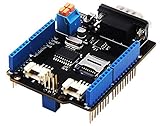
- 💎Notice: When we produced the new batch of CAN-BUS Shield V2, the wire of the back pads was embedded inside the PCB, although the wire between the pads is now not visible on the outside, the inside is still connected, if you want to change the wiring of the pads, you still need to cut the wiring in the PCB first.
- 💎CAN-BUS is a common industrial bus because of its long travel distance, medium communication speed and high reliability. It is commonly found on modern machine tools and as an automotive diagnostic bus. Thanks for CAN-BUS, makers are able to hack their cars more conveniently.
- 💎The CAN-BUS Shield V2 still uses MCP2515 as CAN-BUS controller and MCP2551 as CAN transceiver. OBD-II or CAN standard pinout can be selected by switching jumpers on DB9 interface, the default pinout is OBD-II.
- 💎We add a TF card slot for data storage and the CS pin can be either set to D4 or D5. The INT pin can also be set to D2 or D3 by switching jumpers on the back of the shield.
- 💎CAN BUS Shield Work well with Arduino UNO (ATmega328), Arduino Mega (ATmega1280/2560) as well as Arduino Leonardo (ATmega32U4) and LinkIt One.
This is useful for application development and automated test setups when a physical controller or vehicle network is unavailable. It does not establish that the software will behave correctly against a physical bus under arbitration, electrical, timing, or error conditions.
MathWorks virtual channels
Vehicle Network Toolbox provides two virtual channels for code prototyping and model simulation. Its documentation lists CAN, CAN FD, and J1939 support on Windows, and CAN and CAN FD support on Linux. Check the documentation for the MATLAB release and operating system you plan to use, particularly if J1939 is required.
Rank #2

- Simulator with LCD screen and accessories.It is used for Passenger car agreement only.Please contact me via email to obtain the electronic manual.
- Package included: simulator with LCD screen, power adapter, USB cable.
- After connecting with a computer via a USB data cable, it supports the simulation of nearly 140 remaining vehicle parameters.
- Supported seven protocols:ISO15765-4 11BIT 500k;ISO15765-4 11BIT 250k;ISO15765-4 29BIT 500k;ISO15765-4 29BIT 250k;ISO9141-2;ISO14230-4 KWP2000 5BPS;ISO14230-4 KWP2000 FAST
- Support real-time simulation of 12 kinds of vehicle parameters through the local knob/button.Support vehicle speed simulation;Support speed simulation;Support coolant temperature simulation (water temperature simulation);Support intake air temperature simulation;Support intake air flow simulation;Support intake manifold pressure simulation;Support absolute throttle position simulation;Support ignition advance angle simulation;Support engine load simulation;Support remaining oil quantity simulation;Support fault code simulation;Support frame number simulation
MathWorks characterizes these as application-level channels. They do not perform low-level protocol activity such as arbitration, error frames, or acknowledgment, so they are not a substitute for testing those behaviors on a physical network.
When you need a virtual ECU
A virtual ECU models executable ECU software, rather than just providing a place for applications to exchange frames. Vector describes vVIRTUALtarget as a way to create a virtual System Under Test for AUTOSAR Classic projects. Its listed I/O capabilities include CAN and CAN FD as well as LIN, FlexRay, Ethernet, SPI, I2C, digital I/O, PWM, and ADC. The product documentation describes running virtual ECUs on Windows or Linux.
Rank #3

- Latest PRO Edition with faster processing, improved interface, and expanded protocol simulation tools for advanced CAN-BUS diagnostics and training.
- Includes Sniffer to monitor live CAN-BUS data and Trainer to build and send custom OBD2 and J1939 messages. Simulate real vehicle behavior directly from your PC.
- Simulates OBD-II fault codes, J1939 PGNs, CANopen control frames, and marine NMEA 2000 messages. Ideal for automotive, truck, marine, and industrial applications.
- Comes with a printed CAN-BUS training book covering frames, PGNs, PIDs, diagnostics, and network fundamentals. Perfect for students, technicians, and engineers.
- Includes Trainer Kit PRO Edition, PRO software access, USB-C cables, OBD2 to Deutsch adapter, J1939 connector, and Quick Start Guide. Works on most Windows PCs.
In CANoe, the built vECU is added as a node component and its communication controllers are mapped to CANoe channels. The configured network names must match; incorrect names or channel mapping can prevent the vECU from communicating on the intended network. Follow the CANoe vECU configuration guidance for the project’s setup.
Independent reader supportYour contribution helps us test, update, and keep practical guides available for everyone.Do you need a USB CAN adapter?
No, not for software-only frame exchange with Linux vcan or MathWorks virtual channels. Physical CAN hardware becomes relevant when the computer and its software need to connect to an actual network. CANdevStudio documents a PEAK PCAN-USB backend example, while SODA.Sim documents device connections to SocketCAN, USB-PCAN, and Kvaser hardware.
Rank #4

- 5-SAE-J1939 simulator.It is used for J1939 protocol only,for commercial vehicle such as bus, truck.Please contact me via email to obtain the electronic manual.
- Package included: 5-SAE-J1939 simulator with LCD screen, power adapter, USB cable.
- After connecting with a computer via a USB data cable, it supports the simulation of nearly 140 remaining vehicle parameters.
- Supported seven protocols:ISO15765-4 11BIT 500k;ISO15765-4 11BIT 250k;ISO15765-4 29BIT 500k;ISO15765-4 29BIT 250k;ISO9141-2;ISO14230-4 KWP2000 5BPS;ISO14230-4 KWP2000 FAST
- Support real-time simulation of 12 kinds of vehicle parameters through the local knob/button.Support vehicle speed simulation;Support speed simulation;Support coolant temperature simulation (water temperature simulation);Support intake air temperature simulation;Support intake air flow simulation;Support intake manifold pressure simulation;Support absolute throttle position simulation;Support ignition advance angle simulation;Support engine load simulation;Support remaining oil quantity simulation;Support fault code simulation;Support frame number simulation
Those examples do not establish universal hardware compatibility. Before choosing an adapter, check the operating system, driver, CAN or CAN FD support, connector, and compatibility with the selected application and release.
Quick Recap
Best Value

- HIGH EFFICIENCY: For CANABLE V2.0 use high performance for STM32G4 series microcontroller, operating frequency up to 170M. Experience fast and accurate data analysis with the USB to CAN Module, enabling streamlined processing of CAN messages for enhanced efficiency
- SUPPORTED PROTOCOLS: USB to CAN Module support CAN2.0A CAN2.OB and CAN‑FD protocols, and the speed is set up your CAN bus interface effortlessly with the user friendly USB to CAN Module, providing a hassle experience for seamless integration into your system
- COMPACT DESIGN: from a compact and portable design of the CAN FD analyzer adapter, easily fitting into your workspace for convenient use whenever needed
- TYPE C INTERFACE: USB to CAN Module support 5V Type C power supply, more convenient and more practical to use than ever. Enjoy seamless connectivity with multiple devices, ensuring communication across different platforms
- LED INDICATOR: USB CAN converter module with three color LED status indicator. Support web page update firmware, easy to use, open source data, useful and practical
Choose a model by the test you need to run
- Test application frame handling without hardware: use a virtual interface such as Linux
vcan, or a documented application-level channel such as MathWorks virtual CAN. - Prototype in MATLAB or Simulink: check Vehicle Network Toolbox support for your OS, release, and required protocol; its virtual channels do not model low-level bus behavior.
- Execute and integrate ECU software: consider a vECU workflow such as vVIRTUALtarget with CANoe, and verify the target network names and channel mapping.
- Simulate vehicle-level networks or inspect traffic: evaluate tools such as SODA.Sim or CANdevStudio against the needed network types, backends, operating system, and release.
- Validate a physical bus: connect suitable interface hardware and perform tests on the real network. A virtual interface alone cannot verify physical-bus behavior.
Product prices and availability are accurate as of the date/time indicated and are subject to change. Any price and availability information displayed on Amazon at the time of purchase will apply.

