
iTechGuides is reader-supported. When you buy through links on our site, we may earn an affiliate commission. As an Amazon Associate I earn from qualifying purchases. Learn more
The ASUS M4A89GTD PRO/USB3 VGA switch card is a motherboard-specific PCIe accessory, not a switch for changing between VGA monitors. Install it in the gray PCIe 2.0 x16_1 slot when using one graphics card in the blue PCIe 2.0 x16_2 slot; ASUS documents that arrangement as enabling an x16 link in the blue slot.
What the VGA switch card does
ASUS included one “VGA switch card” in the M4A89GTD PRO/USB3 package contents. Its purpose is to configure the board’s PCIe slot resources for a single graphics card in the blue slot. It does not carry an analog VGA monitor signal, select between displays, or replace a desktop KVM/VGA switch.
The accessory is tied to this motherboard’s PCIe lane configuration. ASUS’s user manual states: “For working at x16 speed on the PCIe 2.0 x16_2 slot (blue), it is necessary to install the bundled VGA switch card to the PCIe 2.0 x16_1 slot (gray).”
Where to install it
- Turn off the computer, switch off the power supply, unplug the AC cable, and ground yourself before opening the case.
- Locate the two long PCIe slots identified by the manual: the blue PCIe 2.0 x16_2 slot and the gray PCIe 2.0 x16_1 slot.
- Install the VGA switch card in the gray x16_1 slot. It is the small board ASUS supplied for this configuration, not the graphics card itself.
- Install the single graphics card in the blue x16_2 slot and secure it to the case.
- Reconnect power and verify the graphics card in firmware or the operating system. If the system does not start, power down and reseat both cards.
Do not force the accessory into a different connector or substitute a normal PCIe expansion card. The gray slot is the documented position for the switch card.
#1 Best Overall

- Users can share a VGA monitor, a USB mouse & a USB keyboard between 2 computers
- 2 ports
- Users can switch between computers using the wired remote switch button
- Offers an out-of-box solution with no additional cables needed
- Plug & play
What slot speeds ASUS documents
The manual describes the blue x16_2 slot as supporting a single x16 link or dual x8 links. The gray x16_1 slot has an x8 link. ASUS’s table gives these arrangements:
| Graphics-card setup | Switch-card placement | Graphics-card slot | Documented link width |
|---|---|---|---|
| One VGA/PCIe card | Bundled card in gray x16_1 | Blue x16_2 | x16 |
| One VGA/PCIe card | No switch card | Blue x16_2 | x8 |
| Two VGA/PCIe cards | Not specified as a single-card switch-card arrangement | Blue x16_2 and gray x16_1 | x8/x8 |
These are manufacturer-published PCIe link configurations, not guaranteed frame-rate differences. A 2010 TechSpot review reported no performance difference in its particular Radeon HD 5870 test system with the card installed versus removed. That result applies to that hardware and testing period, not every graphics card or workload.
What happens if the card is missing?
For one graphics card in the blue slot, ASUS documents operation at x8 without the accessory. The computer may therefore boot and work normally, but the slot will not use the manual’s documented x16 configuration. With two graphics cards, the manual lists x8/x8.
Recommended Free Tools
Rank #2

- 2 Port VGA switch allows two computers or laptops to share one monitor, LCD, Projector,etc.
- The VGA switch 2 input 1 output is built with panel button for switching. Metal shell, plug and play, no AC adapter required
- The vga selector switch supports wide screen 16:9, 16:10, 4:3 Screen, up to 250MHz bandwidth for video clarity, support VGA resolutions up to full 1920x1080 and WUXGA 1920x1440
- Auto-detect display DDC information for the optimal resolution.Note: this is a VGA selector switch, not splitter for dual monitors.
- Compact size and lightweight for convenient carrying.This vga switch box supports VGA, SVGA, UXGA, WUXGA and multisync monitors.
If your package was supposed to include the card and it is absent or damaged, ASUS’s package-contents guidance says to contact the retailer. On a used board, check the accessory bundle before assuming the motherboard is defective.
Is a generic VGA switch an equivalent replacement?
No. A desktop VGA monitor switch is an external display-signal device and has a completely different function. A generic PCIe adapter or an unrelated “VGA switch” also has no established compatibility with this board. The manual identifies a bundled, board-specific accessory and does not provide evidence that a universal replacement will reproduce the required lane configuration.
Search using the exact phrase ASUS M4A89GTD PRO/USB3 VGA switch card. Before buying a used or surplus part, confirm all of the following:
Rank #3
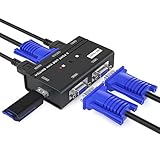
- VGA KVM switch: MT-VIKI 260KL 2 port KVM Switch enables 2 computers to share 1 set of monitor, keyboard, mouse, one U-disk, printer or USB speaker (not 3.5mm jack)
- IMPORTANT NOTE: This USB VGA KVM Switch is power by USB cable, pls plug the USB+VGA head into your computer, the VGA head plug into this KVM Switch, otherwise, the monitor will not have any display. Meanwhile, this kvm switch can't support mechanical keyboard and mouse.
- Resolution: Support 1920 x 1440 resolution and DDC; The USB VGA KVM cable is 4ft/1.2m, to require 10ft/16ft, please order ASIN: B08ZJ41YD4
- Compatibility: Support windows 10/8/7 / XP / Vista (32/64-bit), Mac, Linux, DOS, Win3, WINNT, Netware, and Unix. But not support docking Station
- Package: VGA KVM Switch 2 port *1, 1.2m USB VGA KVM Cable*2, User Manual*1; Please plug the VGA cable w/ USB pigtail into the computer port.
- The motherboard model is exactly M4A89GTD PRO/USB3, not a similar M4A89-series board.
- The seller shows the actual card and identifies it as the motherboard accessory, not a monitor switch.
- The connector, keying, labeling, and physical shape match photographs or documentation for the board.
- The condition, return policy, and shipping protection are clear.
Current replacement stock, a verified standalone ASUS part number, and present-day pricing are not established here. Treat marketplace listings as unverified until the model fit and condition have been checked.
Practical troubleshooting
The system works but the blue slot reports x8
Shut down and confirm that the switch card is fully seated in the gray x16_1 slot and the graphics card is in the blue x16_2 slot. Check the motherboard manual’s slot labels rather than relying on slot length alone. Also verify the link width in firmware or a trusted hardware-information utility after reseating.
The computer will not boot after installation
Remove AC power, reseat the switch card and graphics card, and check that no case obstruction prevents either card from sitting level. Test with the graphics card alone if necessary, then reinstall the accessory in the gray slot. If the board still fails to start, inspect the cards for damage and use the motherboard’s normal clear-CMOS and diagnostic procedures.
Rank #4
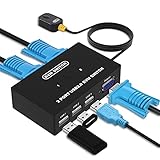
- Ideal Sharing Devices: USB VGA KVM Switch Box allows you to control 2 PCs via 1 Video Monitor and 3 USB2.0 Devices such as a printer, scanner, mouse, keyboard. It includes 2 KVM cables, VGA cables, and USB cables are 2 in 1 to keep your workspace tidy and efficient.
- Easy to install: plug and play with no driver required. With the switch button that you can easily switch 2 PCs without constantly swapping cables or setting up complicated software.
- High resolution: This KVM switch's resolution up to 1920 * 1440 and supports a super widescreen display. Support for DDC and high-quality auto-identification.
- Fast switching: you can easily and conveniently switch between 2 computers by pressing the buttons on the wired desktop controller.
- High compatibility: DGODRT KVM switch works with great compatibility, suit for DOS, Windows, Netware, Unix, Linux, Vista, Mac OS. For a business, office, multimedia classroom, meeting room, game room, home theater, research test, etc.
You want two graphics cards
Use the two PCIe slots as ASUS specifies for dual-card operation. The documented arrangement is x8/x8; the bundled card is not a way to make both slots run at x16.
Bottom line for owners and buyers
Keep the original card with the motherboard whenever possible. It is the accessory ASUS specifies for a single graphics card in the blue slot to operate at x16. Without it, ASUS documents x8 in that slot; with two graphics cards, the documented arrangement is x8/x8. Do not buy an ordinary VGA display switch as a substitute, and verify exact model compatibility before purchasing a used replacement.
The Tool Desk
Outbyte PC Repair FREEClear out junk files and repair common Windows errorsFree Scan →Outbyte Driver Updater FREEFix the driver behind crashes, sound loss and screen glitchesFind Drivers →Quick Recap
Product prices and availability are accurate as of the date/time indicated and are subject to change. Any price and availability information displayed on Amazon at the time of purchase will apply.

