
Recommended Free Tools
iTechGuides is reader-supported. When you buy through links on our site, we may earn an affiliate commission. As an Amazon Associate I earn from qualifying purchases. Learn more
A Snapseed QR Look lets you save an edit you like as a code, then reopen that same starting point on another photo or device. It works only inside the Snapseed app, not on a website. It gives you a repeatable recipe, not guaranteed identical final images, so every photo still needs a quick check.
What a QR Look is and what it needs
A QR Look is a code that stores the settings of an edit you have built in Snapseed. Google’s QR Look page states that the code requires the Snapseed app and will not work on the website (snapseed.com/qr/). That page confirms the requirement but does not give the full creation steps, so the navigation below comes from an independent walkthrough rather than from Google’s help content.
Two version details matter before you follow any instructions:
- The Google Play listing, updated October 2, 2026, identifies Snapseed 4.1 (Snapseed on Google Play).
- Guides written for Snapseed 2.x place QR Look under a different menu. The Snapseed 4 guides place the QR button in Tools. Check your app version before following button-by-button directions.
How to create a QR Look in Snapseed 4
The current independent walkthrough, which recorded its steps on Snapseed 4.1 for Android and iOS in August 2026, describes this sequence (Digital Photography Life, “How to Use Snapseed 4”):
#1 Best Overall
![G Stylus 2021 Pen Stylus Pen Replacement for Motorola Moto G Stylus 2021 XT2115 Touch Pen [Not for G Stylus 5G (2021)]](https://m.media-amazon.com/images/I/31aJTKJKX9L._SL160_.jpg)
- High quality replacement sensor touch stylus for moto g stylus 2021 XT2115.
- ❤Not for Moto G Stylus 5G! ! ! ! ! ! Not for Moto G Stylus 2020(moto g stylus)! ! ! Not fit Moto G Stylus 2022! ! ! Please check the model before buying! ! !
- Way more accurate than your finger, you can edit photos, jot notes, sketch artwork, copy and paste text, mark up screenshots.
- The integrated stylus provides you with precise control and a whole new way to express yourself.
- ❤If you have any questions, you can contact Amazon for return and exchange.The stylus is seamlessly integrated with the Moto Note app, so you can start writing without even unlocking your phone.
- Open a photo and build the edit you want to reuse, such as a tone curve, white balance change and a selective brightening.
- Save the edit as a Look. On Android the same option may appear as a Style.
- Open Tools and tap the QR button in the top-right corner to generate a share card.
- Share or save the generated card or code so you can bring it back into Snapseed later.
A dedicated QR guide updated September 25, 2026 also notes the difference between 2.x and 4.x guidance (Snapseed QR Code Presets: How To Scan, Share, and Shine).
How to apply a saved QR Look
Two routes are documented. Neither is a universal import button, and the official pages do not settle how they behave across Android and iOS.
Rank #2
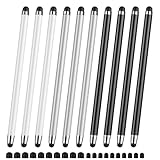
- 【Stylus Pen for Touchscreen】Our stylus pen requires no Bluetooth pairing or charging, you can unleash your creativity anytime and anywhere, just pick up the stylus and express your thoughts freely on the touchscreen.
- 【2-in-1 Stylus Pen】: Tablet pen for touchscreen, made of lightweight alloy, no need for Bluetooth connection or charging, ready to use after opening the package, comfortable in hand, sturdy, durable and anti-aging, so you can use it anytime, anywhere Easily capture inspiration and make everything feel like writing on paper, giving you a more accurate writing/drawing/touching experience.
- 【High Sensitivity & Precision】Acempire stylus can flexibly fit on the screen without delays, interruptions, or screen scratches, allowing you to have a smoother writing or drawing experience and enhance your creative pleasure.
- 【Compatibility and multi-purpose】: Universal stylus, suitable for touchscreen devices (Apple, Samsung, nintendo switch 2, switch lite, Moto, Lenovo, Xiaomi, etc., and also compatible with major operating systems, such as: Google, Android, Microsoft, etc.), you can use it like a real pen, You can use our stylus to write on drawing applications, take notes, read news, play games, etc. just like any other touchscreen device.
- 【Professional customer service】: we provide professional 24-hour customer service. If you encounter any product problems, please feel free to contact us through the store, and you will get a solution in the shortest time.
Scan the code from a second screen
Display the QR code on a second phone, tablet or monitor, then use the scanning option inside Snapseed to read it. Keep the code large and fully visible on screen. Official Google pages do not spell out the exact scanning menu path, so locate the scan option in your version of the app.
Do these 3 things before closing this tab:
1Clear out junk files and repair common Windows errors2Scan for outdated or missing drivers - takes under a minute3Repair Windows errors before they cause bigger problemsOpen a saved QR image from the gallery
A Snapseed team representative, replying in the r/snapseed community thread about gallery import, said that long-pressing the QR image in the phone gallery should offer an option to open the Look in Snapseed (r/snapseed thread). Treat this as a possible route that depends on your device. If the option does not appear, fall back to scanning from a second screen.
Rank #3
- UNIVERSAL COMPATIBILITY: Works seamlessly with all capacitive touch screen devices including smartphones, tablets, and other touch-enabled gadgets
- DUAL PACK VALUE: Includes 2 black stylus pens, providing a spare or allowing simultaneous use on multiple devices
- PRECISION CONTROL: Smooth-gliding tip enables accurate writing, drawing, and navigation on touch screens with enhanced accuracy
- PORTABLE DESIGN: Lightweight and compact construction makes it easy to carry in pockets, bags, or device cases
- RESPONSIVE PERFORMANCE: Capacitive technology ensures quick response time and fluid interaction with touch screen surfaces
The same response said the team is considering improvements to creating, sharing, importing and managing Looks. No delivery date was given, so do not assume a dedicated import feature exists yet.
Comparing the two methods
| Factor | Scan from a second screen | Open from gallery (long-press) |
|---|---|---|
| Official support | Implied by the QR Look feature; exact menu path not stated by Google | Team representative’s community reply only; not in official help |
| Extra hardware | Needs a second screen or a printed code | None beyond the saved image |
| Image legibility | Depends on screen brightness, size and camera focus | Not affected by camera focus; the saved file is read directly |
| Open-in-Snapseed action | Not applicable | Reported to appear on some devices; not stated for all Android or iOS versions |
| Best use | Reliable fallback on any device | Quickest route when the option is available |
Getting consistent results across photos
A QR Look carries the settings, but the same settings produce different results on different photos. Exposure, starting tones, subject brightness and crop all vary. Google’s Play listing describes Snapseed’s controls for manual and automatic exposure, color adjustments, white balance and selective adjustments, along with batch editing and non-destructive editing of JPG and RAW files (Google Play listing). Those controls are what you check on each image.
Rank #4

- Unleash your creativity with the KP 504E Pen and its advanced pressure sensitivity, allowing for precise and accurate drawing on your tablet or pen display.
- Crafted from high quality materials, this pen offers durability and comfort, ensuring a smooth and enjoyable drawing experience.
- Designed for artists, designers, and enthusiasts, the KP 504E Pen provides a reliable tool to bring your ideas to life.
- Whether you're working on detailed illustrations, photo editing, or creating stunning artwork, this pen is perfect for achieving precise and intricate designs.
- Enhance your skills and explore new possibilities in the world of digital creativity with the KP 504E Pen. Experience control and precision like never before.
Use this sequence for a batch:
- Pick a representative photo and build the Look there, so the recipe reflects a typical scene.
- Apply the Look to the other photos in the batch.
- Check each result for exposure, white balance, subject brightness, crop and any selective adjustments.
- Correct the images that drift. Keep the Look as the base and adjust only what differs.
Tool order changes the result
Snapseed’s official help explains that the order of tools and filters matters. For example, applying Frames before Lens Blur blurs the frame, while applying Frames after Lens Blur leaves it sharp (Getting Started with Tools and Filters). If a Look produces a result you did not expect, check the order of the steps that built it before judging the Look itself.
Revisit saved edits with Stacks
Snapseed’s help also explains that Stacks let you adjust edits that were applied earlier, after they are saved (Snapseed Help). When a preset is too strong for a particular photo, open its stack and reduce the setting rather than rebuilding the whole edit.
Best Value

- replacement touch stylus pen for Moto G Stylus (2023) / Moto G (2023). Not for Moto G Stylus 2022, Not applicable to Moto g stylus 2020, moto g stylus 2021, moto g stylus 5g 2021.
- Stylus pen more accurate than your finger, you can take quick notes, edit photos, sketch artwork, copy and paste text, mark up screenshots and all other typical touch screen commands.
- The integrated stylus provides you with precise control and a whole new way to express yourself,release your creativity.The integrated stylus provides you with precise control and a new way of expression.
- More accurate than your fingers, you can edit photos, take notes, sketch artwork, copy and paste text, mark screenshots, and more. The stylus is seamlessly integrated with the Moto app, so you don’t need to unlock your phone to start writing.
- Package Included: 1x Moto G Stylus 2023 stylus pen.
Batch editing or per-photo refinement
The choice is between speed and control, not between right and wrong.
- Batch first: Applying one Look to many photos is quickest and keeps a series visually related. It is the better choice for a set shot in the same light.
- Per-photo refinement: Checking each image takes longer but corrects differences that a shared recipe cannot anticipate, such as a backlit subject or a crop that changes the balance.
Most series benefit from both: a batch pass for the shared look, then a short refinement on the images that differ.
Limits to keep in mind
- QR Look navigation, labels and gallery behavior can change between app versions and devices. Google’s QR page and the Play listing are the places to confirm current behavior.
- Official pages do not state that a QR Look reproduces identical results on every photo.
- No official statistics on how often QR Looks improve consistency were found, so the advice here rests on Snapseed’s tool documentation rather than on measured outcomes.
Use the QR Look as a starting point, check every image, and rely on Stacks to refine the result.
The Tool Desk
Outbyte Driver Updater FREEScan for outdated or missing drivers - takes under a minuteDriver Scan →Outbyte PC Repair FREEClear out junk files and repair common Windows errorsFree Scan →
