
Recommended Free Tools
iTechGuides is reader-supported. When you buy through links on our site, we may earn an affiliate commission. As an Amazon Associate I earn from qualifying purchases. Learn more
Yes. Canonical’s current supported listing offers Ubuntu Server 24.04.5 LTS for the RISC-V Milk-V Mars, as both a preinstalled microSD image and a live installer. Canonical announced an optimized Ubuntu 24.04 image for the board on May 28, 2024; the current download is the 24.04.5 point release, not a new 2026 launch. For installation to NVMe, Canonical recommends the live installer, with an important prerequisite: U-Boot must be installed on the board’s SPI flash.
Which Ubuntu image should you use?
Canonical lists two Ubuntu Server 24.04.5 LTS options for Mars: a preinstalled image that boots from microSD, and a live installer that installs Ubuntu onto eMMC, USB storage, or NVMe. The live installer is Canonical’s recommended route for NVMe installation. Choose the image according to where you want the running system to live:
| Option | Use it when | Media and destination | Key setup |
|---|---|---|---|
| Preinstalled Ubuntu Server 24.04.5 LTS | You want to boot and run Ubuntu directly from a microSD card. | Write the preinstalled image to microSD; the system boots from that card. | Set the board to boot from microSD. The documented setup uses a USB UART console, interrupts autoboot, and resets the U-Boot environment. |
| Live Ubuntu Server 24.04.5 LTS installer | You want to install Ubuntu onto eMMC, USB storage, or NVMe. | Boot the installer from microSD and select the installed storage as the destination. | Install U-Boot to SPI flash first, then follow Canonical’s installer boot instructions. Canonical warns that vendor U-Boot is not EBBR-compatible without manual changes. |
Use Canonical’s RISC-V download page for the current image choices and its Milk-V Mars installation guide for board-specific instructions. The guide was last updated February 26, 2026; follow its current steps rather than assuming filenames from earlier point releases remain current.
Quick wins for a faster PC:
Fix the driver behind crashes, sound loss and screen glitchesFind Drivers →Repair Windows errors before they cause bigger problemsFix Now →Scan for outdated or missing drivers - takes under a minuteDriver Scan →How to install Ubuntu on the Milk-V Mars
Canonical documents separate workflows for preinstalled microSD boot and installation to another storage device. These are not interchangeable: the live installer requires working U-Boot on SPI flash, while the preinstalled image is itself the system on the microSD card.
#1 Best Overall
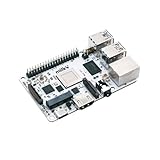
- Milk-V Mars is a high-performance RISC-V Single Board Computer (SBC) the size of a credit card, built on the StarFive JH7110. Up to 8GB LPDDR4 RAM.SoC StarFive JH7110, 64bit SoC with RV64GC, up to 1.5GHz
- This RISC-V Single Board Computer provides 3 boot options through which you can expand more storage space.1x eMMC Slot ,1x Micro SD Slot , 1x SPI Flash for bootloader
- Complete online documentation is provided to make it easy for you to use it and open the door to risc-v. check: http(s:)//milkv.io/docs/mars/overview
- Milk-V Mars is similar to the Raspberry Pi version, it has USB3.0 x3 , USB2.0 X1 a total of 4 USB ports. It has HDMI 2.0 with up to 4K support and an RJ45 Gigabit Ethernet port.
- This RISC-V SBC compatible with Raspberry Pi 40PIN GPIO, and support POE function through POE expansion board.
Prepare the board and serial console
- Check the board’s DIP switches and select the intended boot source: SPI flash, microSD, eMMC, or UART. The correct selection depends on whether you are following the preinstalled-image or live-installer route.
- For the documented console procedure, connect a USB-to-TTL UART adapter to the GPIO header. Configure the terminal for 115200 baud, 8 data bits, no parity, one stop bit, and no flow control.
- Do not connect the adapter’s red 3.3 V wire. Use the guide’s pinout and connection instructions for the board and adapter.
Boot the preinstalled microSD image
- Download the Mars preinstalled Ubuntu Server 24.04.5 LTS image from Canonical’s RISC-V download page.
- Write the image to a microSD card using an image-writing utility, then insert the card and set the board’s boot switches for microSD.
- Open the serial terminal using the settings above. During startup, interrupt autoboot at the U-Boot prompt and reset the U-Boot environment as directed in Canonical’s Mars guide.
- Continue the boot sequence. At the first login, use the documented default username and password, both
ubuntu. Change the password when prompted.
Install to eMMC, USB, or NVMe
- Install U-Boot to the board’s SPI flash by following Canonical’s Mars guide. Canonical cautions that the vendor U-Boot does not work with EBBR as-is; using it requires manual changes.
- Download the live Ubuntu Server 24.04.5 LTS installer image, write it to microSD, and prepare the desired destination storage in the board.
- Set the board to boot from SPI flash and follow Canonical’s instructions for launching GRUB and the installer.
- In the installer, select the intended destination (eMMC, USB, or NVMe) and complete the installation. For NVMe, this live-installer route is the one Canonical recommends.
What works, and what does not?
Canonical’s hardware guide, last updated February 26, 2026, describes support with the 6.8 kernel. Its documented limits matter if you are choosing Mars for graphics, expansion cards, or USB peripherals:
- On-board GPU: unsupported according to the guide.
- PCIe: support is incomplete. NVMe storage is usable, but Wi-Fi cards and external GPUs are not working according to the guide.
- USB: three USB 3.0 ports work; the USB 2.0 port is unsupported by the 6.8 kernel cited in the guide.
These are guide-specific support statements, not a guarantee about later kernels or future image updates. Check the current Mars guide before buying expansion hardware or planning a deployment around a particular peripheral.
Rank #2
- Milk-V Mars is a high-performance RISC-V Single Board Computer (SBC) the size of a credit card, built on the StarFive JH7110. Up to 8GB LPDDR4 RAM.SoC StarFive JH7110, 64bit SoC with RV64GC, up to 1.5GHz
- This RISC-V Single Board Computer provides 3 boot options through which you can expand more storage space.1x eMMC Slot ,1x Micro SD Slot , 1x SPI Flash for bootloader
- Complete online documentation is provided to make it easy for you to use it and open the door to risc-v. check: http(s:)//milkv.io/docs/mars/overview
- Milk-V Mars is similar to the Raspberry Pi version, it has USB3.0 x3 , USB2.0 X1 a total of 4 USB ports. It has HDMI 2.0 with up to 4K support and an RJ45 Gigabit Ethernet port.
- This RISC-V SBC compatible with Raspberry Pi 40PIN GPIO, and support POE function through POE expansion board.
What is the Milk-V Mars?
Canonical’s May 2024 launch announcement describes Mars as a RISC-V single-board computer built around StarFive’s JH7110, with a quad-core processor and configurations supporting up to 8 GB LPDDR4. The announcement lists three USB 3.0 ports, one USB 2.0 port, HDMI 2.0 with 4K support, RJ45 Ethernet with PoE support, an M.2 E-Key slot for Wi-Fi/Bluetooth modules, MIPI CSI camera interfaces, and a 40-pin GPIO header. These are specifications cited by Canonical, not independent performance findings.
Free tools Windows power users keep installed
One-click scans. No signup required.
Canonical’s announcement quoted Milk-V Vice President Ke Yiran describing the collaboration as intended to accelerate innovation and time to market for developers. That is a partner statement about the launch, not evidence of measured performance or user outcomes.
Rank #3
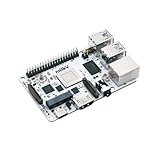
- Milk-V Mars is a high-performance RISC-V Single Board Computer (SBC) the size of a credit card, built on the StarFive JH7110. Up to 8GB LPDDR4 RAM.SoC StarFive JH7110, 64bit SoC with RV64GC, up to 1.5GHz
- This RISC-V Single Board Computer provides 3 boot options through which you can expand more storage space.1x eMMC Slot ,1x Micro SD Slot , 1x SPI Flash for bootloader
- Complete online documentation is provided to make it easy for you to use it and open the door to risc-v. check: http(s:)//milkv.io/docs/mars/overview
- Milk-V Mars is similar to the Raspberry Pi version, it has USB3.0 x3 , USB2.0 X1 a total of 4 USB ports. It has HDMI 2.0 with up to 4K support and an RJ45 Gigabit Ethernet port.
- This RISC-V SBC compatible with Raspberry Pi 40PIN GPIO, and support POE function through POE expansion board.
Why the current image is Ubuntu 24.04.5 LTS
Canonical’s current RISC-V download page says its 26.04 LTS release requires RVA23S64. It also says hardware that is not RVA23-ready remains supported on Ubuntu 24.04.5 LTS. This is the version context for Mars: the current official listing is Ubuntu Server 24.04.5 LTS, while Canonical’s original May 2024 announcement concerned Ubuntu 24.04.
In a separate 2025 retrospective, Canonical says RVA20 users can receive up to 15 years of support when using Ubuntu 24.04 LTS with Ubuntu Pro. That is a conditional support statement, not a claim that every Mars installation automatically receives 15 years of support. Check Canonical’s current RISC-V page and the applicable Ubuntu Pro terms for eligibility and current policy details.
Quick Recap
Product prices and availability are accurate as of the date/time indicated and are subject to change. Any price and availability information displayed on Amazon at the time of purchase will apply.

