
iTechGuides is reader-supported. When you buy through links on our site, we may earn an affiliate commission. As an Amazon Associate I earn from qualifying purchases. Learn more
The best camera for baby photography is the one that can focus reliably on a face, handle dim indoor light with a suitable lens, and stay easy enough to use that you actually carry it. For most parents, the Canon EOS R50 is the easiest starting point; choose the Sony a6100 if a discounted or used bundle is compelling, the Nikon Z50II for a more capable all-around APS-C camera, the Sony a6700 for active toddlers and video, or the Nikon Z5II for a full-frame system geared toward indoor work.
These are category recommendations based on manufacturer specifications and published camera testing, not a claim that one model guarantees sharp photos. Lens choice, light, shutter speed, and timing matter as much as the body.
At a glance: which camera should you choose?
| Camera | Best for | Sensor | Why it suits baby photography | Main trade-off |
|---|---|---|---|---|
| Canon EOS R50 | First interchangeable-lens camera | 24.2MP APS-C | Simple operation, people and eye detection, and a silent electronic shutter option. | One card slot; fewer affordable third-party RF-S options than Sony E-mount. |
| Sony a6100 | Affordable autofocus, especially used or discounted | 24MP APS-C | Strong people tracking and a tilting touchscreen. | Older body, less refined handling, and a kit lens that is slow indoors. |
| Nikon Z50II | Balanced enthusiast starter | 20.9MP APS-C | Subject recognition, twin control dials, comfortable handling, and JPEG pre-capture. | No in-body stabilization; 30fps pre-capture is JPEG-only. |
| Sony a6700 | Moving babies, toddlers, and family video | 26MP APS-C | Very capable autofocus and access to Sony’s broad E-mount lens system. | Costs more than entry-level APS-C bodies; viewfinder and controls may not suit everyone. |
| Nikon Z5II | Indoor low light and full-frame system growth | 24MP full-frame | Strong image quality, in-body stabilization, and dual card slots. | Larger, costlier lenses; stabilization does not freeze a moving child. |
Rankings are editorial category judgments, not universal test results. DPReview’s March 5, 2026 mirrorless camera guide identifies the a6100 as an affordable kit choice, the Z50II as a value choice around $1,000, the a6700 as a capable APS-C option, and the Z5II as a value full-frame model.
The Tool Desk
Outbyte PC Repair FREEClear out junk files and repair common Windows errorsFree Scan →Outbyte Driver Updater FREEScan for outdated or missing drivers - takes under a minuteDriver Scan →What matters most in a baby camera?
Face and eye autofocus that can keep up
Babies turn their heads without warning; toddlers can cross a room before you finish recomposing. Look for face and eye detection, continuous autofocus, tracking, and a way to take control when the camera chooses the wrong person or loses a face. Published testing from DPReview praises the a6100’s people tracking, while noting that the Z50II’s human detection is less sticky than Nikon’s higher-end cameras in some situations. Nikon’s Z50II recognizes nine subject types and offers 3D Tracking.
Canon lists Dual Pixel CMOS AF II, people detection, eye detection, and broad face-detect tracking coverage for the EOS R50. Its official specifications do not list left/right eye selection. No autofocus system is infallible: dim light, profile views, closed eyes, blankets, and several faces can interfere with detection.
#1 Best Overall
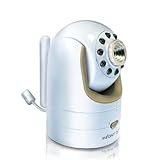
- Not compatible with DXR-8 PRO (5.0" model)
- Additional Camera Unit pairs with Infant Optics DXR-8 (3.5" model)
- Features remote pan/tilt/zoom, night vision, remote thermometer, and interchangeable lens. Number of channels: 1 frequency channel
- Expand up to 4 camera units per monitor unit
- Zoom lens and wide angle lens sold separately. Camera unit power adapter included.
Indoor light and the whole camera system
Many family photos happen in bedrooms and living rooms, not bright outdoor light. Low-light results depend on sensor size, lens aperture, shutter speed, autofocus performance, stabilization, and whether the child is moving. A full-frame sensor can offer an image-quality advantage in low light, but a fast lens and enough shutter speed are still essential.
A wide-aperture prime—often f/1.8 or f/2—lets in more light than many kit zooms. Image stabilization can reduce blur from your hands, but it cannot freeze a baby who moves during the exposure. For motion, use a faster shutter speed and add light, open the aperture, or raise ISO as needed.
Quick wins for a faster PC:
Fix the driver behind crashes, sound loss and screen glitchesFind Drivers →Clear out junk files and repair common Windows errorsFree Scan →Scan for outdated or missing drivers - takes under a minuteDriver Scan →Quiet shooting, with an important caveat
A silent electronic shutter can help when photographing a sleeping newborn or working in a quiet room. Canon says the R50’s electronic shutter makes no shutter noise, but lens focusing or aperture adjustments may still be audible; long-exposure noise reduction can also invoke a mechanical shutter sound. Electronic shutters can distort fast movement or show bands under flickering LED or fluorescent lighting, and may not work with flash. For ordinary indoor action, electronic first curtain is a useful alternative when absolute silence is unnecessary; test the fully electronic mode under the room’s lighting before relying on it.
Burst rate, screens, and handling
Burst shooting can preserve a fleeting yawn, smile, or first step, but frames per second alone do not ensure a sharp result. Continuous autofocus, a fast enough shutter, and a buffer that can handle the burst matter too. Canon lists up to 12 frames per second with electronic first-curtain shutter and 15fps with electronic shutter for the R50. Nikon’s Z50II can reach 30fps with pre-capture, but DPReview specifies that this mode records JPEGs only.
A tilting or articulating screen is useful at floor level, above a crib, or beside a changing mat. So are touchscreen focus placement, a comfortable grip, and controls you can operate quickly. These can matter more in daily family use than professional features you rarely need.
Reviews: five cameras worth considering
1. Canon EOS R50: easiest budget starter
Best for: Parents who want a noticeable step up from a phone without having to manage many settings. Canon describes the R50 as a compact 24.2MP APS-C mirrorless camera with a DIGIC X processor, Dual Pixel CMOS AF II, subject tracking, and 4K/30 video oversampled from 6K. It records RAW and JPEG, detects people and eyes, and offers the burst modes noted above. Specifications are on Canon’s U.S. product page.
Lens plan: The 18–45mm kit zoom is a convenient first lens for family scenes and general use. It is relatively slow as you zoom toward the telephoto end, so a fast compatible prime is a sensible next addition for dim rooms. Buying the body alone makes sense only if you already have a compatible RF lens.
Trade-offs: The camera has one SD-card slot, and the RF-S lens ecosystem has fewer affordable third-party choices than Sony E-mount, according to DPReview. The electronic shutter’s silent operation does not eliminate the distortion and lighting risks described above.
Buy it if: Ease, compact size, and guided operation matter more than dual-card redundancy or the widest lens selection.
2. Sony a6100: affordable autofocus value
Best for: A buyer who finds a good discounted or used bundle and values tracking autofocus over newer-body refinements. DPReview describes this 24MP APS-C camera as a strong tracker of people and pets, with a tilting touchscreen and 4K video. It remains relevant as a bargain, not as the newest or most future-proof option.
Recommended Free Tools
Lens plan: The 16–50mm kit lens is compact and convenient, but its aperture is not ideal for dim interiors. A fast prime or brighter standard zoom may improve everyday indoor photos more than moving to a newer body.
Trade-offs: DPReview notes a basic viewfinder, less welcoming interface, less robust build, rolling-shutter distortion in 4K, and a crop in 4K/30p. The guide showed an approximately $598 U.S. retail signal in its page context; it is not a guaranteed price, and the exact date, retailer, stock, and kit configuration can change. Check whether a used listing includes a lens, battery, charger, and return protection before comparing it with a new kit. Sony’s official product page is here.
Buy it if: You find a substantially discounted bundle and can accept older ergonomics and video compromises.
3. Nikon Z50II: balanced enthusiast starter
Best for: Someone who wants a capable APS-C camera with room to learn manual controls. The Z50II combines a 20.9MP sensor, subject-recognition autofocus, twin command dials, and full-width 4K video up to 30p. Its 30fps pre-capture feature can help with brief expressions, but it is JPEG-only. Details and test context are in DPReview’s guide.
Lens plan: The 16–50mm kit lens covers general family use; consider a fast prime for indoor movement or a brighter zoom if changing framing matters. The lens choice is important because the camera has no in-body image stabilization.
Trade-offs: DPReview flags weak battery life, no in-body stabilization, a narrower APS-C lens selection than Sony’s, and less dependable human detection than Nikon’s higher-end models in some cases. Its guide displayed date-sensitive U.S. retail signals of about $1,049 with the 16–50mm lens at Amazon and about $906 at Adorama and B&H. Those are not stable MSRP claims; verify live price and kit contents. See Nikon’s official product page.
Buy it if: You want more direct control and a balanced camera without paying for full frame.
4. Sony a6700: active toddlers and hybrid family shooting
Best for: A family that photographs crawling babies, toddlers in motion, and video as well as stills. DPReview calls the a6700 its most capable APS-C option, citing strong autofocus, image quality, video, and Sony’s broad E-mount lens ecosystem.
Free tools Windows power users keep installed
One-click scans. No signup required.
Lens plan: A fast standard zoom or prime is a better indoor partner than relying only on a slow kit zoom. E-mount’s broad selection gives buyers more options across price and size, including third-party lenses.
Rank #2

- 🎥Capture UHD Video & 64MP Photo: This compact digital camera features newest CMOS sensor, supports 4K UHD video recording and 64MP high-resolution photos, turning everyday moments into cinematic memories. Enjoy steady, blur-free photos with built-in anti-shake stabilization, and zoom in on distant scenes with 18X digital zoom.
- 📷2.8" Screen Dual-Lens Cameras: Point and shoot style digital camera with a 2.8″ front display and a 1.4″ rear screen for framing perfect selfies and vlogs. Playful photo effects and filters add extra fun to every image. Time-lapse,slow-motion,face/motion detection, self-timer and continuous shooting add creative flair.
- 🆗Effortless Point-and-Shoot: Designed for beginners, this film camera is truly plug-and-play. Its simple menus and auto modes let even kids and first-time photographers grab great shots right away. Connect the video camera through a USB cable and plug it into a PC to use it as a webcam for live streaming.
- 🔋Ready-to-Shoot Kit: This travel digital camera comes with everything you need, you will receive a camera, charging cable, 32GB storage card, so you can charge the camera and start shooting right away.
- ✈️Compact Travel Companion: With its stylish look and trendy design, this small vintage digital camera looks as good as it performs. It’s also a camera for kids and a perfect gift for teens girls and adults who love photography and vlogging, or anyone who wants a cute, beginner-friendly 4k digital camera.
Trade-offs: It costs more than entry-level APS-C cameras. DPReview notes a smaller, lower-resolution viewfinder and no AF joystick, and finds it less pleasant to use than the Fujifilm X-T5 in those respects. The guide showed approximately $1,398 at Amazon and B&H in its U.S. retail context; confirm current price, stock, and whether a lens is included. Sony’s official page is the a6700 listing.
Buy it if: Tracking active children and having a strong photo-and-video APS-C system justify the added cost.
5. Nikon Z5II: full-frame choice for indoor work
Best for: A buyer who prioritizes indoor image quality, background separation, and growth into a full-frame lens system. DPReview lists a 24MP BSI full-frame sensor, in-body stabilization, dual UHS-II card slots, very good autofocus, and strong handling. The guide says people recognition becomes less dependable in low light, so full frame does not remove the need to check focus.
Lens plan: Choose a bright standard or portrait prime for indoor work. Full-frame lenses tend to be larger and more expensive than APS-C equivalents, so include lens cost and carrying weight in the decision rather than comparing bodies alone.
Trade-offs: In-body stabilization helps counter camera shake, not a child’s movement. The body is larger than APS-C choices, 4K/60 video is cropped, and battery life is reasonable but not outstanding, according to DPReview. The guide described the model as under $2,000 in the U.S.; verify current body and kit pricing. See Nikon’s official Z5II page.
Buy it if: You are comfortable investing in bigger, more expensive lenses in exchange for full-frame options and dual-card recording.
Independent reader supportYour contribution helps us test, update, and keep practical guides available for everyone.How to choose a sensor and lens
APS-C or full frame?
APS-C is the sensible default for most families: modern APS-C bodies deliver ample image quality for albums and common prints, with smaller bodies, lenses, and overall system cost. Full frame can offer cleaner high-ISO results and more control over background blur, but it is not automatically the better camera for every parent. It is most compelling if you often photograph in dim rooms, make larger prints, want more subject isolation, or expect to work professionally and accept the added lens cost and weight.
Do these 3 things before closing this tab:
1Fix the driver behind crashes, sound loss and screen glitches2Clear out junk files and repair common Windows errors3Scan for outdated or missing drivers - takes under a minuteHow much resolution do you need?
About 20–26MP is enough for family albums, social sharing, ordinary prints, and moderate cropping. More pixels can help with heavy cropping and large prints, but they also use more storage and make motion blur or missed focus easier to notice. For family use, dependable focus and a bright lens usually matter more than chasing a high megapixel count.
Choose a lens for how you photograph
- Kit zoom: Flexible framing for learning, trips, and group photos; often slow indoors.
- Fast prime: More light and background blur for portraits; fixed framing means you may need to move. At very wide apertures, focus can be unforgiving.
- Wide zoom: Useful for siblings or family groups in a small room.
- Portrait lens: A longer view can flatter faces and give you working distance, but requires more room.
- Macro lens: Helpful for close details such as eyelashes, fingers, toes, and textures.
As rough full-frame-equivalent perspectives, 23–35mm on APS-C suits environmental family scenes, 33–56mm suits portraits, and 50–60mm macro lenses can suit close details. Framing varies with sensor format and shooting distance. For a parent and baby together, close the aperture down somewhat if their faces are at different distances; a very wide aperture may leave one face soft.
Starter settings for baby photos
Moving baby or toddler
- Use Shutter Priority or Manual with Auto ISO.
- Start around 1/250 second for ordinary baby movement; try 1/500 second or faster for crawling, bouncing, or first steps.
- Set continuous autofocus and people/eye detection; use low or medium burst rather than holding the shutter indefinitely.
- Use the widest practical aperture, then stop down if two faces need to be sharp.
- Adjust exposure compensation if a bright window or pale blanket leads to an exposure that is too dark.
These are starting points, not fixed prescriptions. Available light, lens aperture, movement, and the depth of field you want all affect the right exposure.
Sleeping newborn
- Around 1/125 second may be enough if you are steady and the baby remains still; choose a faster speed if there is movement.
- Use an electronic or silent mode only after checking for banding or distortion under the room’s lighting.
- If face detection struggles, use a single focus point on the nearer eye, or manual focus assistance while the subject is still.
- Use window light or a large indirect source rather than relying on flash, and inspect sharpness closely before assuming the eyes are in focus.
When the kit lens produces dark or noisy photos
A camera upgrade cannot create light that is not there. Add ambient light first, consider a fast prime, raise ISO when needed, and use a faster shutter if the subject moves. Stabilize the camera when the baby is still. Bounce flash may be an option for an experienced user when suitable, but it should not be the default pointed at an infant.
What’s actually slowing this PC down?
Pick the symptom - the matching free tool is one click away.
Fix common focus, shutter, and workflow problems
Autofocus picks the wrong face or object
A sibling in front, patterned bedding, a partly covered face, low contrast, or several people can confuse automatic selection. Choose a person on the screen if the camera allows it, narrow the focus area, or place a single point over the nearer eye. If two faces at different distances need to be sharp, stop down modestly.
Eye detection fails in dim light
Low light, eyelashes, hats, blankets, profile angles, and closed eyes can make eye recognition unreliable. Add a larger light source, use a faster lens, try face detection without eye priority, or focus with a single AF point. Manual focus assistance is an option for a still subject.
Electronic shutter shows bands or warped movement
Flickering artificial light can produce bands, while fast movement can skew in an electronic shutter’s readout. Switch to mechanical or electronic-first-curtain shutter, try an anti-flicker setting if the camera offers one, change shutter speed, or use daylight. Make test frames before an important session.
Photos blur even with stabilization
Stabilization counters camera shake, not a child’s movement. Raise shutter speed and compensate with more light, a wider aperture, or higher ISO.
PC Slower Than It Used to Be?
A free scan shows the junk files, broken settings and background clutter dragging Windows down - then fixes them in one click.Free scan · Windows 10 & 11Crashes, No Sound, or Screen Glitches?
Random freezes, missing sound and display glitches usually trace back to one bad driver. Find and replace yours safely.Free scan · under a minuteDepth of field is too shallow
At a very wide aperture, a small change in distance can move a face out of focus. Stop down when a baby is angled away, when a parent and child are at different distances, or when the child is moving.
Battery or storage runs short
Charge before outings and keep a compatible spare battery, especially for a camera whose battery life is a known compromise. Use a compatible SD card that meets the camera’s requirements; faster cards mainly help with buffer clearing, video, and transfer rather than making autofocus more accurate. JPEG files are smaller and ready to share; RAW files provide more editing flexibility; RAW+JPEG offers both at the cost of storage. Burst shooting and 4K video fill cards quickly.
Keep the camera and the child safe
Ordinary family snapshots are different from posed newborn sessions. Safe handling and supervision take priority over making a particular photograph; no camera feature makes a posing setup safe.
- Never leave a baby unattended on a prop, raised surface, or posing setup.
- Keep lights, tripods, straps, and camera equipment where a child cannot pull them down or become entangled.
- Prefer natural or bounced light for ordinary home photos. If using flash, avoid harsh direct light into the baby’s face, use appropriate bounce or diffusion, and follow the equipment maker’s instructions.
- Do not sacrifice supervision to change settings or reposition equipment.
Final picks by situation
- For the easiest inexpensive start: Canon EOS R50 with the kit zoom, then add a fast prime if indoor light is the main frustration.
- For a bargain find: Sony a6100 when a discounted or used bundle is genuinely good value and its older handling is acceptable.
- For a balanced camera around $1,000: Nikon Z50II for stronger direct controls and room to grow.
- For active toddlers and video: Sony a6700 for its autofocus capability and E-mount lens range.
- For a full-frame indoor system: Nikon Z5II if lens size and cost are acceptable.
For many families, a compact APS-C camera paired with a bright lens is a more useful purchase than a heavier full-frame kit. The best system is the one you can use comfortably, in the light you have, while keeping attention on your child.
Quick Recap
Product prices and availability are accurate as of the date/time indicated and are subject to change. Any price and availability information displayed on Amazon at the time of purchase will apply.

