
iTechGuides is reader-supported. When you buy through links on our site, we may earn an affiliate commission. As an Amazon Associate I earn from qualifying purchases. Learn more
SmartNICs help 5G networks run selected packet-processing tasks on network adapters instead of consuming general-purpose server CPU cores. Their clearest potential roles are accelerating parts of the 5G core’s User Plane Function (UPF) at the edge and handling packet I/O and timing in cloud RAN and O-RAN systems. They are components in a larger hardware-and-software design—not standalone 5G systems or a guarantee of better performance.
What a SmartNIC does in a 5G server
A SmartNIC is a network adapter with programmable or specialized processing capabilities. A conventional server may use host CPU cycles not only for applications and network functions but also for moving packets, handling virtual network overlays, filtering traffic, and load balancing. A SmartNIC can take on selected parts of that work, leaving host cores available for other tasks and potentially making packet processing more predictable.
The boundary between the adapter and host software depends on the specific card, its software stack, and the workload. A SmartNIC accelerates only functions that have actually been implemented and enabled for that combination; it is not a universal plug-in speed boost.
Why this fits a software-defined network
5G architectures can run network functions as software on cloud-style infrastructure rather than relying exclusively on purpose-built appliances. Offloading selected work to programmable hardware can preserve some of that software flexibility while reducing how much packet processing the host must perform. It also introduces a hardware-and-software co-design challenge: the network function, adapter, drivers, orchestration, and server all need to work together.
#1 Best Overall

- 1000Mbps Extreme Experience: Upgrade to 1000Mbps Ethernet full speed to enjoy unprecedentedly smooth video playback and gaming experience, say goodbye to lagging caused by weak signals, and realize fast LAN access. While solving the problem of weak WiFi signals, the 1000Mbps ethernet adapter further stabilizes the network, effectively helping you surf the Internet more stably and enjoy a smooth experience with zero latency.
- Specially Designed for Chromecast : Your Chromecast with USB C ports perfectly fit our Chromecast ethernet adapter, such as Chromecast HD, Chromecast 4K which are the most popular types in Google TV. In addition, the Chromecast with Google TV ethernet adapter also support Smartphones, Tablets in USB Type C connection. Attention :It do not fit for VPN.
- Easy to Set Up: Plug and work instantly, No driver needed. Just simply connect your Ethernet Adapter for Chromecast into Google TV USB Type C port and plug in an Ethernet cable directly from your router to activate and get a stable, high-speed Internet connection. (Additional Power cable is suggested for sufficient power supply via USB Type C port)
- Heat Dissipation Design: Made of high-quality aluminum alloy, it can quickly and effectively dissipate heat and maintain optimal performance even after long hours of operation. Chromecast ethernet network adapter also provides over-voltage protection, over-current protection, over-power protection and short-circuit protection, making it safer to use.
- Thoughtful & Perfect Design: Equipped with an LED indicator light, it can accurately show the working status of this ethernet adapter, so that you can know the network connection status at any time. Comes with 2pcs self-adhesive tapes, which is convenient for you to locate this Chromecast with Google TV ethernet adapter in proper location, avoiding poor contact between Chromecast ethernet adapter and LAN Wires due to hanging in the air.
Microsoft Research’s Azure AccelNet paper illustrates the general approach of moving host networking functions to custom FPGA SmartNICs. It is evidence for cloud host-networking design, not a 5G product or a direct test of a 5G network function.
Where SmartNICs fit in 5G
| Network location | Potential SmartNIC role | What the evidence establishes |
|---|---|---|
| 5G core and edge cloud | Offload selected UPF traffic processing, virtual switching, forwarding, or load-balancing tasks close to edge compute. | The Akraino IEC Type 5 blueprint describes SmartNIC offload of OVS-DPDK and parts of UPF processing. It is an architecture blueprint, not proof of a measured commercial rollout. |
| Cloud RAN and O-RAN fronthaul | Handle high-rate packet I/O and support timing or synchronization within a larger cloud-native RAN system. | NVIDIA describes a reference design with a ConnectX-6 Dx SmartNIC receiving O-RAN fronthaul traffic. Intel lists PTP and SyncE support for a vRAN-targeted FPGA SmartNIC platform. These are vendor materials, not independent comparative tests. |
| Network security | Potentially accelerate selected classification, filtering, encryption, or timestamping tasks. | NVIDIA describes capabilities including GTP-U classification, MACsec, IPsec, TLS, rule filtering, and timestamping. These are vendor-described capabilities and should not be generalized to every SmartNIC. |
How SmartNIC offload can support the UPF
The UPF handles user traffic between the radio access network and data networks. It is therefore a natural place to consider packet-processing offload, particularly when the function runs on edge-cloud servers and traffic needs to be handled near users or services.
Rank #2

- Convenient Deployment: Your wired device can connect to a WiFi network with this wireless bridge. Eliminates the need for long cable runs in your home to get Internet access.
- Universal Compatibility: With RJ45 port, this WiFi bridge works with any Lan-only devices like smart TV, printer, Blu-ray player, game console, camera, Ethernet switch, desktop, laptop PC, Raspberry Pi, etc.
- Stable Connection: 2 powerful external antennas receives stronger WiFi from router than internal ones. The WiFi to Ethernet adapter brings a reliable connection for a non-WiFi device
- Fast Speed: Working with your 5Ghz WiFi network, the Ethernet bridge delivers a 3 times faster transmission compared with the one which only supports 2.4Ghz WiFi band
- Installation is a Breeze: Pair the Ethernet WiFi adapter with your router via WPS in seconds. WEB UI method allows you to pick other existing Wi-Fi signals and do more settings. Driver setup is not needed
The Akraino IEC Type 5 blueprint describes offloading OVS-DPDK and selected UPF work, including forwarding, load balancing, and deep packet inspection (DPI). A survey by E. F. Kfoury and co-authors, A Comprehensive Survey on SmartNICs: Architectures, Development Models, Applications, and Research Directions, also discusses possible functions such as GTP-U tunneling, policing, statistics, quality-of-service marking, load balancing, and NAT. These are examples found across possible designs, not a feature list guaranteed by every card.
Recommended Free Tools
Offloading selected data-plane operations does not mean a SmartNIC replaces the entire UPF or the broader software and control systems around it. Operators need to establish which functions the chosen adapter and software stack support and how those functions are managed alongside the host-based parts.
Rank #3

- The IOGEAR GWU637 enables compatible Ethernet devices to connect to Wi-Fi, providing wireless access to any Ethernet-enabled device at home or in the office. Once configured simply connect an Ethernet cable from the GWU637 to your device.
- Not Compatible with Enterprise Authentication or Mesh Networks — Designed to connect directly to a wireless router. Hotspots, repeaters, and access points are not guaranteed to function properly. This will not create a hotspot or a secondary network. Not compatible with open or hotel networks.
- Maximize Transfer Bandwidth — Using dual antennas (2T2R), the adapter delivers data rates up to 300Mbps with sufficient bandwidth for faster file transfers, music downloads, video streaming, online gaming, and HD multimedia applications. The true bandwidth capability is limited by your internet bandwidth of 2.4 Ghz. This will not work with 5 Ghz networks.
- Turn Legacy Gadgets, Printers (LAN), VOIP into High Speed Wi-Fi Enabled Devices — Older laptops, A/V receivers, network printers and other Ethernet only devices leave you at the mercy of a hardwired data connection. With IOGEAR's Ethernet-2-WiFi Universal Wireless Adapter, you can breathe new life into your legacy electronics by giving them Wi-Fi or wireless bridge capability.
- Compact Design, Maximum Versatility — Designed to be thinner and lighter to make applications clean and clutter free, the Ethernet-2-WiFi Adapter is 40% smaller than its predecessor, without having to sacrifice performance. The compact design gives you the freedom to place your home entertainment center practically anywhere and stay connected to your wireless network. Due to the compact design it is normal for the adapter to reach temperatures of approximately 122 degrees.
What the SmartNIC does in cloud RAN
In cloud RAN, radio access functions are implemented on cloud-style compute, and packets must move between components such as radio units and baseband processing. A SmartNIC may contribute high-rate packet handling and timing support, but it is only one part of that system.
NVIDIA’s cloud RAN reference article describes a ConnectX-6 Dx SmartNIC receiving O-RAN fronthaul traffic alongside a GPU-based baseband SDK, a third-party higher-layer stack, containers, and a PTP grandmaster. That architecture illustrates how NIC, compute, timing, and software components can be assembled; it does not show that the NIC alone implements a complete RAN.
Rank #4

- 【Controller】: 25GbE PCI-E NIC with Original Mellanox ConnectX-6 Lx controller. High throughput, low CPU utilization — new generation MT2894 chip, typical power consumption only 11.53W (PCIe 4.0), No Crypto.
- 【Data Rate】: Dual SFP28 Ports(25GbE/10GbE/1GbE). PCIe 4.0 (compatible with 3.0/2.0/1.1) x8 high-speed bus, line-rate forwarding reaches 75Mpps, meeting the needs of virtualization, storage, and AI computing networks.
- 【Technical Support】:Advanced network offload and acceleration, freeing CPU resources — supports RoCEv2, IPsec, VXLAN/GENEVE tunnel acceleration, PTP precise time synchronization, hardware offloading and connection tracking, significantly reducing server CPU usage.
- 【Supported Operating Systems】:Windows; Windows Server; Linux Stable Kernel version; Ubuntu; Vmware ESXi; Citrix XenServer; Deepin; RHEL/CENTOS; Freebsd; OFED AND WINOF-2; Mikrotik; Debian; BCLINUX; ALIOS; Euler; KYLIN; etc.
- 【What you Get】: Vogzone 25GbE PCI-E X8 Network Card MCX631102AN-ADAT-25G (compare to Mellanox MCX631102AN-ADAT) x1, Low-profile Bracket x1.
Timing features matter only in the context of the complete synchronization design. Intel lists IEEE 1588v2 Precision Time Protocol (PTP) and SyncE support on its N6000-PL platform. A buyer still needs to check how those features integrate with the required timing sources, network topology, software stack, and deployment design.
What’s actually slowing this PC down?
Pick the symptom - the matching free tool is one click away.
A concrete platform and what its specifications mean
Intel lists the Intel FPGA SmartNIC N6000-PL Platform with 2×100GbE connectivity, FPGA acceleration, and IEEE 1588v2 PTP / SyncE support. Intel identifies 4G/5G vRAN, virtual cell-site routing, and 5G UPF offload as target workloads, and names WNC, Silicom, and Artiza Networks as COTS board partners.
Best Value
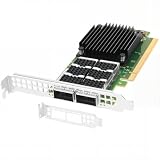
- Dual empty QSFP56 slots support automatically negotiated or manually configured 1/10/25/40/50/100GbE per port, total 200Gbps aggregate bandwidth; up to 148Mpps DPDK message rate, ultra-low sub-0.9μs latency (the ConnectX-6 Dx can reduce latency by 20% to 30% compared to other NICs in the same category).
- PCIe Gen4 x16 host interface (16GT/s per lane), backward compatible PCIe3.0/2.0/1.1; pre-installed full-height bracket plus extra low-profile half-height bracket, fits standard & short-depth rack servers, tower workstations seamlessly.
- Full hardware offloads: SR-IOV virtualization(up to 512 VFs), VXLAN/Geneve/NVGRE tunnel encapsulation & decapsulation, ASAP2 vSwitch acceleration to reduce host CPU overhead efficiently.
- Compare to MCX623106AN-CDAT, features industry-leading RoCE v1/v2 RDMA over Ethernet, DCB, IEEE 1588 PTP timing & Multi-Host QoS for stable datacenter connectivity.
- Compatible with Windows Server, Linux across Intel/AMD x86 & ARM platforms; optimized for cloud, data center, AI/HPC, NVMe-oF storage, big data and NFV, compatible with standard QSFP56/QSFP28 DAC/AOC & 100G SR4/LR4/FR4 transceivers.
Those details establish a physical platform positioned for relevant workloads; they do not establish independent performance in a particular operator’s network. Suitability, current availability, software qualification, and fit with a specific server or network-function vendor must be verified for the intended deployment.
Independent reader supportYour contribution helps us test, update, and keep practical guides available for everyone.What published performance evidence does—and does not—show
Microsoft Research’s 2018 NSDI paper, Azure Accelerated Networking: SmartNICs in the Public Cloud, reports deployment of Azure SmartNICs implementing AccelNet on all new Azure servers since late 2015, across a fleet of more than one million hosts. The paper reports that the AccelNet service had been available since 2016 and describes consistent VM-to-VM TCP latency below 15 microseconds and throughput of 32 Gbps.
| Reported figure | Qualification |
|---|---|
| More than 1 million hosts | Azure fleet scale reported by Microsoft Research in 2018 for the AccelNet context; not a 5G deployment count. |
| Below 15 microseconds VM-to-VM TCP latency | Reported by Microsoft Research in 2018 for Azure AccelNet; not a 5G UPF or RAN latency measurement. |
| 32 Gbps throughput | Reported by Microsoft Research in 2018 for its cloud networking system; not a 5G benchmark or a current Azure measurement. |
The Azure results show that SmartNIC-based networking operated at scale in a cloud environment as reported in 2018. They cannot be used as a performance estimate for a 5G UPF, cloud RAN, or different SmartNIC. The available evidence does not establish a universal latency improvement, typical operator savings, market share, or a current count of 5G SmartNIC deployments.
How to assess a SmartNIC for a 5G deployment
There is no apples-to-apples product benchmark established here. Operators should validate candidate hardware against their own workload, software, server, and operational requirements rather than selecting on a headline throughput figure alone.
- Match the workload: establish whether the target is UPF, vRAN or fronthaul, virtual switching and routing, security, or a combination.
- Test representative traffic: measure throughput, packet rate, latency, and jitter using the intended packet sizes and traffic mix.
- Verify timing integration: confirm PTP or SyncE support and how synchronization fits the required network design.
- Check offload and programmability: identify exactly which functions are supported, how they are updated, and how they can be debugged.
- Measure system-level impact: assess host CPU savings, power, and total cost in the target configuration rather than assuming the adapter’s capabilities translate into whole-system gains.
- Confirm compatibility: check the PCIe slot and server, drivers, FPGA or NIC software, orchestration, and network-function vendor support.
- Plan operations: evaluate observability, failure behavior, security updates, lifecycle support, and the skills needed to operate programmable hardware.
The architectural trade-off
SmartNICs offer a way to move selected networking work closer to the network interface while retaining software-based network functions on general-purpose servers. In 5G, that can be useful both for edge packet-core processing and for packet handling and timing in cloud RAN designs. The trade-off is added dependence on platform-specific hardware, software integration, and operational support. Whether the offload is worthwhile must be established in the intended system, not inferred from a card’s specifications or results from a different cloud workload.
Quick Recap
Product prices and availability are accurate as of the date/time indicated and are subject to change. Any price and availability information displayed on Amazon at the time of purchase will apply.

