
What’s actually slowing this PC down?
Pick the symptom - the matching free tool is one click away.
iTechGuides is reader-supported. When you buy through links on our site, we may earn an affiliate commission. As an Amazon Associate I earn from qualifying purchases. Learn more
There is no single best rugged tablet for every job. For an enterprise Windows deployment, the Getac F120 is the strongest current specification-based choice, with a 12.2-inch 1,200-nit display, hot-swappable batteries, optional 5G and a newer Core Ultra platform. For Android field work, the Samsung Galaxy Tab Active5 Pro is the safest mainstream recommendation. For warehouses, freezer rooms and barcode-heavy fleets, the Zebra ET60/ET65 is the better specialist choice because its scanner, dock, battery and lifecycle options matter more than raw processor performance.
Budget buyers should look at the Ulefone RugKing Pad Pro, Ulefone Armor Pad 5 Ultra or UMIDIGI Active T1, but these are not direct substitutes for Getac, Panasonic, Dell or Zebra hardware. They generally provide less transparent testing evidence, less extensive enterprise support and fewer long-term accessory options.
This guide covers U.S. products, pricing and availability checked August 10, 2026. Manufacturer specifications and claims are identified as such. Unless explicitly stated otherwise, the recommendations below are not claims of hands-on testing by iTechGuides.
Quick recommendations
| Tablet | Best for | OS | Display | Durability and battery | U.S. price or availability | Evidence |
|---|---|---|---|---|---|---|
| Getac F120 | Enterprise Windows field work | Windows 11 Pro | 12.2-inch WUXGA, 1,200 nits | IP66, six-foot drop claim, dual hot-swap batteries | Quote-based enterprise purchase | Manufacturer specifications |
| Getac F110 | Mature 11.6-inch Windows deployments | Windows 11 Pro | 11.6-inch FHD, up to 1,200 nits | IP66, six-foot drop claim, dual hot-swap batteries | Quote-based enterprise purchase | Manufacturer specifications and established platform |
| Panasonic TOUGHBOOK G2 | Modular Windows workstations | Windows 11 Pro or Red Hat Enterprise Linux | 10.1-inch WUXGA, 1,000 nits | IP65, six-foot drop to plywood, optional bridge battery | Quote-based enterprise purchase | Manufacturer specifications |
| Dell Pro Rugged 10 or 12 | Current Dell Windows fleets | Windows 11 Pro | 10.1 or 12 inches; 1,200-nit option on the 12 | Configuration-specific; verify IP and drop details | Listed configurations started at $3,423.79 and $3,880.01 | Current Dell listings |
| Samsung Galaxy Tab Active5 Pro | Enterprise Android and mobile forms | Android | Large rugged Android display | IP68, glove support, no-battery mode, replaceable battery | $759 Wi-Fi or $869 5G for listed 128GB business configurations | Manufacturer specifications and current listing |
| Samsung Galaxy Tab Active5 | Compact Android field work | Android | 8-inch-class display | IP68, S Pen, removable battery | About $499.99–$599.99 depending on configuration | Manufacturer specifications and current listing |
| Zebra ET60/ET65 | Warehouse scanning and freezer work | Android | 10.1-inch WUXGA, 1,000 nits | IP66, five-foot drop claim, hot-swap battery, freezer options | Quote-based enterprise purchase | Manufacturer specifications |
| Lenovo ThinkTab X11 Gen 1 | Lighter Android frontline work | Android 16 or later | 10.95-inch, 600 nits, 90Hz | IP68; MIL-STD-810H claim applies with rugged case | Listed U.S. configurations at $499.99 and $579.99 | Manufacturer specifications and current listing |
| Ulefone Armor Pad 5 Ultra | Feature-heavy outdoor use | Android 15 | 11-inch, 90Hz | 24,200mAh battery, IP68/IP69K claims, about 1.6kg | $799.99 sale price on the official store | Manufacturer specifications; independent review evidence exists elsewhere |
| Ulefone RugKing Pad Pro | Low-cost personal rugged tablet | Android 16 | 8.68-inch, 860-nit peak claim | IP68/IP69K claims, 540g, non-removable battery | $239.99 sale price on the official store | Manufacturer specifications |
Brightness, drop resistance, IP ratings, battery behavior and runtime in this table are manufacturer claims unless otherwise noted. Prices are a dated U.S. snapshot and can change.
What counts as a rugged tablet?
The word rugged covers three very different product classes. Confusing them is the fastest way to buy the wrong device.
Fully rugged tablets
A fully rugged tablet is designed around field abuse rather than adapted from a consumer device. It normally has a reinforced chassis, sealed ports, protected corners, a higher ingress-protection rating, drop testing, glove or wet-touch support, serviceable batteries and dedicated vehicle or industrial docks. Getac F120 and F110 tablets, the Panasonic TOUGHBOOK G2, Dell Pro Rugged tablets and Zebra ET60/ET65 models fit this category.
#1 Best Overall

- S Pen Storage and Compatibility: Fully compatible with the S Pen and includes a built-in holder that keeps your stylus secure and easily accessible during travel, work, school, or everyday use, ensuring you always have your S Pen ready for writing, drawing, note-taking, or productivity tasks.
- Car-Inspired Premium Design: Car-inspired design with carbon fiber accents and a matte black finish delivers a sleek, modern look while the textured surface enhances grip, reduces fingerprints, and improves secure handling during daily use at home, office, classroom, or on the go.
- Air Cushion Drop Protection: Air Cushion Technology is built into every corner to absorb shock from accidental drops and impacts, while reinforced edges provide additional protection for the screen and body during everyday use, commuting, travel, or busy environments.
- Versatile Kickstand Cover: The cover transforms into a stable kickstand for hands-free viewing and multiple viewing angles, making it ideal for watching videos, video calls, browsing, drawing, or working in both landscape and productivity modes.
- Precision Fit for Galaxy Tab S10 FE and Tab S9: Precisely designed for Samsung Galaxy Tab S10 FE (2025) 10.9-inch and Galaxy Tab S9 (2023) 11-inch models, ensuring a secure fit with full access to buttons, ports, speakers, and features for seamless usability.
Fully rugged hardware costs more because the tablet is only one part of the system. The manufacturer may also provide vehicle cradles, scanner modules, external antennas, shoulder straps, spare batteries, keyboard modules, depot repair and multiyear availability.
Semi-rugged or business-rugged tablets
Semi-rugged devices are tougher and often more practical to carry than fully rugged machines, but they may have fewer sealed ports, less modular expansion or a lower drop and environmental rating. They can be a sensible choice for indoor industrial work, retail, education, light field service and occasional outdoor use.
A consumer tablet in a rugged case
An iPad or ordinary Galaxy Tab in a good case can be the best value when the primary threat is an accidental drop. Consumer tablets often provide better app selection, cameras, displays and processor performance for the money.
However, a case does not automatically create a fully rugged system. It may not provide sealed connectors, hot-swappable batteries, vehicle charging, glove operation, industrial temperature tolerance, scanner integration or a long-lived accessory and repair program. Choose this route only after checking the case, mount and charging solution as a complete system.
How to interpret IP ratings
The IP code is defined by IEC 60529. Its first digit describes protection against solids and dust; its second digit describes protection against water.
PC Slower Than It Used to Be?
A free scan shows the junk files, broken settings and background clutter dragging Windows down - then fixes them in one click.Free scan · Windows 10 & 11Outdated Drivers Are Slowing You Down
One free scan finds every outdated or missing driver and matches the right update for your exact hardware.Free scan · exact hardware match- IP65: dust-tight and protected against water jets.
- IP66: dust-tight and protected against stronger water jets.
- IP67: dust-tight and protected against temporary immersion under specified test conditions.
- IP68: dust-tight and protected against immersion under manufacturer-specified conditions. The exact depth and duration matter.
- IP69K: a high-pressure, high-temperature washdown claim under defined conditions.
IP68 is not a universal durability score. It does not by itself prove resistance to chemicals, salt water, solvents, vibration, crushing, impact or years of port-cover wear. A tablet can survive an immersion test and still be a poor choice for a forklift, a vibrating utility vehicle or a chemical plant.
Port covers are part of the protection system. They must be fully closed and undamaged. A torn gasket, bent cover or loose connector can invalidate the practical protection. Liquid damage may also be excluded from the warranty. Treat an IP rating as a design and test claim, not permission to use any tablet in any liquid.
What MIL-STD-810H actually means
MIL-STD-810H is frequently described as a certification or a single durability grade. That is misleading. The U.S. Defense Logistics Agency description of MIL-STD-810 presents it as an environmental engineering and laboratory-testing standard that helps manufacturers tailor tests to a product’s expected service environment. It does not require every product to undergo every method, and it is not one universal pass/fail score.
A useful review should identify:
- Whether the claim uses MIL-STD-810G or MIL-STD-810H.
- The specific methods tested, such as drop, vibration, humidity, dust, rain or temperature shock.
- Drop height, surface and number of drops.
- Operating and storage temperature ranges.
- Whether the tablet was tested alone, with a keyboard, or inside a protective case.
- Whether testing was performed by the manufacturer, an independent laboratory or a reviewer.
For example, Lenovo qualifies the ThinkTab X11’s MIL-STD-810H claim for models bundled with the rugged case. Samsung separately describes tablet and protective-case drop claims for the Galaxy Tab Active5. Those details matter: a tablet that meets a test only inside an accessory has not demonstrated the same resistance without that accessory.
The Tool Desk
Outbyte PC Repair FREERepair Windows errors before they cause bigger problemsFix Now →Outbyte Driver Updater FREEScan for outdated or missing drivers - takes under a minuteDriver Scan →The safer wording is the manufacturer says the tablet was tested to selected MIL-STD-810H methods. Avoid unsupported phrases such as "military-grade," "MIL-STD certified" or "drop-proof."
The best rugged tablets by category
Best enterprise Windows tablet: Getac F120
The Getac F120 is the best current enterprise Windows choice based on its published specification package. It launched in September 2025 as a fully rugged Copilot+ PC and combines a newer Intel Core Ultra 5 or 7 200V platform with up to 32GB of LPDDR5X memory and a 2TB SSD.
Its 12.2-inch WUXGA display is rated at 1,200 nits, making it better suited to outdoor inspection, construction and utility work than a dimmer indoor tablet. Getac lists IP66 protection, MIL-STD-810H testing, a six-foot drop claim and an operating range from -29°C to 63°C. Optional 4G or 5G, GPS, Wi-Fi 7 and thermal-imaging capability make it adaptable to field deployments. Dual hot-swappable batteries are more important for long shifts than a thin chassis would be.
Why buy it: current Windows performance, bright screen, rugged enclosure, connectivity options and a serious battery system.
Free tools Windows power users keep installed
One-click scans. No signup required.
Limitations: it is a high-cost enterprise device, configurations are quote-based and the exact cellular, GPS, camera, storage and accessory selection must be confirmed. The specifications are not independent measurements; this guide does not claim to have drop-tested or brightness-tested the F120.
Best alternative: choose the F110 if your organization values a mature design, existing docks or a slightly smaller 11.6-inch display.
Best mature 11.6-inch Windows tablet: Getac F110
The Getac F110 remains a strong field-service tablet even though its 13th-generation Intel Core platform is older than the F120’s Core Ultra hardware. It has an 11.6-inch FHD display rated up to 1,200 nits, IP66 protection, a manufacturer-listed six-foot drop claim and an operating range of -29°C to 63°C.
Its dual hot-swappable batteries, optional 5G and GPS, extensive docking options and listed weight of 1.49kg make it a practical established platform. A three-year bumper-to-bumper warranty is listed by Getac.
Recommended Free Tools
Why buy it: mature hardware, bright screen, Windows compatibility, dual hot-swap batteries and a broad accessory ecosystem.
Limitations: the processor platform is older than the F120, and enterprise configurations and pricing vary. A newer CPU is not automatically worth the migration cost if your existing F110 docks, mounts and support arrangements already work.
Best alternative: the F120 for new deployments needing newer performance and Wi-Fi 7, or the Panasonic G2 for modular expansion.
Best modular Windows tablet: Panasonic TOUGHBOOK G2
The Panasonic TOUGHBOOK G2 is the choice for organizations that need to tailor the tablet to specialized equipment. It supports Windows 11 Pro or Red Hat Enterprise Linux and uses an Intel Core Ultra 5 135U platform. Panasonic offers expansion options including serial, barcode, thermal-camera and smart-card modules, depending on configuration.
The 10.1-inch WUXGA display is rated at 1,000 nits. Panasonic lists IP65 protection and a six-foot drop to plywood, reduced to three feet with the keyboard attached. Its 2.9-pound listed weight is relatively manageable for a fully rugged Windows tablet. An optional bridge battery can keep the device running while the main battery is changed, and Panasonic lists a 15-hour MobileMark 2025 battery claim under its test conditions.
Rank #2

- RUGGED CONSTRUCTION: Durable TPU armor shell and impact resistant corner bumpers shield your device from real world accidental drops dents or scratches. Precise cutouts provide easy and full access to touchscreen and ports. Soft-raised screen surround bezel to protect screen and lens.
- BUILT-IN KICKSTAND: Built-in kickstand quickly transforms your tablet into a laptop. Essential for typing or hands free video viewing.
- COMPATIBLE KEYBOARDS: Compatible with Microsoft Surface Type Cover Keyboard - both Metal and Alcantara Keyboard options. Perfect for work or school.
- VERSATILE PORTABILITY: Surface Pen storage to keep your Surface Pen secure and close by. Comfortable built-in 360 degree rotating hand strap provides a steady and firm grip when in use and premium handling of your device on the go. Optional included shoulder strap and stylus tether anchor points for added portability.
- MILITARY DROP PROTECTION: Meets military drop-test standards (MIL STD 810G-516.6)
Why buy it: removable SSD, expansion areas, legacy dock compatibility, Linux support and a wide range of industrial modules.
Limitations: IP65 is lower than the IP66 or IP68 ratings on some competitors, and the exact configuration determines the useful ports and modules. A MobileMark result should not be compared directly with a WLAN or standby claim from another brand.
Best alternative: Getac F110 or F120 if a brighter 1,200-nit screen and stronger water-jet rating are more important than modularity.
Quick wins for a faster PC:
Scan for outdated or missing drivers - takes under a minuteDriver Scan →Clear out junk files and repair common Windows errorsFree Scan →Fix the driver behind crashes, sound loss and screen glitchesFind Drivers →Best current Dell option: Dell Pro Rugged 10 or Pro Rugged 12
Dell’s current rugged-tablet recommendation should be the Pro Rugged 10 or Pro Rugged 12, not the discontinued Latitude 7030. Dell’s current listings use Intel Core Ultra processors and Windows 11 Pro. The Pro Rugged 10 listing includes a Core Ultra 5 236V, 16GB of memory and 512GB of storage in a configuration priced at $3,423.79 at the time checked. A listed Pro Rugged 12 configuration was $3,880.01, with a 12-inch 1,200-nit display option.
Those prices are configuration-specific and volatile. Dell’s product pages and technical documentation should be checked for the exact IP rating, drop test, cellular module, GPS option, ports and dock before placing an order. Do not carry over the Latitude 7030’s specifications or availability to the newer Pro Rugged models.
Why buy it: current Dell procurement and support channels, Windows 11 Pro, current Core Ultra hardware and a choice of screen sizes.
Limitations: the tablets are expensive, and the meaningful durability and expansion details depend on the exact SKU. The Pro Rugged 10 and 12 are not interchangeable with older Latitude accessories without confirmation.
Best alternative: Getac or Panasonic if you need a more clearly documented fully rugged accessory ecosystem.
Best enterprise Android tablet: Samsung Galaxy Tab Active5 Pro
The Samsung Galaxy Tab Active5 Pro is the most approachable Android recommendation for businesses that need durability without moving to Windows. Samsung’s rugged-tablet portfolio provides IP68 protection, glove support, a programmable key, DeX, S Pen support, replaceable batteries and a no-battery mode for fixed-power installations.
The no-battery mode is useful in vehicles, kiosks and other installations where running continuously from external power is preferable to keeping a battery permanently at full charge. Android also fits barcode, dispatch, inspection, inventory and cloud-form workflows well, provided the required application supports Android.
At the U.S. business store snapshot, the 128GB Wi-Fi configuration was listed at $759 and the 128GB 5G configuration at $869. Confirm the exact display, memory, cellular bands, accessories and regional model before buying.
Why buy it: familiar Android software, Samsung enterprise management, strong ingress protection, pen and glove support, removable power and a mature accessory ecosystem.
Limitations: it cannot run Windows-only CAD, GIS, diagnostic or legacy applications natively. The price is considerably higher than consumer Android tablets, and the enterprise features are most valuable when the organization uses device management and supported accessories.
Best alternative: Zebra ET60/ET65 for integrated warehouse scanning and freezer use, or the smaller Active5 for one-handed work.
Best compact rugged tablet: Samsung Galaxy Tab Active5
The Galaxy Tab Active5 is the smaller Android option, built around an 8-inch-class display. It supports an S Pen, removable battery and enterprise features, while Samsung describes IP68 protection and MIL-STD-810H testing claims. Samsung also distinguishes a 1.5-meter tablet drop claim from a 1.8-meter claim with the protective case.
Do these 3 things before closing this tab:
1Repair Windows errors before they cause bigger problems2Scan for outdated or missing drivers - takes under a minute3Clear out junk files and repair common Windows errorsThis form factor is useful for delivery drivers, inspectors, retail associates, technicians and anyone who needs to hold the device for most of a shift. It is less suitable when the application needs a large map, a full inspection form or a wide warehouse interface.
U.S. business listings placed the tablet around $499.99 to $599.99 depending on configuration. That range should be treated as a dated listing snapshot rather than a guaranteed street price.
Why buy it: compact size, stylus support, replaceable battery and strong Android enterprise features.
Limitations: the smaller screen limits mapping, spreadsheets and multiwindow work; performance and battery capacity are below the Pro model.
Best alternative: Galaxy Tab Active5 Pro for larger forms and longer shifts, or a consumer tablet in a case when enterprise serviceability is not required.
Best warehouse and freezer tablet: Zebra ET60/ET65
The Zebra ET60/ET65 is the specialist pick for warehouses, logistics, manufacturing and cold-storage operations. Zebra offers integrated scanning options, a 10.1-inch WUXGA display rated at 1,000 nits, IP66 protection, a five-foot drop claim and configurations designed for freezer use.
The platform supports standard and extended batteries rated at 8,920mAh and 17,840mAh. Zebra describes hot-swap operation with a supercapacitor, vehicle docks, heated touch and heated vehicle-dock components for cold environments. The company advertises four years of product availability and up to eight years of service and support, an important distinction for fleet buyers.
Rank #3

- [Compatible Models] Exclusively designed for Samsung Galaxy Tab A11+/A11 Plus 11” 2026 Release(SM-X230/SM-X236/SM-X238), Samsung Galaxy Tab A9+/A9 Plus 11” 2024 Release (SM-X210/X216/X218), [No Screen Protector] DO NOT fit other Tablet
- [High-Quality Material] The case is made from high-grade thermoplastic polycarbonate and anti-skidding silicone, to create a perfect protection for your tablet. Not only shockproof/durable but also comfortable hand feeling
- [Built-in Kickstand] Functional pop out kickstand allows easy access to your favorite shows, movies, and games while on the go
- [Precise Openings] Easy access to all the controls and features; Perfect cutouts for speakers, cameras, ports and buttons
- [3 Months Warranty] Free charge of Product Changing or Refunding after received products within 3 months. Please contact our service team via email if you have any question,we will reply within 24 hours
There are Android ET60/ET65 models using Qualcomm 6490 hardware with 8GB of memory and 128GB of storage, and Windows ET60W/ET65W versions using Intel Core Ultra processors and Windows 11 Pro or Windows IoT Enterprise LTSC. Select the operating system based on the application, not the tablet’s appearance.
Quick wins for a faster PC:
Repair Windows errors before they cause bigger problemsFix Now →Scan for outdated or missing drivers - takes under a minuteDriver Scan →Clear out junk files and repair common Windows errorsFree Scan →Why buy it: scanning, docks, hot swap, freezer options and long enterprise lifecycle.
Limitations: Zebra hardware is difficult to justify for casual outdoor use, and the best features depend on buying the correct scanner, battery and dock configuration.
Best alternative: Samsung Galaxy Tab Active5 Pro for general Android field work without Zebra’s specialized warehouse ecosystem.
Best lighter Android business option: Lenovo ThinkTab X11 Gen 1
The Lenovo ThinkTab X11 Gen 1 is a lighter, more conventional Android business tablet rather than a fully rugged Windows field computer. It uses Android 16 or later, a Snapdragon 7s Gen 3 processor, up to 8GB of memory and up to 256GB of storage. Its 10.95-inch 2560×1600 display runs at 90Hz and is rated at 600 nits.
Outdated Drivers Are Slowing You Down
One free scan finds every outdated or missing driver and matches the right update for your exact hardware.Free scan · exact hardware matchPC Slower Than It Used to Be?
A free scan shows the junk files, broken settings and background clutter dragging Windows down - then fixes them in one click.Free scan · Windows 10 & 11The tablet has a removable 10,200mAh battery and IP68 protection. Lenovo’s MIL-STD-810H claim applies to models supplied with the bundled rugged case, so buyers should not treat the bare tablet as equivalent to a Getac, Panasonic or Zebra fully rugged device.
U.S. listings showed configurations at $499.99 and $579.99. It is a reasonable middle ground for mobile forms, education, retail, light field service and outdoor users who want an Android tablet that is more protected than a standard model.
Why buy it: high-resolution display, current Android software, removable battery and lower weight than most fully rugged tablets.
Limitations: 600 nits is less compelling in direct sun than the 1,000- or 1,200-nit enterprise alternatives, and the key durability claim depends on the case.
Best alternative: Samsung Galaxy Tab Active5 Pro for stronger enterprise ruggedization, or a consumer tablet in a case for ordinary drop protection.
Best feature-heavy outdoor tablet: Ulefone Armor Pad 5 Ultra
The Ulefone Armor Pad 5 Ultra is aimed at outdoor users who value battery capacity and unusual built-in features. Ulefone lists Android 15, a Dimensity 7400X processor, 12GB of memory plus virtual RAM, 512GB of storage, an 11-inch 90Hz display, a 24,200mAh battery and 120W charging. It also includes a projector and night-vision camera.
Ulefone lists IP68, IP69K and MIL-STD-810H claims. The major practical drawback is weight: approximately 1.6kg. Its battery is non-removable, so the impressive capacity does not provide the same shift-continuity advantage as a hot-swappable battery.
The official store listed a $799.99 sale price at the U.S. snapshot. Independent hands-on coverage from TechRadar identified the weight as a significant usability drawback while recommending it as an overall rugged-tablet choice for its test audience.
Why buy it: enormous battery, fast charging, projector, night vision and strong headline environmental claims.
Limitations: heavy, non-removable battery, less evidence of long enterprise support and fewer standardized fleet accessories than the major enterprise brands.
Best alternative: Samsung Active5 Pro for a lighter, more supportable Android fleet, or Ulefone RugKing Pad Pro for a much lower purchase price.
Best low-cost rugged tablet: Ulefone RugKing Pad Pro
The Ulefone RugKing Pad Pro is attractive when the budget is the primary constraint. It runs Android 16, uses a Unisoc T7250 processor, has 8GB of memory plus virtual RAM and 128GB of storage. The 8.68-inch display is rated at 860 nits peak brightness, and the tablet weighs approximately 540g.
What’s actually slowing this PC down?
Pick the symptom - the matching free tool is one click away.
Ulefone lists IP68, IP69K and MIL-STD-810H claims. The 7,100mAh battery is non-removable. The official store listed it at $239.99 on sale.
Why buy it: low price, compact size, high stated brightness and substantial protection claims.
Limitations: lower-end performance, an 1340×800 display, non-removable battery and weaker evidence for enterprise updates, repair channels, MDM deployment and spare accessories.
Best alternative: Lenovo ThinkTab X11 for a more conventional business purchase, or Samsung Active5 when fleet management and battery replacement matter.
Free tools Windows power users keep installed
One-click scans. No signup required.
Budget 11-inch alternative: UMIDIGI Active T1
The UMIDIGI Active T1 provides an 11-inch 2000×1200 display, 8GB of memory plus virtual RAM, 128GB of storage and a 10,000mAh battery. UMIDIGI lists IP68, IP69K and MIL-STD-810G claims and a 1.5-meter drop claim.
Rank #4

- Signature Carbon Fiber Design: Signature matte black finish with carbon fiber accents delivers a sleek, timeless look while enhancing grip and reducing fingerprints for a clean and professional appearance during everyday use.
- Slim and Comfortable Protection: Slim and lightweight design provides reliable protection without adding unnecessary bulk, making it easy to carry while maintaining a secure and comfortable grip for daily handling.
- Air Cushion Drop Protection: Air Cushion Technology is built into every corner to absorb shock from accidental drops and impacts, helping protect your tablet during everyday use, travel, or busy environments.
- Screen Protector Compatible Design: Designed to be compatible with Spigen screen protectors, allowing you to add additional screen protection without fit issues for a complete and reliable protection setup.
- Precision Fit for Galaxy Tab A11+ / A9+: Precisely designed for Samsung Galaxy Tab A11+ (2025) and Galaxy Tab A9+ (2023), ensuring a secure fit with full access to buttons, ports, and features for seamless usability.
Its 350-nit display is the clearest reason not to choose it for frequent direct sunlight. It may work well for occasional outdoor use, farm records, travel or a family tablet that needs more protection than a standard model, but it is not a strong replacement for a purpose-built fleet tablet.
Why buy it: large screen and battery at a budget price.
Limitations: low stated brightness, older 810G terminology and less transparent enterprise support than Getac, Panasonic, Zebra or Samsung.
Best alternative: Lenovo ThinkTab X11 if outdoor readability and current business support are more important.
Best rugged tablet by job
| Workload | Best starting point | Why | What to verify |
|---|---|---|---|
| Construction and field service | Getac F120 or F110 | Bright displays, Windows applications, hot-swap batteries, GPS and vehicle accessories | CAD or service software, cellular bands, mounting, glove mode and dust exposure |
| GIS, mapping and surveying | Getac F120 or Panasonic G2 | Sunlight-readable screens, Windows GIS compatibility, GNSS and expansion options | GNSS accuracy, antenna configuration, field software and external survey equipment |
| Warehouse scanning | Zebra ET60/ET65 Android | Integrated scanner options, docks, hot swap and fleet lifecycle | Scan engine, barcode symbologies, Wi-Fi roaming, MDM and mounting |
| Freezer and cold storage | Zebra ET60/ET65 freezer configuration | Freezer-oriented hardware, heated touch and heated dock options | Operating temperature, condensation, battery behavior and charging limits |
| Emergency response | Getac F120/F110 or Samsung Active5 Pro | Battery continuity, cellular connectivity, glove input and vehicle integration | Carrier certification, GPS, radio or camera accessories and security policy |
| Manufacturing and legacy software | Panasonic G2, Getac F120 or Dell Pro Rugged | Windows support, serial and smart-card options, docking and replaceable storage | Exact ports, Windows edition, industrial peripherals and service contract |
| Outdoor recreation and travel | Lenovo ThinkTab X11 or Ulefone RugKing Pad Pro | Lower cost and lighter carrying weight than fully rugged Windows hardware | Sunlight visibility, charging, navigation apps and software updates |
| Long remote shifts | Getac F120/F110 or Zebra ET60/ET65 | Hot-swappable batteries are more useful than a large fixed battery | Spare-battery cost, charger availability and actual shift workload |
| Vehicle-mounted kiosk | Zebra ET60W/ET65W, Zebra Android or Samsung Active5 Pro | Docking, fixed-power operation and no-battery or bridge-battery options | Dock wiring, ignition control, vibration, external antennas and screen angle |
| Hazardous locations | No universal recommendation | Certification must match the exact worksite and tablet configuration | ANSI/UL, CSA, ATEX or IECEx approval, temperature class and accessories |
Windows, Android or an iPad in a rugged case?
Choose Windows when the application is the deciding factor
Windows is the safer choice for full desktop applications, legacy industrial software, CAD, GIS, fleet diagnostics, Microsoft management tools and peripherals that expect USB, serial, Ethernet or smart-card connectivity. The trade-offs are more weight, higher prices, more complex deployment and often shorter battery life.
Getac, Panasonic, Dell and Zebra all provide Windows-oriented rugged platforms. Zebra also offers Windows IoT Enterprise LTSC on ET60W/ET65W models, which can be useful for fixed-function enterprise deployments.
Choose Android for task-based mobile workflows
Android is usually better for barcode scanning, inventory, delivery, dispatch, retail, inspections and cloud-based forms. It tends to produce lighter hardware and simpler one-purpose interfaces. Samsung adds enterprise management and Knox features to its rugged portfolio, while Zebra integrates Android with its scanning and warehouse ecosystem.
Recommended Free Tools
Before buying, confirm that the exact application supports the Android version and that the vendor supports the device for the life of the deployment. A low-cost Android tablet can be acceptable for one person and a poor choice for a 100-device fleet if security updates, MDM, spare batteries and repairs are unavailable.
Choose an iPad in a rugged case for value and app availability
An iPad in a rugged case makes sense when the organization already standardizes on Apple, the workflow is supported by iPadOS and the main risk is dropping the tablet. It usually provides excellent consumer software and display quality, but it does not become a purpose-built industrial tablet. There is no native hot-swappable battery, and the buyer depends on third-party cases, docks, mounts and adapters.
A simple decision rule is:
- If the required software is Windows-only, buy a Windows rugged tablet.
- If the workflow is scanning, forms or dispatch, compare Samsung and Zebra Android models.
- If the device is for occasional outdoor use and the main hazard is a drop, compare a consumer tablet plus case.
- If it will be mounted in a freezer, vehicle or hazardous area, start with a purpose-built configuration and its certification, dock and temperature documentation.
Display brightness and field usability
Brightness is one of the most important specifications for outdoor work, but it is not the same as measured real-world readability. A 1,200-nit tablet may still be difficult to use if its glass is reflective or the interface does not support gloves and rain.
Published current examples range from 1,200 nits on the Getac F120 and F110, to 1,000 nits on the Panasonic G2 and Zebra ET60/ET65, 600 nits on the Lenovo ThinkTab X11 and 350 nits on the UMIDIGI Active T1. These are manufacturer figures, not comparable independent measurements.
Do these 3 things before closing this tab:
1Clear out junk files and repair common Windows errors2Fix the driver behind crashes, sound loss and screen glitches3Repair Windows errors before they cause bigger problemsFor a field tablet, check sustained brightness rather than peak brightness, anti-glare treatment, optical bonding, viewing angles, thermal dimming, glove sensitivity, wet-touch mode and behavior with rain or snow. Thick work gloves can be more difficult for capacitive screens than ordinary winter gloves, so test the actual gloves used on site.
Battery choices: removable, hot-swappable and fixed power
A removable battery lets you replace the battery, but the tablet may need to shut down. A hot-swappable system lets the user exchange the main battery without interrupting work. A bridge battery or supercapacitor supplies temporary power during the exchange. A no-battery mode lets a tablet run from external power without a battery installed.
- Getac F120 and F110: dual hot-swappable batteries.
- Panasonic TOUGHBOOK G2: optional bridge battery.
- Zebra ET60/ET65: hot swap with an internal supercapacitor.
- Samsung Galaxy Tab Active5 Pro: no-battery mode and replaceable batteries.
- Lenovo ThinkTab X11: removable battery, but not the same as an enterprise hot-swap system.
- Ulefone Armor Pad 5 Ultra: large non-removable battery.
For an eight-hour desk shift, battery swapping may not justify a premium. For a 12-hour utility shift, emergency response or vehicle-mounted work, it can prevent more downtime than a faster processor.
Connectivity and expansion: check the SKU, not the product family
Rugged tablets are often sold as a family of configurations. A product page may mention 5G, GPS or a barcode reader even though those features are optional.
Before ordering, confirm:
- Wi-Fi generation, including Wi-Fi 6E or Wi-Fi 7 where relevant.
- 4G or 5G bands, carrier certification, physical SIM and eSIM support.
- Dedicated GNSS/GPS hardware and antenna performance.
- NFC, RFID and contactless-reader support.
- Integrated barcode engine and supported scan types.
- Thermal camera, smart-card or CAC reader options.
- Ethernet, serial, USB-A, USB-C and Thunderbolt availability.
- Vehicle-dock charging, external antenna pass-through and ignition integration.
Never assume that a 5G label means universal carrier compatibility. The cellular module, region and carrier approval must match the deployment country and network.
Independent reader supportYour contribution helps us test, update, and keep practical guides available for everyone.Total cost of ownership is more important than tablet price
A professional rugged tablet is a system purchase. The usable deployment may include a cellular module, spare batteries, charger, vehicle dock, scanner, handle, shoulder harness, keyboard, stylus, mount, MDM license, extended warranty and replacement parts.
The following dated U.S. tablet-only examples show why the headline price can be misleading:
| Model and listed price | One device | Five devices | 25 devices | 100 devices |
|---|---|---|---|---|
| Ulefone RugKing Pad Pro at $239.99 | $239.99 | $1,199.95 | $5,999.75 | $23,999 |
| Samsung Galaxy Tab Active5 Pro Wi-Fi 128GB at $759 | $759 | $3,795 | $18,975 | $75,900 |
| Samsung Galaxy Tab Active5 Pro 5G 128GB at $869 | $869 | $4,345 | $21,725 | $86,900 |
| Dell Pro Rugged 10 listed configuration at $3,423.79 | $3,423.79 | $17,118.95 | $85,594.75 | $342,379 |
| Dell Pro Rugged 12 listed configuration at $3,880.01 | $3,880.01 | $19,400.05 | $97,000.25 | $388,001 |
These are multiplication examples using listed tablet prices only. They exclude tax, shipping, cellular service, accessories, software, deployment, repair and warranty extensions. Enterprise Getac, Panasonic and Zebra pricing is generally quote-based.
The Tool Desk
Outbyte Driver Updater FREEScan for outdated or missing drivers - takes under a minuteDriver Scan →Outbyte PC Repair FREERepair Windows errors before they cause bigger problemsFix Now →For a fleet, calculate:
Total ownership cost = hardware + accessories + software and MDM + deployment + support + expected repairs and replacements − resale or reuse value
A $3,000-plus tablet can be financially sensible if it prevents vehicle downtime, survives several years, has available docks and batteries, and reduces field-worker interruptions. Conversely, it is wasteful for a camper who only needs protection against an occasional drop.
Support, security and lifecycle questions for enterprise buyers
Ask the reseller or manufacturer:
- How long will the exact model remain available for new purchases?
- How long will batteries, docks, scanners and port covers remain available?
- What is the standard warranty, and does it cover accidental damage?
- What is the typical repair turnaround and where is service performed?
- Can the SSD be replaced, and is storage encrypted?
- Which Windows edition is supplied: Pro, IoT Enterprise LTSC or another version?
- Which Android Enterprise and MDM features are supported?
- How long will security and operating-system updates be provided?
- Does the warranty follow the device or the original purchaser?
- Are there approved vehicle docks, external antennas and replacement chargers?
- Does the exact configuration have hazardous-location approval if required?
Zebra advertises four years of product availability and up to eight years of service and support for ET60/ET65. Getac lists a three-year bumper-to-bumper warranty for the F110 and F120, while Panasonic lists a three-year limited warranty for the TOUGHBOOK G2. Those statements do not make the products identical; they illustrate why lifecycle information should be part of the comparison.
Best Value
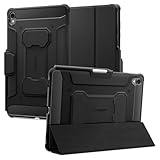
- S Pen Storage and Compatibility: Fully compatible with the S Pen and includes a built-in holder that keeps your stylus secure and easily accessible during travel, work, school, or everyday use, ensuring you always have your S Pen ready for writing, drawing, note-taking, or productivity tasks.
- Car-Inspired Premium Design: Car-inspired design with carbon fiber accents and a matte black finish delivers a sleek, modern look while the textured surface enhances grip, reduces fingerprints, and improves secure handling during daily use at home, office, classroom, or on the go.
- Air Cushion Drop Protection: Air Cushion Technology is built into every corner to absorb shock from accidental drops and impacts, while reinforced edges provide additional protection for the screen and body during everyday use, commuting, travel, or busy environments.
- Versatile Kickstand Cover: The cover transforms into a stable kickstand for hands-free viewing and multiple viewing angles, making it ideal for watching videos, video calls, browsing, drawing, or working in both landscape and productivity modes.
- Precision Fit for Galaxy Tab S11 (2025): Precisely designed for the 11-inch Samsung Galaxy Tab S11 (2025), ensuring a secure fit with full access to buttons, ports, speakers, and features while maintaining compatibility with the S Pen for seamless everyday use.
Common failure modes and how to avoid them
The tablet has an impressive MIL-STD label but no useful test detail
Request the test methods, drop height, surface, number of drops and whether the case was installed. If the seller cannot provide those details, treat the claim as limited evidence rather than a complete durability rating.
The device loses water resistance
Inspect port covers and gaskets regularly. Replace damaged covers before exposure, close every connector and do not charge a wet port. A device that was once IP-rated can become vulnerable after impact, repair or normal wear.
The battery lasts less than expected
Battery claims are not interchangeable. Brightness, GPS, cellular signal, scanning, temperature, processor load and screen-on time can radically change runtime. Compare results only when the benchmark and conditions are similar. For mission-critical shifts, buy spare batteries or a hot-swap system instead of relying on a best-case runtime number.
The 5G or GPS option is missing
Check the complete SKU and bill of materials. Cellular, GNSS, scanner, smart-card and thermal-camera features are frequently optional.
The tablet works in a freezer but the screen or battery does not
Freezer use requires more than an IP rating. Condensation, touch response, battery chemistry, charging behavior and heated components all matter. Zebra’s freezer-oriented ET60/ET65 configurations are more credible starting points than an ordinary rugged tablet, but the exact temperature rating and dock still need confirmation.
Quick wins for a faster PC:
Scan for outdated or missing drivers - takes under a minuteDriver Scan →Repair Windows errors before they cause bigger problemsFix Now →Fix the driver behind crashes, sound loss and screen glitchesFind Drivers →The tablet is approved for a normal workplace but not a hazardous location
For oil, gas, mining, chemical or explosive environments, IP and MIL-STD claims are insufficient. Verify the exact ANSI/UL, CSA, ATEX or IECEx certification for the tablet, battery, dock and any attached accessory. An optional certified configuration does not automatically certify every model in the family.
Buying checklist
- Record the exact model number and SKU.
- Choose Windows, Android or a consumer tablet with case based on application compatibility.
- Confirm RAM, SSD, processor and operating-system edition.
- Check sustained brightness, anti-glare treatment and glove or wet-touch support.
- Read the full IP rating and the manufacturer’s water-test conditions.
- Request the specific MIL-STD methods, drop height, surface and device configuration.
- Determine whether the battery is fixed, removable, hot-swappable or supported by a bridge battery.
- Check cellular bands, carrier approval, SIM type and GPS/GNSS hardware.
- Confirm barcode, RFID, serial, Ethernet, smart-card and thermal-camera options.
- Verify the vehicle dock, charger, mount, keyboard, handle and scanner as compatible with that SKU.
- Ask how long batteries, docks and replacement parts will remain available.
- Check warranty length, accidental-damage coverage and repair turnaround.
- Confirm Android Enterprise, MDM, Windows management and security-update support.
- For freezer work, verify temperature, condensation, heated touch and charging behavior.
- For hazardous locations, obtain certification documentation for the exact configuration.
- Calculate the full deployment cost rather than comparing tablet prices alone.
How the evidence should be read
Rugged-tablet reviews often combine three types of evidence: manufacturer specifications, independent hands-on testing and retailer or user reports. They should not be presented as equivalent.
TechRadar describes a hands-on process involving performance benchmarks, dimensions and weight measurements, plus drop and water tests. That makes its observations useful for portability and real-world usability, although its current ranking is aimed more at general buyers than at large industrial fleets.
Android Central is useful for Android comparisons, especially Samsung’s Active series, but it mixes enterprise devices with consumer-oriented budget products. A separate feature such as a kids’ tablet is not evidence that it can replace a managed warehouse or utility tablet.
Free tools Windows power users keep installed
One-click scans. No signup required.
By contrast, a manufacturer page can verify the configuration, warranty, claimed rating and available accessory, but it does not constitute an independent measurement. For that reason, the F120 is described here as the strongest specification-based Windows front-runner, not as a tablet independently tested by this publication.
Bottom-line buying advice
Buy the Getac F120 for a new, demanding Windows field deployment when the newest platform, bright screen and hot-swappable batteries justify the price. Choose the Getac F110 when a mature platform and existing accessories reduce deployment risk. Pick the Panasonic TOUGHBOOK G2 when serial, barcode, thermal, smart-card or legacy dock modules are central to the job. Consider the Dell Pro Rugged 10 or 12 when current Dell procurement and support are decisive, but verify the exact configuration.
For Android, choose the Samsung Galaxy Tab Active5 Pro for general enterprise field work, the Active5 when compact size matters and the Zebra ET60/ET65 when scanning, freezer operation, docking and long fleet support are the priority. Choose the Lenovo ThinkTab X11 for lighter business use, and Ulefone or UMIDIGI only when lower price or unusual outdoor features outweigh enterprise lifecycle requirements.
Frequently Asked Questions
Are rugged tablets waterproof?
Not in an unlimited sense. An IP65, IP66, IP67, IP68 or IP69K rating describes specific laboratory water conditions. It does not guarantee resistance to every liquid, chemical, pressure level or aging port-cover failure. Follow the manufacturer’s depth, duration and maintenance instructions.
Recommended Free Tools
Is MIL-STD-810H a certification?
MIL-STD-810H is an environmental testing and engineering standard, not one universal durability certification or score. Ask which methods were used, including the drop height, surface, number of drops and whether the tablet was tested inside a case.
Is IP68 better than IP65?
IP68 provides immersion protection under specified conditions, while IP65 protects against water jets. IP68 is not automatically better for vibration, drops, chemicals, washdown, freezer work or vehicle mounting. Choose the rating and complete device design that match the environment.
Can I use a rugged tablet in a freezer?
Only if the exact configuration is rated for the required temperature and condensation conditions. Freezer work can require heated touch, special batteries and a heated vehicle dock. Zebra ET60/ET65 freezer configurations are a strong starting point; an ordinary IP-rated tablet is not automatically freezer-ready.
Do rugged tablets work with gloves?
Many enterprise rugged tablets provide glove modes, but performance depends on the glove material, screen settings, moisture and the application. Test the exact tablet with the gloves used at work rather than relying only on a product-page claim.
Can I replace the battery without shutting down?
Only some models support true hot swapping. Getac F120/F110 and Zebra ET60/ET65 provide hot-swap systems. Panasonic’s G2 can use an optional bridge battery. Samsung’s Active5 Pro supports no-battery mode and replaceable batteries, while a merely removable battery may still require a shutdown.
Are Windows rugged tablets worth the price?
They can be when the organization needs Windows-only software, legacy peripherals, CAD, GIS, diagnostics, serial ports, smart cards, long shifts or vehicle docks. They are usually poor value for occasional outdoor use or simple Android forms where a consumer tablet and case may be sufficient.
Can I use an iPad with a rugged case instead?
Yes, when the application supports iPadOS and the primary risk is an accidental drop. An iPad case does not normally provide the sealed ports, hot-swap battery, industrial docks, temperature testing or fleet lifecycle of a fully rugged tablet.
What is the best rugged tablet for construction?
The Getac F120 is the strongest new Windows starting point based on published specifications. The F110 is a mature alternative, and the Samsung Galaxy Tab Active5 Pro is better when the workflow is Android-based and lighter hardware is preferred.
PC Slower Than It Used to Be?
A free scan shows the junk files, broken settings and background clutter dragging Windows down - then fixes them in one click.Free scan · Windows 10 & 11Outdated Drivers Are Slowing You Down
One free scan finds every outdated or missing driver and matches the right update for your exact hardware.Free scan · exact hardware matchWhat is the best rugged tablet for warehouse scanning?
The Zebra ET60/ET65 is the most purpose-built choice because it offers integrated scanner options, vehicle docks, hot-swap batteries, freezer configurations and a long advertised service lifecycle. Confirm the scan engine and exact Android or Windows SKU.
Which rugged tablets support 5G and GPS?
Getac F120 and F110 offer optional cellular and GPS configurations. Dell Pro Rugged and Samsung Galaxy Tab Active5 Pro have cellular variants, while other models may vary by region. Confirm the exact SKU, supported bands, carrier approval and whether GPS/GNSS is integrated.
How much does a professional rugged tablet cost?
Enterprise devices are often quote-based and can cost several thousand dollars before docks, batteries, scanners, mounts and software. In the dated U.S. snapshot used here, listed Dell Pro Rugged configurations were $3,423.79 and $3,880.01, while the Samsung Active5 Pro was listed at $759 Wi-Fi or $869 5G. Budget Android tablets were listed below $800, but generally have weaker fleet support.
The Bottom Line
The right rugged tablet is determined by the workflow, not the IP number. Getac is the strongest Windows starting point, Samsung is the safest general Android choice, and Zebra is the better warehouse and freezer platform. Before ordering, verify the exact SKU, battery system, brightness, cellular and GPS options, dock, support lifecycle and certification. Those details—not the phrase "military-grade"—determine whether the tablet will actually reduce downtime.
Do these 3 things before closing this tab:
1Repair Windows errors before they cause bigger problems2Fix the driver behind crashes, sound loss and screen glitches3Clear out junk files and repair common Windows errorsQuick Recap
Product prices and availability are accurate as of the date/time indicated and are subject to change. Any price and availability information displayed on Amazon at the time of purchase will apply.

