
What’s actually slowing this PC down?
Pick the symptom - the matching free tool is one click away.
iTechGuides is reader-supported. When you buy through links on our site, we may earn an affiliate commission. As an Amazon Associate I earn from qualifying purchases. Learn more
A useful email signature puts a person’s name and the best way to reach them first, then adds only the role, organization, links, or logo that help the recipient. Keep essential details readable as text, use meaningful link labels and image alt text, and verify the result in the email clients your recipients use. Gmail and Outlook have different editors and image behaviors, so one HTML design cannot be assumed to render identically everywhere.
What belongs in an email signature?
An email signature is a footer added to messages. Google describes Gmail signatures as text—such as contact information or a quote—automatically added to the end of Gmail messages. In practice, prioritize information a recipient may need to identify you or reply.
- Name: Make the sender’s identity clear.
- Role or organization: Include these when they help explain who you are or why you are writing.
- Direct contact route: Add the most useful way to reach you, such as an email address, phone number, or relevant website.
- Optional links or logo: Include only items that add useful context. Keep key contact information in text so it remains available if images are not displayed.
Gmail allows up to 10,000 characters in a signature, and Google says images count toward that limit. That is a product limit, not a target: a compact footer is easier to scan than a long block of promotional or redundant information.
The Tool Desk
Outbyte PC Repair FREERepair Windows errors before they cause bigger problemsFix Now →Outbyte Driver Updater FREEFix the driver behind crashes, sound loss and screen glitchesFind Drivers →How should you design the signature?
Make the text do the essential work
Use a clear reading order: name first, then role or organization if relevant, followed by contact details. Avoid making a logo or image the only place where a name, phone number, or other essential detail appears. A recipient should still be able to understand the footer when images are blocked or unavailable.
#1 Best Overall

- Emailed, premium self-inking rubber stamp, red ink
- 9/16X 1-1/2impression size
- Commerical Heavy Duty Stamp with Laser Engraved rubber for Clean, Precise Imprints
- Clear base for easy aliging of stamp and Stableizing rubber feet to minamize slips
- Makes approximately 5,000 impressions before needing to be re-inked
Use links whose labels explain their destination
Write link text that tells readers where a link goes. For example, use “Company website” rather than “Click here.” This is especially helpful when several links appear together or are read out of context by assistive technology. Microsoft’s Outlook accessibility guidance recommends meaningful hyperlink text.
Add a logo only when it helps identify you
A logo can provide useful identification, but it should support rather than replace the text. Add alternate text that conveys the image’s purpose or identity; Microsoft explains how to add image alt text in its Outlook accessibility guidance.
Rank #2

- Signature Stamps by ExcelMark are available in 5 different sizes - Impression area - Small: 9/16"x 1-1/2"- Medium: 11/16"by 1-7/8", Extra Wide: 5/8"by 2-21/32", Large: 15/16"by 2-3/8", Extra Large: 1-1/8"by 2-11/16"
- Prints in your choice of ink color: black, red, blue, green, and purple. Ink pads are re-inkable.
- Customization Instructions: Click on 'Customize Now' on the right and follow instructions to upload a .jpg or .png file for your signature stamp or type your name in the font of your choice
- Clear mount bottom helps you line up your stamp correctly
For Gmail, Google recommends a signature image 70–100 pixels high by 300–400 pixels wide, and states a maximum size of 100 pixels high by 1,000 pixels wide. These are Gmail Help recommendations, not universal dimensions for every email client. Preserve the image’s proportions when resizing. Google says Gmail can insert an image from a public web address, Google Drive, or a file upload; its signature troubleshooting guidance covers image sizing and insertion.
Do these 3 things before closing this tab:
1Scan for outdated or missing drivers - takes under a minute2Clear out junk files and repair common Windows errors3Fix the driver behind crashes, sound loss and screen glitchesHow do you add a signature in Gmail or Outlook?
Use the editor for the specific product you send mail from. The available controls and image handling differ between Gmail and Outlook variants; do not assume that pasting arbitrary HTML into one editor will work the same way in another.
Rank #3
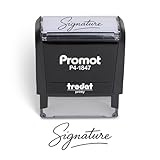
- Personalized with Your Handwritten Signature: Create your own stamp signature for a professional touch. Ideal for anyone who signs documents often, this customized stamp ensures each impression is clear & consistent while maintaining a genuine look.
- Self-Inking Signature Stamp: No need for messy separate ink pads. This custom signature stamp is designed with a built-in, self-inking mechanism that automatically re-inks itself after each impression, giving you quick and clean stamping every time.
- Choice of Ink Color: Select from a variety of ink colors to match your needs. Whether you prefer black for legal documents, blue for banking or red for emphasis, this stamp provides the flexibility to create impressions that fit every situation.
- Durable Construction: Made from quality materials, this custom signature stamps is built to withstand frequent use at home, office or in professional settings. The refillable ink pad delivers thousands of crisp impressions before needing replacement.
- Versatile for Business, Legal, Personal Use & Gifting: More than just a time-saving office tool, this custom self-inking signature stamp makes a thoughtful gift for professionals, business owners, teachers, or anyone who frequently signs documents.
| Context | What the documentation establishes | Practical implication |
|---|---|---|
| Gmail on a computer | Gmail Help documents formatting, image insertion, multiple signatures, and default signatures for new messages and replies. Google’s Gmail signature instructions provide the setup steps. | Set the default for the message types you use, and check both a new message and a reply. |
| Outlook | Microsoft provides setup instructions for named Outlook variants, including adding links and images. Microsoft’s Outlook signature instructions distinguish product routes. | Follow the instructions for your Outlook product rather than treating all Outlook editors as interchangeable. |
Gmail’s and Outlook’s signature editors are the safer starting point for ordinary users because their documented workflows handle the product’s own settings and controls. If you create custom HTML, rendering still depends on the client. Google’s Gmail CSS support documentation, last updated 2025-06-04 UTC, describes Gmail’s CSS support generally; it is not a guarantee that every signature editor or every recipient’s client will render a design identically.
What should you know about HTML markup and rendering?
Email clients do not all interpret HTML, CSS, and images in the same way. Keep markup and styling conservative, and do not rely on a single rendering as proof that every recipient will see the same result. Microsoft specifically warns that Vector Markup Language (VML) tags can cause some signature elements to appear as attachments instead of inline images; see its Outlook signature guidance.
Rank #4
![TechMark Personalized Signature Stamp Self Inking [Upload Signature or Pick Font] Custom Signature Stamp for Signing Name and Checks with Clear, Consistent Impressions & Effortless Stamping](https://m.media-amazon.com/images/I/41oACJn7hzL._SL160_.jpg)
- ✒️ Smooth & Effortless Stamping – Designed for quick, easy, and reliable use, this custom self-inking signature stamp delivers crisp, clear impressions every time—no separate ink pad needed!
- ✒️ Bright & Quick-drying Ink – The high quality ink used in our personalized signature stamp is bright in color and dries quickly. It won't smudge your hands, documents, and workspace. Keep your work area clean.
- ✒️ Refillable & Eco-Friendly – The built-in ink pad is easy to refill, saving you money and cutting down on plastic waste—a smart, sustainable choice!
- ✒️ Make It Yours – Design your unique signature stand out with precision and professional. Boost efficiency and save time.
- ✒️ Just the Right Size – With a 1.85" x 0.98" impression, durable casing and ergonomic grip, it’s perfect for contracts and personal projects, invoices.
Check the finished signature in the clients, devices, and display conditions relevant to your audience, including light and dark display modes. Confirm that links are understandable, text remains legible, and images do not displace or obscure contact details. No single universal test matrix is established by the cited product documentation, so choose checks that reflect where your recipients actually read mail.
When should an organization manage signatures centrally?
An individually configured signature suits a person who controls their own mailbox settings. An organization may instead need to apply standardized signatures, disclaimers, footers, or headers across messages. Microsoft Learn documents that administrative use case in its Exchange organization-wide disclaimers and signatures guidance, which is Exchange 2013 help. Treat it as documentation of the centralized-management scenario, not as a current setup recipe guaranteed to work in every Exchange deployment or tenant.
Quick Recap
Best Value

- Signature Stamps by ExcelMark are available in 5 different sizes - Impression area - Small: 9/16"x 1-1/2"- Medium: 11/16"by 1-7/8", Extra Wide: 5/8"by 2-21/32", Large: 15/16"by 2-3/8", Extra Large: 1-1/8"by 2-11/16"
- Prints in your choice of ink color: black, red, blue, green, and purple. Ink pads are re-inkable.
- Customization Instructions: Click on 'Customize Now' on the right and follow instructions to upload a .jpg or .png file for your signature stamp or enter your name with the selected font.
- Clear mount bottom helps you line up your stamp correctly
Product prices and availability are accurate as of the date/time indicated and are subject to change. Any price and availability information displayed on Amazon at the time of purchase will apply.

