
What’s actually slowing this PC down?
Pick the symptom - the matching free tool is one click away.
iTechGuides is reader-supported. When you buy through links on our site, we may earn an affiliate commission. As an Amazon Associate I earn from qualifying purchases. Learn more
The TCL 57R94 is a single 57-inch, 32:9 curved monitor with 7680×2160 resolution—two UHD-width work areas on one continuous screen—and a 120Hz refresh rate. It can replace the combined desktop width of two 4K monitors for some setups, but whether your computer can drive it at 7680×2160 and 120Hz depends on the computer’s video output, cable, and operating-system support.
What the TCL 57R94 offers
TCL identifies the 57R94 as a Dual 4K QD-Mini LED monitor. Its 7680×2160 resolution spans a 32:9 aspect ratio, giving it two UHD-width work areas without a bezel dividing the center. TCL describes it as “a screen as wide as two UHD monitors, showcasing incredibly detailed and sharp visuals.” This is a single display, not two independently connected panels.
| Specification | TCL’s stated figure |
|---|---|
| Screen size and aspect ratio | 57 inches; 32:9 |
| Resolution and pixel density | 7680×2160; 140 PPI |
| Curvature | 1000R |
| Refresh rate and response time | 120Hz; claimed 1ms GTG |
| Backlight and local dimming | QD-Mini LED; 2,304 local-dimming zones |
| HDR and peak brightness | VESA DisplayHDR 1000; claimed 1,200-nit peak brightness |
| Colour | Claimed 98% DCI-P3, 10-bit colour depth, Delta E <1, and PANTONE validation |
| Connections and audio | Full-functional 90W USB-C; dual-channel speakers |
These figures are manufacturer specifications, not independent test results. TCL qualifies some performance figures as laboratory data; the product pages do not establish independent HDR brightness, input lag, blooming, uniformity, or text-clarity measurements. Specifications are listed on TCL’s global 57R94 page and TCL’s European 57R94 page; no publication year is shown there.
Can it run at 7680×2160 and 120Hz?
The monitor’s stated maximum resolution and refresh rate are 7680×2160 and 120Hz. That does not by itself guarantee that a connected desktop or laptop will deliver both simultaneously. Check the computer’s specific video-output capabilities, the connection path and cable, and operating-system support for the chosen resolution and refresh rate. The official product information cited here does not establish compatibility for every GPU, laptop, cable, or operating system.
#1 Best Overall

- 27” Gaming Monitor with 4K UHD (3840x2160) Resolution Crisp and clear visuals with lifelike detail on a spacious 27″ screen—perfect for gaming, streaming, or everyday use.
- TCL Halo Control System: An advanced Technology Suite that includes the Powerful Light-emitting Microchip, Super Condensed Micro Lens, Micro-OD Reduced Optical Distance, and High Contrast HFS Shoot Panel for Stunning “Halo-Free” Images.
- Dual Mode with UHD 160Hz and FHD 320Hz: Switch seamlessly between ultra-sharp UHD at 160Hz and lightning-fast FHD at 320Hz—precision and speed, on demand.
- LD2304 Precise Dimming Series: Smart local dimming that adjusts scene by scene, for deeper blacks and sharper contrast with every frame.
- HDR2000 Brightness: Ultra-bright highlights and breathtaking contrast bring every scene to life—whether the room is pitch black or full of sunlight.
TCL lists a full-functional 90W USB-C connection, which may suit a compatible laptop desk setup. Confirm that the laptop supports the required display output over USB-C and can use the monitor at the intended resolution and refresh rate; also check the cable’s capabilities and whether 90W meets the laptop’s charging needs. Do not assume that USB-C power delivery guarantees 7680×2160 at 120Hz.
One ultrawide screen or two 4K monitors?
The main practical difference is a continuous canvas versus two separate displays. The 57R94 has no center bezel interrupting the workspace, while a two-monitor setup offers physically independent screens. Window placement and app behavior depend on the operating system and software; the monitor’s resolution alone does not guarantee any particular split-screen workflow.
Rank #2

- 27" Gaming Monitor with QHD (2560x1440) Resolution: Crisp and clear visuals with lifelike detail on a spacious 27" screen for gaming, streaming, or everyday use
- QD-Mini LED Technology: TCL's QD-Mini LED delivers stunning brightness and precision for serious gamers seeking a truly immersive session
- TCL Halo Control System: An advanced Technology Suite that includes the Powerful Light-emitting Microchip, Super Condensed Micro Lens, Micro-OD Reduced Optical Distance, and High Contrast HVA Panel for Stunning "Halo-Free" Images
- LD180 Precise Dimming Series: Smart local dimming with 180 zones that adjusts scene by scene, delivering deeper blacks and sharper contrast with every frame
- HDR600 Brightness: HDR600 Brightness delivers brilliant highlights and rich depth in nearly any light
- Choose the 57R94’s format if you want one very wide screen and your computer can support the target resolution and refresh rate.
- Consider two separate monitors if independent screens, flexible placement, or separate connections matter more than a seamless center area.
- Compare the full setup, including your computer’s outputs, any needed cabling, desk space, USB-C charging requirements, warranty and regional service, and total delivered price.
Is the 57-inch curved format practical for your desk?
The 57R94’s 1000R curvature and 57-inch, 32:9 format are central to its fit. Before buying, check the available desk width and depth, the monitor’s physical dimensions and stand footprint, your seating position, and whether you can view the whole screen comfortably. TCL’s cited pages state the screen size and curvature but do not provide a desk-size recommendation, so measure your own workspace rather than relying on a universal minimum.
Outdated Drivers Are Slowing You Down
One free scan finds every outdated or missing driver and matches the right update for your exact hardware.Free scan · exact hardware matchPC Slower Than It Used to Be?
A free scan shows the junk files, broken settings and background clutter dragging Windows down - then fixes them in one click.Free scan · Windows 10 & 11What to know about gaming and HDR claims
A 120Hz refresh rate is the monitor’s headline motion specification, and TCL also claims a 1ms GTG response. The 7680×2160 resolution is demanding: the connected system must support the intended output, and games must be able to render at the resolution and frame rate you want. The specification alone does not establish game performance, input lag, or compatibility with a particular system.
Rank #3
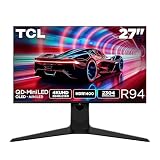
- 27” Gaming Monitor with 4K UHD (3840x2160) Resolution: Crisp and clear visuals with lifelike detail on a spacious 27″ screen—perfect for gaming, streaming, or everyday use.
- QD-Mini LED: TCL’s QD-Mini LED delivers brilliant brightness and pinpoint precision — perfect for deep, immersive gameplay.
- TCL Halo Control System: An advanced Technology Suite that includes the Powerful Light-emitting Microchip, Super Condensed Micro Lens, Micro-OD Reduced Optical Distance, and High Contrast HVA Panel for Stunning “Halo-Free” Images.
- 165Hz Native Refresh Rate: Smooth, responsive motion that keeps up with every move—perfect for fast-paced games and fluid visuals.
- LD2304 Precise Dimming Series: Scene-by-scene backlight control for deeper blacks, brighter highlights, and beautifully balanced contrast in every frame.
TCL also claims QD-Mini LED backlighting with 2,304 local-dimming zones, VESA DisplayHDR 1000, and 1,200-nit peak brightness. Those are vendor specifications; they do not establish how HDR looks in a particular scene or quantify blooming and uniformity in independent testing.
Quick Recap
Best Value

- 27" Gaming Monitor with QHD Resolution: Crisp and clear visuals with lifelike detail on a spacious 27" screen featuring 2560x1440 resolution for gaming, streaming, or everyday use
- TCL Halo Control System: An advanced Technology Suite that includes the Powerful Light-emitting Microchip, Super Condensed Micro Lens, Micro-OD Reduced Optical Distance, and High Contrast Fast IPS Panel for Stunning Halo-Free Images
- 260Hz Native Refresh Rate: Ultra-high refresh rate for fluid motion and razor-sharp clarity in fast-paced action
- LD1196 Precise Dimming Series: Smart local dimming that adjusts scene by scene, for deeper blacks and sharper contrast with every frame
- HDR1200 Brightness: Ultra-bright highlights and breathtaking contrast bring every scene to life whether the room is pitch black or full of sunlight
Rank #4
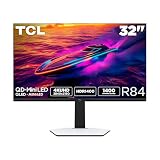
- 32” Gaming Monitor with 4K UHD (3840x2160) Resolution: Crisp and clear visuals with lifelike detail on a large 32″ screen—perfect for gaming, streaming, or everyday use.
- QD-Mini LED: TCL’s QD-Mini LED delivers stunning brightness and precision—just what serious gamers need for a truly immersive session.
- TCL Halo Control System: An advanced Technology Suite that includes the Powerful Light-emitting Microchip, Super Condensed Micro Lens, Micro-OD Reduced Optical Distance, and High Contrast HVA Panel for Stunning “Halo-Free” Images.
- LD1400 Precise Dimming Series: Smart local dimming that adjusts scene by scene, for deeper blacks and sharper contrast with every frame.
- HDR1400 Brightness: Ultra-bright highlights and breathtaking contrast bring every scene to life—whether the room is pitch black or full of sunlight.
What to verify before buying
- Confirm that your GPU or laptop output supports 7680×2160 at 120Hz through the connection you plan to use.
- Check the required cable and operating-system support, rather than inferring full-rate video from the USB-C port or its 90W power rating.
- Measure the desk and consider the curve, viewing distance, stand footprint, and placement.
- Confirm regional availability, warranty terms, service options, and the delivered price with the seller; these details are not stated on the cited product pages.
- For image-quality decisions, seek independent measurements rather than treating manufacturer laboratory figures as independently verified performance.
Product prices and availability are accurate as of the date/time indicated and are subject to change. Any price and availability information displayed on Amazon at the time of purchase will apply.

