
iTechGuides is reader-supported. When you buy through links on our site, we may earn an affiliate commission. As an Amazon Associate I earn from qualifying purchases. Learn more
If the Supermicro H11SSL-i-O shows a blinking heartbeat light but no system power light, the two indicators are reporting different conditions: the BMC heartbeat is present, while the board is not indicating Power OK. That combination does not identify a failed component or prove the motherboard is defective.
What the two lights mean
Check the labels printed on the motherboard before interpreting the lights. On the H11SSL family, LEDM1 is the BMC Heartbeat LED, and LE1 is the separate Onboard Power OK LED. Neither should be confused with chassis front-panel lights or LAN indicators.
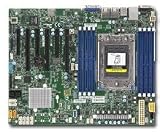
| Board label | Indicator | Meaning in Supermicro’s H11SSL manual |
|---|---|---|
| LEDM1 | BMC Heartbeat LED | Green blinking: BMC functioning normally. Green solid: BMC not ready. Green fast blinking: BMC initializing. |
| LE1 | Onboard Power OK LED | Green: system on and power OK. Off: system off in the indicator table; the manual also says it turns off if any system power rail fails. |
Supermicro’s manual states, “When LEDM1 is blinking, the BMC is functioning normally.” This describes the BMC’s status; it does not establish that the host has powered up, completed POST, or booted an operating system. LE1 being dark means the documented Power OK condition is absent. It does not by itself prove that the AC cord is disconnected.
What’s actually slowing this PC down?
Pick the symptom - the matching free tool is one click away.
What this light combination does—and does not—tell you
A blinking LEDM1 alongside a dark LE1 confirms only that the BMC heartbeat is active while the board is not indicating Power OK. The manual does not map that combination to a particular failed part. It is not enough evidence to conclude that the PSU, cable, processor, motherboard, or another component is defective.
#1 Best Overall
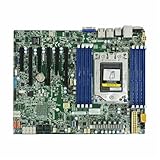
- Features a multi-layer PCB design that delivers excellent electrical performance, effectively reduces signal interference, and enhances overall system stability
- Equipped with ample USB ports and expansion slots to support simultaneous connection of multiple devices, including keyboards, mice, storage devices, and peripherals.
- Supports high-speed network transmission and stable data exchange, ensuring smooth and lag-free performance for gaming, live streaming, and file transfers.
- Offers excellent hardware compatibility, supporting mainstream graphics cards, coolers, and storage devices, with ample room for upgrades.
- Subject to strict quality control and reliability testing, it features high durability and is capable of withstanding prolonged, uninterrupted operation.
Use the troubleshooting section of the manual for the exact board and verify the system’s power setup rather than diagnosing from the lights alone. The H11SSL-i-O title may refer to a particular model suffix; check the board’s silkscreen and revision, and use documentation that matches before following pin-level instructions.
Safe next steps
- Confirm the indicators. Locate the board labels and verify that the blinking light is LEDM1 and the dark light is LE1.
- Consult the matching manual. Use the H11SSL series manual’s troubleshooting guidance and confirm the power setup for your system. The LED pattern alone does not identify a switch, connector, or component fault.
- Isolate power before handling components. Supermicro instructs users to turn off the system and unplug the power cord before removing or installing components.
- Do not treat firmware flashing as a generic fix. Supermicro advises against BIOS or BMC updates unless there is a related problem and warns that incorrect firmware can cause irreparable damage. Use the board-specific support resources only when an update is relevant to the problem.
Use the correct H11SSL documentation
The primary reference is Supermicro’s H11SSL Motherboard Series User’s Manual (MNL-2085), which documents LEDM1, LE1, and component-handling safety. Supermicro’s H11SSL-i support resources provide access to manuals and firmware resources. Confirm the exact model and revision before applying board-specific instructions.
Quick Recap
Best Value

- OWC 128GB DDR4 3200MHz PC4-25600 CL22 1.2V 288pin Server DIMM ECC Registered memory compatible with Supermicro Motherboard models H11SSL-i, H11SSL-NC, H11SSW-iN, H12SSW-iN and H12DSG-O-CPU. Compatible with Samsung M393AAG40M32-CAE, Hynix HMABAGR7A2R4N-XS, Micron MTA72ASS16G72PSZ-3S2
- ECC REGISTERED UPGRADE: This type of memory is used in Workstations and Servers. It will NOT be compatible with standard desktop computers. Also, it cannot be mixed with UNBUFFERED memory.
- INDUSTRY LEADING: Consumer-friendly Advanced Replacement Program and Limited Lifetime Warranty, which includes Free Tech Support by Other World Computing.
- MAXIMIZE YOUR SERVER: With OWC's ECC Registered Server Memory, you will extend the life of your old infrastructure or save money when building a new one.
- Replacement for Supermicro part numbers MEM‐DR412L‐HL01‐ER32, MEM‐DR412L‐SL01‐ER32 and MEM-DR412MC-ER32.
Rank #4
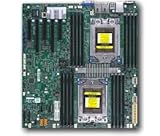
- Dual AMD EPYC 7001 Processor
- 2TB Registered ECC DDR4 2666MHz SDRAM in 16 DIMMs
- Expansion slots: 2 PCI-E 3.0 x16 3 PCI-E 3.0 x8
- 10 SATA3, 1 M.2, 2 SATA DOM
- Dual Gigabit Ethernet LAN Ports 6. ASPEED AST2500 BMC graphics
Rank #3

- H11SSL-i Industrial Package Motherboard For Single-socket Server Second Generation EPYC7001/7002
Product prices and availability are accurate as of the date/time indicated and are subject to change. Any price and availability information displayed on Amazon at the time of purchase will apply.

