
Free tools Windows power users keep installed
One-click scans. No signup required.
iTechGuides is reader-supported. When you buy through links on our site, we may earn an affiliate commission. As an Amazon Associate I earn from qualifying purchases. Learn more
SpotiKeep is desktop software that advertises converting Spotify songs, albums, and playlists into local audio files. The vendor lists batch conversion, metadata retention, adjustable bitrates, and formats including MP3, M4A/AAC, FLAC, and WAV, depending on the platform. However, the product pages disagree about supported operating-system versions and output formats, and its speed, reliability, audio fidelity, and present-day stability were not independently tested for this review. Spotify also prohibits copying, “ripping,” and circumvention unless expressly permitted by its agreements or applicable law. Verify the current installer, purchase terms, and your legal permissions before using it.
What SpotiKeep is—and what this review can establish
SpotiKeep is a Windows and Mac desktop converter, not a hardware device. Its official materials describe a workflow in which you add Spotify tracks, albums, or playlists, choose an output format and bitrate, and export files for local playback. Batch conversion and metadata retention are also advertised.
This review evaluates those published claims and the relevant Spotify policy language. It does not present an installation, benchmark, audio analysis, malware scan, or success-rate test. Marketing statements such as “5X faster,” “high quality,” “lossless,” or dependable DRM removal should therefore not be treated as independently established facts.
Windows Errors? Fix Them Before They Spread
Repair common Windows errors and clear accumulated junk for a smoother, more stable PC - no reinstall needed.Free scan · no reinstallCrashes, No Sound, or Screen Glitches?
Random freezes, missing sound and display glitches usually trace back to one bad driver. Find and replace yours safely.Free scan · under a minuteSpotiKeep features at a glance
| Claim or setting | What the vendor says | Qualification |
|---|---|---|
| Source content | Spotify songs, albums, and playlists | Advertised product workflow; actual conversion success was not independently verified. |
| Batch processing | Multiple tracks can be handled together | Vendor claim; no throughput test was performed. |
| Metadata | Track information can be retained | Vendor claim; tag accuracy was not checked. |
| Output formats | MP3, M4A/AAC, FLAC, and WAV are mentioned across product pages | The exact list varies by page and platform; confirm it in the current build. |
| Bitrate choices | 320, 256, and 128 kbps options are advertised | These are selectable product settings, not measured quality results. |
| Premium requirement | The getting-started material says a Spotify Premium account is not required | This is a vendor statement, not authorization under Spotify’s agreements or local law. |
| Trial | A support entry says the free trial converts three minutes of each audio file | Check the live application and purchase page because trial terms can change. |
What formats does SpotiKeep support?
The format matrix is not fully consistent across SpotiKeep’s own pages. The Mac-oriented information lists MP3, M4A, and FLAC; Windows information additionally lists WAV. An overview page also mentions AAC, while another guide presents MP3 as the default. Treat the following as an advertised, not guaranteed, matrix:
#1 Best Overall
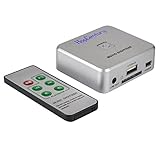
- Powerful Audio Capture Recorder: Capture all audio signals and save it as MP3 files in a USB flash drive, computer is NOT required. Support most audio and multimedia devices which has a 3.5mm or RCA audio output port, such as cellphones, cassette players, DVD, game consoles, TV boxes, phonograph and other equipments. Playback function is easy for you to check the MP3 files in the USB flash drive, just need a earphone! Designed to convert your old analog music to MP3, not a professional DJ device
- Record Audio: You could press the RECORD button to star and stop recording at any time you like, it is a flexible way for you in most situations. At the same time, you could connect a earphone to the LINE OUT port to listen the music you are recording. The recorded file is the popular and standard MP3 file, 128Kbps 44.1KHz Dual-Mono, it is very easy to edit or share to your friends
- Support SD Card & USB Flash Drive: You could plug a SD card or a USB flash drive on the music capture recorder to save the recorded files, usually the recorded file is about 50Mb for 60 minutes. It is IMPORTANT to format it before use to avoid errors. Support 32GB Max. with FAT32 file format, NTFS is not supported. Please do NOT insert a SD card and a USB flash drive at the same time
- Remote Controlled: It is very convenient to access all functions of the audio capture device with the attached remote control, Start / Stop recording, Play / Pause music, Previous, Next , Turn up / down Volume
- What You Get: 1 x Music digitizer recorder, 1 x USB power cable, 1 x 3.5mm audio cable, 1 x Remote control, 1 x User manual, 30-day money back & 1-year warranty guarantee, and 7 days a week friendly customer service
| Format | Where it is advertised | What to verify |
|---|---|---|
| MP3 | Windows and Mac materials; commonly shown as the default | Available bitrate choices and tag behavior in your installer. |
| M4A | Mac format list | Whether the current Windows build exposes it. |
| AAC | Overview material | Whether AAC is a separate selectable output or an M4A container option. |
| FLAC | Mac format list and overview material | Whether the output is genuinely lossless; no independent audio test established this. |
| WAV | Windows format list and overview material | Whether it is available in the current Mac build. |
Choosing FLAC or WAV does not restore information already lost in a compressed source stream. A larger or nominally lossless output file is not proof of original-quality audio.
Does SpotiKeep work on your computer?
The technical-specification page lists Windows 10, 8.1, 8, and 7, plus macOS 10.15, 10.14, 10.13, 10.12, and 10.11. A support page surfaces older Mac versions as well. That conflict is a reason to check the current installer and system requirements immediately before purchase, especially on a current macOS release or a recently updated Windows system.
- Confirm the exact Windows or macOS version supported by the download you will install.
- Check whether your architecture (for example, Intel or Apple silicon) is supported or requires translation.
- Review permissions requested by the installer and whether security software flags the application.
- Use the trial, where available, to test one short track and a small playlist before committing.
Can SpotiKeep convert Spotify playlists to MP3?
Yes, playlist conversion is an advertised feature, alongside individual tracks and albums. A typical published workflow is:
Recommended Free Tools
Rank #2
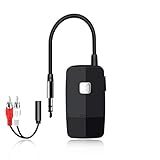
- 【The Latest Bluetooth V5.4】 With upgraded Bluetooth V5.4 technology and the advanced chipset, combining A2DP profile, this bluetooth rca adapter comes with stable connectivity and remarkable signal stability. Provides high quality and clear Hi-Fi music streaming. Creates enjoyable listening experience.
- 【Save Your Old Speakers】Golvery J205 Bluetooth receiver is a perfect solution to make your old speaker/stereo system/car stereo/wired headphones to play music wireless from your phone/tablet/laptop via Bluetooth connection. Bring new life to your old audio equipment! NOTE: it is NOT a Bluetooth transmitter, CANNOT work for TV/PC to pair with Bluetooth headphones/speaker.
- 【Easy to Use】Pairs with your Bluetooth devices like smartphone/tablet/laptop and connect it to your car stereo/old speaker/home stereo system/wired speaker/headphones by the 3.5mm/RCA audio cable (included). NOTE: There isn’t a built-in microphone, CANNOT support hands-free calling.
- 【Keeping Working While Charging】This upgraded Bluetooth music receiver can keep working while it is charging, which means it will never stop streaming. It will pair with the last pairing devices automatically when you turn on the Bluetooth function of the device.
- 【20-Hour Long Battery Life】With the built-in 240mAh rechargeable lithium battery, it takes only 2 hours to fully charge by the USB-C charging cable . And it can last to work for about 20 hours, brings you all-day music enjoyment.
- Install the desktop application from the vendor and sign in or otherwise connect as its current instructions require.
- Add the Spotify track, album, or playlist identified by the application.
- Select MP3 and choose an available bitrate such as 128, 256, or 320 kbps.
- Set the destination folder and metadata preferences.
- Start the batch job, then inspect the resulting files, tags, filenames, and playback on your intended device.
The vendor’s claims do not establish that every playlist item will convert, that protected or unavailable tracks will succeed, or that the advertised speed will occur on your connection and computer.
Does it work without Spotify Premium?
SpotiKeep’s getting-started material says Premium is not required. That answers only the product’s stated account requirement. It does not override Spotify’s service rules, copyright licenses, territorial restrictions, or any requirement that may apply to the particular content and use. A non-Premium workflow should not be interpreted as permission to make unrestricted copies.
Is SpotiKeep safe and legal?
Spotify’s stated restrictions
Spotify’s User Guidelines prohibit “copying, reproducing, redistributing, ‘ripping,’ recording, transferring, performing, framing, linking to or displaying to the public, broadcasting, or making available to the public, or any other use which is not expressly permitted under the Agreements or applicable law, or which otherwise infringes intellectual property rights.” The same guidelines prohibit circumventing technology used by Spotify, its licensors, or third parties.
Rank #3

- Wireless Sound Streaming:The LP10 is a high-performance wireless audio receiver that supports wireless streaming technologies such as WiFi, Bluetooth, AirPlay 2, Spotify connect, and Tidal connect, allowing you to play your favorite subscription content directly and upgrade your legacy speaker equipment to a wireless audio system.
- High Quality Sound: As a Hi-Res audio streamer,the LP10's optical output seamlessly delivers studio-quality sound to your audio amplifiers, speakers, and other devices with 192kHz/24bit high-resolution audio processing. Sample rates up to 96KHz/24bit when using Google Cast.
- Multiple Audio Interfaces: The LP10 supports line inputs and USB inputs for transferring audio from CD players and USB flash drives. It also offers line out (analog line out) and optical output, allowing you to play high-quality audio to amplifiers, bar speakers, and more.
- Universal Smart Home Audio Solution:LP10 can realize deep connection with Apple Home, Google Home and other smart ecological platforms. You can customize your own audio experience in multiple intelligent scenarios. For example, LP10 can link with HomePod to create whole-house stereo sound, and automatically play customized song list with the alarm clock in the morning.
- APP and Control Methods:You can integrate device personalization naming, audio source switching, playback control, and direct WiFi connectivity via the free Go Control APP for iOS and Android. The LP10 also features a simple IR remote control and touch buttons for greater flexibility and convenience.
What that means for a user
There is no responsible blanket answer that conversion is always legal or always illegal. The outcome depends on Spotify’s agreements, the rights attached to the recording, your jurisdiction, and the specific use. Converting a catalog track for ordinary personal convenience may still conflict with the service agreement even where local copyright exceptions are argued. Obtain permission or use an expressly authorized download/export feature when one exists.
What’s actually slowing this PC down?
Pick the symptom - the matching free tool is one click away.
Safety checks
No independent security certification or malware assessment was established here. Download only from the vendor’s current official channel, scan the installer with your security tools, read requested permissions, avoid cracked copies, and test the trial in a non-critical user account before adding a large library.
Independent reader supportYour contribution helps us test, update, and keep practical guides available for everyone.Is SpotiKeep worth it?
It may be worth considering if you specifically need a desktop batch workflow and the current build demonstrably supports your operating system, desired format, and lawful use case. The advertised convenience is less compelling if you only need Spotify’s own offline listening, require a guaranteed archival format, or cannot confirm that making the copies is permitted.
Rank #4

- AUDIO ALL-ROUNDER – convert your audio or video files into almost any audio format - edit, trim, merge, adjust sample and bit rate, extract audio from videos
- Supported input formats - MP3, MP2, AAC, AC3, WAV, WMA, M4A, RM, RAM, OGG, AU, AIF, AIFF, PG, MPEG, MPEG 2, MP4, M4V, MJPG, MJPEG, HD TS, HD MTS, HD M2TS, HD MPG, HD MPEG, HD MP4, HD WMV, QuickTime HD MOV and others
- Supported output formats - AAC, AC3, AIFF, AMR, AU, FLAC, M4A, MKA, MP2, MP3, OGG, WAV, WMA
- EASY TO INSTALL AND USE - user-friendly and intuitive interface, free tech support whenever you need assistance
- compatible with Windows 10, 8 and 7 (32 and 64-bit versions) - single user license
- Potential fit: users with lawful local-audio rights who need MP3 or another supported format for a non-streaming player.
- Reasons to wait: conflicting system requirements, inconsistent format lists, unverified performance, unclear current purchase terms, or uncertainty about policy and copyright permissions.
- Do not infer: a Premium-free claim is not a legal clearance, and a FLAC/WAV option is not proof of lossless source quality.
Before you buy or rely on it
- Open the current product, specification, support, and checkout pages and record the exact version, supported OS, formats, trial limit, price, refund terms, and license duration.
- Test a short, lawfully usable file and a small playlist with the trial, checking tags, artwork, filenames, gaps, and playback.
- Confirm whether output is re-encoded and whether the selected bitrate applies to every format.
- Read the privacy statement to understand whether account details, URLs, or audio-related data leave your computer.
- Keep the resulting files only where your rights and Spotify’s agreements allow.
Using the files with a portable MP3 player
A portable MP3 player can be a sensible destination for audio files you already own or are otherwise licensed to store locally. It is not required for SpotiKeep, and having a player does not make Spotify-catalog copying authorized. Check the player’s supported codecs, storage, and tag handling before choosing an export format.
Frequently Asked Questions
What is SpotiKeep Spotify Music Converter?
It is advertised Windows and Mac desktop software for converting Spotify tracks, albums, and playlists into local audio files, with batch processing and metadata options.
Do these 3 things before closing this tab:
1Repair Windows errors before they cause bigger problems2Scan for outdated or missing drivers - takes under a minute3Clear out junk files and repair common Windows errorsWhich output format should I choose?
Choose the format your playback device supports and your lawful use requires. MP3 is broadly compatible; FLAC and WAV create larger files and do not prove that the source was lossless.
Can I rely on the listed Windows and Mac requirements?
Use them as a starting point only. SpotiKeep’s specification and support pages conflict, so verify the current installer and test compatibility before purchase.
The Bottom Line
SpotiKeep presents a convenient Spotify-to-file workflow, but its format and platform claims need current verification, its performance was not independently tested, and Spotify’s rules restrict ripping and circumvention unless expressly permitted. Treat it as an unverified utility, not a guaranteed or automatically authorized way to archive Spotify music.
Quick Recap
Product prices and availability are accurate as of the date/time indicated and are subject to change. Any price and availability information displayed on Amazon at the time of purchase will apply.

