
Do these 3 things before closing this tab:
1Fix the driver behind crashes, sound loss and screen glitches2Repair Windows errors before they cause bigger problems3Scan for outdated or missing drivers - takes under a minuteiTechGuides is reader-supported. When you buy through links on our site, we may earn an affiliate commission. As an Amazon Associate I earn from qualifying purchases. Learn more
The WIZnet W5100S-EVB-Pico can serve as a wired smart-home sensor or control endpoint: its RP2040 handles your inputs and outputs, while the W5100S provides Ethernet networking. It is not a smart-home hub or a turnkey Home Assistant device. WIZnet documents Ethernet examples and a Node-RED demonstration, but a surfaced Home Assistant tutorial for a related Pico project could not be verified for this exact board.
What the W5100S-EVB-Pico is suited for
The board combines a Raspberry Pi RP2040 microcontroller with WIZnet’s W5100S hardwired TCP/IP controller and a built-in RJ45 Ethernet connection. WIZnet describes it as working like a Raspberry Pi Pico with Ethernet added. That makes it a candidate for a purpose-built networked device—for example, one that reports sensor readings or controls an appropriately designed output—not a general-purpose computer or complete home-automation hub. WIZnet’s board documentation lists a 10/100 Ethernet PHY, 2 MB of flash, four independent hardware sockets and 16 KB of TX/RX buffer memory. These are manufacturer specifications, not independent performance measurements.
The RP2040 provides GPIO and peripherals including I2C, UART, SPI, PWM and ADC, subject to board wiring and pin allocation. Ethernet has a significant pin cost: GPIO16 through GPIO21 connect to the W5100S for SPI, reset and interrupt signals. WIZnet says those pins cannot be repurposed while Ethernet is in use, so reserve them before choosing sensors or outputs.
How to connect it to a home-automation system
Think of the board as an endpoint that exchanges data with a separate server or automation system. WIZnet maintains C/C++ Ethernet examples covering areas such as DHCP/DNS, HTTP, MQTT, TLS, cloud services, lwIP and FreeRTOS; the setup instructions require selecting the target board and network interface for the example being used. See the WIZnet-PICO-PING-C repository for its maintained examples.
#1 Best Overall
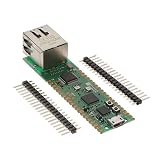
- Maximum Operating Temperature: + 85 C Minimum Operating Temperature: - 20 C Operating Supply Voltage: 1.8 V to 3.3 V
WIZnet also published a concrete Node-RED demonstration on February 17, 2023. It uses the Arduino-Pico board core, manually installs WIZnet’s Arduino Ethernet library, sets the Ethernet chip-select pin with Ethernet.init(17), obtains an address through DHCP and sends the board’s core-temperature value to a Node-RED server/dashboard. The tutorial describes adding sensors, but does not establish compatibility for a particular sensor or relay. Because the guide is dated, check current versions of the board core, library and Node-RED modules when following it. Read the WIZnet Node-RED project.
MQTT is another possible route when your design uses a broker: WIZnet lists MQTT among its examples. The specific message format, broker configuration and integration behavior will depend on your firmware and automation server; the cited materials do not provide a turnkey Home Assistant integration for this exact board.
Rank #2
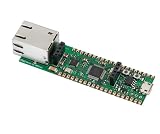
- Operating Supply Voltage: 3.3 V Mounting Type: Fixed
A practical planning sequence
- Define the job. Decide what the device must measure or switch, how often it should report, and which server or dashboard will consume the data.
- Plan the pin map. Reserve GPIO16–GPIO21 for Ethernet, then map the remaining suitable pins to the intended inputs and outputs. Confirm the board wiring and peripheral needs for each component.
- Choose a firmware path. Use a WIZnet C/C++ example or adapt the Arduino-Pico approach shown in the Node-RED tutorial. Select the network interface and board target required by that example.
- Define the network interface. Decide how the device will obtain network configuration and how it will communicate with the server—for example, through the documented Node-RED approach or an MQTT-based design.
- Test the endpoint before installing it. Verify network connectivity, data delivery and the behavior of the connected input or output in the intended setup before relying on it for automation.
Is there verified Home Assistant support?
A WIZnet Maker search result is titled “Pico Smart Home: Home Assistant and Raspberry Pi Pico for Smart Living” and points to a project described as using a W5100-EVB-Pico GitHub project and an Arduino Home Assistant library. The page could not be fetched, so its exact board revision, implementation, software versions and current working status are not established. Treat it as a lead to investigate, not evidence of native, maintained or currently working support for the W5100S-EVB-Pico. The surfaced page is WIZnet Maker’s Home Assistant tutorial result.
Crashes, No Sound, or Screen Glitches?
Random freezes, missing sound and display glitches usually trace back to one bad driver. Find and replace yours safely.Free scan · under a minutePC Slower Than It Used to Be?
A free scan shows the junk files, broken settings and background clutter dragging Windows down - then fixes them in one click.Free scan · Windows 10 & 11Choosing components and designing safely
Sensors and switching hardware depend on the project; the cited examples do not validate specific models. A build may also need jumper wires, a breadboard or an enclosure. For any household-load control, choose components with ratings, isolation, wiring and enclosure suitable for the actual electrical installation. The available documentation does not validate a particular mains-switching module.
Rank #3

- Based on Pi Pico, RPi Pico W comes with a wireless communication module. The wireless module hardware uses CYW43439 wireless chip, which supports Wi-Fi 4 wireless networks, making it the perfect solution for wireless network control and communication.
- Based on Official RP2040 Dual-core Processor. Dual-core Arm Cortex M0+ processor, flexible clock running up to 133 MHz.
- Onboard CYW43439 wireless chip, supports Wi-Fi 4 wireless network and Bluetooth 5.2. 264KB of SRAM, and 2MB of on-board Flash memory.
- Castellated module allows soldering direct to carrier boards. USB 1.1 with device and host support. Low-power sleep and dormant modes.
- Drag-and-drop programming using mass storage over USB. 26 x multi-function GPIO pins. 2 x SPI, 2 x I2C, 2 x UART, 3 x 12-bit ADC, 16 x controllable PWM channels.
When comparing this board with alternatives, weigh wired Ethernet against Wi-Fi, GPIO remaining after the network pins are reserved, hardware socket and buffer capacity, compatibility with your intended SDK and dashboard, and power and enclosure needs. The specifications alone do not establish real-world latency, reliability or throughput versus another board.
Quick Recap
Best Value
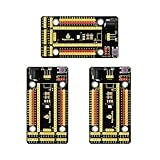
- Compatible models -> Raspberry Pi Pico / Pico 2/ Pico W/ Pico 2 W. (NOT included)
- It also breaks out communications ports like 2 x I2C, 2 x UART, 2 x SPI, 3 x analog IO and 13 x digital IO as well as a 6.5-12V power interface. All pins are clearly marked thus much better than a plain breadboard.
- DC input voltage: 6.5-12V ; Output voltage: DC3.3V
- A nice, flexible, value-conscious way to get projects up and running quickly.
- Package includes: 3 x Pi PICO Shield
Rank #4

- Raspberry Pi Pico W with Pre-Soldered Header comes with a wireless communication module. The wireless module hardware uses Infineon's CYW43439 wireless chip, which supports Wi-Fi 4 wireless networks in the 2.4 / 5 GHz band, making it the perfect solution for wireless network control and communication.
- 26 x multi-function GPIO pins: configurable pin function, allows flexible development and integration
- Built-in Wi-Fi: Onboard Infineon CYW43439 wireless chip, supports 2.4/5 GHZ Wi-Fi 4
- Dual-core Arm processor: Dual-core Arm Cortex M0+ processor, flexible clock running up to 133 MHz
- C/C++, MicroPython support: Comprehensive SDK, dev resources, tutorials to help you easily get started
Product prices and availability are accurate as of the date/time indicated and are subject to change. Any price and availability information displayed on Amazon at the time of purchase will apply.

