
iTechGuides is reader-supported. When you buy through links on our site, we may earn an affiliate commission. As an Amazon Associate I earn from qualifying purchases. Learn more
Verdict: The SilverStone FTZ01 remains an unusually attractive 14-liter slim case for a carefully planned gaming, living-room, or workstation build. Its separated “Z” layout, aluminum exterior, horizontal/vertical operation, and generous GPU length are still distinctive. In 2026, however, it is a specialist purchase: the 83 mm CPU-cooler ceiling, two-slot-class GPU geometry, older PCIe riser, dated front I/O, involved assembly, and uncertain used-stock condition matter more than the headline 330 mm GPU figure.
What the FTZ01 is
The FTZ01 is SilverStone’s premium Fortress alternative to the company’s Raven-style console cases. It followed the RVZ01 concept but uses an aluminum unibody frame around a steel chassis. The result is a slim enclosure that can stand vertically or lie horizontally without looking like a conventional tower.
Its defining feature is the internal “Z” arrangement. The graphics card sits parallel to the Mini-ITX or Mini-DTX motherboard on a right-angle PCIe riser, while the GPU, CPU area, and power supply occupy separate zones. That separation is intended to give the graphics card its own airflow path and reduce direct heat interaction. A GPU support bracket is included for longer cards.
PC Slower Than It Used to Be?
A free scan shows the junk files, broken settings and background clutter dragging Windows down - then fixes them in one click.Free scan · Windows 10 & 11Crashes, No Sound, or Screen Glitches?
Random freezes, missing sound and display glitches usually trace back to one bad driver. Find and replace yours safely.Free scan · under a minuteSilverStone sold the case in black (SST-FTZ01B) and silver (SST-FTZ01S). Do not confuse the original FTZ01 with the FTZ01-E: the E model changes the power-supply and storage arrangement to accommodate a limited-length ATX PSU.
#1 Best Overall

- Classic exterior built from aluminum anybody frame. Fits in nearly any environment with horizontal or Vertical orientation
- Support Graphics card up to 13 inches
- Mini-itx motherboard & SFX PSU compatible
- Positive air pressure design for excellent cooling/quietness and dust-prevention
- Maximum performance in slim form Factor with support for liquid cooling
Specifications and layout details: SilverStone FTZ01 manual/specification PDF and TechPowerUp-style hands-on review.
FTZ01 specifications at a glance
| Feature | Specification |
|---|---|
| Motherboards | Mini-ITX and Mini-DTX |
| Dimensions | 376 × 107 × 351 mm |
| Approximate volume | 14 liters |
| Net weight | 4.6 kg |
| Materials | Aluminum unibody frame, steel chassis |
| Power supply | SFX or SFX-L |
| Graphics card | Up to 330 mm long and approximately 149 mm wide/high; two expansion slots |
| CPU cooler | Up to 83 mm tall |
| Fans included | Two slim 120 mm fans, 1500 rpm, rated 18 dBA |
| Additional fan support | One 120 mm position |
| Storage | One 3.5-inch drive and three 2.5-inch drives |
| Optical drive | One slim slot-loading drive |
| Front I/O | Two USB 3.0 Type-A ports, audio and microphone |
| Orientation | Horizontal or vertical |
| Other | Kensington lock support |
The dimensions and limits come from SilverStone’s documentation and product listing: manual and Newegg FTZ01S listing. “USB 3.0” here means USB 3.x 5-Gbps-class Type-A connectivity, not USB-C.
Component compatibility: the numbers are only the starting point
Graphics card
The 330 mm length figure is useful but incomplete. Thickness, height above the bracket, shroud shape, backplate, power-connector position, and cable bend radius are just as important. A card can be shorter than 330 mm and still exceed the approximately 149 mm envelope or prevent the side panel from closing. The two-slot geometry also rules out many current high-end cards.
Rank #2

- Classic exterior built from aluminum unibody frame
- Support graphics card up to 13 inches
- Mini-ITX motherboard & SFX PSU compatible
- Maximum performance in slim form factor with support for liquid cooling
- Positive air pressure design for excellent cooling/quietness and dust-prevention
- Measure the complete card, including its rear bracket and protruding cooler parts.
- Check slot thickness, not only the manufacturer’s length.
- Confirm where the power connector exits and how much room its cable requires.
- Check that the fans can draw air through the case vents.
- Verify the riser’s condition and generation before buying a used case.
SilverStone’s older marketing emphasized support for very large consumer GPUs, but that claim belongs to its original product context. It should not be treated as a universal 2026 compatibility guarantee.
CPU and cooler
An 83 mm ceiling permits more than an ultra-thin laptop-style cooler, but excludes many tower and top-down designs. The manual also describes additional upper, front, and overhang boundaries, including an 11 mm overhang allowance and a 7 mm front-clearance constraint. A cooler below 83 mm can still collide with memory, VRM heatsinks, the motherboard layout, or the top fan.
- Choose the exact motherboard and socket first.
- Check the cooler’s complete height and footprint against the manual’s boundaries.
- Verify RAM, VRM, fan, and front-clearance interference.
- Match sustained CPU power to the cooler; do not rely on nominal TDP alone.
- Use sensible power limits or undervolting for high-power processors.
The FTZ01 is a safer match for a moderate-power CPU than for an unrestricted modern flagship running sustained workloads. A historical review recorded a 70°C peak with an Intel Core i5-4790K and stock cooler, but that result reflects that old hardware and test setup, not current CPU performance.
Rank #3
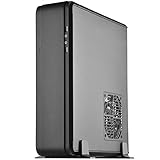
- Classic exterior built from aluminum unibody frame
- Support cards up to 13 inches (330mm) to fit most high-end GPUs for compute power far exceeding consoles
- Mini-ITX motherboard & ATX PSU compatible for wide array of building possibilities
- Maximum performance in slim form factor with support for AIO liquid cooling
- Positive air pressure design for excellent cooling/quietness and dust-prevention
Power supply
The original model accepts SFX and SFX-L supplies. SFX is usually easier because it leaves more room for drives and cable bends. SFX-L can provide a larger fan or higher capacity, but its extra length makes routing tighter. Check the exact PSU length, connector position, and cable stiffness.
Storage and optical drive
The case offers one 3.5-inch position, three 2.5-inch positions, and a slim slot-loading optical-drive bay. That is unusually flexible for a 14-liter enclosure, but every additional drive adds cables and assembly work. One or two motherboard M.2 drives are often the cleaner modern configuration. The optical bay accepts a slim slot-loading drive, not a standard desktop 5.25-inch unit.
PCIe riser
The supplied right-angle riser is central to the design. The available documentation does not establish that every FTZ01 revision includes a modern PCIe 4.0 or PCIe 5.0 riser. With a newer motherboard and GPU, automatic link negotiation may require a firmware setting such as PCIe Gen 3, or a replacement shielded riser. Treat this as a compatibility risk to verify, not a guaranteed failure.
Rank #4

- Classic exterior built from aluminum unibody frame
- Support graphics card up to 13 inches (330mm)
- Mini-ITX motherboard & SFX PSU compatible
- Positive air pressure design for excellent cooling/quietness and dust-prevention
- Fits in nearly any environment with horizontal or vertical orientation
How difficult is it to build in?
The exterior is simple; the interior is not. Brackets overlap, access disappears as assemblies go in, and modular cables consume scarce space. Follow a deliberate order rather than installing components as you find them.
- Confirm every component’s dimensions, including GPU thickness, cooler boundaries, PSU length, and cable exits.
- If possible, test the motherboard, CPU, memory, storage, GPU, PSU, and riser outside the case.
- Remove the top cover and internal brackets.
- Install the CPU, cooler, memory, M.2 drives, and accessible motherboard headers.
- Mount the GPU in its bracket and connect its power leads before the bracket becomes inaccessible.
- Install the PSU on its bracket, using the required right-angle AC connection.
- Install the 3.5-inch drive now if you are using one; later access can be blocked.
- Install the motherboard and connect essential power, front-panel, storage, and fan leads.
- Add 2.5-inch drives only after planning the cable path.
- Position the fans and connect the splitter.
- Spin-check each fan by hand and secure every cable away from the blades.
- Fit the covers carefully, checking that no wire is pinched, then perform a complete boot test before final placement.
The hands-on review specifically found that removing brackets first simplified PSU and motherboard installation, while GPU power cables became difficult to reach after the GPU assembly was installed. It also noted that the case is a poor first SFF project unless the manual is followed closely.
What’s actually slowing this PC down?
Pick the symptom - the matching free tool is one click away.
Cooling, noise, and maintenance
The two included slim 120 mm fans support a positive-pressure airflow strategy, with dedicated ventilation around the component zones. The separated GPU chamber is the layout’s strongest thermal advantage. The 18 dBA fan rating is a fan specification, not a promise that a complete system will be quiet; GPU, CPU, PSU, fan curves, and workload dominate actual noise.
Best Value
- Classic exterior built from aluminum unibody frame
- Support graphics card up to 13 inches (330mm)
- Mini-ITX motherboard & SFX PSU compatible
- Positive air pressure design for excellent cooling/quietness and dust-prevention
- Fits in nearly any environment with horizontal or vertical orientation
Historical testing of a Haswell processor and GTX 970 reported approximately 70–71°C CPU/GPU peaks under that review’s conditions. Those figures explain the older design’s airflow behavior but cannot predict 2026 temperatures or gaming performance. Current results would require testing the exact hardware.
- Clean vents and filters regularly, especially because positive pressure draws air through defined openings.
- Keep cables away from the closely mounted fans.
- Check cooler contact and motherboard power limits if temperatures or noise rise.
- Expect upgrades and cleaning to involve more disassembly than in a modern open-layout ITX case.
FTZ01 versus FTZ01-E
| Feature | FTZ01 | FTZ01-E |
|---|---|---|
| Power supply | SFX/SFX-L | ATX PSU support, with a stated 150 mm length limit |
| CPU cooler | 83 mm | 83 mm |
| GPU headline envelope | Up to 330 mm; approximately 149 mm width limit | Similar headline envelope |
| Optical drive | Supported | Removed |
| Storage | 3.5-inch plus 2.5-inch support | Different arrangement |
| Design priority | Slim SFX/SFX-L build | More PSU-format flexibility |
The FTZ01-E is not a universally improved FTZ01. Its larger PSU changes cable and storage space. Confirm the exact suffix on used or marketplace listings; reference documentation is available in the FTZ01-E manual.
Who should buy the FTZ01?
It makes sense when
- You specifically want a slim, console-like aluminum chassis.
- You need horizontal placement for a media center or living-room system.
- Your GPU is confirmed to fit thickness, height, connectors, and cable bend—not just length.
- You are comfortable with a low-profile cooler, an SFX/SFX-L PSU, and careful assembly.
- You value optical-drive support or the distinctive separated GPU chamber.
- The complete, accessorized case is meaningfully cheaper than a newer premium SFF case.
Choose something else when
- You need a three- or four-slot current GPU.
- You expect unrestricted high-wattage CPU cooling.
- You want front USB-C, tool-less installation, or frequent upgrades.
- You cannot verify the riser generation, accessories, seller warranty, and return policy.
- The asking price approaches that of a current case with better support.
Alternatives by priority
| Priority | Case to investigate | Why it differs |
|---|---|---|
| Similar slim console format | SilverStone RVZ01/RVZ03 family | Similar layout and footprint; the FTZ01’s premium aluminum exterior is the key distinction. |
| Current slim ecosystem | Fractal Design Ridge | Newer platform and I/O; verify its exact GPU, cooler, and riser limits. |
| Easier ITX build | Cooler Master NR200P | Less slim, but generally broader component compatibility and easier access. |
| Compact enthusiast sandwich layout | DAN Cases A4-SFX | Prioritizes compact modern components over optical-drive support and the FTZ01’s separated GPU chamber. |
| ATX PSU requirement | SilverStone FTZ01-E | Accepts a limited-length ATX PSU but changes storage and optical-drive provisions. |
Availability, pricing, and exact compatibility for these alternatives change by region and date, so check the manufacturer’s current specification before ordering.
Free tools Windows power users keep installed
One-click scans. No signup required.
Buying a used or old-stock FTZ01
Availability is a material concern. An accessible Newegg page shows a marketplace-style FTZ01S listing rather than an obviously current mainstream launch, with seller-controlled warranty and return terms. Do not buy on the case price alone.
- Confirm whether the unit is FTZ01B, FTZ01S, or FTZ01-E.
- Verify the PCIe riser, GPU bracket, support bracket, both fans, splitter, feet, screws, and optical-drive hardware.
- Ask about riser damage, bent panels, missing filters, and seller return rights.
- Budget for a compatible replacement riser or short flexible PSU cables if necessary.
The manufacturer’s current site and support area are SilverStone and SilverStone support.
Bottom line
The FTZ01 is still a remarkable piece of slim-case engineering, but it is no longer an easy default recommendation. Buy it for the aluminum console aesthetic, separated GPU airflow, flexible orientation, and optical-drive option—not because “330 mm GPU support” guarantees compatibility. If your exact GPU, cooler, PSU, riser, and accessories all check out and the price reflects its age, it can make a powerful and distinctive small-form-factor PC. Otherwise, a newer case with modern I/O, easier assembly, and clearer component support is the safer 2026 choice.
Quick Recap
Product prices and availability are accurate as of the date/time indicated and are subject to change. Any price and availability information displayed on Amazon at the time of purchase will apply.
The Tool Desk
Outbyte PC Repair FREERepair Windows errors before they cause bigger problemsFix Now →Outbyte Driver Updater FREEScan for outdated or missing drivers - takes under a minuteDriver Scan →
