
What’s actually slowing this PC down?
Pick the symptom - the matching free tool is one click away.
iTechGuides is reader-supported. When you buy through links on our site, we may earn an affiliate commission. As an Amazon Associate I earn from qualifying purchases. Learn more
If your ASUS laptop won’t turn on, first check whether any power indicator appears. No indicator points to a power-supply or hardware-reset path; a power light with a blank screen calls for display and startup checks instead. These symptoms do not identify a failed part by themselves. Follow the path that matches what your laptop is doing, and check your exact model’s manual before using a reset or BIOS-recovery procedure.
First, identify the symptom
Press the power button once and look for a charging or power light, fan noise, keyboard illumination, a startup sound, or the ASUS logo. Indicator behavior varies by product, so consult the manual for your model if you are unsure what a light means.
| What you observe | Where to start |
|---|---|
| No power or charging indication | Check the outlet, adapter, cable, and connections; then consider the model-appropriate EC/RTC reset. |
| Power light is on, but the screen is blank | Follow the no-display checks. If the issue followed a BIOS update, use the separate, model-specific recovery path. |
If your ASUS laptop won’t turn on and no power light appears
Check the power source and adapter
- Connect the adapter directly to a working wall outlet. If you were using an extension cord or power strip, bypass it for this check.
- Firmly reconnect the power cable and adapter at both ends. Look for visible damage, loose fittings, or damaged connectors.
- Use the original adapter or one that meets the specifications for your exact laptop. ASUS cautions that adapters for different products may have different output specifications; do not assume another ASUS charger is compatible.
- Disconnect USB devices, memory cards, docks, and other external accessories.
- If your battery is removable, power down and reseat it according to the model manual. Do not try to remove a built-in battery.
ASUS advises that a device or battery left unused or uncharged for a while may be left connected to power overnight. If the adapter or cable is visibly damaged, stop using it and contact an ASUS service center about service or a compatible replacement. See ASUS’s power troubleshooting guidance.
Crashes, No Sound, or Screen Glitches?
Random freezes, missing sound and display glitches usually trace back to one bad driver. Find and replace yours safely.Free scan · under a minuteWindows Errors? Fix Them Before They Spread
Repair common Windows errors and clear accumulated junk for a smoother, more stable PC - no reinstall needed.Free scan · no reinstallTry the model-appropriate EC/RTC reset
An EC/RTC reset is a hardware-level reset of the embedded controller and real-time clock. It is not a Windows factory reset and does not reinstall Windows. ASUS’s general instructions call for removing external devices, turning the laptop off, connecting the power adapter, and holding the power button. The required hold time depends on the model.
#1 Best Overall

- This charger is designed for devices with power requirements up to 65W(45W 33W included). It is not fit for TUF Gaming A14 A15 17 F15 F17 A16. Not fit for ROG Strix G15 G16 G17 G18. Not fit for ROG Zephyrus G14 G15 M15 G16 S15 S17. Not fit for Vivobook Pro 15 15X 16X. Not compatible with Zenbook Pro 14 Duo 15 16X OLED. Not fit for ROG Flow X16 X13 Z13, ProArt StudioBook 15 16 17, ProArt P16 PX13. Not fit for Chromebook CX1 CX3 CR11 Flip CX5 CX9 and other models more than 65W
- Flawless compatibility --- Exclusively designed switchable round connectors will fit for ASUS vivobook, zenbook. Fit for chromebook, transformer. Fit for eeebook, imaginebook. Fit for expertbook of 65W, 45W, 33W with round power connectors. (Not fit for USB-C, 7.4*5.0mm, 6.0*3.7mm - Please check our images to confirm the compatible connector)
- 24 months manufacturer warranty
- What's in the box --- 1 X power adapter fit for Asus laptop charger replacement, 4 X switchable round connectors
- Other specs --- Output: 19V 3.42A 65W (Fit for Asus laptops of 65W, 45W & 33W), Input:100-240V
- 40-second design: Hold the power button for 40 seconds, as directed for models using this design.
- Supported 20-second design: Hold the button for 20 seconds. On the applicable models, the indicator rapidly flashes after 15 seconds for about 3–5 seconds; release after the flashing stops.
Do not choose a timing based on guesswork: verify the instructions for your exact laptop on ASUS’s EC/RTC reset page or in its model manual. After the reset, reconnect power and try starting the laptop.
If your ASUS laptop won’t turn on but the power light is on
A lit power indicator means this is not the same symptom as no power indication. Use ASUS’s no-display checks rather than treating a blank screen alone as proof that the laptop has no power.
Rank #2
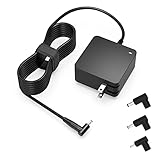
- Exceptional compatibility--- Fit for Asus laptop 65W and under (incl. 45W and 33W) with round power connector. Fit for Vivobook 11 17 Flip 14 15, S14 S15 S13, fit for Zenbook UX, fit for Chromebook Flip, fit for Transformer, fit for Eeebook, fit for Imaginebook, fit for Expertbook series. A real 'One for All' solution that aims to make your life easier
- Industry-Leading Safety--- Engineered to meet strict international safety and quality standards, this laptop charger is built with advanced protection systems and rigorous testing to ensure safe, stable, and reliable charging every day
- Not compatible with gaming laptops or high-performance models exceeding 65W power requirements. Not compatible with VivoBook Flip TP200 TP3407 TP3607, VivoBook E200 M5406 S5406 M5506 S5506 M5606 S5606. Not compatible with Chromebook 14, CZ11 CR11 CZ1 CX1 CX3 CX34 CX5 CX55 CX9, Flip CM1 CM5 CM3 CM4 CM34 CM30 C100 C201 CR1. Not compatible with Zenbook UX9702 UX5400 UX5401 UX5304 UX325 UX3402 UX3404 UX363 UX370 UX371 UX390 UX391 UX392 UX393 UX425 UX435 UX482 UX490 laptop
- Please verify connector from the image—Not supported for [USB-C, 7.4*5.0, 6.0*3.7] connector
- 1-year manufacturer warranty
- Test an external display, if available. Connect a monitor and use
Windows+Pto check whether Windows is sending the picture to another display. Whether an external screen works can help distinguish a display-output issue from a broader startup problem, but it does not establish the failed component. - Reset the display driver. Press
Windows+Ctrl+Shift+B. This is ASUS’s recommended display-reset shortcut for the applicable Windows scenario. - Remove peripherals. Disconnect external devices and cards, then check whether the laptop displays anything during startup.
- Consider recent hardware changes. If memory or storage was recently changed, that timing is relevant. Consult the model manual or ASUS support rather than opening the laptop or reseating internal parts based only on a blank screen.
- Use the model-specific EC/RTC reset instructions. The reset timing varies by model; follow the applicable instructions linked above.
For the full official path, see ASUS’s troubleshooting guidance for startup or no-display problems.
Free tools Windows power users keep installed
One-click scans. No signup required.
If the black screen began after a BIOS update
A failed BIOS update is a separate case from an ordinary black screen. ASUS recovery steps depend on the model and what appears on screen. Some situations call for waiting while an automatic update proceeds; certain recovery procedures use a USB flash drive formatted as FAT32 and the BIOS file for the exact laptop model.
Rank #3

- Not fit for Gaming laptops and high-performance models with power needs greater than 65W. Not fit for TUF Gaming series. Not fit for ROG Strix/Flow/Zephyrus series. Not fit for Vivobook Pro series. Not fit for Zenbook Pro series. Not fit for Chromebook Flip series. Not fit for ExpertBook B2 B3 B5 B7 B9 Flip laptop
- Superb compatibility: Fit for Asus Vivobook, Zenbook series, fit for Chromebook, EeeBook, fit for ImagineBook, ExpertbBook, fit for TransformerBook laptop series 65W 45W 33W replacement with round power connector
- One-year manufacturer warranty
- Package includes: 1 X replacement charger fit for Vivobook, Zenbook laptop, 4 X different sizes of detachable round connectors - 65W-45W-33W
- Specifics: Output max - 65W, 19V 3.42A, fit for Asus Vivobook, Zenbook laptop 45W and 33W as well, input range - 100 - 240V
Keep the laptop connected to power during firmware recovery, and do not force it to shut down while recovery is in progress. ASUS documents different key combinations for some models, so do not treat any one shortcut as universal. Follow the recovery instructions on your model’s official ASUS support page. If you need the USB-based procedure, first confirm the matching model and BIOS file in ASUS’s instructions; a FAT32-formatted drive alone is not sufficient.
Independent reader supportYour contribution helps us test, update, and keep practical guides available for everyone.When to stop troubleshooting and contact ASUS
If the checks do not restore startup, contact ASUS customer service for your region and provide the full model number, what indicators or sounds you observed, and whether the problem followed a BIOS update or hardware change. The symptom alone cannot determine the fault, compatible replacement adapter, warranty route, or part required. ASUS’s support pages direct users to local customer service when the official troubleshooting steps do not resolve the issue.
Quick Recap
Rank #4

- Input:100-240V 50-60Hz;Output DC: 19V~3.42A for 65W, 19V~2.37A for 45W, also compatible for 19V~1.75A 33W
- SZGUDULO laptop charger compatible with Asus VivoBook A540LA A441N A441U E201 E201NA E203 E203MAH E203NAH Q304UA Q405UA Q504UA S330FA S330FN
- SZGUDULO laptop charger compatible with Asus S200 S200E Q200 Q200E L402S L402SA L402M L402MA L402WA L402W L402 L402WA-EH21 R540SA R540S R540LA R540L C202 C202S C202SA C300 C300M C300MA C300S C300SA C301SA C301S C301 X200 X200C X200CA X200M X200MA X202 X202E X201 X453MA X453SA
- SZGUDULO laptop charger compatible with Asus UX330 UX330UA UX330U UX330CA UX330C UX360 UX360C UX360U UX360UA UX360CA UX305F UX305FA UX305L UX305LA UX305C UX305CA UX305U UX305UA UX305 X541NA X541N X541S X541SA X541SC X541UA X541UV X541UJ X541U X541
- Package: 1 X Power Adapter,4 X Switchable Round Connectors
Product prices and availability are accurate as of the date/time indicated and are subject to change. Any price and availability information displayed on Amazon at the time of purchase will apply.
Do these 3 things before closing this tab:
1Fix the driver behind crashes, sound loss and screen glitches2Repair Windows errors before they cause bigger problems3Scan for outdated or missing drivers - takes under a minute
