
Do these 3 things before closing this tab:
1Repair Windows errors before they cause bigger problems2Fix the driver behind crashes, sound loss and screen glitches3Clear out junk files and repair common Windows errorsiTechGuides is reader-supported. When you buy through links on our site, we may earn an affiliate commission. As an Amazon Associate I earn from qualifying purchases. Learn more
To remove a Google account from an accessible Samsung Galaxy A03, open the account-management screen in Settings, select the Google account, choose Remove account, and confirm. Do this before a factory reset if you are selling, giving away, or transferring the phone. A Galaxy A03 that has already been reset and is asking for the previous Google account is a different case: it is protected by Google’s device-verification system and requires the proper screen lock or account credentials, or ownership help from Samsung.
First identify which situation you have
The correct action depends on whether you can still reach the A03’s normal home screen. Removing an account is a Settings task; clearing a verification prompt after a reset is an ownership check.
| Phone state | What you should do | What you need |
|---|---|---|
| Phone opens normally and you can unlock it | Remove the Google account from Settings, then reset only if you intend to erase the phone. | The device unlock PIN, password, or pattern may be requested during security-sensitive actions. |
| Phone was reset and now says it needs a previous Google account | Complete Google’s verification with the previously associated account or the screen lock used before the reset. | The correct credentials and, if you are locked out, proof of ownership for Samsung support. |
| You want to keep using the phone | Remove only the account you no longer want on the device; do not factory-reset unless you intend to erase everything. | Access to Settings and the account-management controls. |
The exact Galaxy A03 hardware variant, region, and Android version are not specified, so labels can differ. Look for the same account-management function even if your menus use slightly different wording.
Recommended Free Tools
Prepare the Galaxy A03 before removing the account
Back up anything you still need
A factory reset permanently deletes personal information and data stored on the phone. Copy photos, videos, contacts, messages, authenticator data, documents, and app-specific files to a safe location before you erase the device. Check that your backup can actually be opened from another device; a backup that was never completed will not protect the data.
#1 Best Overall

- Compatibility: Engineered exclusively for Samsung A03S with precision cutouts that give full access to ports, speakers, and buttons without interfering with wireless charging. Our 24/7 dedicated support team resolves any model or quality concerns instantly.
- Military-Grade Dual-Layer Protection: A shock-absorbing TPU interior with reinforced corner airbags is wrapped in a hard polycarbonate outer shell. Certified 14ft drop protection guards your phone against high-impact falls onto concrete warehouse floors and rocky hiking terrain.
- Practical Design for Secure Grip: Textured side panels and a non-slip matte back provide a confident hold during sweaty gym workouts, one-handed texting, and fast-paced daily commutes. The fingerprint-resistant finish stays clean, and soft-touch buttons deliver crisp, responsive feedback.
- All-Scenario Versatility: The minimalist, low-profile matte design blends effortlessly into any environment, from business commutes to weekend hikes. It pairs rugged durability with everyday pocketability for heavy-duty protection without the bulk.
- Eco-Conscious Durability: Crafted with over 50% certified recycled materials, this case offers robust protection while supporting sustainable design. Made with safer chemicals under ethical manufacturing conditions, it delivers a long-lasting shield that cares for your device and worker well-being.
Make sure you can unlock the phone
Keep the A03’s screen-lock PIN, password, or pattern available. Samsung’s reset guidance states that the reset process requires one of these unlock methods. If you cannot unlock the phone, use the locked-device instructions later in this article rather than repeatedly guessing credentials.
Check which Google account is present
If more than one Google account is listed, note which one you intend to remove. Removing one account does not automatically remove other accounts, Samsung accounts, or local files. For a transfer to another person, remove every personal Google account that should not remain on the phone.
Remove the Google account through Settings
- Open Settings. Unlock the Galaxy A03 and open the Settings app from the app screen or notification shade.
- Open account management. Tap Accounts and backup, then Manage accounts. This is the current path described for Samsung phones, although the wording can vary by software version.
- Select the Google account. In the list of accounts, tap the Google account you want to remove. Confirm that the displayed address is the one you intend to delete from this phone.
- Choose Remove account. Tap Remove account. If Samsung asks you to confirm, read the warning and continue only when the selected account is correct.
- Complete the security check. Enter the A03’s PIN, password, or pattern if prompted. This confirms that the person removing the account has access to the device.
- Verify the result. Return to Settings > Accounts and backup > Manage accounts and confirm that the selected Google account no longer appears. Other accounts may still be listed.
If your menu labels are different
Samsung says menu names vary by model and operating-system version. Older software may show the account list under Cloud and accounts > Accounts or through Accounts > Google. Start in Settings and search for accounts if your screen does not match the current labels. The destination is the screen that lists accounts saved on the phone; open the Google entry there and look for Remove account.
Crashes, No Sound, or Screen Glitches?
Random freezes, missing sound and display glitches usually trace back to one bad driver. Find and replace yours safely.Free scan · under a minuteWindows Errors? Fix Them Before They Spread
Repair common Windows errors and clear accumulated junk for a smoother, more stable PC - no reinstall needed.Free scan · no reinstallRank #2
![Yiakeng for Samsung Galaxy A03S Case, Galaxy A03S Phone Case with HD Screen Protectorr [Military Grade Drop Tested], Double Layer Protective Phone Case Suitable for Samsung Galaxy A03S (Black)](https://m.media-amazon.com/images/I/41yVnUdZc5L._SL160_.jpg)
- 1. Note: This phone case is fit for: Samsung Galaxy A03S, Not fit for :Samsung A03, Samsung A03 Core, they are diffrent.
- 2. Samsung Galaxy Galaxy A03S mobile phone case is molded by the original factory. It is a double-layer protective case with accurate cutting. The perfect cut of speakers, cameras and charging holes make it easy for you to use all functions
- 3.Samsung Galaxy A03S Phone Case is made of durable PC and silicone TPU material with bumper design around the edge to protect your phone from drops, scrapes and bumps.
- 4.Galaxy A03S Phone Case can charge your phone without removing the phone case, and it supports all wireless charging, keeping your phone always stylish in design.
- 5. Our Samsung Galaxy A03S Case products come with 90 days warranty. If you have any questions or anything you feel unsatisfied, please contact us by E-mail. We will happy to solve for you within 24 hours.
| Possible label on your A03 | Where it leads |
|---|---|
| Accounts and backup > Manage accounts | Samsung’s newer account list. |
| Cloud and accounts > Accounts | An older Samsung account-management layout. |
| Accounts > Google | A direct route to Google accounts on some older software. |
Why removal matters before a factory reset
Android’s Factory Reset Protection (FRP) is designed to stop an unauthorized person from making a reset phone usable after it has been lost or stolen. Samsung UK support describes it this way: “This feature is designed as a safeguard to prevent unwanted people from using your device if they managed to reset it without your permission, for example, if it was lost or stolen.”
If you reset the A03 while a Google account remains associated with it, the next setup may request the credentials for that account. Google explains that a protected device reset can require either the previous screen lock or the Google account password. That is why removing your Google account while the phone is still accessible is the safest preparation for a sale or hand-off.
Recommended transfer sequence
- Back up personal data and confirm the backup is usable.
- Remove each personal Google account from Manage accounts.
- Remove any other personal accounts you do not want to transfer, checking each account type separately.
- Start the factory-reset process from the phone’s Settings reset controls only after the backup and account review are complete.
- Enter the requested screen-lock credential and allow the reset to finish without interrupting power.
- When the welcome screen returns, stop there. The recipient can complete setup with their own account.
Removing an account does not itself erase photos, downloads, messages, or other local files. If another person will receive the phone, the factory reset is the separate step that deletes those files.
Rank #3
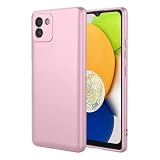
- High end protection: The VNWIOEA phone case is made of high-quality TPU material, which has excellent shock absorption and scratch resistance, and can protect your phone. Protect your Samsung Galaxy A03(164) from daily wear and tear.Please confirm your phone model before purchasing.
- Fashion Design: The solid color and smooth surface of this phone case not only add a touch of elegance to your device, but also provide a comfortable grip, making your hands feel natural. Enjoy fashion and practicality in one accessory.
- Precise fit: The VNWIOEA phone case adopts a precise design that can perfectly fit the phone, ensuring easy control of all buttons and smooth use of various ports, completely eliminating the annoyance of bulky shells affecting use.
- Anti slip feature: The textured surface enhances grip and significantly reduces the risk of accidental falls. Whether held in hand or in your pocket, confidently carry your phone and protect it with peace of mind.
- Customer Satisfaction Guarantee: We are committed to your satisfaction, which means you can purchase with confidence. If you encounter any problems while using the VNWIOEA phone case, our dedicated customer service team will assist you promptly and provide worry free protection for your device.
If the A03 is already asking for the previous Google account
A screen such as “Verify your account” after a reset indicates that protection is active. It is not the same as an account that can be removed from Settings. Google’s supported route is to enter the Google account password that was associated with the device or use the screen lock requested by the verification screen.
What’s actually slowing this PC down?
Pick the symptom - the matching free tool is one click away.
When you know the account
Enter the exact Google address and password previously used on the A03. If you recently changed that password, the verification screen may require the currently accepted credentials after Google’s security checks. Follow the on-screen recovery process if you cannot remember the password; do not keep submitting guesses, because repeated failures can prolong access problems.
When you bought the phone second-hand
Ask the previous owner to complete the verification or, when possible, to remove the device from their account before handing it over. The former owner’s credentials are not interchangeable with a new owner’s account. A new Google account cannot satisfy a prompt that specifically requests the account previously associated with the reset.
Rank #4

- 【 PLEASE NOTE!!! There are three versions of Samsung Galaxy A03S phone, this case is only fit for Samsung Galaxy A03S US version (Phone Model: SM-A037U). 】 Compatible Model: Package inludes a free PET HD Screen Protector (Plastic), Perfect Designed for Samsung Galaxy A03S;
- Refined Design: Soft TPU case, all keys inclusive, brushed back and carbon fiber design increase grasp force, but without sweat stain, fingerprint or dust accumulation;
- Good Material: This Samsung Galaxy A03S case is made of environment-friendly plastic and anti-stretch TPU rubber; Inner sleeve is spider web structure effectively dissipates heat;
- Great Protection: Flexible TPU edge bumper ensures reliable shock absorption protection; Raised edge for added camera and screen protection;
- Easy To Access: Precisely cut openings to allow full access to all the functions of your device and ports, and sensitive button covers allow responsive presses.
When you are the owner but cannot verify
Samsung advises a locked-out owner to take the device and proof of purchase to an authorized Samsung Service Centre. Bring documentation that identifies the purchase and the device, and explain that the phone is stopped at Google account verification. Official support and ownership verification are the reliable options described by Samsung and Google; an unofficial bypass is not guaranteed to work and can create additional security or support problems.
Independent reader supportYour contribution helps us test, update, and keep practical guides available for everyone.Troubleshooting account removal
Remove account is not visible
- Confirm that you tapped the Google account itself, not a general account category.
- Scroll to the bottom of the account page; the remove control may be below synchronization settings.
- Use Settings search for Manage accounts or Google and open the result that lists accounts on the device.
- If the phone is managed by an employer or school, an administrator policy may restrict account changes. Contact that organization rather than attempting to defeat its controls.
The phone requests a PIN or pattern
This is the normal device-security confirmation for removing an account or starting a reset. Use the current screen-lock method. If it is forgotten, stop before erasing the phone and use Samsung’s official account-recovery or service route; a factory reset will not provide the missing credentials for a protected setup.
The account still appears after removal
Wait briefly, return to the account list, and reopen the Google entry to verify its status. If the account remains, repeat the removal action while the phone is connected to a reliable network and fully unlocked. Do not assume that removing a Google account deletes the same address from Google’s servers; it removes the account from this A03.
Best Value

- Prefect design for Samsung Galaxy A03S International Edition【NOT FOR Samsung Galaxy A03S U.S. Edition(Model: SM-A037U )】
- Made of shock absorbing, shatterproof premium TPU and Polycarbonate material
- Can offers extreme protections from daily uses, fall, bumps and scratches, resistant to tear and dust accumulation
- Available in 4 different texture colors,Navy Blue,Black,Gray, Red
- Packing include 1 set case and 2pcs Screen Protector, 100% new brand
You removed the wrong account
If the phone is still accessible, add the account again through the Google account option in the account-management screen and complete sign-in. If you are preparing the device for someone else, review the list one more time before resetting so no personal account remains.
What a factory reset does and does not do
- It does: erase personal information and data stored on the A03, return system settings to their initial state, and require setup again.
- It does not: create a backup, recover forgotten passwords, or guarantee that a previously protected device will skip Google verification.
- It may require: the device PIN, password, or unlock pattern before the erase begins.
- It does not remove: information stored elsewhere, such as data already synchronized to an online account or files on a separate storage device.
Because the A03 variant and installed Android version are unknown, the names and order of reset menus may differ. Use the reset option presented by your Settings app and read each confirmation screen carefully.
Use this decision checklist
- Can you unlock the phone? If yes, remove the Google account from Settings first. If no, you cannot safely perform the normal removal steps.
- Are you keeping the phone? Remove only accounts you no longer want on it and skip the factory reset unless you need a clean start.
- Are you transferring the phone? Back up data, remove personal Google accounts, remove other personal accounts, then factory-reset from Settings.
- Does setup request the previous account? Use the previously associated credentials or screen lock. If those are unavailable, use Samsung’s authorized service process with proof of purchase.
Key points for a Samsung A03 account removal
The dependable workflow is state-dependent: an accessible Galaxy A03 lets you remove the account in Settings, while a phone already stopped at post-reset verification requires ownership credentials. Account removal and data erasure are separate actions, so back up first and perform the reset only after confirming that no personal account should remain. Since Samsung menu labels vary across A03 variants and software versions, follow the account-management function rather than relying on one exact screen name.
Quick wins for a faster PC:
Clear out junk files and repair common Windows errorsFree Scan →Fix the driver behind crashes, sound loss and screen glitchesFind Drivers →Quick Recap
Product prices and availability are accurate as of the date/time indicated and are subject to change. Any price and availability information displayed on Amazon at the time of purchase will apply.

