
iTechGuides is reader-supported. When you buy through links on our site, we may earn an affiliate commission. As an Amazon Associate I earn from qualifying purchases. Learn more
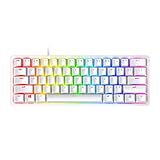
The Razer Reclusa X Mini 65% is a wired mechanical keyboard with tactile switches, hot-swap support and sound-dampening layers, reported at $49.99 in the US. Its compact layout retains arrow and navigation keys, but the price comes with clear trade-offs: 1,000 Hz polling, no Hall effect switches, no dedicated media keys and no included wrist rest. Independent reviewers praise its feel and build, making it a compelling entry-level option if those omissions suit your needs.
Is the Razer Reclusa X Mini 65% worth $50?
At the reported US price of $49.99, the Reclusa X Mini offers a strong feature mix for a compact wired board: tactile mechanical switches, hot-swap support, per-key RGB and two layers of silicone dampening. Windows Central describes its typing experience as refined and sees it as an accessible introduction to hot-swappable keyboards. PC Gamer likewise praises the tactile feel, crisp keycaps and robust-feeling frame, while noting several gaming-focused compromises.
Those are reviewers’ impressions, not results from independent laboratory testing. PC Gamer’s reviewer summed up the value this way: “For $50? It’s a very impressive thing indeed.” The $49.99 figure appears in Windows Central’s 2026 review and on Razer’s US product page; PC Gamer gives a 2026 price of $50 in the US and £60 in the UK. Prices and stock can change, so check the current price and availability in your region before buying.
PC Slower Than It Used to Be?
A free scan shows the junk files, broken settings and background clutter dragging Windows down - then fixes them in one click.Free scan · Windows 10 & 11Crashes, No Sound, or Screen Glitches?
Random freezes, missing sound and display glitches usually trace back to one bad driver. Find and replace yours safely.Free scan · under a minuteThe short version: it makes sense for someone who wants a compact, wired keyboard with tactile switches and room to customize. If fast actuation, Hall effect controls or a higher polling rate are priorities, its specifications are less compelling.
#1 Best Overall

- HOT-SWAPPABLE CUSTOMIZATION – Personalize your typing and gaming experience with a socketed PCB compatible with both 3-pin and 5-pin mechanical switches, making switch upgrades and modifications fast and tool-friendly for enthusiasts
- TACTILE GAMING PERFORMANCE – Enjoy responsive, satisfying keystrokes with Razer Orange Tactile Mechanical Switches Gen-3, engineered for quieter actuation and precise feedback during FPS, MOBA, RPG, and everyday productivity
- PREMIUM SOUND AND FEEL – Experience cleaner acoustics and a plush bottom-out thanks to a PPS plate, custom stabilizers, and dual-layer silicone dampening that reduce resonance for a refined custom keyboard feel
- DURABLE ABS DOUBLESHOT KEYCAPS – Game confidently with premium doubleshot ABS keycaps featuring fade-resistant legends, consistent texture, and a distinctive 3-tone colorway built for long-term daily use
- CHROMA RGB IMMERSION – Customize every key with per-key Razer Chroma RGB lighting and 16.8 million colors, while south-facing LEDs improve compatibility with a wider variety of aftermarket keycap sets
What does the 65% layout keep—and remove?
A 65% keyboard saves space by removing the numpad and function row while retaining arrow and navigation keys. The Reclusa is therefore smaller than a full-size board without requiring you to give up dedicated arrow keys. Razer describes the keyboard’s form factor and layout on its product page.
The trade-off is that functions normally reached on the missing function row or numpad require alternate key combinations or a separate device. PC Gamer also notes that the Reclusa has no dedicated media keys. If you regularly use those keys or prefer a number pad, a larger layout may be more practical.
Rank #2

- FASTER THAN TRADITIONAL MECHANICAL SWITCHES — Razer Linear Optical switch technology uses optical beam-based actuation, registering key presses at the speed of light (15-30% shorter actuation distance than other linear switches at 1.0 mm)
- ULTIMATE PERSONALIZATION & GAMING IMMERSION WITH RAZER CHROMA RGB LIGHTING — Fully syncs with popular games, Razer hardware, Philips Hue, and gear from 30+ partners; supports 16.8 million colors on individually backlit keys from the world’s largest lighting ecosystem for gaming devices
- QUALITY, ALUMINUM CONSTRUCTION — Covered with a matte, aluminum top frame for increased structural integrity
- OIL-RESISTANT DOUBLESHOT PBT KEYCAPS — Made of textured, high-grade PBT for a more durable and textured finish less prone to long-term grime buildup
- FULLY PROGRAMMABLE MACROS — Razer Hypershift allows for all keys and keypress combinations to be remapped to execute complex commands
How do the switches feel, and can you change them?
The keyboard ships with Razer Gen-3 Orange tactile mechanical switches. Razer says the hot-swap sockets support most standard 3-pin or 5-pin mechanical switches, allowing you to change switches without replacing the whole keyboard. Razer lists Green Clicky and Yellow Linear switches as separately sold alternatives; check the exact switch model and socket compatibility before ordering third-party replacements.
Razer rates the Orange switches at 50 g actuation, a figure also cited in PC Gamer’s review. That is a specification, not a prediction of how fast or comfortable the keyboard will feel to you. Tactile switches provide a bump as a key actuates; clicky switches add an audible click, while linear switches move without a tactile bump.
Rank #3
- FASTER THAN TRADITIONAL MECHANICAL SWITCHES — Razer Linear Optical switch technology uses optical beam-based actuation, registering key presses at the speed of light (15-30% shorter actuation distance than other linear switches at 1.0 mm)
- ULTIMATE PERSONALIZATION & GAMING IMMERSION WITH RAZER CHROMA RGB LIGHTING — Fully syncs with popular games, Razer hardware, Philips Hue, and gear from 30+ partners; supports 16.8 million colors on individually backlit keys from the world’s largest lighting ecosystem for gaming devices
- QUALITY, ALUMINUM CONSTRUCTION — Covered with a matte, aluminum top frame for increased structural integrity
- OIL-RESISTANT DOUBLESHOT PBT KEYCAPS — Made of textured, high-grade PBT for a more durable and textured finish less prone to long-term grime buildup
- FULLY PROGRAMMABLE MACROS — Razer Hypershift allows for all keys and keypress combinations to be remapped to execute complex commands
Razer’s support listing gives the keyboard a manufacturer-rated lifespan of 100 million keystrokes. That is a published specification, not an independently verified lifespan. Razer also cautions that its warranty does not cover internal damage caused by internal modifications, so switch customization should not be treated as a risk-free reason to open or alter the board beyond its supported hot-swap use.
What features come with the Reclusa?
- Per-key Chroma RGB: lighting can be configured key by key.
- Doubleshot ABS keycaps: the legends are formed as part of the keycap construction. Razer says the LEDs face south to improve compatibility with a wider range of keycap sets, but fit and lighting results can vary by set.
- Dual-layer silicone dampening: a sound-dampening layer is part of the keyboard’s feature package; it does not establish a particular sound level or typing result.
- Snap Tap, Snap Flex and Dual-Keypress Priority: Razer includes these input-control features. Their presence alone does not demonstrate a measurable competitive advantage.
- Detachable USB-C cable: the keyboard is wired, and the cable detaches at the board.
Razer’s support listing for model RZ03-0598, updated September 9, 2026, specifies 1,000 Hz polling and no onboard memory. These are manufacturer specifications, not independent performance measurements.
Rank #4

- PRECISION FOR COMPETITIVE GAMING – Dominate FPS games and esports tournaments with Razer Hall Effect Magnetic Switches featuring Rapid Trigger and adjustable 0.1-4.0 mm actuation for faster reactions, cleaner movement inputs, and personalized control
- ULTRA-FAST 8000HZ PERFORMANCE – Gain a split-second advantage with true 8000Hz HyperPolling, an advanced gaming keyboard technology that delivers near-zero latency response for competitive gaming, ranked matches, and esports play
- FASTER MOVEMENT IN FPS TITLES – Razer Snap Tap prioritizes the latest directional input between two selected keys, enabling quicker counter-strafes, cleaner directional changes, and more responsive movement for shooter games
- ADVANCED MAGNETIC KEYSTROKE CUSTOMIZATION – Trigger up to four actions on a single key with Dynamic Keystroke and use Razer Snap Flex key-release activation for enhanced control in competitive games and complex keybind setups
- COMPACT 65% ESPORTS KEYBOARD – Maximize mouse movement with a streamlined 65% gaming keyboard layout designed for FPS players, tournament setups, and portable gaming stations without sacrificing essential controls
What are the main compromises?
- 1,000 Hz polling: a standard specification for many gaming keyboards, but below the maximum reported for the competing NS68 discussed by PC Gamer.
- No Hall effect switches: the Reclusa does not offer the magnetic switch technology found in some boards designed around adjustable actuation or rapid-trigger features.
- No dedicated media keys: media controls are not provided as separate keys.
- No height adjustment: PC Gamer identifies this as a limitation.
- No wrist rest: Razer’s product FAQ says one is not included.
- No onboard memory: Razer’s support specification lists no onboard memory, which may matter if you want settings stored on the keyboard.
These omissions do not make the keyboard a poor value; they clarify who should look elsewhere. The Reclusa is aimed more naturally at someone seeking compactness, tactile feel and switch customization than at someone choosing a board chiefly for advanced competitive input features.
Free tools Windows power users keep installed
One-click scans. No signup required.
How does it compare with the Gamakay x NaughShark NS68?
PC Gamer compared the Reclusa with the similarly priced Gamakay x NaughShark NS68. The figures below are the specifications reported in that 2026 comparison, not independent measurements of performance.
Best Value
- FAST MECHANICAL SWITCHES — Razer Optical switches use light-based actuation, registering key presses at the speed of light (30% shorter actuation distance than other clicky switches at 1.5 mm) with satisfying, clicky feedback
- ULTIMATE PERSONALIZATION & GAMING IMMERSION WITH RAZER CHROMA RGB LIGHTING — Fully syncs with popular games, Razer hardware, Philips Hue, and gear from 30+ partners; supports 16.8 million colors on individually backlit keys from the world’s largest lighting ecosystem for gaming devices
- QUALITY ALUMINUM CONSTRUCTION — Covered with a matte, aluminum top frame for increased structural integrity
- DOUBLESHOT PBT KEYCAPS — Made of textured, high-grade PBT for a more durable and textured finish less prone to long-term grime buildup
- FULLY PROGRAMMABLE MACROS — Razer Hypershift allows for all keys and keypress combinations to be remapped to execute complex commands
| Feature | Razer Reclusa X Mini 65% | Gamakay x NaughShark NS68 |
|---|---|---|
| Polling rate | 1,000 Hz | Up to 8,000 Hz |
| Actuation | 50 g | 40 g |
| Switch technology | Mechanical tactile; no Hall effect | Hall effect |
| Keycaps | Doubleshot ABS | Doubleshot PBT |
| Reviewer’s preference | PC Gamer preferred the Reclusa’s feel and build | PC Gamer did not prefer it over the Reclusa |
The NS68’s higher maximum polling rate, lighter reported actuation and Hall effect switches may matter more to competitive players. PC Gamer preferred the Reclusa’s feel and build in its comparison. A higher polling figure on its own does not establish that a keyboard will feel or perform better for every player. See PC Gamer’s Reclusa-versus-NS68 comparison for its assessment.
Who should buy it?
- Consider it if you want a compact wired layout that keeps arrow keys, prefer tactile switches, and value hot-swap support and per-key RGB.
- Look at a different layout if you rely on a numpad, function row, dedicated media keys or an included wrist rest.
- Compare other gaming options if Hall effect switches, rapid-trigger controls or polling above 1,000 Hz are central to your decision.
Before purchasing, confirm the live price and availability for your region. For switch or keycap customization, verify compatibility with the exact parts you plan to use rather than assuming every model or set will fit.
Frequently asked questions
What switches are compatible with the Razer Reclusa X Mini 65%?
Razer says it supports most standard 3-pin and 5-pin mechanical switches. Confirm the exact switch model’s compatibility before buying; Razer lists its Green Clicky and Yellow Linear options as separately sold alternatives.
What is a 65% keyboard form factor?
It is a compact layout that removes the function row and numpad while retaining arrow and navigation keys.
Does the Razer Reclusa X Mini 65% come with a keyboard wrist rest?
No. Razer’s product FAQ says a wrist rest is not included.
Quick Recap
Product prices and availability are accurate as of the date/time indicated and are subject to change. Any price and availability information displayed on Amazon at the time of purchase will apply.

