Z-Maestro
Z-Maestro: A focused Windows music tool with MIDI, multitrack recording, editing, and a free three-track edition. Ranked #26 of 28 in Audio Mixing Software by our editors (6.3/10); pricing: Free plan; best for basic Windows MIDI and audio projects.
At a glance
- Editor score6.3 / 10
- PricingFree plan
- Best forBasic Windows MIDI and audio projects
- Free planYes
- Facts checked25 Sep 2026
Where it wins
- Timeline supports loopable, length-adjustable parts and track automation
- Records from audio inputs and MIDI instruments, with channel routing
- Exports audio and MIDI in five formats, including WAV and MP3
Where it doesn't
- Lite is limited to three tracks and excludes commercial productions
- Official requirements list Windows XP, Vista, and 7; newer compatibility is unverified
- Surround support is planned, not currently supported
Our verdict on Z-Maestro
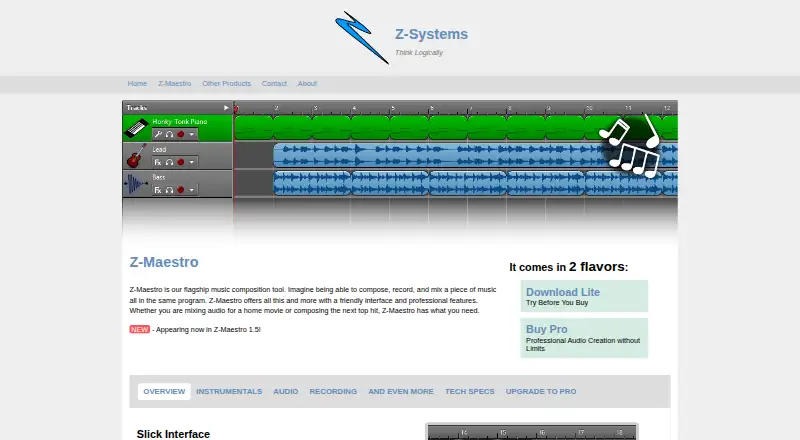
Z-Maestro is a desktop Windows program for composing, recording, editing, and mixing music, including audio for home movies. Its timeline organizes loopable parts with adjustable lengths, while tracks can hold audio or MIDI instrument recordings. That combination makes it suited to solo creators and small projects built around basic MIDI and audio work, rather than users seeking a currently verified workflow on newer Windows releases or surround mixing.
The feature set covers more than basic arrangement: users can record from audio input devices, route MIDI input channels, edit audio clips and spectral content, and automate track volume and panning. Real-time effects include chorus, echo, and filters, and SoundFont 2 instruments and percussion can be rendered. Projects can be exported to MP3, WMA, WAV, OGG Vorbis, or MIDI. This breadth is useful for a standalone composing and mixing workflow, though the official site lists Windows XP, Vista, and 7 requirements, and its latest changelog entry is dated 2011. Current compatibility with newer Windows versions is not verified.
The free Lite edition does not expire, but is limited to three tracks and cannot be used for commercial productions. Pro costs $29.99 as a one-time purchase, includes future versions, permits commercial use, and removes the three-track restriction; no maximum track count is published. Those terms give hobby projects a no-cost starting point and provide a defined upgrade path for commercial work. Choose Z-Maestro if those editions and its listed Windows environment fit your project; look elsewhere if you need confirmed newer-Windows support or surround sound, which is described as planned rather than available.
Your product? Our editors can test Z-Maestro in depth and publish a review, labelled as paid · from $149/mo →
Z-Maestro pricing
All 2 Z-Maestro plans and prices →
Z-Maestro fact sheet
| Free plan | Yes |
|---|---|
| Paid from | Not verified |
| Maximum tracks | Not verified |
| Surround mixing | No |
| Stem separation | Not verified |
| Cloud collaboration | Not verified |
| Live audio input | Yes |
| Supported platforms | Windows XP, Vista, and 7 |
| Export formats | MP3, WMA, WAV, OGG Vorbis, MIDI |
| Deployment | Desktop |
| Platforms | Windows |
| Support | Docs |
| Built for | Solo, Small business (editorial estimate) |
| Pricing | Free plan (source) |
| Website | z-sys.org |
| Facts checked | 25 Sep 2026 |
Alternatives to Z-Maestro
- Fairlight LiveA capable free mixer for teams handling complex live, broadcast, and immersive audio.9.4
- Waves eMotion LV1A high-capacity live mixer for networked FOH, monitor, broadcast and recording workflows.9.2
- MixPadA flexible freemium mixer for recording, editing, and producing audio across desktop and mobile.8.9


See all Z-Maestro alternatives →
Used Z-Maestro? Be the first to review it
The editor score above is our own research. What this page doesn't have yet is a reader's view — what you used Z-Maestro for, what worked and what didn't. No stars are seeded and no review is paid for; an editor reads every one before it appears.
Write a reviewTwo minutes · verified accounts only · read by an editor before it appears
Featured on iTechGuides

Z-Maestro is listed in our Audio Mixing Software directory. Add the badge to your site — it links back to this page.
<a href="https://www.itechguides.com/products/z-maestro/"><img src="https://www.itechguides.com/best/badge/z-maestro.svg" alt="Featured on iTechGuides" width="230" height="46"></a>
Reviewed by iTechGuides Editors · Editorial team · Updated Oct 2026
Advertiser disclosure: iTechGuides is reader-supported. Vendors can pay for top positions in our rankings and for a place on other products' pages, and we may earn a commission when you click some links. Bought places stand at the number bought; this page and our disclosure say so. Paying vendors may get a fuller, more detailed review from our editors, and that review can change their score. How we rank.
Last updated · How we research and update